> For the complete documentation index, see [llms.txt](https://docs.forestall.io/forestall/llms.txt). Markdown versions of documentation pages are available by appending `.md` to page URLs; this page is available as [Markdown](https://docs.forestall.io/forestall/unified-identities/azure-identities/entra-id/tenants.md).
# Tenants
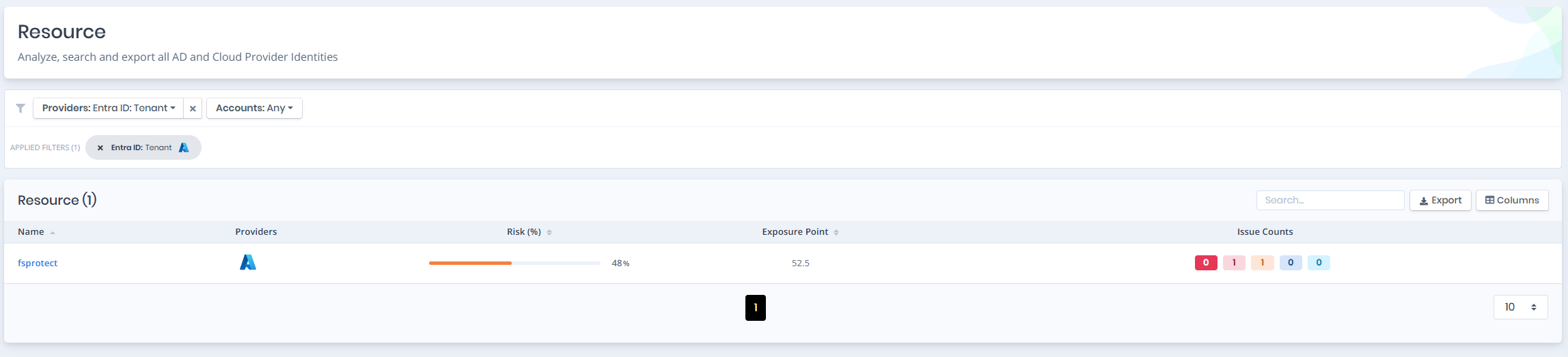
Open **Unified Identities › Resources**, filter **Providers** to **Entra ID › Tenant**, then select a row to open its details.
Tenants
## Tenant Details
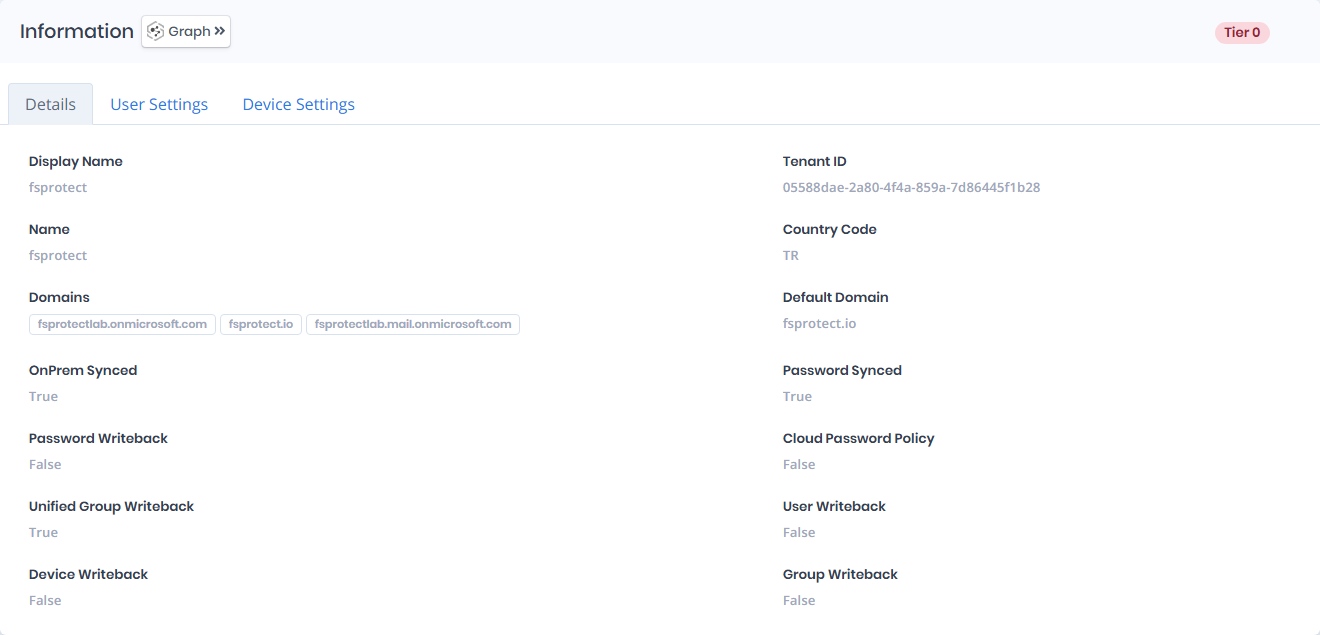
Opening a tenant shows the `Risk` and `Exposure Point` in the header. The `Information` pane carries a `Tier 0` or `Tier 2` badge and contains the `Details`, `User Settings` and `Device Settings` tabs.
{% hint style="info" %}
You can analyze the object in the [Graph](/forestall/visualize/visualize.md) by clicking the **Graph »** button next to the `Information` title.
{% endhint %}
Tenant Details
## Details
Details tab contains attributes below about tenant.
| Attribute | Description |
| --------------------------- | ---------------------------------------------------------------------------------------------------------------------------------------------------------------------------------------------------------------- |
| **Display Name** | The name displayed for the Azure AD tenant in the portal and services. ([Field reference](https://learn.microsoft.com/en-us/azure/active-directory/fundamentals/active-directory-whatis#tenants)) |
| **Tenant ID** | A unique GUID that identifies your Azure Active Directory tenant. ([Field reference](https://learn.microsoft.com/en-us/azure/active-directory/fundamentals/active-directory-how-to-find-tenant)) |
| **Name** | Internal name assigned to the Azure tenant, usually matching the display name. |
| **Country Code** | Two-letter country or region code (ISO 3166) set during tenant creation. ([Field reference](https://learn.microsoft.com/en-us/azure/active-directory/fundamentals/active-directory-access-create-new-tenant)) |
| **Domains** | List of custom and default domains associated with the tenant. ([Field reference](https://learn.microsoft.com/en-us/azure/active-directory/fundamentals/add-custom-domain)) |
| **Default Domain** | Primary domain used by default when creating users (e.g., `forestall.io`). ([Field reference](https://learn.microsoft.com/en-us/azure/active-directory/fundamentals/add-custom-domain#set-a-default-domain)) |
| **OnPrem Synced** | Indicates whether user accounts are synchronized from an on-premises Active Directory. ([Field reference](https://learn.microsoft.com/en-us/azure/active-directory/hybrid/whatis-hybrid-identity)) |
| **Password Synced** | Shows if password hash synchronization is enabled for hybrid users. ([Field reference](https://learn.microsoft.com/en-us/azure/active-directory/hybrid/how-to-connect-password-hash-synchronization)) |
| **Password Writeback** | Indicates whether cloud password changes are written back to the on-premises AD. ([Field reference](https://learn.microsoft.com/en-us/azure/active-directory/authentication/howto-sspr-writeback)) |
| **Cloud Password Policy** | Specifies if the Azure AD password policy is enforced for cloud-only users. ([Field reference](https://learn.microsoft.com/en-us/azure/active-directory/authentication/concept-sspr-policy)) |
| **Unified Group Writeback** | Indicates whether Microsoft 365 groups are written back to the on-premises directory. ([Field reference](https://learn.microsoft.com/en-us/azure/active-directory/hybrid/how-to-connect-group-writeback)) |
| **User Writeback** | Determines if users created in Azure AD are written back to the on-premises AD. ([Field reference](https://learn.microsoft.com/en-us/azure/active-directory/app-provisioning/user-writeback)) |
| **Device Writeback** | Indicates if Azure AD-registered devices are written back to the on-premises AD. ([Field reference](https://learn.microsoft.com/en-us/azure/active-directory/devices/hybrid-azuread-join-plan#device-writeback)) |
| **Group Writeback** | Shows if groups created in Azure AD are written back to the on-prem AD. ([Field reference](https://learn.microsoft.com/en-us/azure/active-directory/hybrid/how-to-connect-group-writeback)) |
## User Settings
User Settings tab shows the tenant-wide user settings.
User Settings
| Section | Settings |
| --------------------------------- | ----------------------------------------------------------------------------------------------------------------------- |
| **Default User Role Permissions** | `Users can register applications`, `Restrict non-admin users from creating tenants`, `Users can create security groups` |
| **Guest User Access** | `Guest user access restrictions`, for example `Guest users have the same access as members (most inclusive)` |
## Device Settings
Device Settings tab shows the tenant-wide device settings.
Device Settings
| Section | Settings |
| -------------------------------------------------- | ----------------------------------------------------------------------------------------------------------------------------------------------------------------------------------------------------------------------------------------------------------------------------------------------------------------------------------------------------------------------------- |
| **Microsoft Entra Join and Registration Settings** | `Users may join devices to Microsoft Entra`, `Require Multifactor Authentication to register or join devices with Microsoft Entra`, `Maximum number of devices per user` |
| **Local Administrator Settings** | `Global administrator role is added as local administrator on the device during Microsoft Entra join (Preview)`, `Registering user is added as local administrator on the device during Microsoft Entra join (Preview)`, `Enable Microsoft Entra Local Administrator Password Solution (LAPS)`, `Restrict users from recovering the BitLocker key(s) for their owned devices` |