> For the complete documentation index, see [llms.txt](https://docs.forestall.io/forestall/llms.txt). Markdown versions of documentation pages are available by appending `.md` to page URLs; this page is available as [Markdown](https://docs.forestall.io/forestall/settings/users.md).
# Users
Create, edit and delete local user accounts and assign their roles.
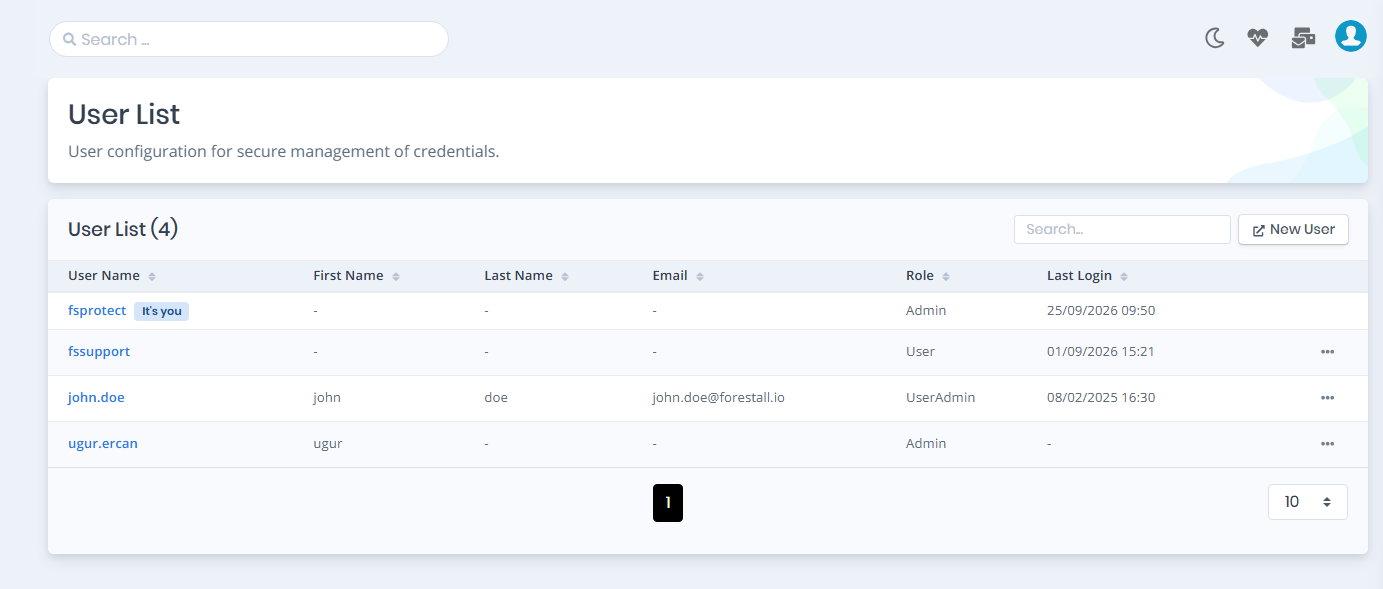
The **Users** page lists the local user accounts and lets you create, edit and delete them. Open it from **Settings > Users** in the left menu (`/settings/users`). The page header is **User List**.
## User list
The **User List (N)** table has these columns:
| Column | Description |
| ---------- | ------------------------------------------------------------------------------------------------------- |
| User Name | Login name. Your own account is marked with an **It's you** badge. |
| First Name | First name, or `-` if empty. |
| Last Name | Last name, or `-` if empty. |
| Email | Email address, or `-` if empty. |
| Role | The role assigned to the user. See [Roles & Permissions](/forestall/settings/roles-and-permissions.md). |
| Last Login | Date and time of the last sign-in, or `-` if the user has never signed in. |
The **⋯** menu at the end of each row has **Edit** and **Delete**. Your own row has no menu: you cannot edit or delete your own account here. To change your own details or password, use [Profile](/forestall/profile-menu/user-settings.md).
**Delete** asks for confirmation in the **Confirm Delete Operation** dialog, then **Delete User**. The last user with the **Admin** role cannot be deleted.
Settings > Users
## Add a user
1. Click **New User** above the table. The **User Add** page opens.
2. Fill in **User Details**:
* **First Name**, **Last Name**: optional.
* **Username**: required and unique.
* **Email**: optional. If entered, it must be a valid address that no other user has.
* **Role**: required. The list contains every role defined in [Roles & Permissions](/forestall/settings/roles-and-permissions.md).
* **New Password** and **Confirm Password**: required for a new user. The password must be at least 8 characters, must not be entirely numeric, too common or too similar to the username or name.
3. Click **Save**.
User Add form
## Edit a user
Choose **Edit** from the row's **⋯** menu. The **User Edit** page shows the same fields. Leave **New Password** and **Confirm Password** empty to keep the current password. Click **Save** to apply the changes, or **Delete** to remove the user.
You cannot move the last **Admin** user to another role.
## LDAP and SSO users
This page manages only local accounts. Users who sign in through [LDAP](/forestall/configuration-center/ldap.md) or [SSO](/forestall/configuration-center/sso.md) get an account automatically on their first sign-in. They do not appear in the User List, and their role comes from the LDAP **Access Control** list or from the SSO provider's **Default Role** and role mappings.
## Permissions
| Permission | Allows |
| ------------ | ----------------------------------------- |
| `ReadUser` | Viewing the Users page and the user list. |
| `WriteUser` | **New User**, **Edit** and **Save**. |
| `DeleteUser` | **Delete**. |
The **Role** list is loaded only when your role also has `ReadRolesAndPermissions`.