> For the complete documentation index, see [llms.txt](https://docs.forestall.io/forestall/llms.txt). Markdown versions of documentation pages are available by appending `.md` to page URLs; this page is available as [Markdown](https://docs.forestall.io/forestall/dashboard/azure-entra-id-dashboard.md).
# Azure Dashboard
Dashboard summarizes the security posture of the scanned Azure environments in the selected scan.
### **Risk Pane (Azure Dashboard)**
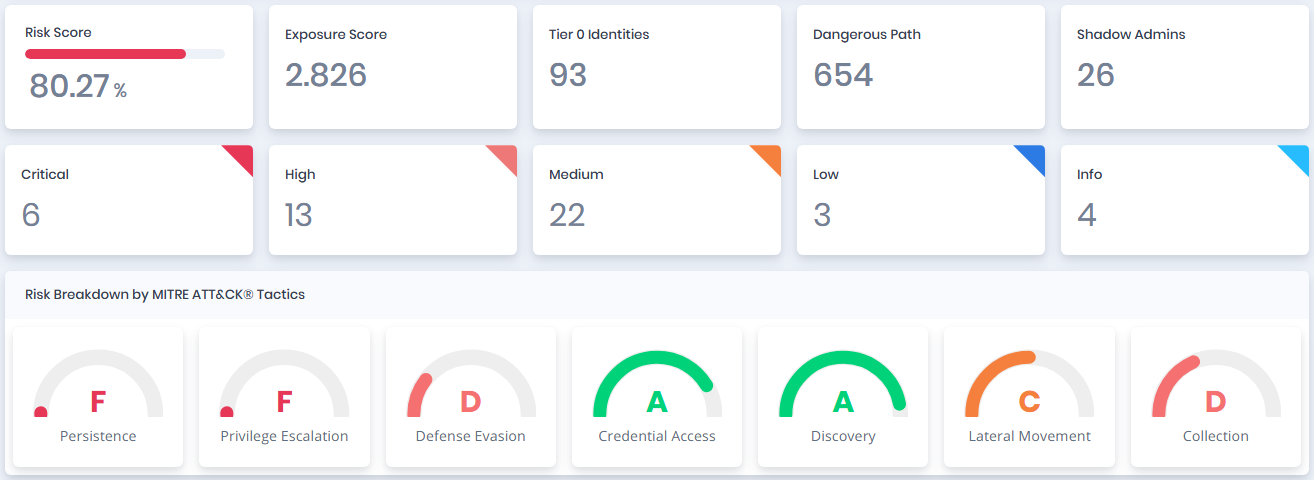
This Risk Pane summarizes key risk metrics from the scan, including the overall Risk and Exposure Scores, Tier 0 Identities, Dangerous Paths, Shadow Admins, and severity levels (Critical to Info). It breaks down risks by MITRE ATT\&CK Tactics (e.g., Persistence, Privilege Escalation), Tags (e.g., Identity Governance, Account Security), Impacts (e.g., Privileged Role Assignment, Service Principal Ownership Abuse), and Azure Entity Types (e.g., AZUser, AZGroup, AZRole, AZApplication, AZServicePrincipal, AZTenant, AZVM). This layout helps quickly identify high-risk areas and prioritize remediation actions within Azure environments.
The **Tier 0 Identities** card is shown when the scan policy enables the **Tier0 Analysis** module for Azure. The **Tier Analysis Statistics** and **Top Choke Points** sections below the entity cards are described on the [Dashboard](/forestall/dashboard.md) page.
Risk Pane
### Risk Breakdown by Tags, Impacts and Entity Types
Risk Breakdown by Tags, Impacts and Entity Types
**Risk Breakdown by Tags:** Risk scores based on Tags.
**Risk Breakdown by Impacts:** Risk scores based on Impacts.
**Risk Breakdown by Entity Types:** Risk scores based on Entity Types.
Azure Entity Pane
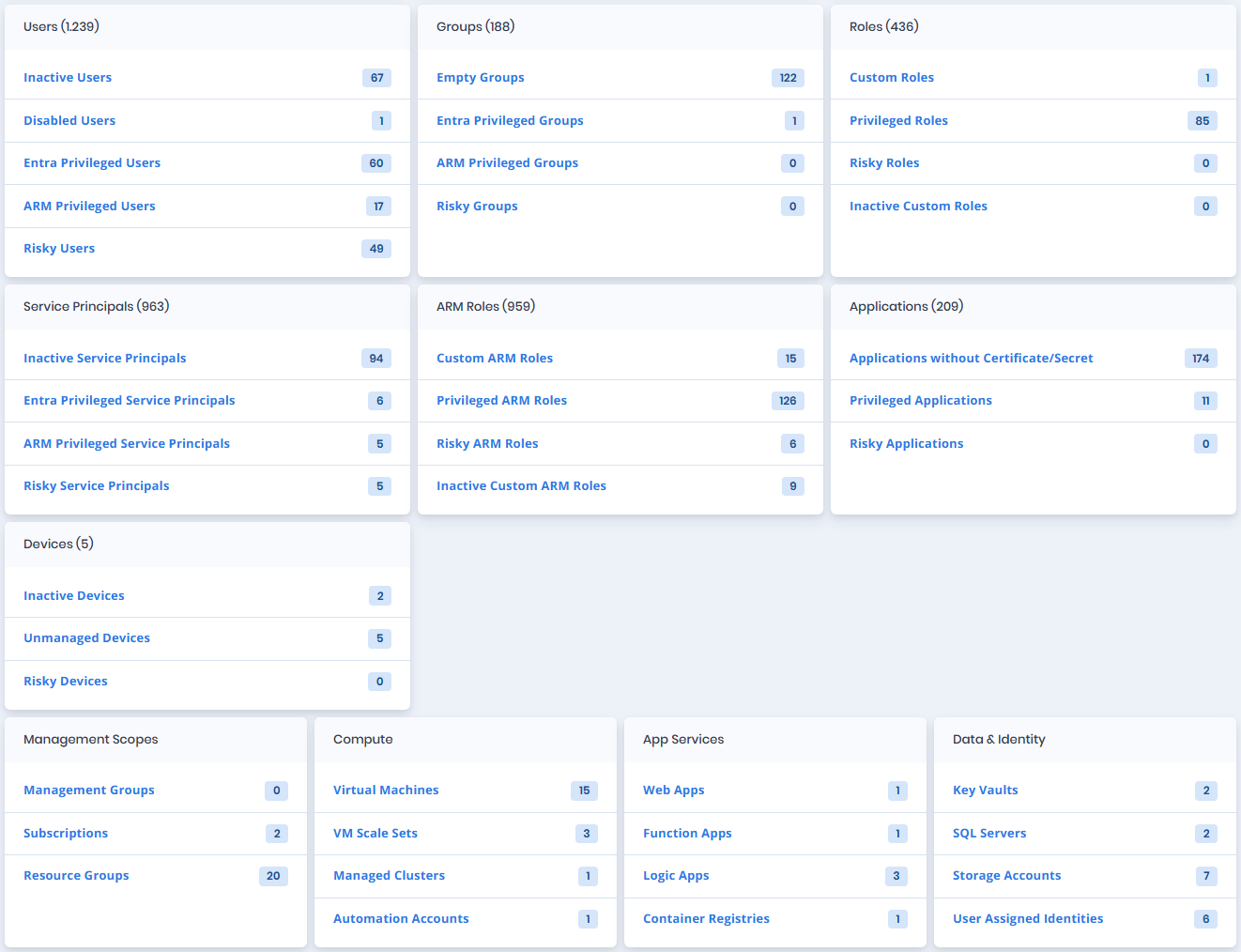
The entity cards are split between Entra ID (directory) privileges and Azure Resource Manager (ARM) privileges. **Entra Privileged** counts identities that hold a privileged Entra ID directory role, and **ARM Privileged** counts identities that hold a privileged Azure role on a management group, subscription, resource group or resource. The header of each card shows the total number of objects of that type, for example **Users (1.239)**.
### **Users Table**
| Statistic | Description |
| -------------------------- | --------------------------------------------------------------------------- |
| **Inactive Users** | The number of inactive user accounts. |
| **Disabled Users** | The number of disabled user accounts. |
| **Entra Privileged Users** | The number of user accounts that hold a privileged Entra ID directory role. |
| **ARM Privileged Users** | The number of user accounts that hold a privileged Azure (ARM) role. |
| **Risky Users** | The number of user accounts that have a risk score greater than 50. |
### **Groups Table**
| Statistic | Description |
| --------------------------- | -------------------------------------------------------------------- |
| **Empty Groups** | The number of groups which have no member. |
| **Entra Privileged Groups** | The number of groups that hold a privileged Entra ID directory role. |
| **ARM Privileged Groups** | The number of groups that hold a privileged Azure (ARM) role. |
| **Risky Groups** | The number of groups that have a risk score greater than 50. |
### **Roles Table**
| Statistic | Description |
| ------------------------- | ---------------------------------------------------------------------- |
| **Custom Roles** | The number of non-default roles created manually in the environment. |
| **Privileged Roles** | The number of privileged roles. |
| **Risky Roles** | The number of roles that have a risk score greater than 50. |
| **Inactive Custom Roles** | The number of custom roles not assigned or used over a defined period. |
### **Service Principals Table**
| Statistic | Description |
| --------------------------------------- | --------------------------------------------------------------------------------------- |
| **Inactive Service Principals** | The number of service principals that have not been used or active in a defined period. |
| **Entra Privileged Service Principals** | The number of service principals that hold a privileged Entra ID directory role. |
| **ARM Privileged Service Principals** | The number of service principals that hold a privileged Azure (ARM) role. |
| **Risky Service Principals** | The number of service principals that have a risk score greater than 50. |
### **ARM Roles Table**
| Statistic | Description |
| ----------------------------- | -------------------------------------------------------------------------- |
| **Custom ARM Roles** | The number of non-default ARM roles created manually in the environment. |
| **Privileged ARM Roles** | The number of ARM privileged roles. |
| **Risky ARM Roles** | The number of ARM roles that have a risk score greater than 50. |
| **Inactive Custom ARM Roles** | The number of custom ARM roles not assigned or used over a defined period. |
### **Applications Table**
| Statistic | Description |
| ------------------------------------------- | ----------------------------------------------------------------------------------------------------- |
| **Applications without Certificate/Secret** | The number of applications missing authentication credentials such as certificates or client secrets. |
| **Privileged Applications** | The number of privileged applications. |
| **Risky Applications** | The number of applications that have a risk score greater than 50. |
### **Devices Table**
| Statistic | Description |
| --------------------- | ----------------------------------------------------------------------------- |
| **Inactive Devices** | The number of device accounts that have not been active for a defined period. |
| **Unmanaged Devices** | The number of devices that are not managed. |
| **Risky Devices** | The number of devices that have a risk score greater than 50. |
### **Azure Resource Cards**
Four cards below the entity tables count the Azure Resource Manager resources collected by the scan. Each count opens the matching resources in Search & Reports.
| Card | Statistics |
| --------------------- | ---------------------------------------------------------------------- |
| **Management Scopes** | Management Groups, Subscriptions, Resource Groups |
| **Compute** | Virtual Machines, VM Scale Sets, Managed Clusters, Automation Accounts |
| **App Services** | Web Apps, Function Apps, Logic Apps, Container Registries |
| **Data & Identity** | Key Vaults, SQL Servers, Storage Accounts, User Assigned Identities |