> For the complete documentation index, see [llms.txt](https://docs.forestall.io/forestall/llms.txt). Markdown versions of documentation pages are available by appending `.md` to page URLs; this page is available as [Markdown](https://docs.forestall.io/forestall/search-and-reports.md).

# Search & Reports

The `Search & Reports` page provides the `Advanced Search` interface for querying the entities and relations of the selected scan across all providers (Active Directory, Azure, AWS, GCP and GitHub). Built-in and custom queries return a table that can be exported or drawn on the graph.

The page has two buttons: **Saved Queries** opens the built-in and saved queries, **New Query** opens the query builder.

<figure><img src="https://3408039743-files.gitbook.io/~/files/v0/b/gitbook-x-prod.appspot.com/o/spaces%2FObpV44hoVkNmo5bFuVVL%2Fuploads%2Fgit-blob-d03829e95a8fbac92bfe45b4e726f51e82c35039%2Fsearch-and-reports-readme-image-1.png?alt=media" alt="Search &#x26; Reports page showing the result of the Risky Admins built-in query"><figcaption><p>Search &#x26; Reports with a query result</p></figcaption></figure>

## Saved Queries

`Saved Queries` lists the built-in queries shipped with Forestall and the queries saved by users, in seven tabs: **AD**, **Azure**, **AWS**, **GCP**, **GitHub**, **Hybrid** (queries that cross providers) and **Custom** (queries saved by users). The **Category** column shows `Builtin` for the queries shipped with Forestall. The built-in queries include the SACL audit queries (Objects With Fully Audited Permissions, Objects With Partially Audited Permissions, Objects With Unaudited Permissions, Dangerous Permissions on AD Objects Without SACL Auditing, Domain Controllers Misconfigured Audit Policy) and a set of GitHub queries.

* Select a query name to run it. The result opens at `/advanced-search/<scan GUID>/<query ID>`. You can bookmark this address or share it with users who can open the scan.
* Use the search box to filter the list.
* The **⋯** menu of a row offers **Run on Graph** for every query, and **Edit** and **Delete** for saved queries. Built-in queries cannot be edited or deleted.
* To delete several saved queries at once, select them, choose **Delete** in **Bulk Actions** and select **Apply**. Built-in queries cannot be selected.

<figure><img src="https://3408039743-files.gitbook.io/~/files/v0/b/gitbook-x-prod.appspot.com/o/spaces%2FObpV44hoVkNmo5bFuVVL%2Fuploads%2Fgit-blob-14abbfa1b3a7730b2ecaa6c751915fd8b02ddc3c%2Fsearch-and-reports-readme-image-2.png?alt=media" alt="Saved Queries window with the AD, Azure, AWS, GCP, GitHub, Hybrid and Custom tabs"><figcaption><p>Saved Queries, AD tab</p></figcaption></figure>

## New Query

`New Query` opens the query builder. A query is a chain of nodes: a single node, or several nodes joined by relations (node, relation, node, and so on).

### Node

* **Preset**: the drop-down on the left fills in the entity types of a provider: **None**, **All**, **AD**, **Azure**, **GCP**, **AWS** or **GitHub**. It shows **Custom** when the types are picked by hand.
* **Select Entity Type**: one or more entity types to search. [Tier0](/forestall/search-and-reports/tier0.md) and [Tier2](/forestall/search-and-reports/tier2.md) select objects by tier instead of by type.
* **Select Additional Fields**: fields added as extra columns to the result table.
* **Rules**: **+ Rule** adds a condition (field, operator, value) and **+ Group** adds a nested group of conditions. **And** / **Or** decides whether all or any of the conditions in a group must match. The fields of each entity type, with their types and operators, are listed on the [entity pages](#entity-reference).

| Field type  | Operators                                                      | Notes                                                                                                                                                                                    |
| ----------- | -------------------------------------------------------------- | ---------------------------------------------------------------------------------------------------------------------------------------------------------------------------------------- |
| TEXT        | LIKE, NOT\_LIKE, EQUAL, NOT\_EQUAL, IS\_EMPTY                  | `LIKE` / `NOT_LIKE` match when the value contains / does not contain the text. The Computer `IPAddress` field also has `IP_RANGE`, which takes an IPv4 CIDR range such as `10.0.0.0/24`. |
| NUMBER      | EQUAL, BETWEEN, SMALLER, LARGER, SMALLER\_EQUAL, LARGER\_EQUAL |                                                                                                                                                                                          |
| DATE        | SMALLER, LARGER, BETWEEN, EQUAL, IS\_EMPTY                     | A few date fields do not offer `IS_EMPTY`; the entity pages show them.                                                                                                                   |
| BOOLEAN     | N/A (toggle)                                                   | The rule shows a switch: on matches true, off matches false.                                                                                                                             |
| MULTI\_LIST | IN                                                             | Matches any of the selected values, for example `AceAuditState` in `None`, `Partial`.                                                                                                    |

The builder shows the operators by label: `LIKE` is "Like", `NOT_LIKE` "Not like", `EQUAL` "Equal", `NOT_EQUAL` "Not equal", `IS_EMPTY` "Is Empty", `BETWEEN` "Between", `SMALLER` "Smaller", `LARGER` "Larger", `SMALLER_EQUAL` "Smaller or equal", `LARGER_EQUAL` "Larger or equal", `IP_RANGE` "Ip Range" and `IN` "In".

### Relation

**Add new relation and node** adds a relation and a second node after the last node. The relation has these settings:

* **Relation preset**: **None**, **All**, **Hybrid Attack Paths** (default), **AD Attack Paths**, **Azure Attack Paths**, **GCP Attack Paths**, **AWS Attack Paths**, **GitHub Attack Paths** or **Custom**. The preset fills in the relation types, which can then be changed.
* **Min Hops** / **Max Hops**: how many relations the path between the two nodes may contain.
* **Shortest Path**: return only the shortest path between the nodes. Min Hops is then limited to 1. Shortest path queries may take a long time.
* **Relation Direction**: off follows the relations from the first node to the second (outgoing). On follows them in the reverse direction (incoming).
* **Select Additional Relation Fields** and relation rules: the properties stored on relations can be added as columns and used in rules, in the same way as node fields. The operators are the same as for node fields of the same type.

| Relation         | Field                           | Type    | Description                                                  |
| ---------------- | ------------------------------- | ------- | ------------------------------------------------------------ |
| ACE (permission) | IsSuccessfullyAudited           | BOOLEAN | Whether a SACL success audit rule covers the permission.     |
| ACE (permission) | VerifiedAt                      | DATE    | When a remediation scan last verified the permission.        |
| ACE (permission) | IsInherited                     | BOOLEAN | Whether the permission is inherited from a parent object.    |
| ACE (permission) | AccessControlType               | TEXT    | `Allow` or `Deny`.                                           |
| ACE (permission) | ActiveDirectoryRight            | TEXT    | Active Directory rights granted by the ACE.                  |
| ACE (permission) | InheritanceType                 | TEXT    | Which child objects inherit the ACE.                         |
| ACE (permission) | ObjectType                      | TEXT    | Property, property set or extended right the ACE applies to. |
| ACE (permission) | InheritedObjectType             | TEXT    | Object class that can inherit the ACE.                       |
| ACE (permission) | PropagationFlags                | TEXT    | How the ACE propagates to child objects.                     |
| ACE (permission) | ObjectFlags                     | TEXT    | Whether `ObjectType` and `InheritedObjectType` are set.      |
| ACE (permission) | IdentityType                    | TEXT    | Type of the identity that holds the permission.              |
| ACE (permission) | Type                            | TEXT    | Type of the ACE.                                             |
| GPLINK           | IsEnforced                      | BOOLEAN | Whether the GPO link is enforced.                            |
| GPLINK           | LinkOrder                       | NUMBER  | Link order of the GPO on the linked container.               |
| Trust            | TrustType                       | TEXT    | Type of the trust.                                           |
| Trust            | Direction                       | TEXT    | Direction of the trust.                                      |
| Trust            | TargetSID                       | TEXT    | SID of the trusted domain.                                   |
| Trust            | IsActive                        | BOOLEAN | Whether the trust is active.                                 |
| Trust            | IsNonTransitive                 | BOOLEAN | Whether the trust is non-transitive.                         |
| Trust            | UsesRC4                         | BOOLEAN | Whether the trust uses RC4 encryption.                       |
| Trust            | UsesAES                         | BOOLEAN | Whether the trust uses AES encryption.                       |
| Trust            | TGTDelegationEnabled            | BOOLEAN | Whether TGT delegation is enabled across the trust.          |
| Trust            | WithinForest                    | BOOLEAN | Whether both domains are in the same forest.                 |
| Trust            | IsSelectiveAuthenticationActive | BOOLEAN | Whether selective authentication is enabled.                 |
| Trust            | IsSidFilteringActive            | BOOLEAN | Whether SID filtering is enabled.                            |
| Trust            | IsObsoleteProtocol              | BOOLEAN | Whether the trust uses an obsolete protocol.                 |
| Trust            | WhenCreated                     | DATE    | When the trust was created.                                  |
| Trust            | WhenChanged                     | DATE    | When the trust was last changed.                             |
| Local right      | Right                           | TEXT    | Local right the relation grants on the computer.             |

The cards under the builder summarize the query: each **NODE** card shows its **Selected Types** and **Selected Rules**, each **RELATION** card its **Selected Relations**, **Selected Hops** (Min Hops / Max Hops) and **Selected Rules**.

<figure><img src="https://3408039743-files.gitbook.io/~/files/v0/b/gitbook-x-prod.appspot.com/o/spaces%2FObpV44hoVkNmo5bFuVVL%2Fuploads%2Fgit-blob-f63834fda7ad2fa02af51ebd0f2de07d726dd7a4%2Fsearch-new-query-relation.gif?alt=media" alt="Query builder with a User node, a relation with IN_GROUP, GenericAll and ADMIN_TO over 1 to 3 hops, and a Tier0 node"><figcaption><p>Relation settings: relation types, Min/Max Hops, Shortest Path and Relation Direction</p></figcaption></figure>

### Buttons

* **Run**: runs the query and shows the result table.
* **Run on Graph**: runs the query and draws the result on the Visualize page.
* **Save**: saves the query under the name typed in **Enter a query name to save.**; it appears in the **Custom** tab of Saved Queries.
* **Clear**: clears the builder.
* **Close**: closes the builder.

## Results

The result table is titled **Result (N)**, followed by the query name when a saved query was run. Its columns depend on the entity types in the query (for example Type, FSName, Enabled, Risk (%)), followed by the additional fields. Rows can be shown 10, 25, 50, 100, 250 or 500 per page.

The **Search** box above the table filters the rows. **Export** downloads the full result as an Excel file (`export.xlsx`).

## Run On Graph

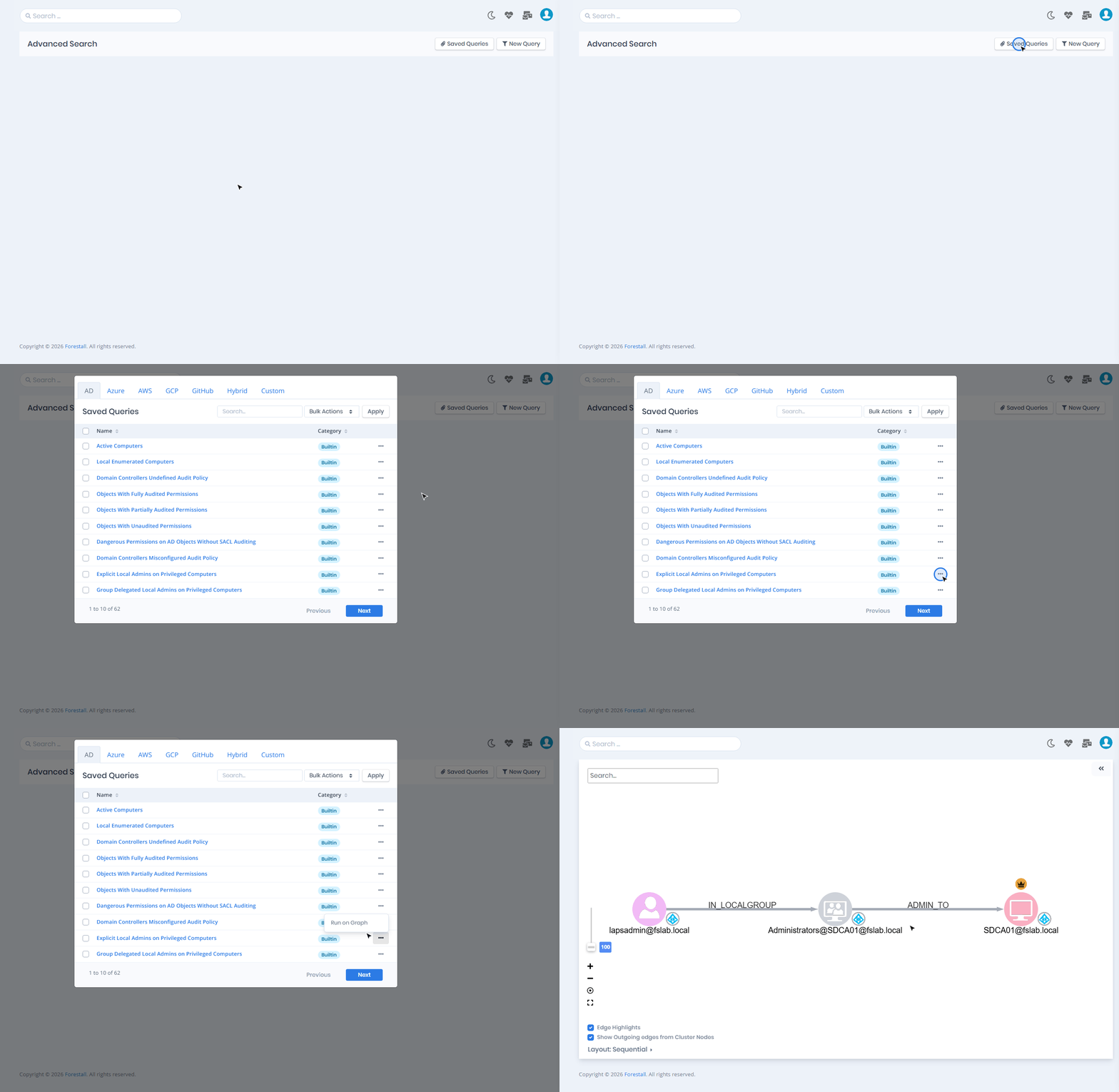
**Run on Graph** is available for saved queries and for new queries. It draws the result on the **Visualize** page.

<figure><img src="https://3408039743-files.gitbook.io/~/files/v0/b/gitbook-x-prod.appspot.com/o/spaces%2FObpV44hoVkNmo5bFuVVL%2Fuploads%2Fgit-blob-44d26713fb580dcbfc8b27280f96888cb7a54143%2Fsearch-saved-query-menu.png?alt=media" alt="Saved Queries row menu with Run on Graph"><figcaption><p>Run on Graph from the Saved Queries row menu</p></figcaption></figure>

<figure><img src="https://3408039743-files.gitbook.io/~/files/v0/b/gitbook-x-prod.appspot.com/o/spaces%2FObpV44hoVkNmo5bFuVVL%2Fuploads%2Fgit-blob-48e109f67ce451d085cf255cbb82e5498dc1d88d%2Fsearch-run-on-graph.gif?alt=media" alt="Visualize page showing the result of the Explicit Local Admins on Privileged Computers query"><figcaption><p>Query result drawn on the Visualize page</p></figcaption></figure>

## Active Directory Queries

### Example 1 - Create Query - Risky Groups with No Member

<figure><img src="https://3408039743-files.gitbook.io/~/files/v0/b/gitbook-x-prod.appspot.com/o/spaces%2FObpV44hoVkNmo5bFuVVL%2Fuploads%2Fgit-blob-e45663d77fae4e81816285ce5f7df222aa23e563%2Fsearch-example-risky-groups.png?alt=media" alt="Group with rules risk Larger 50 and member_count Equal 0"><figcaption><p>Example 1: Group, risk > 50 and member_count = 0</p></figcaption></figure>

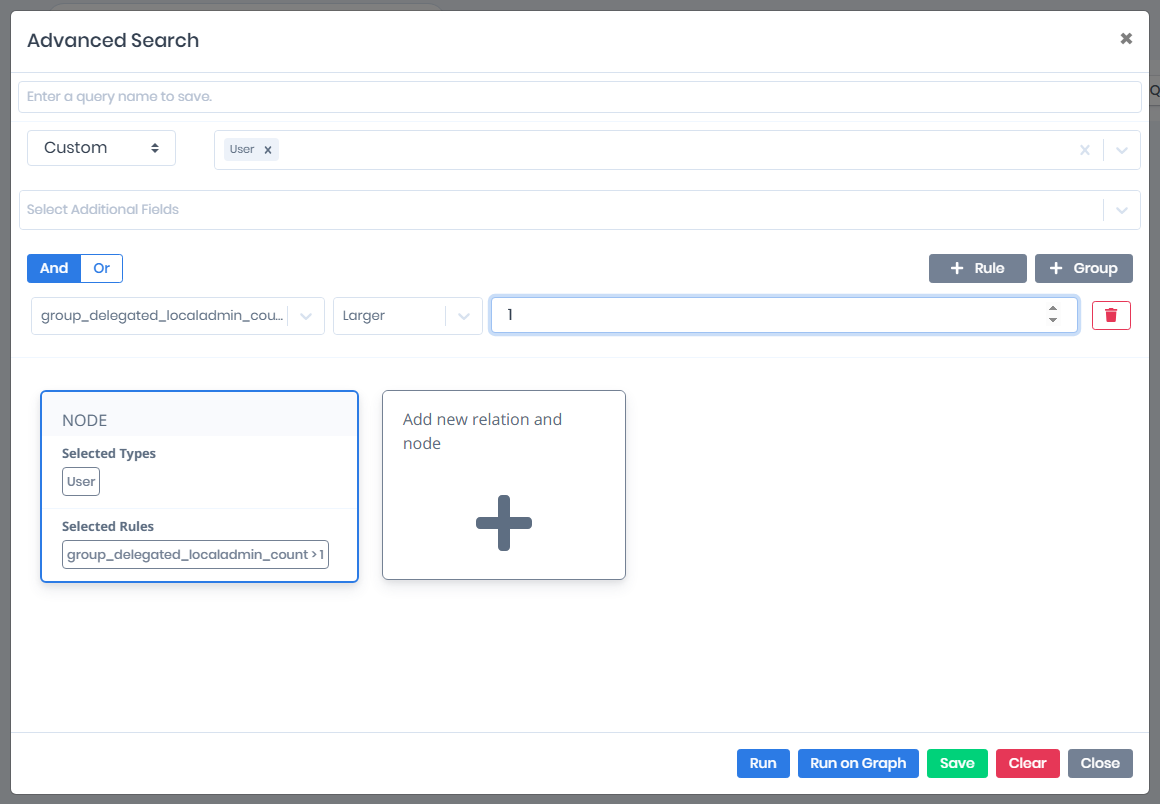
### Example 2 - Create Query - Users with Group Delegated Admin Right on more than 1 Computer

<figure><img src="https://3408039743-files.gitbook.io/~/files/v0/b/gitbook-x-prod.appspot.com/o/spaces%2FObpV44hoVkNmo5bFuVVL%2Fuploads%2Fgit-blob-222ad8247049df4c2873a267a08ce4aa2429448e%2Fsearch-example-group-delegated-admins.png?alt=media" alt="User with rule group_delegated_localadmin_count Larger 1"><figcaption><p>Example 2: User, group_delegated_localadmin_count > 1</p></figcaption></figure>

### Example 3 - Saving Query - Local Admin Accounts created in the last 1 month

<figure><img src="https://3408039743-files.gitbook.io/~/files/v0/b/gitbook-x-prod.appspot.com/o/spaces%2FObpV44hoVkNmo5bFuVVL%2Fuploads%2Fgit-blob-60570fea736dd603d5c51bee47d14ac94b447196%2Fsearch-example-save-local-admins.png?alt=media" alt="Named query: User with IsLocalAdmin true and WhenCreated Larger than one month ago"><figcaption><p>Example 3: a named query, ready to Save</p></figcaption></figure>

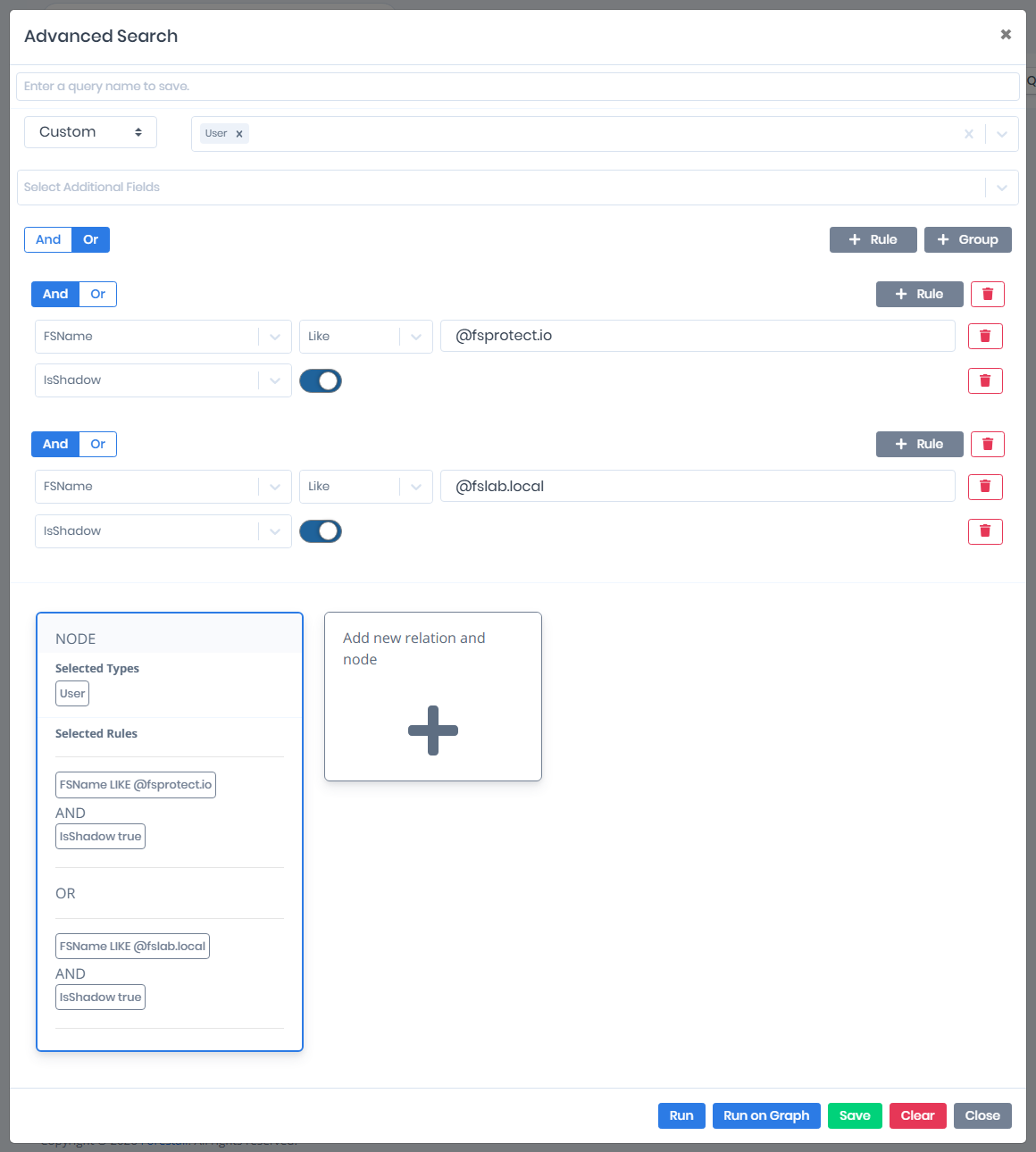
### Example 4 - Using Groups - Shadow Admins in fsprotect.io or fslab.local Domains

<figure><img src="https://3408039743-files.gitbook.io/~/files/v0/b/gitbook-x-prod.appspot.com/o/spaces%2FObpV44hoVkNmo5bFuVVL%2Fuploads%2Fgit-blob-c6de4d413f7b3804d6ab1302916d6c8ebecffcef%2Fsearch-example-shadow-admins-domains.png?alt=media" alt="User; Or of two And groups, each FSName Like @domain and IsShadow true"><figcaption><p>Example 4: two groups joined with Or</p></figcaption></figure>

## Azure Queries

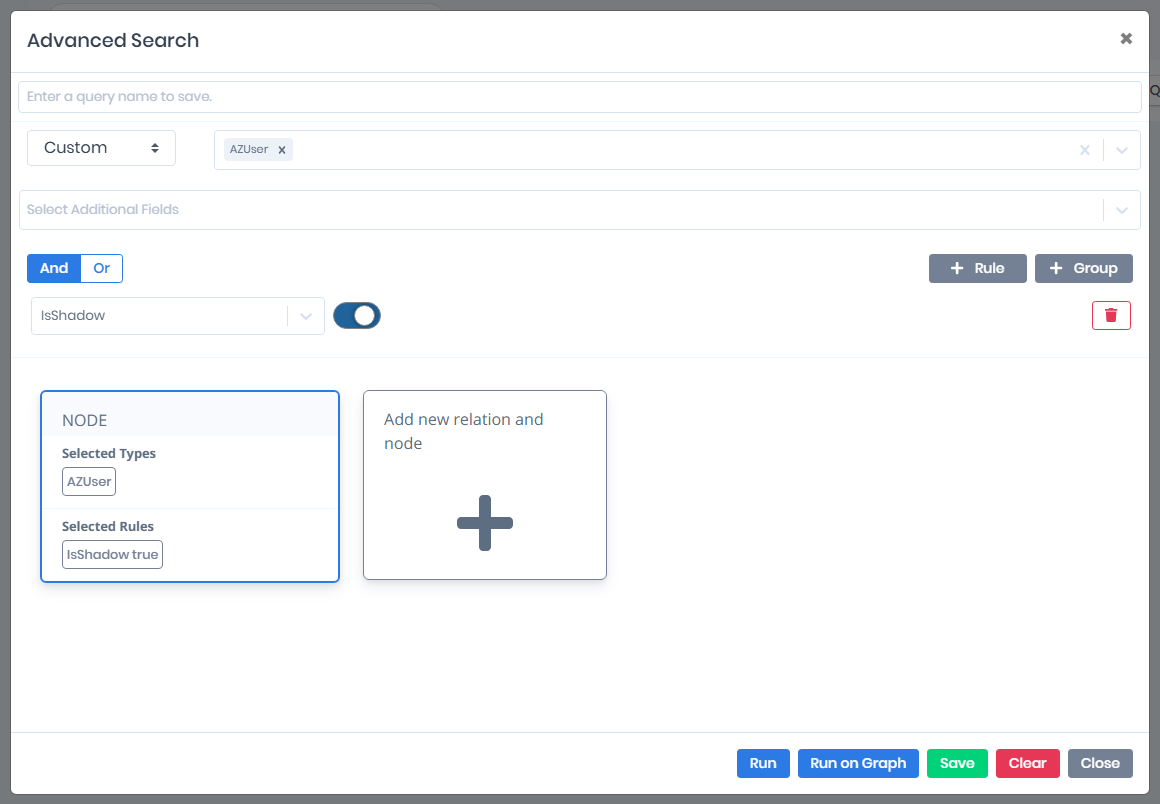
### Example 1 - Create Query - Shadow Admins in Azure

<figure><img src="https://3408039743-files.gitbook.io/~/files/v0/b/gitbook-x-prod.appspot.com/o/spaces%2FObpV44hoVkNmo5bFuVVL%2Fuploads%2Fgit-blob-baa969f1357593c11bb43d5fa1ce9e2bc5e385af%2Fsearch-example-azure-shadow-admins.png?alt=media" alt="AZUser with IsShadow true"><figcaption><p>Azure Example 1: AZUser, IsShadow true</p></figcaption></figure>

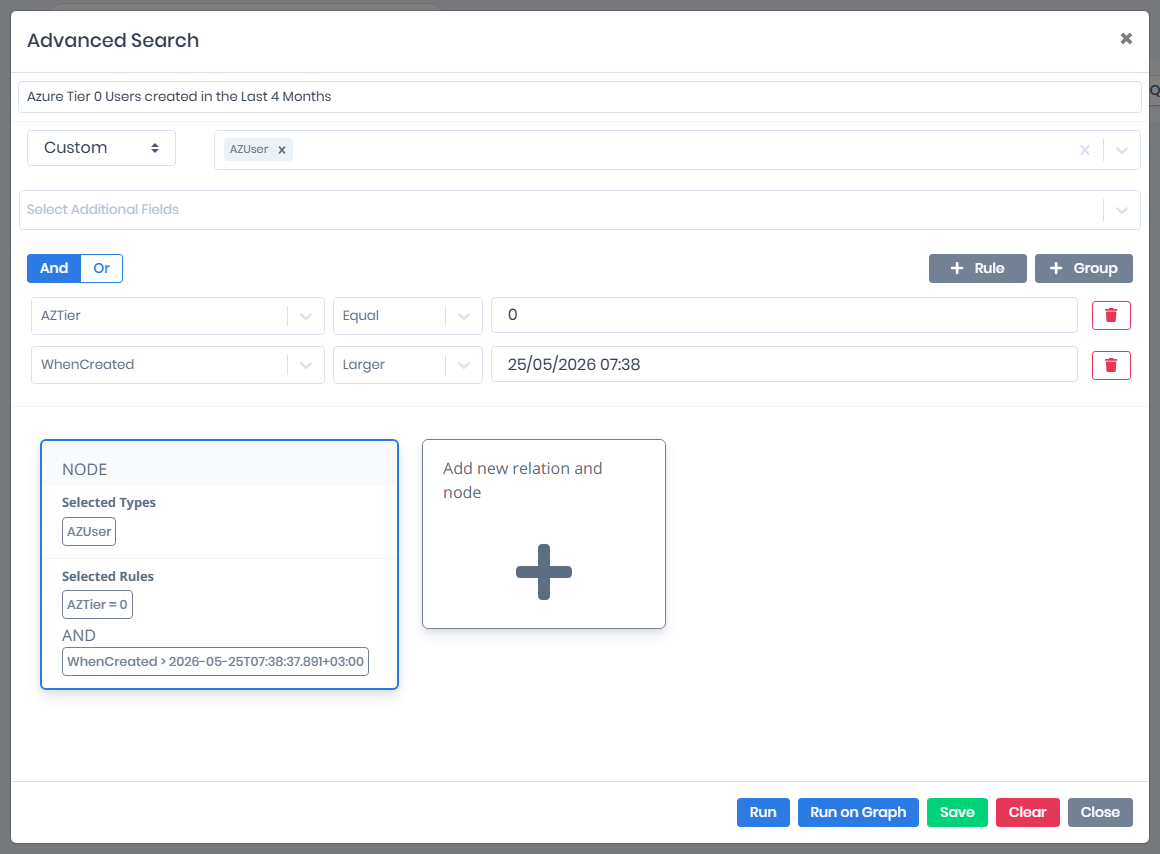
### Example 2 - Saving Query - Azure Tier 0 Users created in the last 4 months

<figure><img src="https://3408039743-files.gitbook.io/~/files/v0/b/gitbook-x-prod.appspot.com/o/spaces%2FObpV44hoVkNmo5bFuVVL%2Fuploads%2Fgit-blob-42cd4cfd9afffaaf8e9f7b8f6f8224e76d79621d%2Fsearch-example-azure-tier0-users.png?alt=media" alt="Named query: AZUser with AZTier Equal 0 and WhenCreated Larger than four months ago"><figcaption><p>Azure Example 2: AZUser, AZTier = 0, created in the last 4 months</p></figcaption></figure>

## Entity reference

{% hint style="info" %}
The pages below list the fields of each entity type with their type, operators and description.
{% endhint %}

{% content-ref url="/pages/JW9nrmsBFoIqCrZ4Gwk8" %}
[Active Directory Entities](/forestall/search-and-reports/active-directory-entities.md)
{% endcontent-ref %}

{% content-ref url="/pages/e0OaJ2XmhLpCOdhYD0mD" %}
[Azure Entities](/forestall/search-and-reports/azure-entities.md)
{% endcontent-ref %}

{% content-ref url="/pages/03A5n1M3QVCBihuM9SHY" %}
[GCP Entities](/forestall/search-and-reports/gcp-entities.md)
{% endcontent-ref %}

{% content-ref url="/pages/dUL4GhGtu451eyEbbjSd" %}
[AWS Entities](/forestall/search-and-reports/aws-entities.md)
{% endcontent-ref %}

{% content-ref url="/pages/pbxQGuy89LANIqEklTLM" %}
[GitHub Entities](/forestall/search-and-reports/github-entities.md)
{% endcontent-ref %}

{% content-ref url="/pages/Jp5ESYskLsOoJg6AoA0F" %}
[Vulnerability](/forestall/search-and-reports/vulnerability.md)
{% endcontent-ref %}

{% content-ref url="/pages/h5voWq3PE9mlBmq8D69s" %}
[Tier0](/forestall/search-and-reports/tier0.md)
{% endcontent-ref %}

{% content-ref url="/pages/sPhcNJaVK65E8YwOV02a" %}
[Tier2](/forestall/search-and-reports/tier2.md)
{% endcontent-ref %}