> For the complete documentation index, see [llms.txt](https://docs.forestall.io/forestall/llms.txt). Markdown versions of documentation pages are available by appending `.md` to page URLs; this page is available as [Markdown](https://docs.forestall.io/forestall/configuration-center/splunk.md).
# Splunk
Splunk integration correlates Active Directory security events from Splunk with ACL/ACE findings discovered during a scan. With a configuration that holds the Splunk Management endpoint, an authentication token and the index, the scan checks whether dangerous permissions were used within the scan inactivity window and marks the unused relations.
#### Splunk Configuration
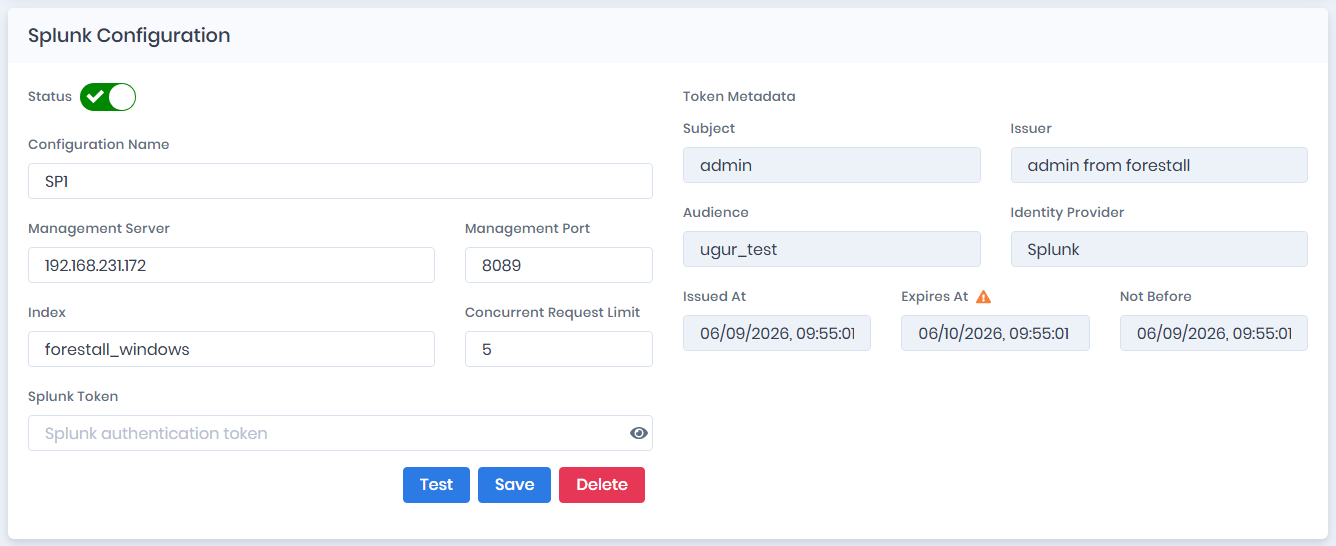
Open **Configuration Center > Splunk > Manage**. The page opens the **Splunk Configuration** form directly, without a list of configurations. A saved configuration is loaded into the form for editing. Otherwise the form is empty.
The form has the following fields:
* **Status:** Turns the configuration on or off. It is on by default. When it is off, the configuration is kept but not used. Scans run without Splunk, and **Save** does not test the connection.
* **Configuration Name:** The name of the configuration.
* **Management Server:** The IP address or hostname of the Splunk Management interface.
* **Management Port:** The port on which the Splunk Management API operates (default is `8089`).
* **Index:** The Splunk index that stores Windows Security event logs used by the analysis (for example `mylab`).
* **Concurrent Request Limit:** The maximum number of requests sent to Splunk at the same time. A higher value speeds up queries but adds load on the Splunk server. **It should not exceed the value specified in the role settings.** [Role resource usage settings](#role-resource-usage-settings).
* **Splunk Token:** The Splunk authentication token (JWT) used to authorize Management API requests. Use the eye icon to show or hide it.
Buttons:
* **Test:** validates network connectivity, token validity, and that the selected index contains searchable `WinEventLog:Security` data, without saving.
* **Save:** saves the configuration.
* **Delete:** shown when a configuration has already been saved. Removes it after confirmation (**Confirm Delete Operation**).
The read-only **Token Metadata** panel shows what the token declares. Check it for a wrong or expiring token before the scan runs. It is filled in after a successful test or save operation (until then the panel shows "Token metadata is populated after a successful test or save operation.").
* **Subject:** The account the token was issued for.
* **Issuer:** The Splunk instance that issued the token.
* **Audience:** The audience the token was issued for.
* **Identity Provider:** The identity provider that authenticated the account.
* **Issued At:** When the token was issued.
* **Expires At:** When the token expires. A red **!** icon next to the label means **Token expired**. An orange **⚠** icon means **Token expires within 30 days**.
* **Not Before:** The time before which the token cannot be used. An orange **⚠** icon next to the label means **Token not yet valid**.
{% hint style="info" %}
Before saving, use **Test** to validate network connectivity, token validity, and that the selected index contains searchable `WinEventLog:Security` data.
{% endhint %}
#### Using Integration in Scans
Once a Splunk configuration is defined and its **Status** is on, the **Over-Privilege Analysis** scan module uses it. The module can also be used without Splunk. In that case audit coverage is reported, but permission usage is not verified.
* The "Over-Privilege Analysis (Beta)" module must be enabled in the scan policy. This module enables SACL (System Access Control List) data collection from Active Directory objects during enumeration.
* If an enabled Splunk configuration exists, the Splunk connection is tested when a scan is started or its credentials are tested. If Splunk cannot be reached, the scan is not started. Fix the Splunk configuration, or turn its **Status** off to scan without Splunk.
* The scan must include Active Directory enumeration with SACL/audit information available on objects.
* If no active SACL audit data is found on enumerated Active Directory objects, Splunk relation analysis is skipped.
* The module loads the configured Splunk connection and queries Security events for trustees that hold dangerous ACEs with success audit enabled.
* Event correlation uses the scan policy **Inactivity Threshold** as the lookback window (for example, last `N` days).
#### How Relation Verification Works
During SACL analysis, the module:
1. Connects to Splunk Management API using the configured token.
2. Detects available Security event codes and whether AD object resolution (`evt_resolve_ad_obj`) is enabled in Splunk.
3. Searches Splunk for related Windows Security events and matches them to ACE relations.
4. Marks matching ACE relations as SACL-verified when evidence is found.
5. Marks unverified relations as unused when no matching activity is found in the lookback window.
Supported Windows Security event codes include:
* **4662**: Directory service access
* **5136**: Directory service object modified
* **5137**: Directory service object created
* **4724**: An attempt was made to reset an account's password
#### Splunk Host Configurations
* Allow the Forestall machine to reach the Splunk Management port over HTTPS.
* Create a Splunk authentication token with permission to run searches against the target index.
* Make sure Windows Security logs (`WinEventLog:Security`) are forwarded to the configured Splunk index and that relevant event codes (`4662`, `5136`, `5137`, `4724`) are present.
* Keep the token valid. With an expired or not-yet-valid token, configuration tests and scan-time analysis fail.
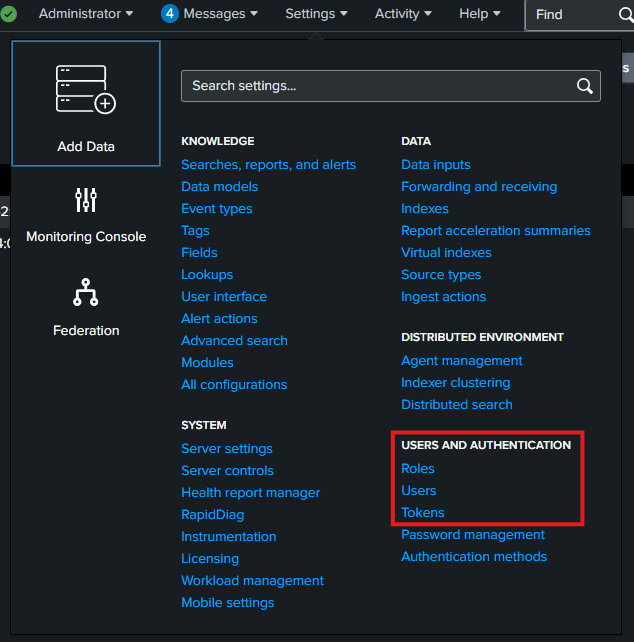
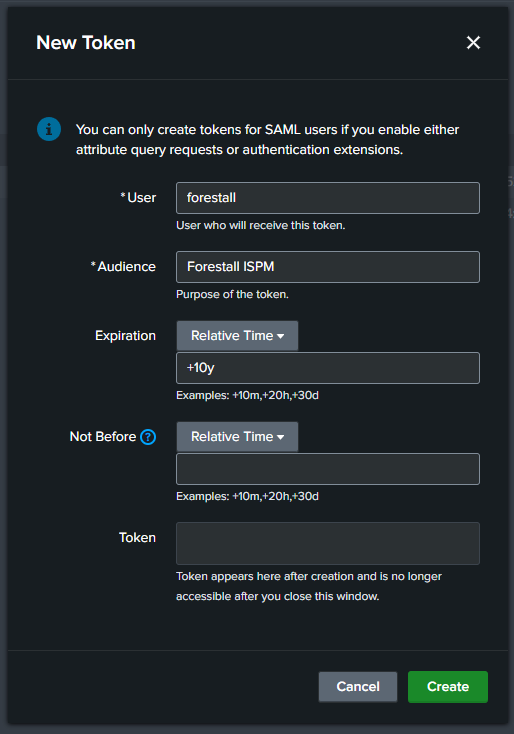
### Steps for Creating a Token
This section lists the settings for the token used when sending requests to Splunk.
#### User Role Requirements
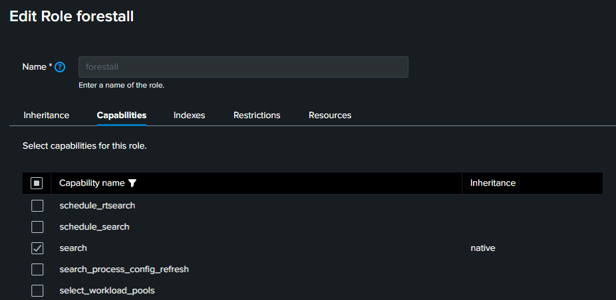
* Search permission to perform searches on the index.
Splunk Role Capabilities
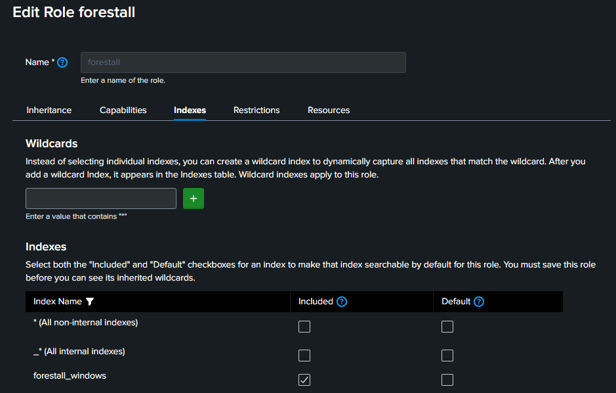
* Permission to read the index data containing the logs.
Splunk index access permissions
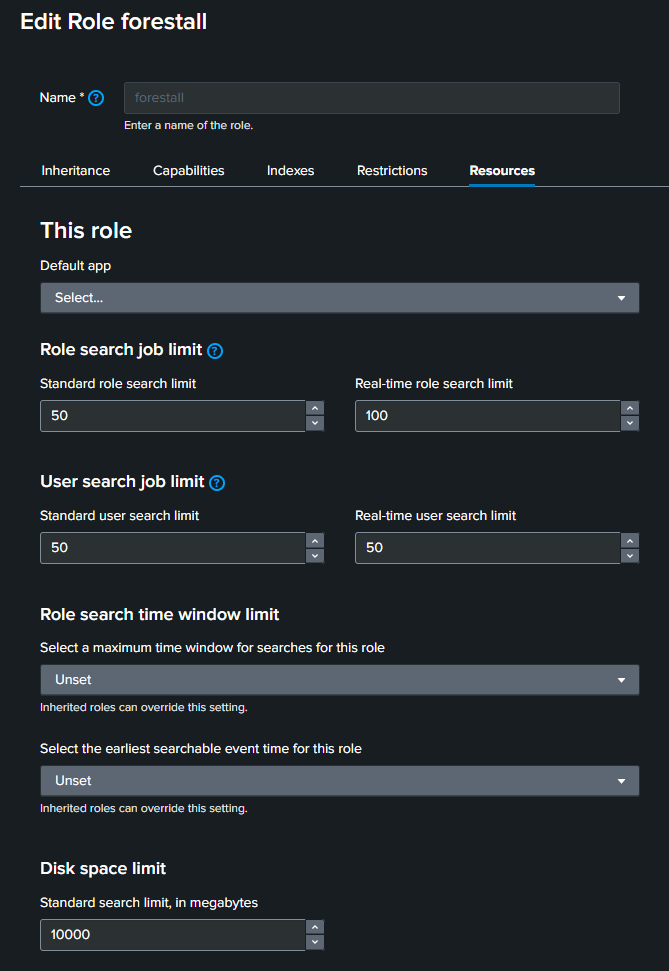
#### Role resource usage settings
Splunk Role Resource permissions
Configure these limits for your Splunk capacity and expected scan volume.
{% hint style="warning" %}
High limits can create significant I/O load on Splunk.
{% endhint %}
Recommended values:
* **Role search job limit:** `20`. Limits concurrent search jobs for all users with this role. Set `0` for no limit.
* **User search job limit:** `20`. Limits concurrent search jobs for each user with this role. Set `0` for no limit.
* **Disk space limit:** `10,000`.
#### Create User Authentication Token