> For the complete documentation index, see [llms.txt](https://docs.forestall.io/forestall/llms.txt). Markdown versions of documentation pages are available by appending `.md` to page URLs; this page is available as [Markdown](https://docs.forestall.io/forestall/trend-insights.md).

# Trend Insights

Trend Insights shows how risk and findings change across scans. You can limit the scans by policy and date range.
The selector at the top-right of the page chooses which **provider** the trends are drawn for. Providers present in the scans (Active Directory, Azure, AWS, GCP and GitHub) are listed under `In this scan`. The others are listed under `Not in this scan` and cannot be selected. Type to filter the list. The choice is kept until you close the browser tab.

The page title shows the number of scans the trends are drawn from, for example **Trend Insights (5 Scans)**. The header offers the following controls:

**Policies:** Selects the scan policies whose scans are included. At least one policy is required. When none is selected, a `Required` warning is shown.

**Date range:** A date picker and a list of preset ranges (`Last Week`, `Last Month`, `Last 2 Months`, `Last 3 Months`, `Last Year`) limit the scans to a period. Picking dates by hand shows `Custom`.

**Print:** The print button prints the visible sections.

The gear next to the page title opens the list of sections, where you can show or hide each one. The sections are `Risk Score Stats`, `Risk Breakdown by MITRE ATT&CK`, `Risk Score`, `Exposure Score`, `Dangerous Path Count`, `Vulnerabilities by Severity`, `Affected Entity and Total Affected Entity Count`, `Shadow Admin and Risky Admin User Count`, `Asset Stats`, `Risky Asset Stats`, `Risk Score By Top 5 Tags`, `Risk Score By Top 5 Impacts` and `Credential Discovery Secret Count`. `Asset Stats`, `Risky Asset Stats` and `Credential Discovery Secret Count` are shown for Active Directory only.

<figure><img src="https://3408039743-files.gitbook.io/~/files/v0/b/gitbook-x-prod.appspot.com/o/spaces%2FObpV44hoVkNmo5bFuVVL%2Fuploads%2Fgit-blob-bdd8182300ab209627073497d0124e554d33824b%2Ftrend-insights-image-13.png?alt=media" alt=""><figcaption><p>Trend Insights</p></figcaption></figure>

The charts are drawn for the selected provider. The sliders below and to the left of each chart zoom into a range of scans or values. Right-clicking a scan's data point offers **Hide**, which removes that scan from the chart. The **Reset Data** button restores it, and the save button downloads the chart as an image.

## Risk Score Stats

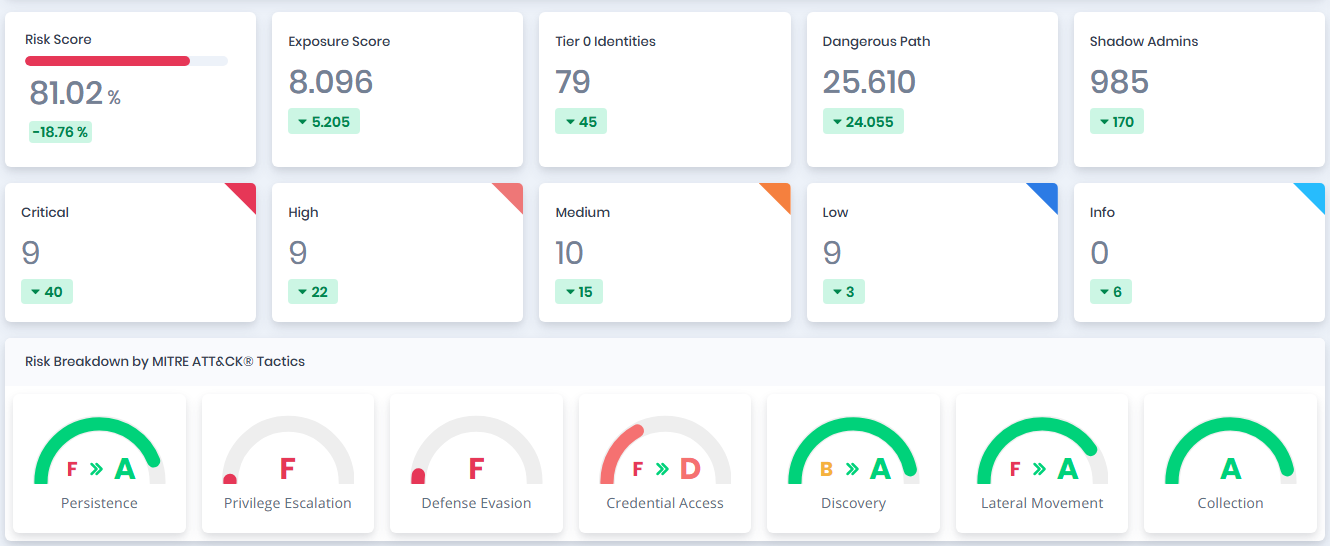
The band at the top of the page compares the newest scan in the range with the oldest one. Each card shows the value for the newest scan and a badge with the change since the oldest scan: `Risk Score`, `Exposure Score`, `Tier 0 Identities`, `Dangerous Path`, `Shadow Admins` and the number of `Critical`, `High`, `Medium`, `Low` and `Info` issues.

## Risk Breakdown by MITRE ATT\&CK® Tactics

The gauges show the risk grade of each MITRE ATT\&CK tactic. When the grade has changed within the range, the gauge shows both grades with an arrow icon between them, from the oldest scan to the newest, for example `F` to `A`.

<figure><img src="https://3408039743-files.gitbook.io/~/files/v0/b/gitbook-x-prod.appspot.com/o/spaces%2FObpV44hoVkNmo5bFuVVL%2Fuploads%2Fgit-blob-e92eb10091e9f29169988eae22b286e3a9383ce6%2Ftrend-insights-risk-score-stats.png?alt=media" alt="Risk Score Stats band and MITRE ATT&#x26;CK tactic gauges"><figcaption><p>Risk Score Stats and Risk Breakdown by MITRE ATT&#x26;CK® Tactics</p></figcaption></figure>

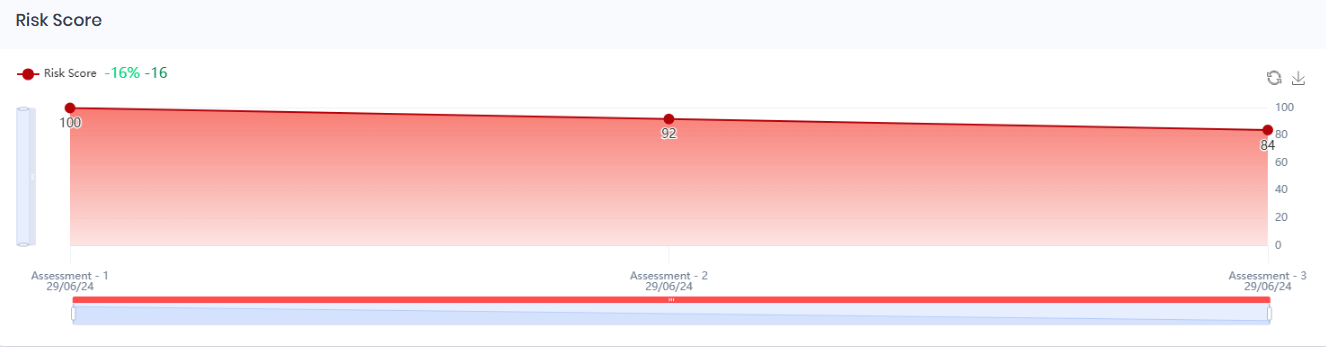
## Risk Score

The Risk Score graph shows the overall risk level of the selected provider's environment in each scan.

<figure><img src="https://3408039743-files.gitbook.io/~/files/v0/b/gitbook-x-prod.appspot.com/o/spaces%2FObpV44hoVkNmo5bFuVVL%2Fuploads%2Fgit-blob-594d4c54027ba9d6c3bd1df99ba5af6375615d12%2Ftrend-insights-image-2.png?alt=media" alt=""><figcaption><p>Risk Score</p></figcaption></figure>

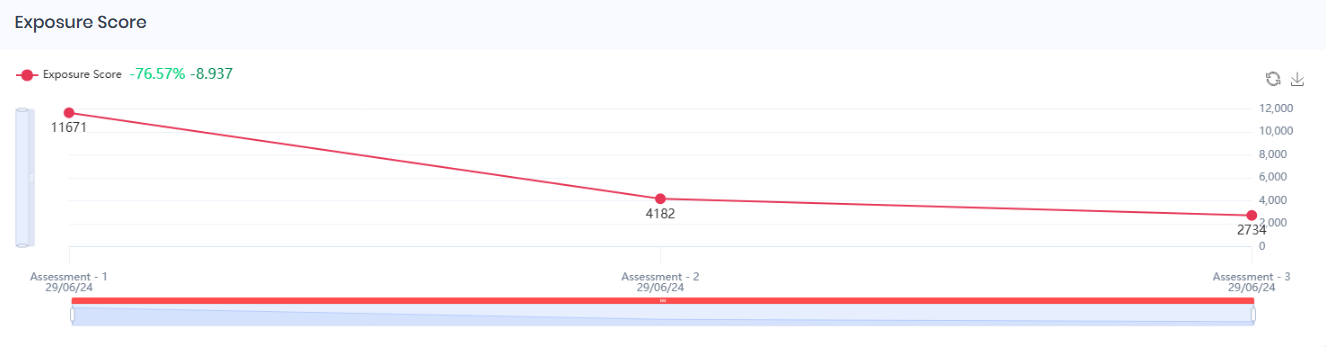
## **Exposure Score**

The Exposure Score graph shows the level of exposure in the selected provider's environment in each scan.

<figure><img src="https://3408039743-files.gitbook.io/~/files/v0/b/gitbook-x-prod.appspot.com/o/spaces%2FObpV44hoVkNmo5bFuVVL%2Fuploads%2Fgit-blob-16c56f11e8dbe2736256860e9cab5265cf86bd3f%2Ftrend-insights-image-3.png?alt=media" alt=""><figcaption><p>Exposure Score</p></figcaption></figure>

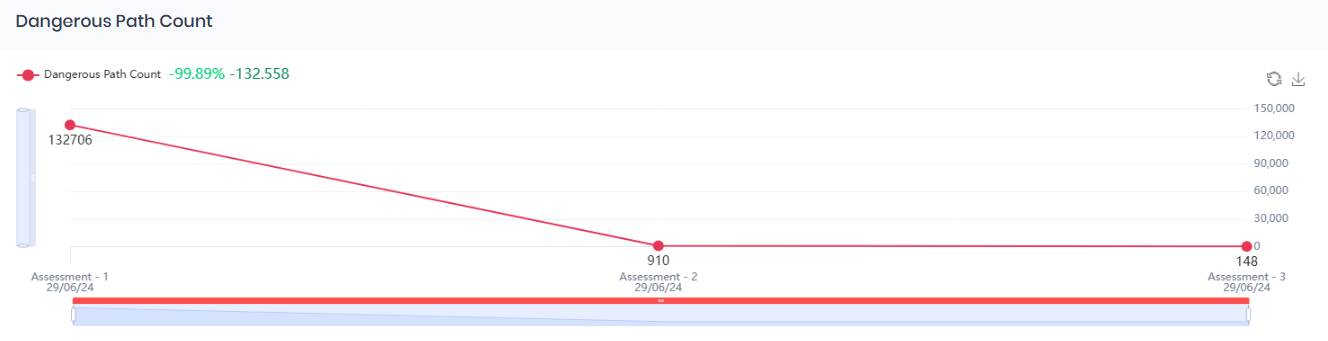
## **Dangerous Path Count**

The Dangerous Path Count graph shows the number of risky access paths in the selected provider's environment that an attacker could use to reach sensitive assets.

<figure><img src="https://3408039743-files.gitbook.io/~/files/v0/b/gitbook-x-prod.appspot.com/o/spaces%2FObpV44hoVkNmo5bFuVVL%2Fuploads%2Fgit-blob-8e0ff13f9eb09f4be7bc6b90f57d3ed92ec2503b%2Ftrend-insights-image-4.png?alt=media" alt=""><figcaption><p>Dangerous Path Count</p></figcaption></figure>

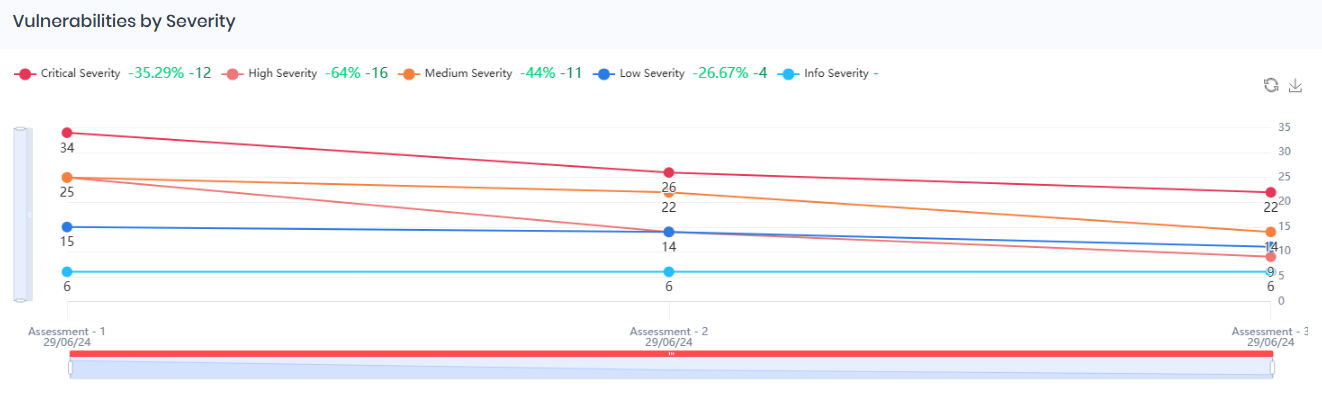
## **Vulnerabilities by Severity**

The Vulnerabilities by Severity graph shows the number of vulnerabilities at each severity level (Critical, High, Medium, Low, and Informational) over time.

<figure><img src="https://3408039743-files.gitbook.io/~/files/v0/b/gitbook-x-prod.appspot.com/o/spaces%2FObpV44hoVkNmo5bFuVVL%2Fuploads%2Fgit-blob-ad658a29bab062a8e526a4a30ccd3e5e8ce982eb%2Ftrend-insights-image-5.png?alt=media" alt=""><figcaption><p>Vulnerabilities by Severity</p></figcaption></figure>

**Critical**: The number of Issues with Critical severity.

**High**: The number of Issues with High severity.

**Medium**: The number of Issues with Medium severity.

**Low**: The number of Issues with Low severity.

**Info**: The number of Issues with Info severity.

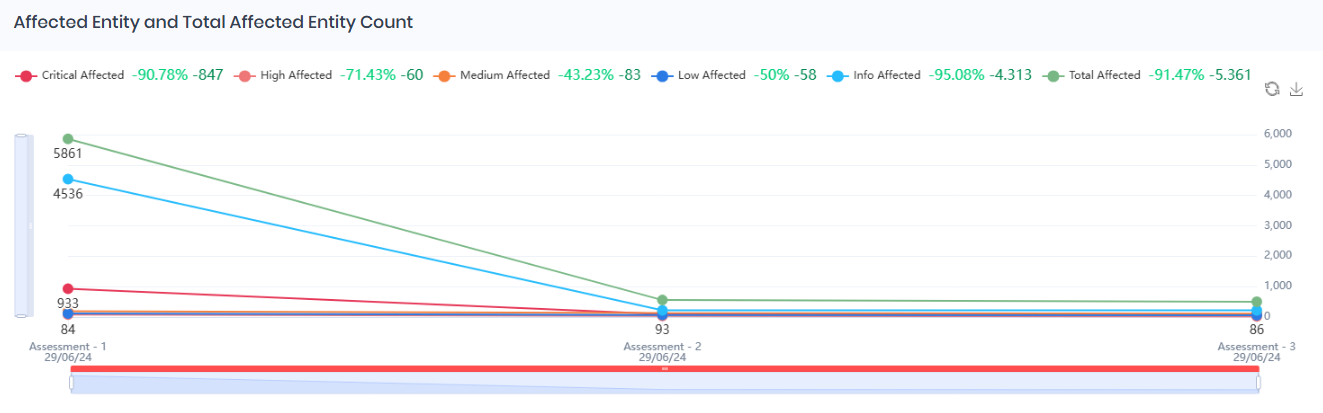
## **Affected Entity and Total Affected Entity Count**

The Affected Entity and Total Affected Entity Count graph shows the number of affected entities at each severity level (Critical, High, Medium, Low, and Informational) in each scan. Use it to follow the effect of remediation.

<figure><img src="https://3408039743-files.gitbook.io/~/files/v0/b/gitbook-x-prod.appspot.com/o/spaces%2FObpV44hoVkNmo5bFuVVL%2Fuploads%2Fgit-blob-96bac21d27439f8192a3d5f5fc933a0038487f0f%2Ftrend-insights-image-6.png?alt=media" alt=""><figcaption><p>Affected Entity and Total Affected Entity Count</p></figcaption></figure>

| **Statistic**     | **Description**                                                |
| ----------------- | -------------------------------------------------------------- |
| Critical Affected | The number of entities affected at a critical level.           |
| High Affected     | The number of entities affected at a high risk level.          |
| Medium Affected   | The number of entities affected at a medium risk level.        |
| Low Affected      | The number of entities affected at a low risk level.           |
| Info Affected     | The number of entities affected by informational level issues. |
| Total Affected    | The total number of affected entities across all risk levels.  |

## **Shadow Admin and Risky Admin User Count**

The Shadow Admin and Risky Admin User Count graph shows the number of risky admin accounts (`Risky Admin`) and shadow admin users (`Shadow Users`) over time.
<figure><img src="https://3408039743-files.gitbook.io/~/files/v0/b/gitbook-x-prod.appspot.com/o/spaces%2FObpV44hoVkNmo5bFuVVL%2Fuploads%2Fgit-blob-0c686f4b5a90ac4cd501d3bd92c540efaf59b1e1%2Ftrend-insights-image-7.png?alt=media" alt=""><figcaption><p>Shadow Admin and Risky Admin User Count</p></figcaption></figure>

## **Asset Stats**

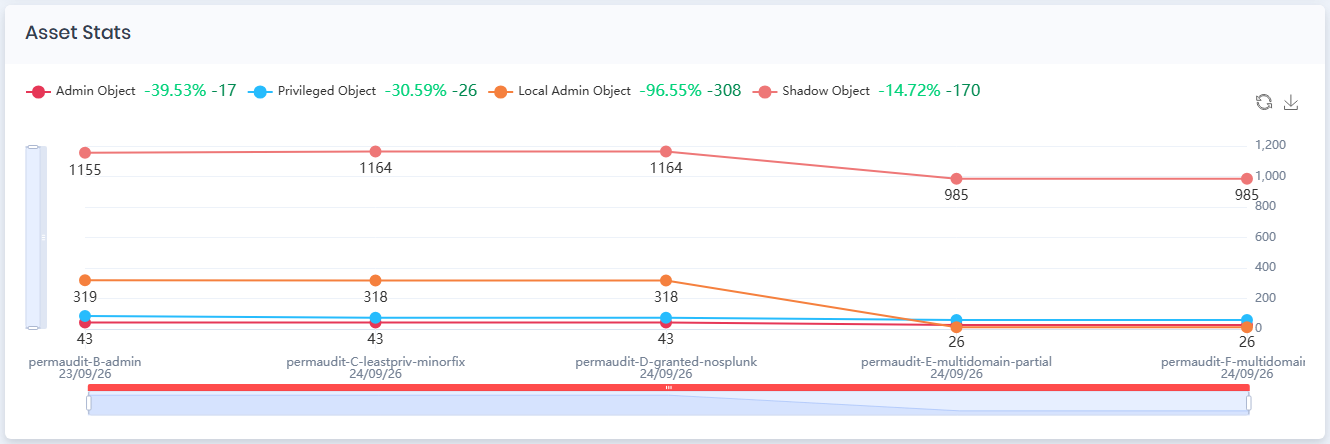
The Asset Stats graph shows the number of Admin, Privileged, Local Admin and Shadow objects in the Active Directory environment over time.

<figure><img src="https://3408039743-files.gitbook.io/~/files/v0/b/gitbook-x-prod.appspot.com/o/spaces%2FObpV44hoVkNmo5bFuVVL%2Fuploads%2Fgit-blob-d62d0ad57d825a019153c8521a1d3c39efd841f0%2Ftrend-insights-image-8.png?alt=media" alt=""><figcaption><p>Asset Stats</p></figcaption></figure>

| **Statistic**          | **Description**                                                                                         |
| ---------------------- | ------------------------------------------------------------------------------------------------------- |
| **Admin Object**       | The number of administrative objects, such as accounts with admin privileges.                           |
| **Privileged Object**  | The number of objects with elevated permissions.                                                        |
| **Local Admin Object** | The number of objects with local administrative rights.                                                 |
| **Shadow Object**      | The number of shadow admin objects: objects that can compromise an admin object through an attack path. |

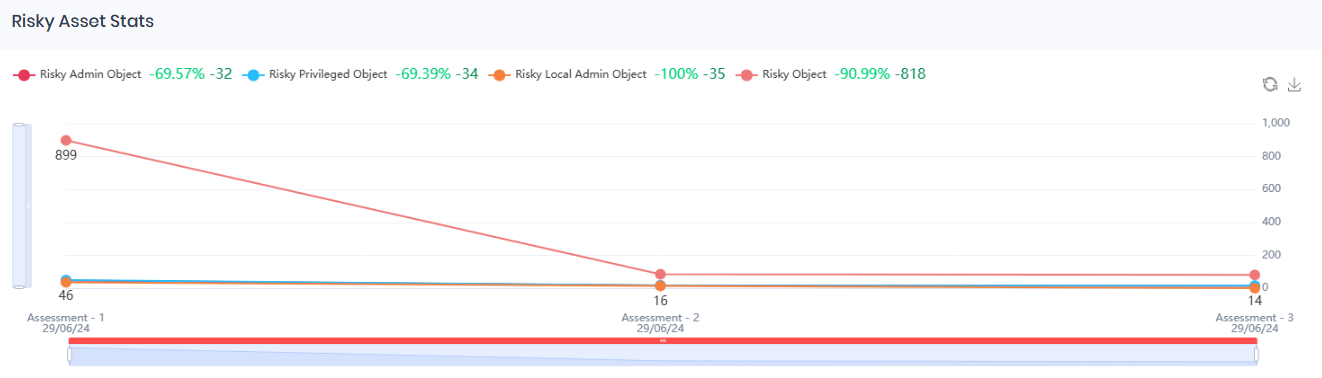
## **Risky Asset Stats**

The Risky Asset Stats chart shows the count and percentage change of Risky Admin Object, Risky Privileged Object, Risky Local Admin Object and Risky Object across scans.

<figure><img src="https://3408039743-files.gitbook.io/~/files/v0/b/gitbook-x-prod.appspot.com/o/spaces%2FObpV44hoVkNmo5bFuVVL%2Fuploads%2Fgit-blob-f986461d8547fb22f80cdf009ce1db9c2dddea1c%2Ftrend-insights-image-9.png?alt=media" alt=""><figcaption><p>Risky Asset Stats</p></figcaption></figure>

| **Statistic**                | **Description**                              |
| ---------------------------- | -------------------------------------------- |
| **Risky Admin Object**       | The number of high-risk admin objects.       |
| **Risky Privileged Object**  | The number of high-risk privileged objects.  |
| **Risky Local Admin Object** | The number of high-risk local admin objects. |
| **Risky Object**             | The total number of high-risk objects.       |

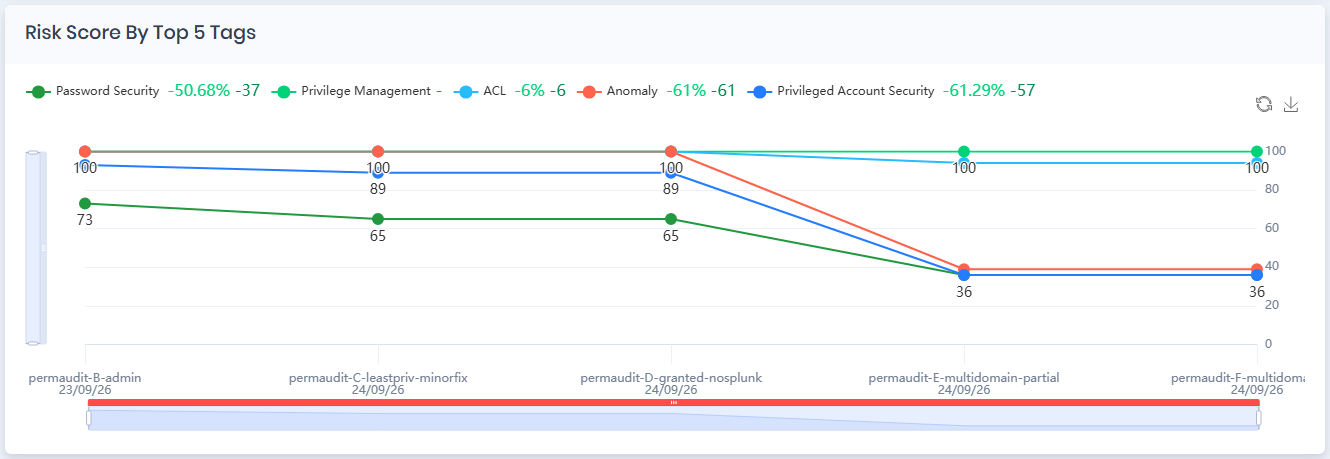
## Risk Score By Top 5 Tags

The Risk Score By Top 5 Tags graph shows changes in risk levels for the five tags with the highest risk in the newest scan in the range. The tags depend on the findings, so they differ between environments.<br>

<figure><img src="https://3408039743-files.gitbook.io/~/files/v0/b/gitbook-x-prod.appspot.com/o/spaces%2FObpV44hoVkNmo5bFuVVL%2Fuploads%2Fgit-blob-dc618aaa169385c4a4405015a7c75f70879a23d7%2Ftrend-insights-image-10.png?alt=media" alt=""><figcaption><p>Risk Score By Top 5 Tags</p></figcaption></figure>

The tags in the example above are:

| **Tag**                         | **Description**                                                     |
| ------------------------------- | ------------------------------------------------------------------- |
| **Privilege Management**        | The risk score related to managing access permissions and controls. |
| **ACL**                         | The risk score related to Access Control Lists.                     |
| **Anomaly**                     | The risk score related to unusual or unexpected activities.         |
| **Password Security**           | The risk score related to password policies and password handling.  |
| **Privileged Account Security** | The risk score related to the security of privileged accounts.      |

## **Risk Score By Top 5 Impacts**

The Risk Score By Top 5 Impacts graph tracks risk trends for the five [impacts](/forestall/impacts.md) with the highest risk in the newest scan in the range. The impacts depend on the findings, so they differ between environments.

<figure><img src="https://3408039743-files.gitbook.io/~/files/v0/b/gitbook-x-prod.appspot.com/o/spaces%2FObpV44hoVkNmo5bFuVVL%2Fuploads%2Fgit-blob-fd5e71b8fb2ff752e06bf623d3bebf21b3d35108%2Ftrend-insights-image-11.png?alt=media" alt=""><figcaption><p>Risk Score By Top 5 Impacts</p></figcaption></figure>

The impacts in the example above are:

| **Impact Type**                             | **Description**                                                       |
| ------------------------------------------- | --------------------------------------------------------------------- |
| **ACL Based Attack Path Exploitation**      | The risk score for exploitations through access control lists (ACLs). |
| **PrivExchange**                            | The risk score related to the Exchange and NTLM relay attack vector.  |
| **Unconstrained Delegation Exploitation**   | The risk score related to exploiting unconstrained delegation.        |
| **Persistence with Access Control Entries** | The risk from persistence through access control entries.             |
| **Credential Theft Attacks**                | The risk score related to credential theft.                           |

## **Credential Discovery Secret Count**

The Credential Discovery Secret Count graph shows the number of secrets that [Credential Discovery](/forestall/credential-discovery.md) found in file shares in the Active Directory environment.

<figure><img src="https://3408039743-files.gitbook.io/~/files/v0/b/gitbook-x-prod.appspot.com/o/spaces%2FObpV44hoVkNmo5bFuVVL%2Fuploads%2Fgit-blob-3ca4630efff3425400e5c0b6f2795a94ebba8ad0%2Ftrend-insights-image-12.png?alt=media" alt=""><figcaption><p>Credential Discovery Secret Count</p></figcaption></figure>

<br>