> For the complete documentation index, see [llms.txt](https://docs.forestall.io/forestall/llms.txt). Markdown versions of documentation pages are available by appending `.md` to page URLs; this page is available as [Markdown](https://docs.forestall.io/forestall/scans/policies/azure-policies.md).
# Azure Policies
Azure policies set what a scan collects and checks in Azure and Entra ID environments.
### Edit Scan Policy (Azure / Entra ID)
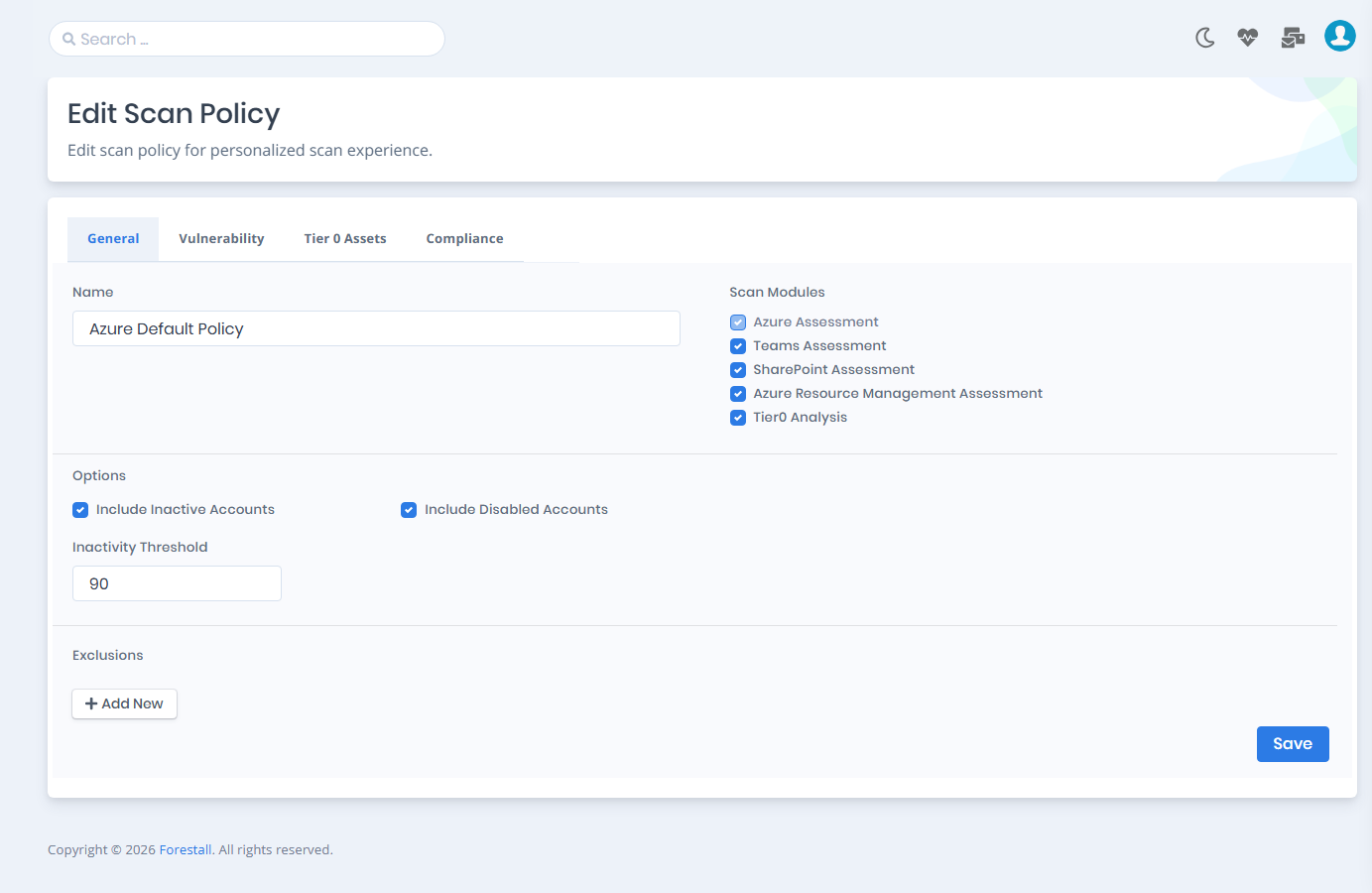
On the **General** tab you enable or disable the scan modules, set the options and define exclusions. The **Edit Scan Policy** page has four tabs: **General**, **Vulnerability**, **Tier 0 Assets** and **Compliance** (see [Compliance Frameworks](/forestall/scans/policies.md#compliance-frameworks)).
Azure Scan Policy Settings
#### Vulnerability Policies and Tiering (Azure / Entra ID)
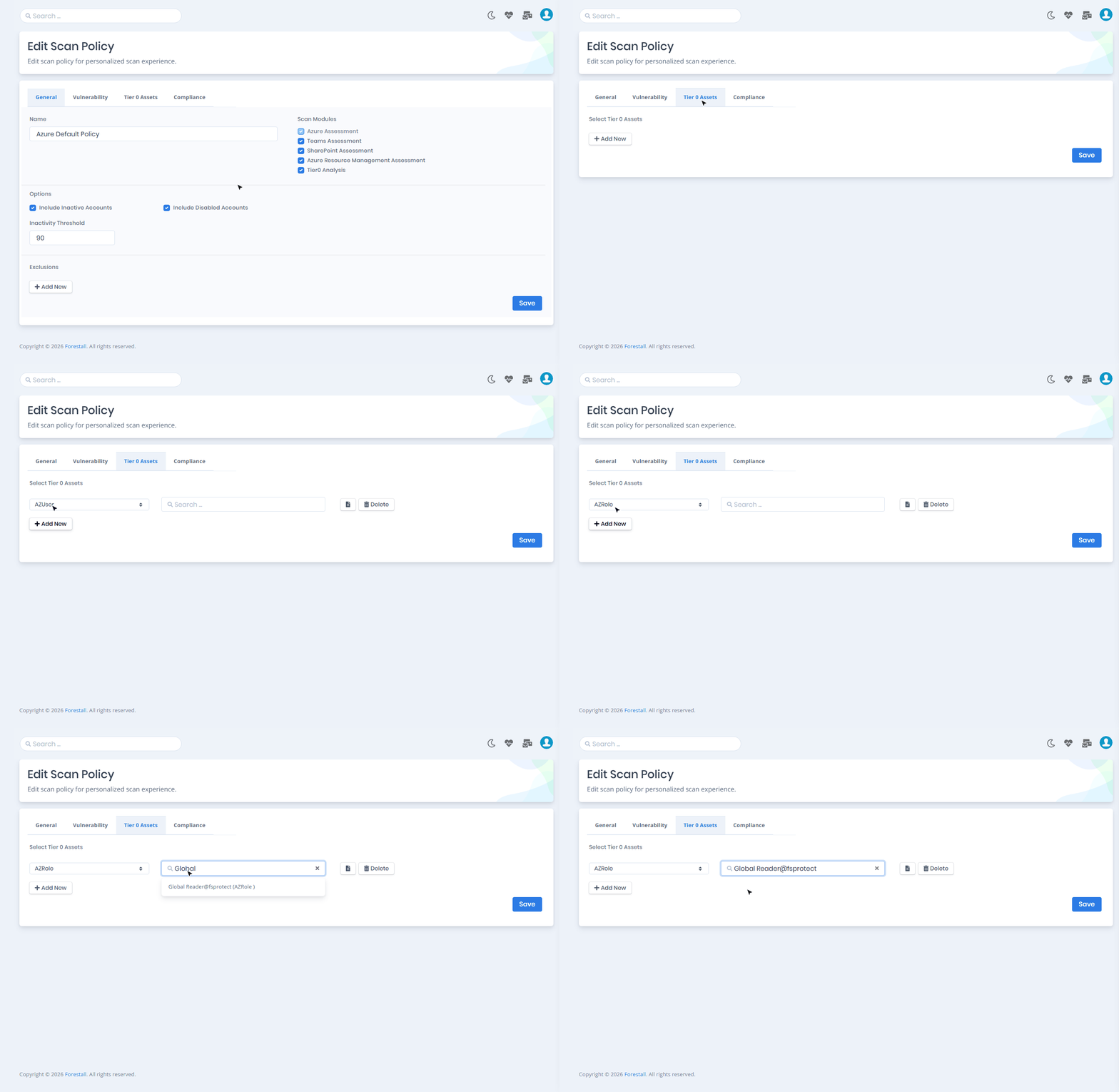
The **Vulnerability** tab sets which Azure checks run during the scan (see [Vulnerability Policies](/forestall/scans/policies.md#vulnerability-policies)). The **Tier 0 Assets** tab marks your most critical identities.
### **Azure Scan Modules**
**Azure Assessment:** Checks vulnerabilities, misconfigurations and attack paths in Entra ID, including users, groups, applications, service principals, roles and permissions. It is the core module and cannot be disabled.
**Teams Assessment:** Optional. Extends the assessment to Microsoft Teams. It collects the tenant-wide Teams configuration, meeting and messaging policies, external access settings, and the policy assignments of users and groups.
**SharePoint Assessment:** Optional. Extends the assessment to SharePoint Online. It checks tenant and site settings such as sharing, ownership and storage. Some SharePoint checks need certificate-based authentication to collect their data.
**Azure Resource Management Assessment:** Optional. Collects and checks Azure Resource Manager resources such as subscriptions, management groups, resource groups, virtual machines, Key Vaults, storage accounts, web apps and managed identities. It also analyzes Azure RBAC assignments between identities and resources.
**Tier0 Analysis:** Optional. An analytics-only module that calculates the attack paths from Tier 2 identities to Tier 0 assets from the data collected by the other modules.
All five modules are enabled in the **Azure Default Policy**.
### **Options (Azure)**
* **Include Inactive Accounts**: Includes inactive users and service principals in the scan. Enabled by default.
* **Inactivity Threshold**: The number of days after which an account counts as inactive. The default value is `90`.
* **Include Disabled Accounts**: Includes disabled users and service principals in the scan. Enabled by default.
### **Exclusions (Azure)**
Click **Add New** to add an exclusion row, then select the entity type and enter the entity. The types and their identifiers are listed under [General Exclusions](/forestall/scans/policies.md#general-exclusions).
#### Tier 0 Assets (Azure / Entra ID)
On the **Tier 0 Assets** tab you mark critical Azure and Entra ID identities as privileged. The types are AZUser, AZGroup, AZServicePrincipal and AZRole. Tier 0 assets are treated as high-impact identities in the attack path analysis.