> For the complete documentation index, see [llms.txt](https://docs.forestall.io/forestall/llms.txt). Markdown versions of documentation pages are available by appending `.md` to page URLs; this page is available as [Markdown](https://docs.forestall.io/forestall/unified-identities/azure-identities/entra-id/users.md).

# Users

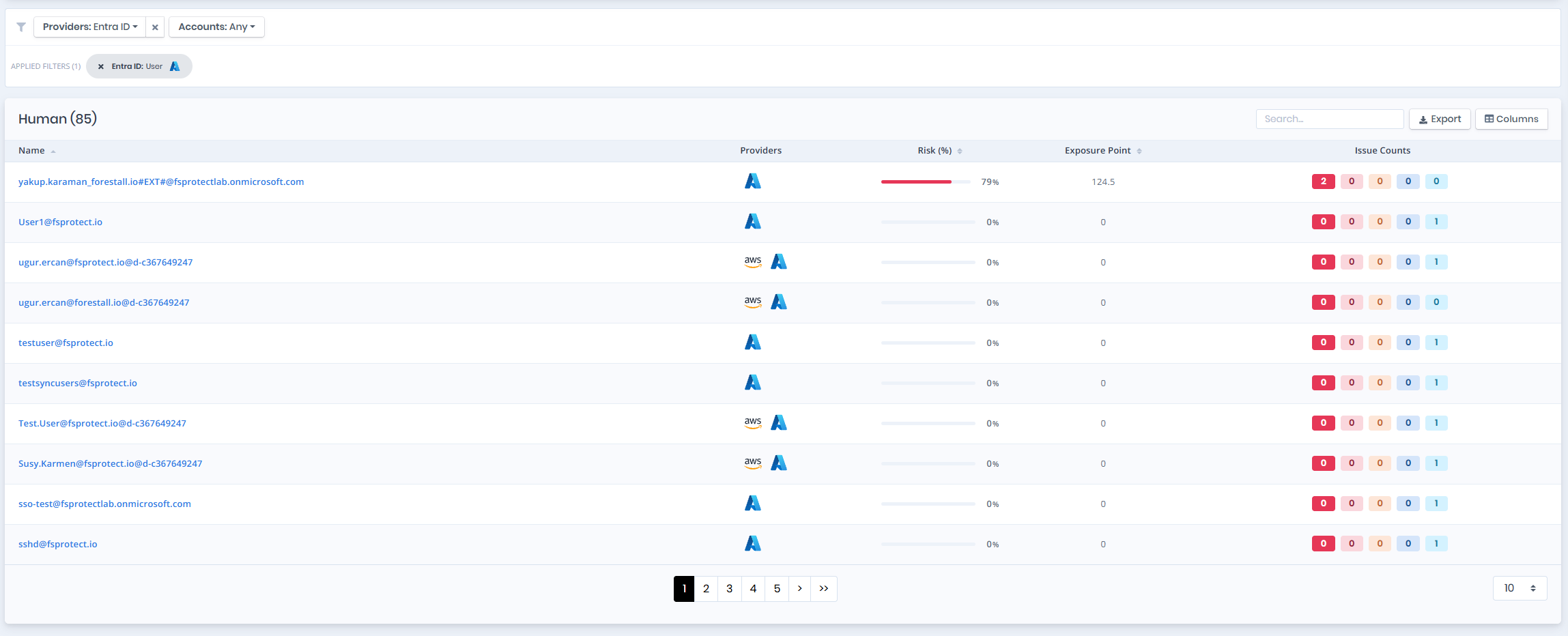
The `Users` page provides a list of enumerated users in entire Azure. The list contains the `Enabled`, `On Prem Sync Enabled`, `Privileged`, `Tier 0`, `Risk Score`,`Exposure Point` and `Issue Counts`.

<figure><img src="https://3408039743-files.gitbook.io/~/files/v0/b/gitbook-x-prod.appspot.com/o/spaces%2FObpV44hoVkNmo5bFuVVL%2Fuploads%2Fgit-blob-8bdb75c63ac681dd5f4a941d894fc6498849e768%2Fusers-1.png?alt=media" alt=""><figcaption><p>Users</p></figcaption></figure>

## User Details

Details page contains the `Risk Score` of the user, `Exposure Point`,`Information` and `Issues` panes.

{% hint style="info" %}
You can analyze objects in the `Graph module` by clicking the `Visualize` button on the upper left side of the `Information Pane`.
{% endhint %}

<figure><img src="https://3408039743-files.gitbook.io/~/files/v0/b/gitbook-x-prod.appspot.com/o/spaces%2FObpV44hoVkNmo5bFuVVL%2Fuploads%2Fgit-blob-daa236601d78bed71fa41d2c050829d0c41684a2%2Fazure-identities-users-image-1.png?alt=media" alt=""><figcaption><p>User Details</p></figcaption></figure>

## Information

`Information Pane` can contain different badges to highlight important attributes.

| Badge          | Description                                                                           |
| -------------- | ------------------------------------------------------------------------------------- |
| **Privileged** | Indicates that the object is Privileged.                                              |
| **Tier**       | Indicates that the object tier according to risk score and importance.                |
| **Enabled**    | Indicates that the object is enabled.                                                 |
| **Disabled**   | Indicates that the object is disabled.                                                |
| **Stealth**    | Indicates that the object can compromise admin objects with at least one attack path. |

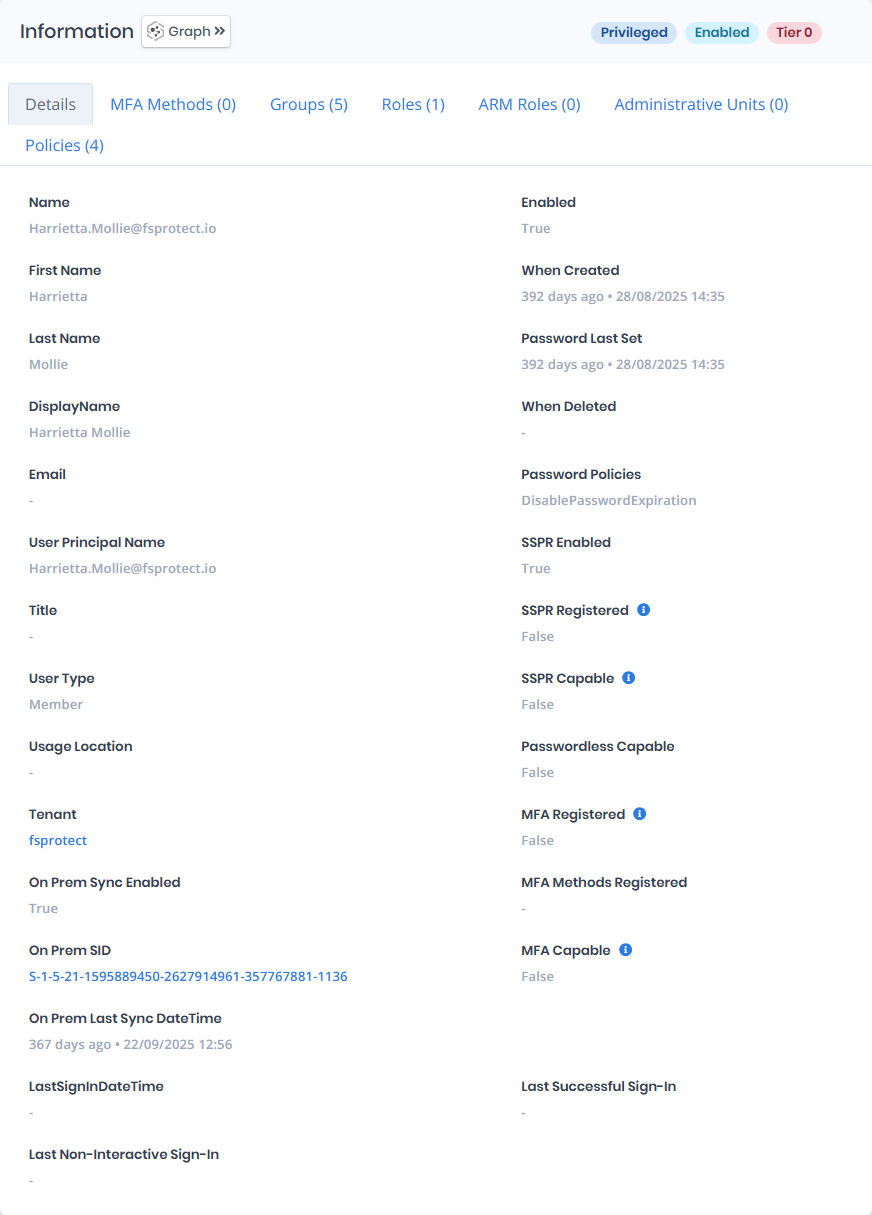
`Information Pane` contains `Details`, `MFA Methods`, `Groups`, `Roles`, `ARM Roles`, `Administrative Units` and `Policies`. Each tab except `Details` carries the number of rows it holds in its label.

## Details

Details tab contains attributes below about user object.

| Attribute                       | Description                                                                                                                                                                                                 |
| ------------------------------- | ----------------------------------------------------------------------------------------------------------------------------------------------------------------------------------------------------------- |
| Name                            | The user's primary email address or User Principal Name (UPN), used to log into Azure services.                                                                                                             |
| First Name                      | The given name of the user as entered in their profile.                                                                                                                                                     |
| Last Name                       | The surname of the user as stored in their profile.                                                                                                                                                         |
| DisplayName                     | The full name of the user, commonly displayed in emails and directory listings.                                                                                                                             |
| Email                           | The user's alternate or contact email address; may be empty if not configured.                                                                                                                              |
| User Principal Name             | The unique sign-in name assigned to the user, typically in email address format.                                                                                                                            |
| Enabled                         | Indicates whether the user account is currently active and allowed to sign in.                                                                                                                              |
| When Created                    | The date and time when the user account was created in Azure AD.                                                                                                                                            |
| Password Last Set               | Shows the last time the user changed or was assigned a new password.                                                                                                                                        |
| When Deleted                    | Indicates if and when the account was deleted; a blank value means the account is active.                                                                                                                   |
| Password Policies               | Defines any specific password settings applied to the user, such as disabled password expiration.                                                                                                           |
| SSPR Enabled                    | Indicates if self-service password reset is enabled for the user.                                                                                                                                           |
| SSPR Registered                 | Shows whether the user has registered for self-service password reset.                                                                                                                                      |
| SSPR Capable                    | Indicates if the user meets the requirements to use self-service password reset.                                                                                                                            |
| **Passwordless Capable**        | Shows whether the user is eligible to sign in using passwordless methods like Windows Hello or FIDO2.                                                                                                       |
| **MFA Registered**              | Indicates whether the user has registered for multi-factor authentication (MFA).                                                                                                                            |
| MFA Methods Registered          | Lists the MFA authentication methods configured by the user (e.g., phone, app, hardware key).                                                                                                               |
| MFA Capable                     | Indicates whether the user is eligible to register for or use MFA.                                                                                                                                          |
| **Object ID**                   | A globally unique identifier (GUID) assigned to the user object in Azure AD.                                                                                                                                |
| Title                           | The user’s job title or role, often used in organizational directories; blank if not set.                                                                                                                   |
| **User Type**                   | Defines the user's role in the directory—either "Member" (internal user) or "Guest" (external collaborator).                                                                                                |
| **Usage Location**              | The country or region assigned to the user, used for licensing and compliance; blank if unset.                                                                                                              |
| Parent Tenant                   | The name of the Azure AD tenant where the user account resides.                                                                                                                                             |
| **On Prem Sync Enabled**        | Shows if the user account is synchronized from an on-premises Active Directory.                                                                                                                             |
| On Prem SID                     | The user’s security identifier (SID) from the on-premises Active Directory.                                                                                                                                 |
| **On Prem Last Sync Date Time** | The last date and time the user's on-premises account was synced to Azure AD.                                                                                                                               |
| Last Sign In Date Time          | The most recent date and time the user successfully signed in; blank if no sign-ins have occurred.                                                                                                          |
| Last Successful Sign-In         | The most recent interactive sign-in that succeeded. An account whose last successful sign-in is far in the past is a candidate for removal.                                                                 |
| Last Non-Interactive Sign-In    | The most recent sign-in performed by a client on the user's behalf, without the user being present. An account can look dormant by interactive sign-in alone while a token is still being refreshed for it. |
| MFA Registered                  | Whether the user has registered at least one multifactor authentication method.                                                                                                                             |
| MFA Capable                     | Whether the user has a registered method that can actually be used for multifactor authentication.                                                                                                          |
| MFA Methods Registered          | The methods the user has registered, for example `mobilePhone` or `softwareOneTimePasscode`.                                                                                                                |
| Passwordless Capable            | Whether the user has a registered method that allows signing in without a password.                                                                                                                         |
| SSPR Enabled                    | Whether self-service password reset is enabled for the user.                                                                                                                                                |
| SSPR Registered                 | Whether the user has completed self-service password reset registration.                                                                                                                                    |
| SSPR Capable                    | Whether the user has enough registered methods to actually reset their own password.                                                                                                                        |
| Password Policies               | The password policies applied to the user, for example whether the password is set never to expire.                                                                                                         |
| User Type                       | Whether the account is a `Member` of the tenant or a `Guest`.                                                                                                                                               |
| Usage Location                  | The country the user is assigned to for service licensing.                                                                                                                                                  |
| Tenant                          | The Entra ID tenant the user belongs to.                                                                                                                                                                    |
| When Created                    | The date the account was created.                                                                                                                                                                           |
| When Deleted                    | The date the account was soft-deleted, if it was.                                                                                                                                                           |

## MFA Methods

MFA Methods tab lists the multifactor authentication methods the user has registered, for example `Phone` or `Authenticator app (time-based code)`. An account with no registered method cannot satisfy a policy that demands multifactor authentication, which is what [CAP Audit](/forestall/cap-audit.md) reports as a user without MFA.

## Groups

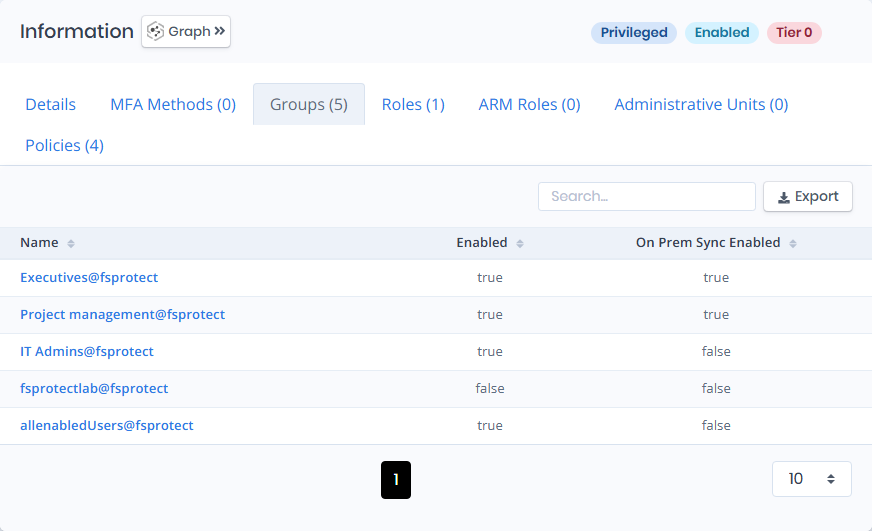
Groups tab contains a list of groups that the user is a member of. This list also contains `Enabled` and `On Prem Sync Enabled` columns to identify the privilege levels of these groups.

<figure><img src="https://3408039743-files.gitbook.io/~/files/v0/b/gitbook-x-prod.appspot.com/o/spaces%2FObpV44hoVkNmo5bFuVVL%2Fuploads%2Fgit-blob-c50fe5115e888a3943d05015e9c6b92490800f61%2Fazure-identities-users-image-2.png?alt=media" alt=""><figcaption><p>G</p></figcaption></figure>

## Roles

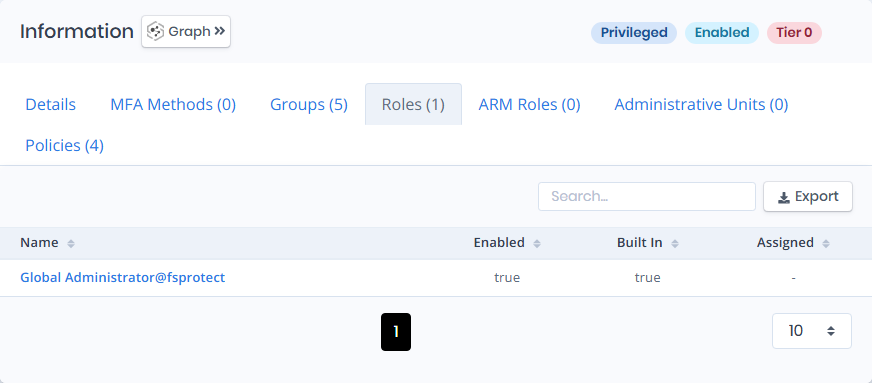
Roles tab contains a list of roles that the user has a session on. This list also contains `Enabled`, and `Built In` columns to identify the whether role is enabled and is built in.

<figure><img src="https://3408039743-files.gitbook.io/~/files/v0/b/gitbook-x-prod.appspot.com/o/spaces%2FObpV44hoVkNmo5bFuVVL%2Fuploads%2Fgit-blob-b695aa1fdf4960ab03a808e4e5823e42197e8f3b%2Fazure-identities-users-image-3.png?alt=media" alt=""><figcaption><p>Roles</p></figcaption></figure>

## ARM Roles

ARM Roles tab contains a list of the Azure Resource Manager role assignments the user holds, so directory roles and resource-plane permissions can be reviewed on the same page.

## Administrative Units

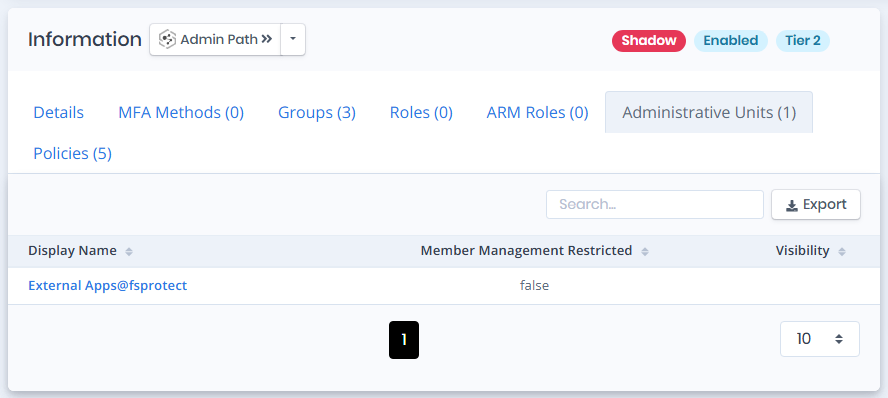
Administrative Units tab contains a list of `Administrative Unit Names` that indicates which administrative unit member the user object belongs to.

<figure><img src="https://3408039743-files.gitbook.io/~/files/v0/b/gitbook-x-prod.appspot.com/o/spaces%2FObpV44hoVkNmo5bFuVVL%2Fuploads%2Fgit-blob-fef93d8bc8483c69d42126d2fcc10dbabc9f3ee3%2Fazure-identities-users-image-4.png?alt=media" alt=""><figcaption><p>Administrative Units</p></figcaption></figure>

## Policies

Policies tab lists the Conditional Access policies that currently apply to the user.

**Name:** The policy the row is about, linking to its [Conditional Access Policy](/forestall/unified-identities/azure-identities/entra-id/conditional-access-policies.md) page.

**State:** Whether the policy is `Enabled`, `Disabled` or `Report-only`. A policy in report-only mode appears here but does not enforce anything, so a user can be covered on paper and unprotected in practice.

## Issues

Issues pane contains identified issues on the user object.

![Issues](https://3408039743-files.gitbook.io/~/files/v0/b/gitbook-x-prod.appspot.com/o/spaces%2FObpV44hoVkNmo5bFuVVL%2Fuploads%2Fgit-blob-3e712d7e975b651a4d21a6c8ffd946c039ecd597%2Fuser-issues.png?alt=media)