> For the complete documentation index, see [llms.txt](https://docs.forestall.io/forestall/llms.txt). Markdown versions of documentation pages are available by appending `.md` to page URLs; this page is available as [Markdown](https://docs.forestall.io/forestall/cap-audit.md).
# CAP Audit
CAP Audit reports the health of the Conditional Access policies collected from Entra ID. It compares the policies in the scan against a baseline of expected protections and reports which protections are missing, which policies no longer protect anybody, which policies duplicate each other, and which users are not covered by multi-factor authentication.
The CAP Audit menu is shown to users whose role can read Azure identities. The pages read the Conditional Access data of the selected scan. If the scan did not collect any Conditional Access policies (for example an Active Directory-only scan), the counters show 0 and the tables are empty.
## Overview
The Overview page summarises the state of Conditional Access for the selected scan. Its subtitle shows the number of policies in the scan: "Health of your conditional access policies — N policies in this scan."
CAP Audit Overview
Four cards summarise the findings. Each card is a link to the page that lists the items behind its number:
**Protections Not In Place:** The number of baseline protections that are missing or not enforced, out of the total number of baseline protections. Opens [Gap Analysis](#gap-analysis).
**Ineffective Policies:** The number of policies that currently protect nobody. Opens [Ineffective Policies](#ineffective-policies).
**Duplicate Policies:** The number of policies that are identical to another policy. Opens [Duplicate Policies](#duplicate-policies).
**Users Without MFA:** The number of users that no enabled policy currently requires multi-factor authentication for. Opens [User Summary](#user-summary) with the `MFA` filter set to `Anything but Enforced`.
The **Summary** table below the cards breaks the same information down:
| Row | Description |
| --------------------------------- | ------------------------------------------------------------------------------------------------------- |
| **Baseline protections in place** | How many baseline protections are configured and enforced, and the percentage this represents. |
| **Configured but not enforced** | Protections that exist as a policy but are not enforced, for example a policy left in report-only mode. |
| **Missing entirely** | Baseline protections with no matching policy at all. |
| **Policies protecting nobody** | Policies whose assignment resolves to no user. |
| **Duplicate policies** | Policies that duplicate another policy. |
**Coverage over time** shows, for each tenant, the share of baseline protections in place across recent scans. The sentence above the chart summarises the change, for example "coverage went from 60% to 80% over the last 10 scans". When more than five scans have baseline data, a selector next to it changes the window to the `Last 5 scans`, `Last 10 scans` (default) or `Last 25 scans`. While only one scan has baseline data, the chart is replaced by "Only one scan has baseline data so far. Run another scan to start building a trend." The same chart is also shown on the Gap Analysis page.
{% hint style="info" %}
All CAP Audit pages show the results of the scan selected in the sidebar. When that is not the most recent scan, the sidebar shows **(Last scan is not selected)** next to the **Scan** selector, as on every other page.
A scan collected before a CAP analysis existed does not carry its results. In that case the Gap Analysis page shows "This scan does not have gap analysis data…", and the Ineffective Policies and Duplicate Policies pages show a warning that the scan lacks that data. Their columns are empty. Select the most recent scan, or run a new scan, to see the full results.
{% endhint %}
## User Summary
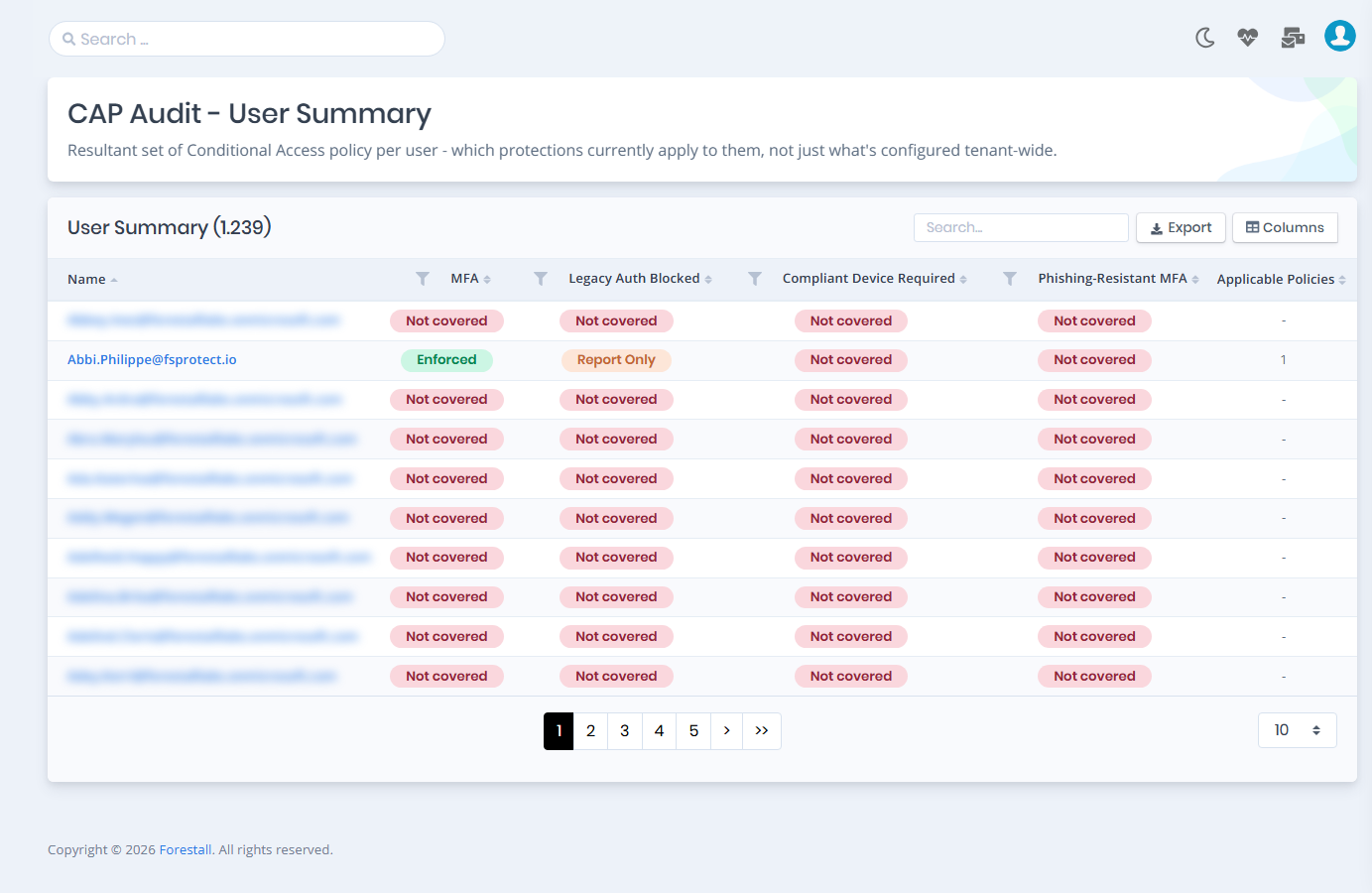
The User Summary page shows the resultant set of Conditional Access policy per user: which protections currently apply to each user, not just what is configured tenant-wide.
User Summary
**Name:** The user the row is about. The name links to the user's detail page.
**MFA:** Whether a policy requires multi-factor authentication for the user.
**Legacy Auth Blocked:** Whether a policy blocks legacy authentication for the user.
**Compliant Device Required:** Whether a policy requires a compliant device for the user.
**Phishing-Resistant MFA:** Whether a policy requires phishing-resistant multi-factor authentication for the user.
**Applicable Policies:** The number of policies that currently apply to the user (`-` when none apply).
The four protection columns show one of the following statuses, and each column has a filter with these statuses plus **Anything but Enforced**:
| Status | Meaning |
| --------------- | -------------------------------------------------------------------------- |
| **Enforced** | An enabled policy enforces the protection for the user. |
| **Report Only** | The protection is configured only in a policy that is in report-only mode. |
| **Disabled** | The protection is configured only in a disabled policy. |
| **Not covered** | No enabled policy covers the user for this protection. |
The table can be searched and exported, and its columns can be chosen with **Columns**.
Gap Analysis shows which protections are missing overall. This page shows what protects one user, for example when you investigate a compromised or over-exposed account.
## Gap Analysis
Gap Analysis compares the policies in the scan against the baseline protections and lists every gap. When the scan carries it, the page header names the standard the baseline is measured against ("Measured against …"), with a **View the standard** link.
Below the **Coverage over time** chart, the **Status**, **Category** and **Priority** filters narrow the list. Each option shows how many protections it matches. The protections are then shown per tenant, in a card titled " - X of Y protections in place". The status badges in the card header (for example "3 Missing") also filter the list. Inside a card the protections are grouped by category, worst status first.
Gap Analysis
**Status:** `Missing` (no matching policy), `Not enforced` (a policy exists but is not switched on or does not reach anyone) or `In place`.
**Priority:** `Critical`, `High`, `Medium` or `Low`.
**Protection:** The baseline protection the row is about.
**Why it matters:** What the protection defends against, in plain language.
**What to do:** The recommended action to close the gap.
**Policies:** The policies, if any, that relate to the protection.
## Ineffective Policies
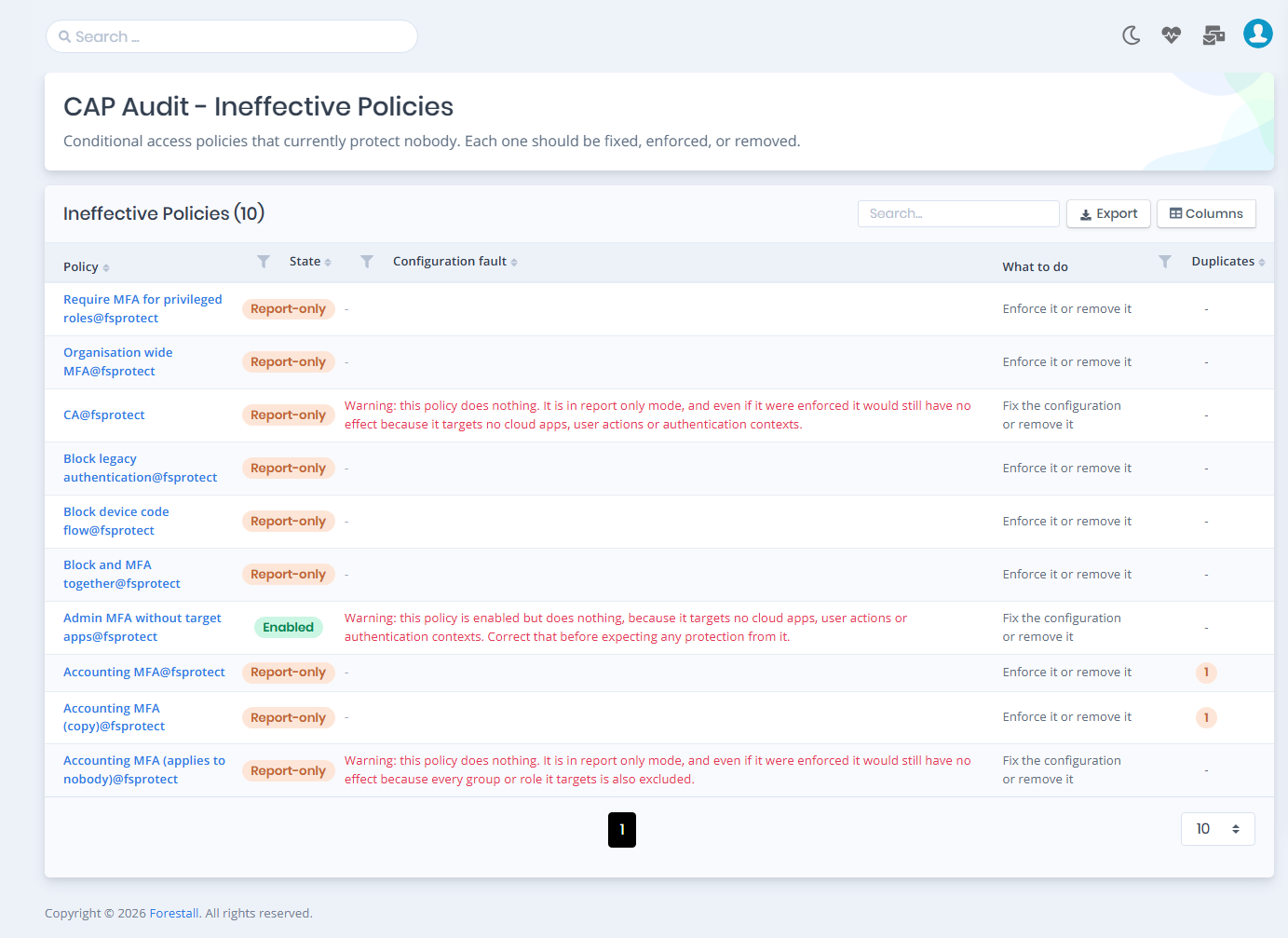
Ineffective Policies lists the Conditional Access policies that currently protect nobody. This includes policies that are disabled or in report-only mode as well as enabled policies whose configuration prevents them from applying, for example because every user in scope is also excluded. Each one should be fixed, enforced, or removed.
Ineffective Policies
**Policy:** The policy that has no effect. The name links to the policy's detail page.
**State:** `Enabled`, `Disabled` or `Report-only`.
**Configuration fault:** Why the configuration has no effect, for example "No users assigned", "Everyone it targets is excluded again", "No target apps or actions" or "Asks for nothing". It is `-` when the policy's only problem is its state.
**What to do:** The recommended action: "Fix the configuration or remove it", "Enable it or remove it", "Enforce it or remove it" or "Review it".
**Duplicates:** The number of other policies that duplicate this one (`-` when there are none).
The **State**, **Configuration fault** and **Duplicates** (`Has duplicates` / `No duplicates`) columns can be filtered.
## Duplicate Policies
Duplicate Policies lists policies with identical conditions and controls, grouped by the **Group** id. Keep one policy per group and remove the rest. While duplicates exist, a change has to be made in more than one place to take effect.
Duplicate Policies
**Group:** The id of the group of policies that duplicate each other.
**Policy:** The policy the row is about. The name links to the policy's detail page.
**State:** `Enabled`, `Disabled` or `Report-only`.
**Duplicates:** The number of other policies in the same group.
**Description:** A plain-language summary of what the policy does.
{% hint style="info" %}
The Conditional Access policies themselves, including what each one applies to and demands, are documented on the [Conditional Access Policies](/forestall/unified-identities/azure-identities/entra-id/conditional-access-policies.md) entity page.
{% endhint %}