> For the complete documentation index, see [llms.txt](https://docs.forestall.io/forestall/llms.txt). Markdown versions of documentation pages are available by appending `.md` to page URLs; this page is available as [Markdown](https://docs.forestall.io/forestall/credential-discovery/settings.md).

# Settings

You can configure `parameters`, `exclusions`, and `matching rules` for the `Credential Discovery` module with the **Credential Discovery Settings** page. The page has two tabs: **General Settings** and **Matching Rules**.

### General Settings

You can configure `Max Depth`, `Max File Size`,`Number of Characters Before Match` ,`Number of Characters After Match`,`Extensions`, and `Exclusions` with `General Settings`.

<figure><img src="https://3408039743-files.gitbook.io/~/files/v0/b/gitbook-x-prod.appspot.com/o/spaces%2FObpV44hoVkNmo5bFuVVL%2Fuploads%2Fgit-blob-2e3575ad6884e956fc41dbb59e08e3ace488f715%2Fcredential-discovery-settings-image-1.png?alt=media" alt="General Settings tab of Credential Discovery Settings"><figcaption><p>Credential Discovery General Settings</p></figcaption></figure>

<table><thead><tr><th width="207">Setting</th><th>Description</th></tr></thead><tbody><tr><td><strong>Max Depth</strong></td><td>Specifies the maximum folder depth that the Credential Discovery module will process.</td></tr><tr><td><strong>Max File Size - KB</strong></td><td>Specifies the maximum size of files that the Credential Discovery module will process.</td></tr><tr><td><strong>Extensions</strong></td><td>Specifies the file extensions that the Credential Discovery module will process.</td></tr><tr><td><strong>Exclusions</strong></td><td>Specifies what the Credential Discovery module will not process. Each exclusion has a type: <code>IP</code>, <code>IP CIDR</code> or <code>IP Range</code> exclude machines, and <code>General</code> excludes shares and folders with an IP Range, a Share Name Regex and a Folder Path Regex.</td></tr><tr><td><strong>Number of Characters Before Match</strong></td><td>Specifies the number of characters to include before the matching pattern in the processed data.</td></tr><tr><td><strong>Number of Characters After Match</strong></td><td>Specifies the number of characters to include after the matching pattern in the processed data.</td></tr></tbody></table>

#### Built-in Exclusions

In addition to the exclusions listed on this page, the collector always skips the following folders. These built-in exclusions apply to every share, are not shown on the page and cannot be changed:

**.venv:** Python virtual environment directories. These paths contain third-party dependencies and are not relevant for credential discovery.

**node\_modules:** Node.js dependency directories. Automatically downloaded packages may cause noise and false positives.

**WindowsApps:** System-managed Windows application directories. These paths do not provide meaningful credential exposure findings.

**Cortana:** Cortana-related system folders. These directories are not relevant for credential discovery analysis.

### Matching Rules

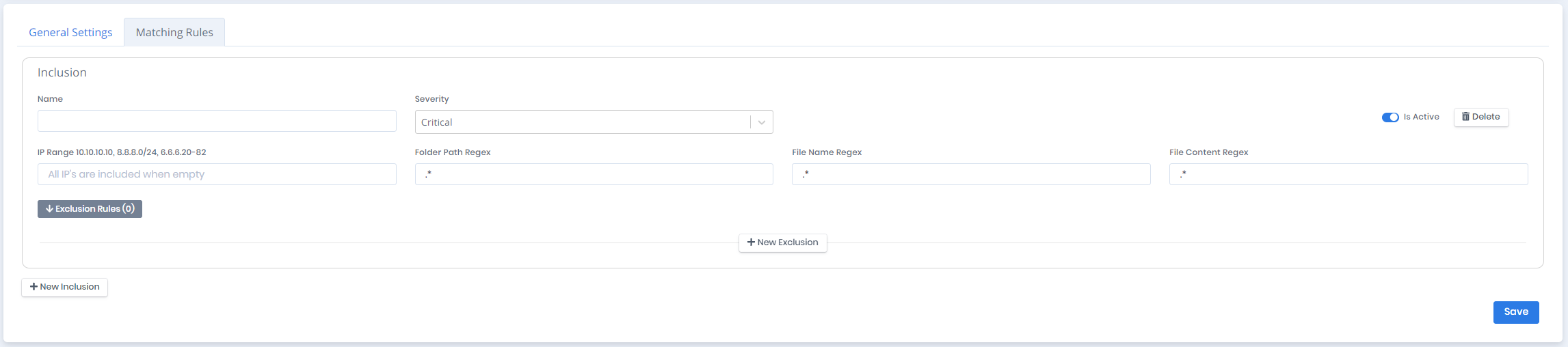
The **Matching Rules** tab lists the rules that decide which files are searched and what counts as a match. Use **New Inclusion** at the bottom of the tab to add a rule and **Save** to store the changes.

#### Inclusion Rule

Each matching rule is designated as an `Inclusion`. You can create matching rules with `Name`, `Severity`, `Is Active`, `IP Range`, `Folder Path Regex`, `File Name Regex`, and `File Content Regex` parameters.

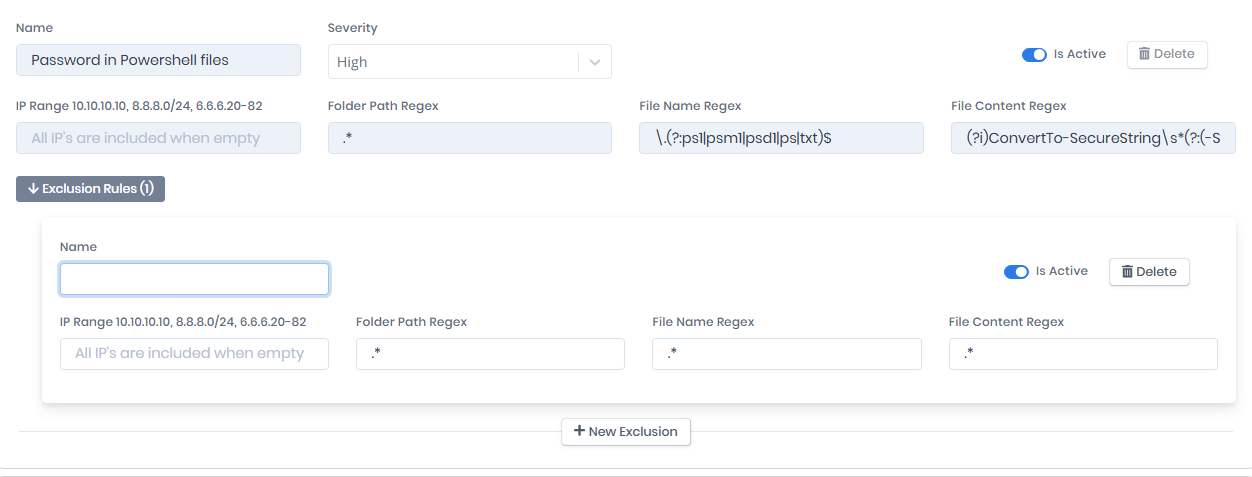
A set of built-in inclusion rules comes preinstalled, for example `Password in Powershell files`. On a built-in rule only **Severity** and **Is Active** can be changed. Its other fields are read-only and it cannot be deleted.

<figure><img src="https://3408039743-files.gitbook.io/~/files/v0/b/gitbook-x-prod.appspot.com/o/spaces%2FObpV44hoVkNmo5bFuVVL%2Fuploads%2Fgit-blob-2b390669da16c7958b448b050b195b34efcf8806%2Fcredential-discovery-settings-image-2.png?alt=media" alt=""><figcaption><p>Matching Rule</p></figcaption></figure>

<table><thead><tr><th width="191">Setting</th><th>Description</th></tr></thead><tbody><tr><td><strong>Name</strong></td><td>Name of the matching rule.</td></tr><tr><td><strong>Severity</strong></td><td>Risk level of matching rule: <code>Critical</code>, <code>High</code>, <code>Medium</code>, <code>Low</code> or <code>Info</code>.</td></tr><tr><td><strong>Is Active</strong></td><td>Status of the rule.</td></tr><tr><td><strong>IP Range</strong></td><td>Specifies the IP range of the machines to be scanned. IP range can be specified in formats such as 10.10.10.10, 8.8.8.0/24, or 6.6.6.20-82. If this field is empty, all machines will be scanned.</td></tr><tr><td><strong>Folder Path Regex</strong></td><td>Specifies the paths to be scanned based on the regex pattern. If this field is <strong><code>.*</code></strong> all folders will be scanned.</td></tr><tr><td><strong>File Name Regex</strong></td><td>Specifies the name of the files to be scanned based on the regex pattern. If this field is <strong><code>.*</code></strong> all files will be scanned.</td></tr><tr><td><strong>File Content Regex</strong></td><td>Specifies the regex pattern used to search for secrets in files. If this field is <strong><code>.*</code></strong> all data will be matched.</td></tr></tbody></table>

#### Exclusion Rule

Each matching rule can have multiple `Exclusion Rules` to filter the output. Open **Exclusion Rules (N)** on a rule and use **New Exclusion** to add one. You can create exclusion rules with `Name`, `Is Active`, `IP Range`, `Folder Path Regex`, `File Name Regex`, and `File Content Regex` parameters.

<figure><img src="https://3408039743-files.gitbook.io/~/files/v0/b/gitbook-x-prod.appspot.com/o/spaces%2FObpV44hoVkNmo5bFuVVL%2Fuploads%2Fgit-blob-5d3fd4370210be1d3c12b23ca8f552e35bde84bc%2Fcredential-discovery-settings-image-3.png?alt=media" alt=""><figcaption><p>Exclusion Rule</p></figcaption></figure>

<table><thead><tr><th width="191">Setting</th><th>Description</th></tr></thead><tbody><tr><td><strong>Name</strong></td><td>Name of the exclusion rule.</td></tr><tr><td><strong>Is Active</strong></td><td>Status of the exclusion rule.</td></tr><tr><td><strong>IP Range</strong></td><td>Specifies the IP range of the machines to be excluded. IP range can be specified in formats such as 10.10.10.10, 8.8.8.0/24, or 6.6.6.20-82. If this field is empty, the exclusion applies to all machines.</td></tr><tr><td><strong>Folder Path Regex</strong></td><td>Specifies the paths to be excluded based on the regex pattern. If this field is <strong><code>.*</code></strong> all folders will be excluded.</td></tr><tr><td><strong>File Name Regex</strong></td><td>Specifies the name of the files to be excluded based on the regex pattern. If this field is <strong><code>.*</code></strong> all files will be excluded.</td></tr><tr><td><strong>File Content Regex</strong></td><td>Specifies the regex pattern used to exclude content. If this field is <strong><code>.*</code></strong> all data will be excluded.</td></tr></tbody></table>

#### Example

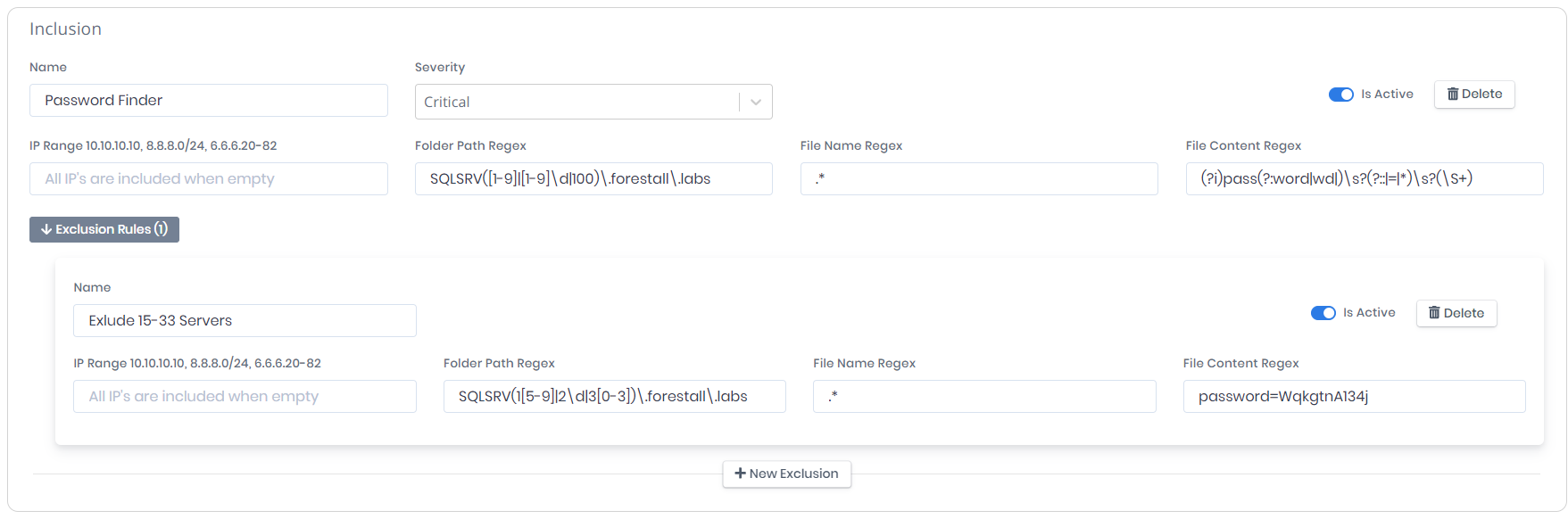
This matching rule finds the passwords between `SQLSRV1.forestall.labs` and `SQLSRV100.forestall.labs`. Machines between `SQLSRV15.forestall.labs` and `SQLSRV33.forestall.labs` and matches containing `password=WqkgtnA134j` are excluded from the rule.

<figure><img src="https://3408039743-files.gitbook.io/~/files/v0/b/gitbook-x-prod.appspot.com/o/spaces%2FObpV44hoVkNmo5bFuVVL%2Fuploads%2Fgit-blob-fb8d0a9eb5c1935957e791eeffa5ff8bf6924d3d%2Fexample-rule.png?alt=media" alt=""><figcaption><p>Example Matching Rule</p></figcaption></figure>