> For the complete documentation index, see [llms.txt](https://docs.forestall.io/forestall/llms.txt). Markdown versions of documentation pages are available by appending `.md` to page URLs; this page is available as [Markdown](https://docs.forestall.io/forestall/compliance.md).
# Compliance
The Compliance page maps the issues detected in a scan to supported cybersecurity frameworks.
Use it to see which controls are affected by the vulnerabilities found, and to prioritize remediation by exposure, severity and control coverage.
Compliance
### Compliance Framework Selection
Compliance Framework Selection
Choose the compliance framework to evaluate the selected scan against.
The list contains the frameworks that are selected on the scan policy used by the scan. If the policy selects no framework, the page prompts you to open the policy and choose one. See [Compliance Frameworks](/forestall/scans/policies.md#compliance-frameworks) for how to select them.
The supported compliance frameworks are:
**ADHICS V2:** Abu Dhabi Healthcare Information and Cyber Security standard.
**Bangladesh Bank CSF v1.0:** Cyber Security Framework published by Bangladesh Bank for the financial sector.
**CBO Cyber Security & Resilience Framework:** Framework issued by the Central Bank of Oman.
**DESC Information Security Regulation (ISR) Version 3.1:** Dubai Electronic Security Center information security regulation.
**Digital Operational Resilience Act (DORA):** European Union regulation on operational resilience for the financial sector.
**General Data Protection Regulation (GDPR):** European Union regulation on personal data protection.
**ISO/IEC 27001:2022:** International information security management standard.
**NCA Essential Cybersecurity Controls:** Cybersecurity control framework published by the National Cybersecurity Authority.
**NIS2 Directive (EU) 2022/2555:** European Union directive on network and information security.
**PCI DSS v4.0.1:** Payment Card Industry Data Security Standard.
**SAMA Cyber Security Framework:** Cybersecurity framework used for organizations regulated by the Saudi Central Bank.
**UAE Information Assurance Regulation:** Information assurance regulation used to evaluate cybersecurity controls and requirements.
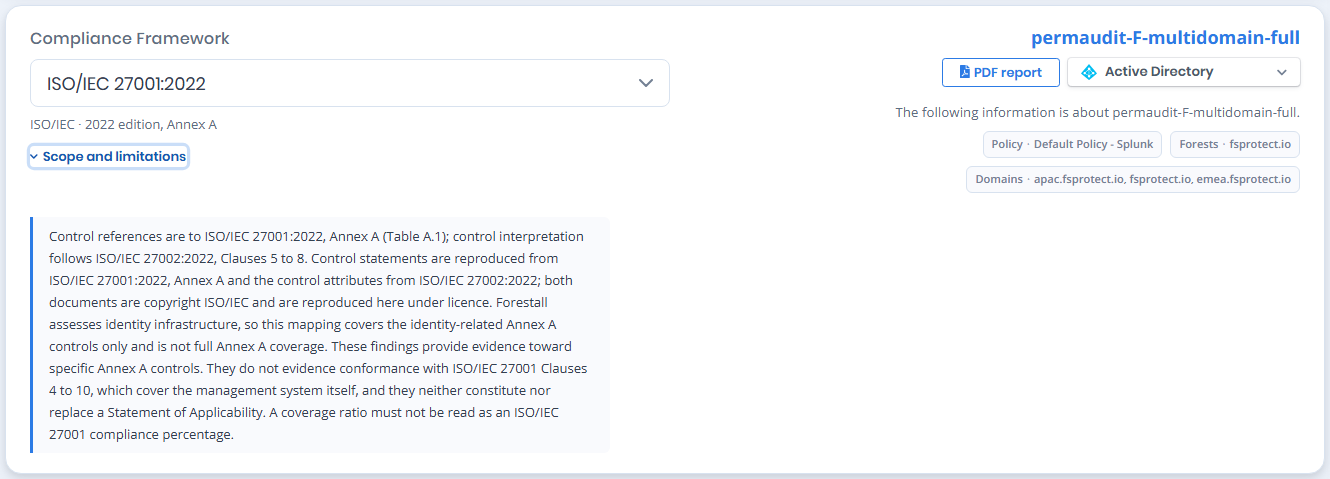
The block on the right of the page names the scan the results belong to. Below the scan name, the **platform** selector chooses which provider the mapping is evaluated for (Active Directory, Azure, AWS, GCP or GitHub). In a multi-provider scan, each provider is assessed separately. Below the selector, chips show the scan context: the policy that produced the scan and the forests and domains it covered.
The **PDF report** button, to the left of the platform selector, exports the selected framework's compliance report.
**Scope and limitations** expands to the mapping notice for the selected framework. The notice names the edition of the document the control references come from and states that the control statements are reproduced under licence. Because scans assess identity infrastructure, the mapping covers only the identity-related controls, not the full standard. Findings serve as evidence for specific controls. They do not show conformance with the management-system clauses and do not replace a Statement of Applicability. A coverage ratio is not a compliance percentage.
ISO/IEC 27001 example
### Compliance Summary
Compliance Summary
Compliance Summary shows the result for the selected framework, based on the vulnerabilities detected in the scan.
The **Controls** card reports how many controls are passing out of the total number of controls in the framework, drawn as a green and red bar:
**Controls Passing:** The number of controls that are passing, over the number of controls in the framework.
**Pass:** The number of controls with no failing check. Shown in green.
**Fail:** The number of controls with at least one failing check. Shown in red.
**Total Exposure Point:** The sum of the exposure points of every vulnerability mapped to the framework.
### Severities
Severities
Severities show the distribution of detected vulnerabilities that are mapped to the selected compliance framework.
### Most and Least Compliant Controls
Most and Least Compliant Controls
Each panel shows up to three controls as a card carrying the control number, its name, its **Checks Passing** ratio, and a bar split into the passing portion in green and the failing portion in red, with the `Pass` and `Fail` counts beneath it.
#### **Most Compliant Controls**
Controls with the lowest ratio of detected vulnerabilities to the vulnerabilities mapped to the control.
#### **Least Compliant Controls**
Controls with the highest ratio of detected vulnerabilities to the vulnerabilities mapped to the control. Start remediation with these.
### Compliance Controls Table
Compliance Controls Table
Compliance Controls Table lists the controls in the selected compliance framework and shows how many mapped vulnerabilities are detected for each control.
**Control No:**\
The unique identifier of the compliance control.
**Name:**\
The name or title of the compliance control.
**Checks Passing:**\
Shows how many of the checks mapped to the control are passing, compared to the total number of checks mapped to it. The cell draws the same green and red bar as the summary cards, with the `Pass` and `Fail` counts beneath it.
**Exposure Point:**\
The total exposure score calculated from detected vulnerabilities mapped to the control.
The table can be searched with the **Search** box, exported with **Export**, and its columns can be shown or hidden with **Columns**. Click a control name to see its vulnerabilities and mapping rationales.
### **Control Details**
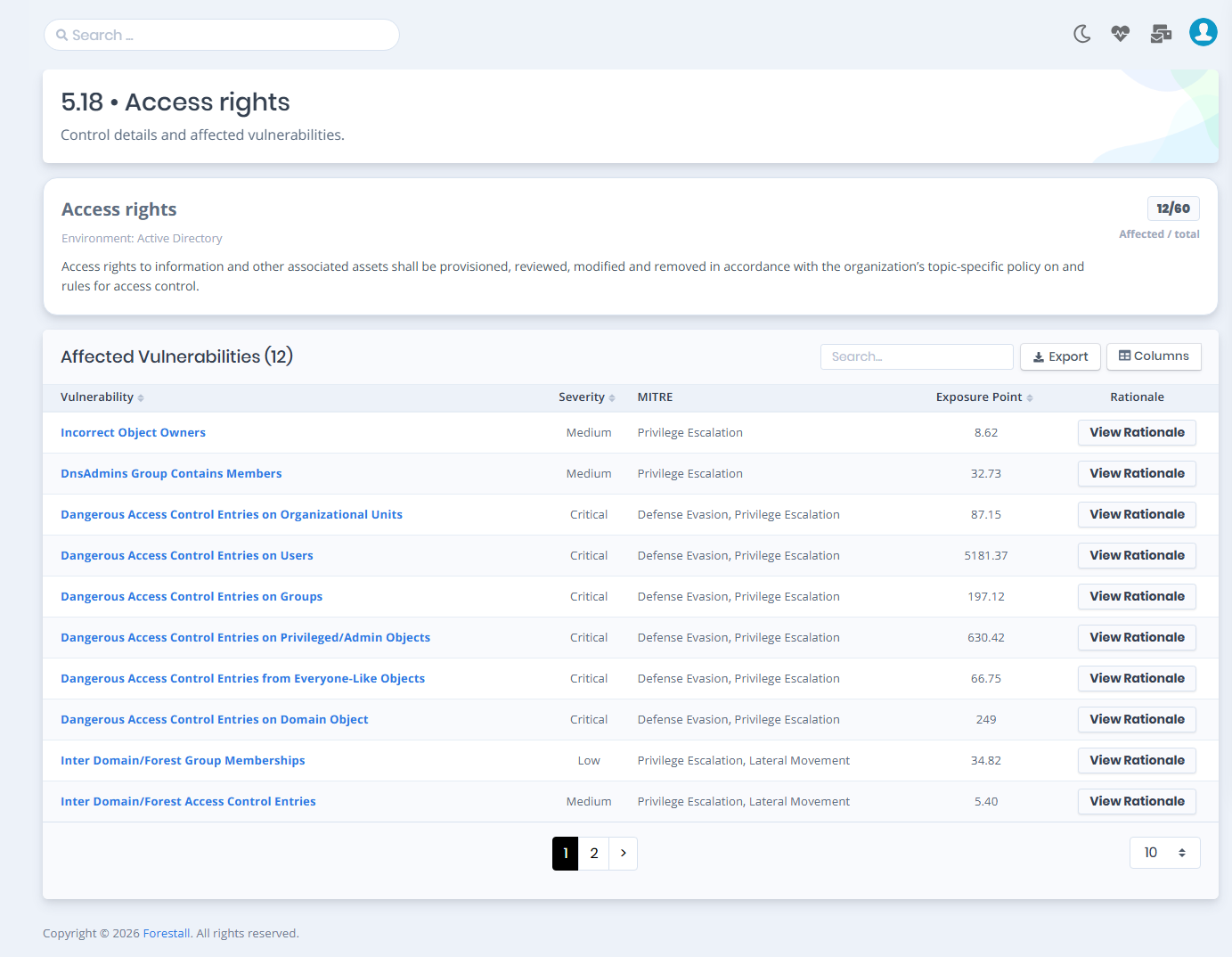
Access Control Details
Control Details shows a compliance control and the vulnerabilities mapped to it.
The page displays the control identifier, control description, environment information, and the ratio of detected vulnerabilities compared to the total number of vulnerabilities mapped to the control, shown as `Affected / total`. The affected count is the number of failing checks. A control shown as `48/60` under `Checks Passing` in the controls table has `12/60` affected.
#### Affected Vulnerabilities
The **Affected Vulnerabilities** table lists every detected vulnerability mapped to the control, and its heading carries the number of them. The table can be exported, and its columns can be shown or hidden with the **Columns** button.
**Vulnerability:** The name of the detected vulnerability, linking to its [Issue Details](/forestall/issues.md#issue-details) page.
**Severity:** The severity of the vulnerability.
**MITRE:** The MITRE ATT\&CK tactics the vulnerability is associated with.
**Exposure Point:** The exposure score contributed by the vulnerability.
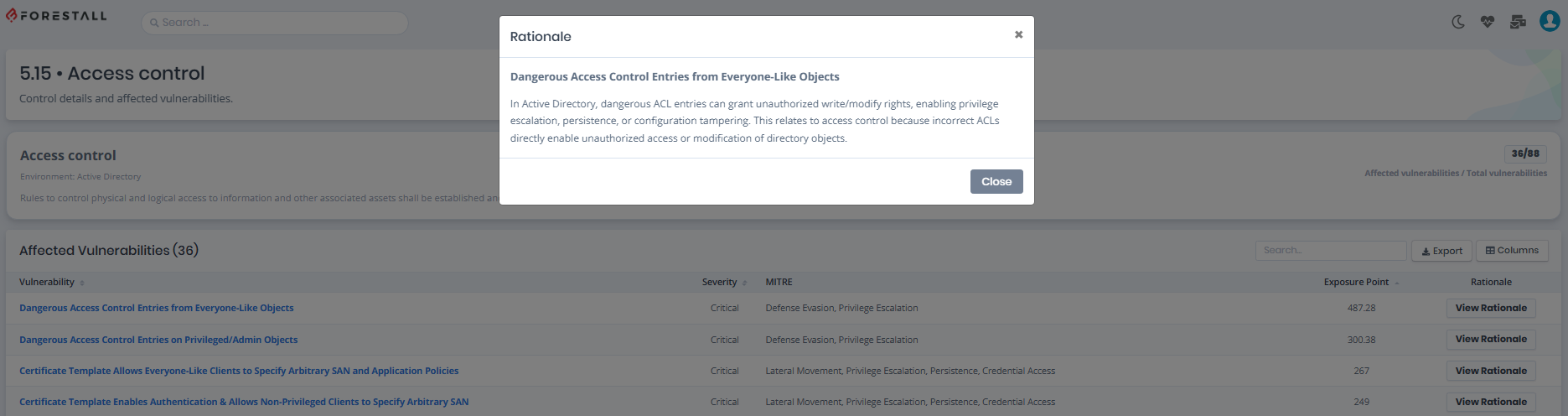
**Rationale:** Opens the explanation of why the vulnerability is mapped to this control. The button is disabled when no rationale is recorded for the mapping.
Click **View Rationale** in a row to read why the vulnerability is mapped to the control without leaving the page.