> For the complete documentation index, see [llms.txt](https://docs.forestall.io/forestall/llms.txt). Markdown versions of documentation pages are available by appending `.md` to page URLs; this page is available as [Markdown](https://docs.forestall.io/forestall/settings/merge-rule-settings.md).
# Merge Rules
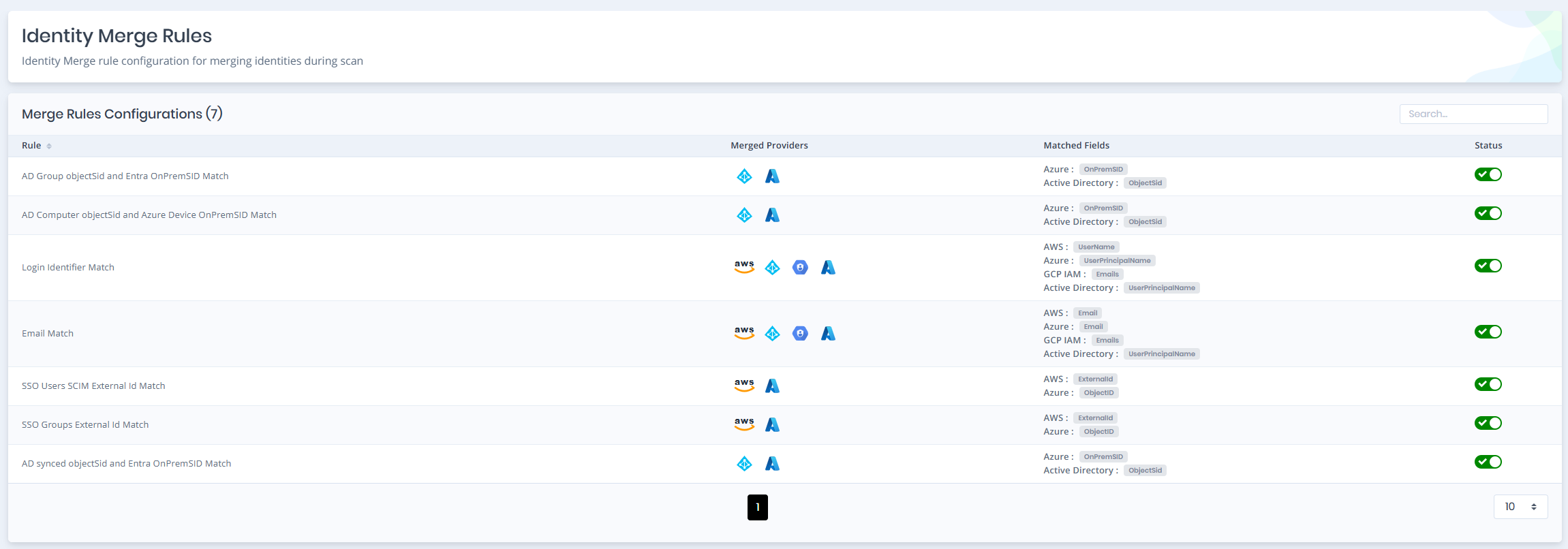
The **Identity Merge Rules** page lists the rules used to match identities of different providers and merge them into one [unified identity](/forestall/unified-identities.md). Open it from **Settings > Merge Rules**. Viewing the page requires the `ReadMergeRuleConfig` permission. Turning rules on or off requires `WriteMergeRuleConfig` (without it the status switches are disabled).
Merge Rules
Disabled Rule Status
The **Merge Rules Configurations** table has the following columns:
**Rule:** Name of the rule.
**Merged Providers:** Providers whose identities are compared by the rule.
**Matched Fields:** The field of each provider that will be used for the matching process.
**Status:** Switch that enables or disables the rule.
The product ships with seven built-in rules. New rules cannot be added. You can only enable or disable them.
| Rule | Merged providers and matched fields |
| ------------------------------------------------------ | ---------------------------------------------------------------------------------------------------- |
| Login Identifier Match | AWS `UserName` · Azure `UserPrincipalName` · GCP IAM `Emails` · Active Directory `UserPrincipalName` |
| Email Match | AWS `Email` · Azure `Email` · GCP IAM `Emails` · Active Directory `UserPrincipalName` |
| SSO Users SCIM External Id Match | AWS `ExternalId` · Azure `ObjectID` |
| SSO Groups External Id Match | AWS `ExternalId` · Azure `ObjectID` |
| AD synced objectSid and Entra OnPremSID Match | Azure `OnPremSID` · Active Directory `ObjectSid` |
| AD Group objectSid and Entra OnPremSID Match | Azure `OnPremSID` · Active Directory `ObjectSid` |
| AD Computer objectSid and Azure Device OnPremSID Match | Azure `OnPremSID` · Active Directory `ObjectSid` |
GitHub identities are not part of any merge rule.
Disabled rules are not included in the merge process. A change to a rule's status takes effect from the next scan.
{% content-ref url="/pages/Lvul64dmDRpXp5Hvoe1M" %}
[Unified Identities](/forestall/unified-identities.md)
{% endcontent-ref %}