
Summary
| Forestall ACL Alias | AZ_RESET_PASSWORD |
| Azure Alias | Reset user passwords |
| Affected Object Types | AZ Users |
| Exploitation Certainty | Certain |
| Graph Permission / Role | Global Administrator, Privileged Authentication Administrator, Authentication Administrator, User Administrator, Password Administrator / Helpdesk Administrator, Partner Tier1 Support, Partner Tier2 Support. |
Description
AZ_RESET_PASSWORD represents the ability for a principal (user, service principal, or group) to reset another user’s password in Microsoft Entra ID.
Resetting a password grants the actor full access to the target user’s account, allowing them to:
- Sign in as the user using the new password.
- Access all cloud resources the user can access (Azure, M365, SaaS apps).
- Perform privileged operations as the target if the user has admin rights.
- In hybrid environments with password write-back enabled, reset the on-prem Active Directory password as well - enabling full compromise of on-prem infrastructure.
Because password reset = account takeover, AZ_RESET_PASSWORD is one of the most sensitive capabilities in Entra ID.
Identification
PowerShell (Microsoft Graph)
List users who can reset passwords by directory role:
Connect-MgGraph -Scopes "RoleManagement.Read.Directory","Directory.Read.All"
# Role template IDs for password reset capable roles$roleIds = @{    "62e90394-69f5-4237-9190-012177145e10" = "Global Administrator"    "7be44c8a-adaf-4e2a-84d6-ab2649e08a13" = "Privileged Authentication Administrator"    "c4e39bd9-1100-46d3-8c65-fb160da0071f" = "Authentication Administrator"    "fe930be7-5e62-47db-91af-98c3a49a38b1" = "User Administrator"    "966707d0-3269-4727-9be2-8c3a10f19b9d" = "Password Administrator"    "729827e3-9c14-49f7-bb1b-9608f156bbb8" = "Helpdesk Administrator"    "4ba39ca4-527c-499a-b93d-d9b492c50246" = "Partner Tier1 Support"    "e00e864a-17c5-4a4b-9c06-f5b95a8d5bd8" = "Partner Tier2 Support"}
$roleIds.Keys | ForEach-Object {    $roleDefId = $_    $roleName = $roleIds[$_]    Get-MgRoleManagementDirectoryRoleAssignment -Filter "roleDefinitionId eq '$roleDefId'" -ExpandProperty Principal -ErrorAction SilentlyContinue | ForEach-Object {        [PSCustomObject]@{            Role = $roleName            PrincipalType = $_.Principal.AdditionalProperties.'@odata.type'.Split('.')[-1]            DisplayName = $_.Principal.AdditionalProperties.displayName            PrincipalId = $_.PrincipalId        }    }} | Format-Table -AutoSize
Azure CLI
az rest --method GET --url 'https://graph.microsoft.com/v1.0/roleManagement/directory/roleAssignments?$filter=roleDefinitionId eq '\''966707d0-3269-4727-9be2-8c3a10f19b9d'\''&$expand=principal'PowerShell:
az rest --method GET --url "https://graph.microsoft.com/v1.0/roleManagement/directory/roleAssignments?`$filter=roleDefinitionId eq '966707d0-3269-4727-9be2-8c3a10f19b9d'&`$expand=principal"Relevant role template IDs:
| Role | Template ID |
|---|---|
| Global Administrator | 62e90394-69f5-4237-9190-012177145e10 |
| Privileged Authentication Administrator | 7be44c8a-adaf-4e2a-84d6-ab2649e08a13 |
| Authentication Administrator | c4e39bd9-1100-46d3-8c65-fb160da0071f |
| User Administrator | fe930be7-5e62-47db-91af-98c3a49a38b1 |
| Password Administrator | 966707d0-3269-4727-9be2-8c3a10f19b9d |
| Helpdesk Administrator | 729827e3-9c14-49f7-bb1b-9608f156bbb8 |
| Partner Tier1 Support | 4ba39ca4-527c-499a-b93d-d9b492c50246 |
| Partner Tier2 Support | e00e864a-17c5-4a4b-9c06-f5b95a8d5bd8 |
Anyone assigned (directly or via group) to these roles effectively has AZ_RESET_PASSWORD.
Azure Portal
- Directory roles whose members can reset passwords
- Open Microsoft Entra admin center.
- Go to Identity -> Roles & administrators.
- Locate these roles:
- Global Administrator (GA)
- Privileged Authentication Administrator (PRA)
- Authentication Administrator
- User Administrator
- Password Administrator / Helpdesk Administrator
- Partner Tier1 Support
- Partner Tier2 Support
- Click each -> Assignments:
- Any assigned user, service principal, or group can reset passwords.
- If a group is assigned, enumerate all transitive members.
- Per-user confirmation
- Open Identity -> Users.
- Select a target user.
- If Reset password is enabled, your identity has
AZ_RESET_PASSWORDover that user.
Exploitation
PowerShell (Microsoft Graph)
Connect-MgGraph -Scopes "UserAuthenticationMethod.ReadWrite.All"
$userId = "<TargetUserObjectId>"$newPassword = "passhere"
$params = @{    passwordProfile = @{        forceChangePasswordNextSignIn = $false        password = $newPassword    }}Update-MgUser -UserId $userId -BodyParameter $params -Verbose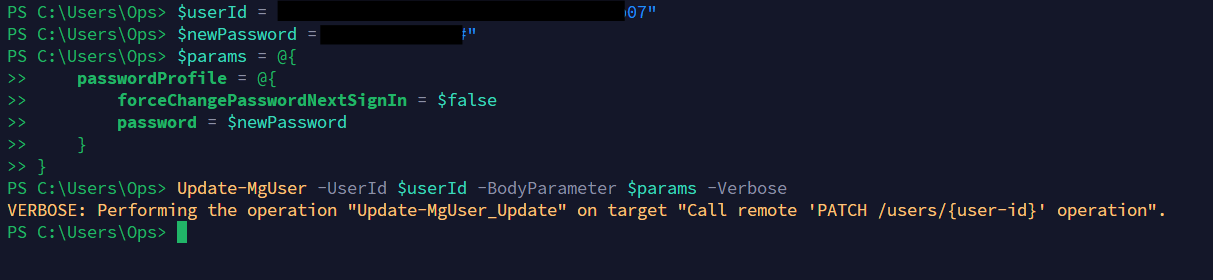
Reset a user password with Microsoft Graph PowerShell
Azure Portal
- Open Microsoft Entra admin center -> Identity -> Users
- Select the target user
- Click Reset password
- Generate a new password or receive the automatically created temporary password
You can now sign in as that user (subject to MFA).
Mitigation
- Limit directory roles that can reset passwords
-
Open Microsoft Entra admin center -> Roles & administrators
-
Review assignments for:
- Global Administrator
- Privileged Authentication Administrator
- Authentication Administrator
- User Administrator
- Password Administrator / Helpdesk Administrator
- Partner Tier1 Support
- Partner Tier2 Support
-
Remove permissions where not required
-> select assignment -> Remove assignment
-
For roles assigned to groups:
- Ensure group membership is tightly controlled
- Avoid broad groups like “All IT”
-
- Harden password reset & hybrid flows
- Go to Identity -> Protection -> Password reset
- Restrict SSPR to specific groups, not all users
- Require strong authentication methods for resets
- If password write-back is enabled:
- Ensure only required identities can reset hybrid passwords
- Regularly review privileged hybrid accounts
Detection
Use the Microsoft Entra admin center:
- Open Microsoft Entra ID -> Audit logs.
- Filter Activity for Reset password or Reset user password.
- Filter Category for UserManagement.
- Review Initiated by (actor), Target, Date, and Status for unexpected password resets.
- Use Manage view -> Edit columns if any of those fields are hidden.