
Summary
| Forestall ACL Alias | GPLINK |
| Affected Object Types | Organizational Unit |
| Exploitation Certainty | Certain |
Description
The GPLINK edge in Active Directory indicates that a Group Policy Object (GPO) is linked to an Organizational Unit (OU), domain, or site. It serves as a reference that helps visualize where specific GPOs are applied within the directory structure.
Accurately mapping these links is essential for understanding the scope and impact of Group Policy across the environment. By analyzing GPLINK relationships, administrators and security professionals can identify which policies are in effect for particular groups of users or computers, ensure proper policy inheritance, and detect potentially misconfigured or overly permissive links that could introduce security risks or configuration drift.
Identification
PowerShell
Active Directory Module
Using the ActiveDirectory PowerShell module, you can enumerate GPLINK entries.
1. Find-GPLINK function
function Find-GPLINK { [CmdletBinding()] param ( [string]$Target, # Optional OU name [string]$OutputPath = "GPLINK.csv" # CSV output file path ) $OUs = Get-ADOrganizationalUnit -Filter * -Properties gPLink | Select-Object Name, gPLink if ($Target) { $OUs = $OUs | Where-Object { $_.Name -eq $Target } } $OUs | Export-Csv -Path $OutputPath -NoTypeInformation -Encoding UTF8 return $OUs}2. Scan all OUs in the domain
Find-GPLINK3. Scan a specific OU
Find-GPLINK -Target Workstations.NET Directory Services
By leveraging PowerShell’s built-in .NET DirectoryServices namespace, you can enumerate GenericWGPLINKrite entries without relying on any external modules or dependencies.
1. Find-GPLINKSimple function
function Find-GPLINKSimple { [CmdletBinding()] param ([string]$Target,[string]$OutputPath = "GPLINK.csv") if ($Target) { try { $entries = @( New-Object System.DirectoryServices.DirectoryEntry("LDAP://$Target") ) } catch {Write-Error "Failed to bind to '$Target': $_";return} } else { try { $root = New-Object System.DirectoryServices.DirectoryEntry("LDAP://RootDSE") $baseDN = $root.Properties["defaultNamingContext"].Value $ldapPath = "LDAP://$baseDN" $searchRoot= New-Object System.DirectoryServices.DirectoryEntry($ldapPath) $searcher = New-Object System.DirectoryServices.DirectorySearcher($searchRoot) $searcher.Filter = "(objectCategory=organizationalUnit)" $searcher.PageSize = 1000 [void]$searcher.PropertiesToLoad.Add("name") [void]$searcher.PropertiesToLoad.Add("gPLink") $hits = $searcher.FindAll() } catch { Write-Error "LDAP search failed: $_";return } $entries = foreach ($hit in $hits) { try { $hit.GetDirectoryEntry() } catch { Write-Warning "Failed to bind entry: $_"; continue } } } $results = foreach ($entry in $entries) { [PSCustomObject]@{ Name = $entry.Properties["name"][0] gPLink = $entry.Properties["gPLink"][0]}} $results | Export-Csv -Path $OutputPath -NoTypeInformation -Encoding UTF8 return $results}2. Scan all OUs in the domain
Find-GPLINKSimple3. Scan a specific OU
Find-GPLINKSimple -Target "OU=Workstations,DC=Forestall,DC=labs"Group Policy Management
1. Open Group Policy Management.
2. Expand the OU name.
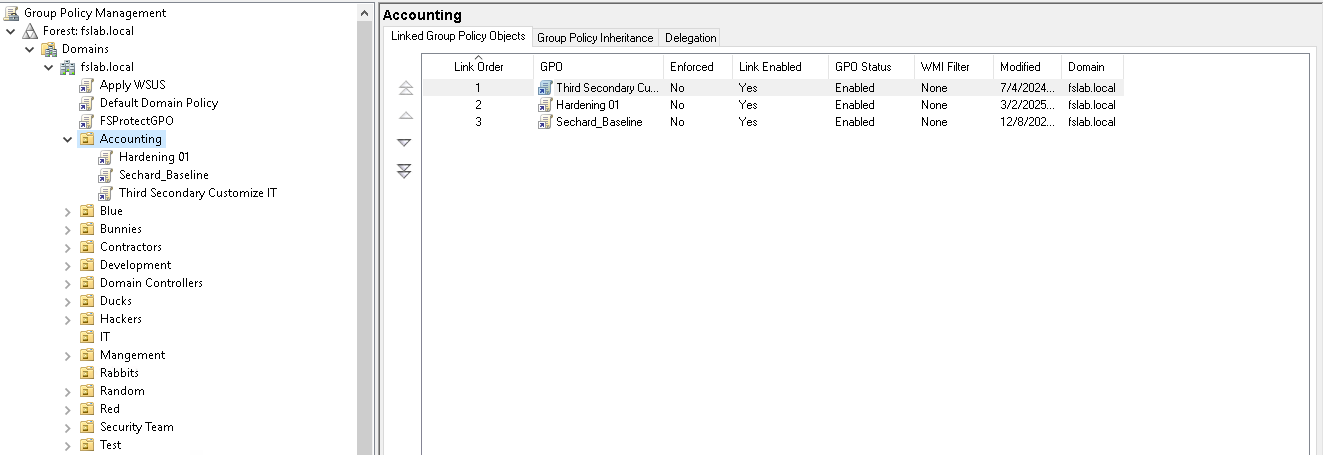
Group Policy Management
Exploitation
This edge shows linkage only. Compromise impact comes from who controls the GPO or who can manage links on the OU (e.g., GPLink, GPOptions). See ManageGPLink.
If control over a GPO is obtained, it means that all objects linked to that GPO will be affected by its settings. See GPOWrite.
Mitigation
To mitigate GPLINK using Group Policy Management, follow the steps below:
1. Open Group Policy Management.
2. Expend or click to the OU name.
3. Right-click the Group Policy.
4. Right-click the linked GPO under the OU and choose Delete to remove the link (this does not delete the GPO itself).
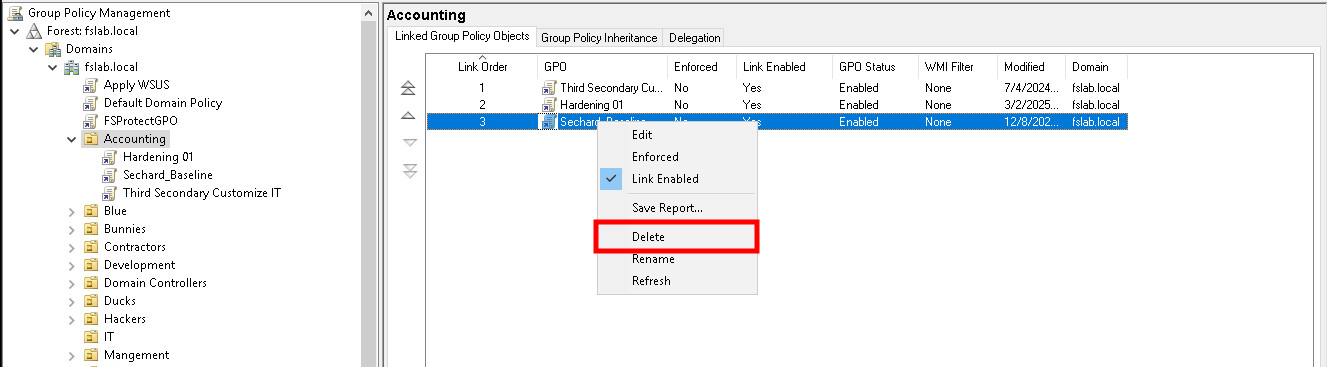
Group Policy Management
Detection
Adding new Access Control Entries to Active Directory objects changes the ntSecurityDescriptor attribute of the objects themselves. These changes can be detected with the 5136 and 4662 Event IDs to identify potentially dangerous modifications.
| Event ID | Description | Fields/Attributes | References |
|---|---|---|---|
| 5136 | A directory service object was modified. | AttributeLDAPDisplayName: gPLink, ObjectDN (the OU), New/Old Value | https://learn.microsoft.com/en-us/windows/security/threat-protection/auditing/event-5136 |
| 4662 | An operation was performed on an object. | AccessMask / Properties indicating write to gPLink | https://learn.microsoft.com/en-us/windows/security/threat-protection/auditing/event-4662 |