
Summary
| Forestall ACL Alias | ManageCertificates |
| Affected Object Types | Certificate Authority |
| Exploitation Certainty | Certain |
Description
The ManageCertificates permission in Active Directory grants a CA officer control over Certificate Authority (CA) operations such as approving or denying requests, configuring issuance policies, adjusting certificate validity and usage, managing the CA database, publishing CRLs, and configuring AIA/CDP locations.
While this permission allows visibility and management of certificate requests, the ability to re-issue previously failed certificate requests requires both ManageCertificates and ManageCA privileges.
Identification
PowerShell
1. Find-ManageCertificates function
function Find-ManageCertificates { [CmdletBinding()] param( [string] $OutputPath = "ManageCertificates.csv", [string[]]$RightsToMatch = @('ManageCertificates'),[string] $Target = $null ) Import-Module PSPKI -ErrorAction Stop Import-Module ActiveDirectory -ErrorAction Stop $Allow = [System.Security.AccessControl.AccessControlType]::Allow $results = [System.Collections.Generic.List[object]]::new() function Test-HasWantedRight { param($ace, [string[]]$wanted) $parts = ($ace.Rights.ToString() -split ',') | ForEach-Object { $_.Trim() } | Where-Object { $_ } return [bool]($parts | Where-Object { $wanted -contains $_ }) } $publishedCAs = $null try { if ($Target) { Write-Host "Using specified CA target: $Target" $publishedCAs = Get-CertificationAuthority -ComputerName $Target -ErrorAction Stop } else { Write-Host "Enumerating all published Enterprise CAs from AD..." $publishedCAs = Get-CertificationAuthority -ErrorAction Stop } } catch { Write-Error "Failed to enumerate CAs: $($_.Exception.Message)" return } if (-not $publishedCAs) { Write-Host "No Certification Authorities found." return } foreach ($ca in $publishedCAs) { $acl = $null try { $acl = $ca | Get-CertificationAuthorityAcl -ErrorAction Stop } catch { Write-Warning "Failed to read CA ACL on '$($ca.ComputerName)' ('$($ca.DisplayName)'): $($_.Exception.Message)" continue } if (-not $acl -or -not $acl.Access) { continue } foreach ($ace in $acl.Access) { if ($ace.AccessControlType -ne $Allow) { continue } if ($ace.IsInherited) { continue } if (Test-HasWantedRight -ace $ace -wanted $RightsToMatch) { $results.Add([pscustomobject]@{ 'CA Host' = $ca.ComputerName 'CA Name' = $ca.DisplayName 'Identity' = $ace.IdentityReference.ToString() 'Rights' = $ace.Rights.ToString() }) } } } if ($results.Count -gt 0) { try { $results | Export-Csv -Path $OutputPath -NoTypeInformation -Encoding UTF8 Write-Host "Results exported to '$OutputPath'" } catch { Write-Warning "Export failed: $($_.Exception.Message)"} } else { Write-Host "No matching ACEs found for rights: $($RightsToMatch -join ', ')."}}2. Scan all CAs in the domain
Find-ManageCertificates3. Scan a specific CA
Find-ManageCertificates -Target 'DC.Forestall.labs'Certification Authority console
1. Open Certification Authority (certsrv) on the Certification Authority server.
2. Right-click the CA server name.
3. Select Properties from the context menu.
4. In the Properties window, go to the Security tab.
5. In the Security settings, select the Access Control Entry (ACE) for the user or group you want to inspect.
6. In the permissions list, locate and check the ManageCertificates permission.
7. Click OK to save and close.
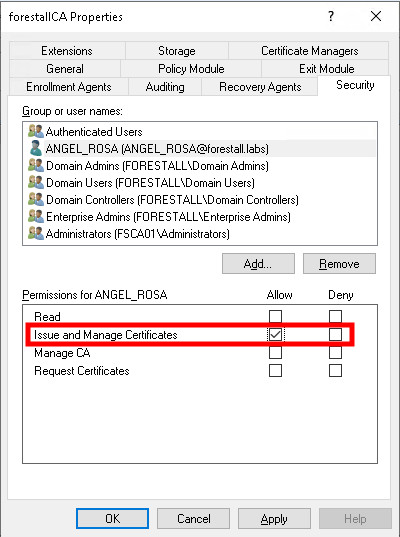
certsrv
Exploitation
This relationship by itself does not allow privilege escalation or impersonation. It may combine with other rights to create escalation paths.
For more details on abuse when ManageCA is also available, see the ManageCA edge documentation.
Mitigation
1. Open Certification Authority (certsrv) on the Certification Authority server.
2. Right-click the CA server name.
3. Select Properties from the context menu.
4. In the Properties window, go to the Security tab.
5. In the Security settings, select the ACE for the user or group whose permissions you want to change.
6. Remove the ManageCertificates permission from the selected ACE.
7. Click OK to save and close.
certsrv
Detection
Changes to Access Control Entries on Active Directory objects update the ntSecurityDescriptor attribute. These modifications can be detected with Event IDs 5136 and 4662.
| Event ID | Description | Fields/Attributes | References |
|---|---|---|---|
| 5136 | A directory service object was modified. | ntSecurityDescriptor | https://learn.microsoft.com/en-us/windows/security/threat-protection/auditing/event-5136| |
| 4662 | An operation was performed on an object. | AccessList, AccessMask | https://learn.microsoft.com/en-us/windows/security/threat-protection/auditing/event-4662| |
| 4886 | Certificate Services received a certificate request. | CertificateTemplate, Requester | https://learn.microsoft.com/en-us/previous-versions/windows/it-pro/windows-server-2012-r2-and-2012/dn319076(v=ws.11)| |
| 4887 | Certificate Services approved a certificate request and issued a certificate. | CertificateTemplate, Requester | https://learn.microsoft.com/en-us/previous-versions/windows/it-pro/windows-server-2012-r2-and-2012/dn319076(v=ws.11)| |