
Summary
| Forestall ACL Alias | SIDHistory |
| Affected Object Types | Users, Groups, Computers |
| Exploitation Certainty | Unlikely |
| AD Attribute | SIDHistory |
| AD Attribute GUID | 17eb4278-d167-11d0-b002-0000f80367c1 |
Description
The SIDHistory attribute in Active Directory stores previous Security Identifiers (SIDs) when an account is migrated from one domain to another. This functionality preserves access to resources in the original domain without requiring administrators to update all access control lists. When properly configured, SIDHistory facilitates seamless domain migrations and consolidations, allowing users to maintain their existing permissions during transition periods.
However, if an object has SIDHistory values, it can introduce significant security risks to an Active Directory environment. When an attacker identifies objects with SIDHistory, they can potentially exploit this attribute for privilege escalation. Because the security system processes and honors all SIDs in an account’s SIDHistory during access checks, a compromised account with high-privilege SIDs in its SIDHistory (such as Enterprise Admins) effectively has those privileges across the domain, even though the account isn’t directly a member of those groups.
Identification
PowerShell
Active Directory Module
Using the Active Directory PowerShell module, you can enumerate SIDHistory entries.
1. Find-SidHistory function
function Find-SidHistory { [CmdletBinding()] param ( [string]$Target = $null,[string]$OutputPath = ".\SIDHistory.csv") Import-Module ActiveDirectory -ErrorAction Stop try { if ($Target) { Write-Host "Retrieving sidHistory for object: $Target" $objects = Get-ADObject -Identity $Target -Properties Name, sidHistory } else { Write-Host "Retrieving all objects with sidHistory..." $objects = Get-ADObject -Filter { sidHistory -like "*" } -Properties Name, sidHistory } if ($objects) { $results = foreach ($obj in $objects) { if ($obj.sidHistory) { foreach ($sid in $obj.sidHistory) { $resolved = $null try { $resolved = (New-Object System.Security.Principal.SecurityIdentifier($sid)).Translate([System.Security.Principal.NTAccount]).Value } catch { $resolved = "Unresolved" } [PSCustomObject]@{ ObjectName = $obj.Name SIDHistory = $sid ResolvedName = $resolved } } } else { [PSCustomObject]@{ ObjectName = $obj.Name SIDHistory = $null ResolvedName = $null } } } $results | Export-Csv -Path $OutputPath -NoTypeInformation -Encoding UTF8 Write-Host "Results exported to $OutputPath" }else { Write-Warning "No objects found with sidHistory." } } catch { Write-Error "An error occurred: $_" }}2. Scan all domain objects
Find-SidHistory3. Scan a specific domain object
Find-SidHistory -Target "CN=_oldAdmin,CN=Users,DC=Forestall,DC=labs".NET Directory Services
By leveraging PowerShell’s built-in .NET DirectoryServices namespace, you can enumerate SIDHistory entries without relying on any external modules or dependencies.
1. Find-SidHistorySimple function
function Find-SidHistorySimple { [CmdletBinding()] param ([string]$Target, [string]$OutputPath = ".\SIDHistory.csv") try { if ($Target) { Write-Verbose "Binding directly to object: $Target" try { $entries = @( New-Object System.DirectoryServices.DirectoryEntry("LDAP://$Target") ) } catch {Write-Error "Failed to bind to '$Target': $_"; return} }else { Write-Verbose "Binding to local RootDSE..." try { $root = New-Object System.DirectoryServices.DirectoryEntry("LDAP://RootDSE") $baseDN = $root.Properties["defaultNamingContext"].Value $ldapPath = "LDAP://$baseDN" $searchRoot= New-Object System.DirectoryServices.DirectoryEntry($ldapPath) $searcher = [System.DirectoryServices.DirectorySearcher]::new($searchRoot) $searcher.Filter = "(sidHistory=*)" $searcher.PageSize = 1000 [void]$searcher.PropertiesToLoad.Add("distinguishedName") [void]$searcher.PropertiesToLoad.Add("name") [void]$searcher.PropertiesToLoad.Add("sidHistory") $hits = $searcher.FindAll() }catch { Write-Error "LDAP enumeration failed: $_"; return; } $entries = foreach ($hit in $hits) { try { $hit.GetDirectoryEntry() } catch { Write-Warning "Could not bind entry: $_"; continue } } } $results = foreach ($entry in $entries) { $name = $entry.Properties["name"].Value $sids = $entry.Properties["sidHistory"] if ($sids -and $sids.Count -gt 0) { foreach ($sid in $sids) { $resolved = $null try { $sidObj = New-Object System.Security.Principal.SecurityIdentifier($sid,0) $resolved = $sidObj.Translate([System.Security.Principal.NTAccount]).Value } catch { $resolved = "Unresolved" } [PSCustomObject]@{ ObjectName = $name SIDHistory = $sidObj.Value ResolvedName = $resolved}}} else { [PSCustomObject]@{ ObjectName = $name SIDHistory = $null ResolvedName = $null}} } if ($results) { $results | Export-Csv -Path $OutputPath -NoTypeInformation -Encoding UTF8 Write-Host "Results exported to $OutputPath" } else {Write-Host "No objects found with sidHistory."} }catch { Write-Error "An error occurred: $_"}}2. Scan all domain objects
Find-SidHistorySimple3. Scan a specific domain object
Find-SidHistorySimple -Target "CN=_oldAdmin,CN=Users,DC=Forestall,DC=labs"Active Directory Users and Computers
1. Open Active Directory Users and Computers.
2. Double-click the object.
3. In the Properties window, navigate to the Attribute Editor tab.
4. In the attributes list, locate sIDHistory.
5. Click OK to close the dialogs.
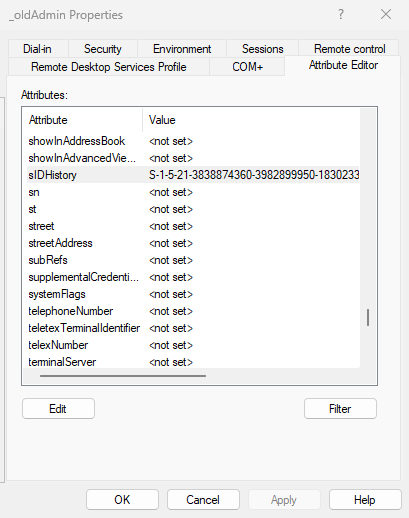
Active Directory Users and Computers
Exploitation
When the SIDHistory attribute contains a SID, it grants the account the same permissions as that SID.
Therefore, if a user has the sIDHistory of the Domain Administrator, this effectively means full domain compromise.
Example:
"ObjectName","SIDHistory","ResolvedName""_oldAdmin","S-1-5-21-3838874360-3982899950-1830233728-500","FORESTALL\Administrator"This means that _oldAdmin has Domain Admin privileges. For testing:
Windows
ls \\dc.forestall.labs\c$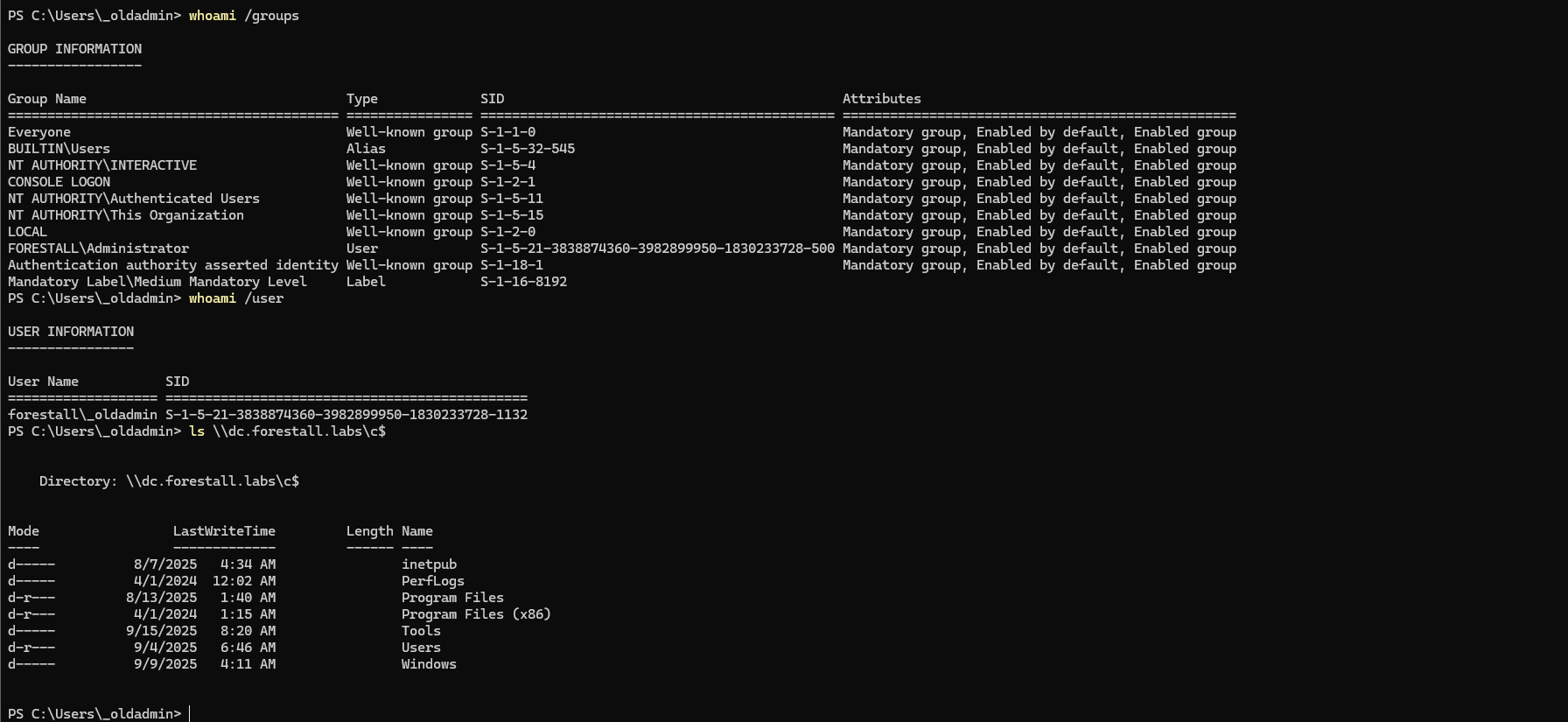
Check access on DC using PowerShell
Linux
Using netexec to check Domain Admin access
nxc smb <dcHost> -u '<user>' -p '<pass>'Example:
nxc smb dc.forestall.labs -u '_oldAdmin' -p 'Temp123!@#'
Check access on DC using netexec
Mitigation
To mitigate SIDHistory, use PowerShell. Graphical tools such as Active Directory Users and Computers cannot modify this attribute.
Set-ADUser -Identity <User> -Remove @{sIDHistory="<SIDHistory Value>"}Example:
Set-ADUser -Identity _oldAdmin -Remove @{sIDHistory="S-1-5-21-3838874360-3982899950-1830233728-500"}
Remove SIDHistory with PowerShell
Detection
Adding new access control entries (ACEs) on Active Directory objects changes the ntSecurityDescriptor attribute of the objects themselves. These changes can be detected with the 5136 and 4662 Event IDs to identify potentially dangerous object modifications.
| Event ID | Description | Fields/Attributes | References |
|---|---|---|---|
| 5136 | A directory service object was modified. | ntSecurityDescriptor | https://learn.microsoft.com/en-us/windows/security/threat-protection/auditing/event-5136| |
| 4662 | An operation was performed on an object. | AccessList, AccessMask | https://learn.microsoft.com/en-us/windows/security/threat-protection/auditing/event-4662| |