
Summary
| Forestall ACL Alias | PARENT_OU |
| Affected Object Types | Organizational Units |
| Exploitation Certainty | Unlikely |
Description
PARENT_OU in Active Directory describes a hierarchical relationship where an Organizational Unit (OU) contains other OUs. This establishes an administrative boundary that affects inheritance, delegation, and policy application. The parent-child structure helps administrators organize directory objects logically to reflect business units or management responsibilities, enabling efficient management of users, computers, and resources across the organization.
However, the PARENT_OU relationship can introduce security risks if it is not managed correctly. An attacker who gains administrative control over a parent OU effectively controls all child OUs in the hierarchy, potentially impacting hundreds or thousands of user accounts, computer objects, and security settings with a single compromise. Misconfigured inheritance settings can also unintentionally expose sensitive objects to excessive permissions or apply policies too broadly.
Identification
PowerShell
Active Directory module
Using the Active Directory PowerShell module, you can enumerate PARENT_OU entries.
1. Find-PARENT_OU function
function Find-PARENT_OU {    [CmdletBinding()]    param ([string]$CsvPath = ".\PARENT_OU.csv",[string]$Target = "*" )    Import-Module ActiveDirectory -ErrorAction Stop    $ous = Get-ADOrganizationalUnit -Filter { Name -like $Target } -Properties DistinguishedName    $ouList = @()    foreach ($ou in $ous) {        $dnParts = $ou.DistinguishedName -split ","
        if ($dnParts.Count -gt 1 -and $dnParts[1] -match "^OU=") {            $parentOU = $dnParts[1..($dnParts.Count - 1)] -join ","
            $ouList += [PSCustomObject]@{                OUName    = $ou.Name                ParentOU  = $parentOU                DN        = $ou.DistinguishedName            }        }    }    $ouList | Export-Csv -Path $CsvPath -NoTypeInformation -Encoding UTF8}
2. Scan all OUs in the domain
Find-PARENT_OU3. Scan a specific OU
Find-PARENT_OU -Target "USSQLAdmins".NET Directory Services
By leveraging PowerShell’s built-in .NET System.DirectoryServices namespace, you can enumerate PARENT_OU entries without relying on external modules or dependencies.
1. Find-PARENT_OUSimple function
function Find-PARENT_OUSimple { [CmdletBinding()] param( [string]$CsvPath = ".\PARENT_OU.csv",[string]$Target = $null) if ($Target) { try { $ous = @( New-Object System.DirectoryServices.DirectoryEntry("LDAP://$Target") ) } catch { Write-Error "Failed to bind to '$Target': $_" ; return } } else { try { $root = New-Object System.DirectoryServices.DirectoryEntry("LDAP://RootDSE") $baseDN = $root.Properties["defaultNamingContext"].Value $searchRoot = New-Object System.DirectoryServices.DirectoryEntry("LDAP://$baseDN") $searcher = [System.DirectoryServices.DirectorySearcher]::new($searchRoot) $searcher.Filter = "(objectCategory=organizationalUnit)" $searcher.PageSize = 1000 [void]$searcher.PropertiesToLoad.Add("distinguishedName") [void]$searcher.PropertiesToLoad.Add("name") $hits = $searcher.FindAll() $ous = foreach ($hit in $hits) { try { $hit.GetDirectoryEntry() } catch { Write-Warning "Could not bind OU: $_"; continue } } } catch { Write-Error "LDAP enumeration failed: $_" ;return} } $ouList = @() foreach ($ou in $ous) { $dnParts = $ou.distinguishedName -split "," if ($dnParts.Count -gt 1 -and $dnParts[1] -match "^OU=") { $parentOU = $dnParts[1..($dnParts.Count - 1)] -join "," $ouList += [PSCustomObject]@{ OUName = $ou.Properties["name"][0] ParentOU = $parentOU.ToString() DN = $ou.distinguishedName.ToString() } } } if ($ouList) { $ouList | Export-Csv -Path $CsvPath -NoTypeInformation -Encoding UTF8 }}2. Scan all OUs in the domain
Find-PARENT_OUSimple3. Scan a specific OU
Find-PARENT_OU -Target "OU=USSQLAdmins,OU=SQLServers,DC=Forestall,DC=labs"Active Directory Users and Computers
1. Launch Active Directory Users and Computers (dsa.msc).
2. In the left navigation pane, expand the domain tree by clicking the > icons.
3. Locate your target OU by navigating through the folder hierarchy.
4. The parent OU is the folder that directly contains your target OU.
5. You can read the full parent hierarchy from the tree structure (each containing folder represents a parent level).
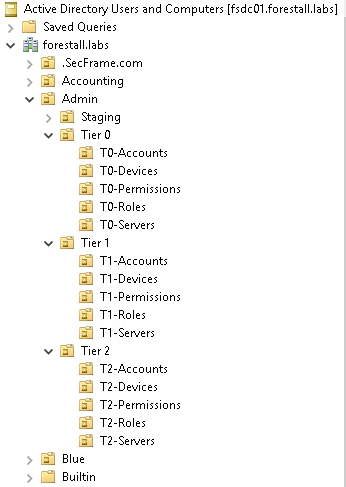
Active Directory Users and Computers
Exploitation
The PARENT_OU relationship only describes the hierarchy between OUs in Active Directory. There is no direct exploitation path.
However, if an attacker compromises a parent OU that has been delegated administrative rights, they can indirectly affect all child OUs, potentially gaining control over users, computers, and policies beneath it.
The delegated rights that make this dangerous are described by the ACL edges that apply to the parent OU. See GenericAll for full control over a container and ManageGPLink for linking Group Policy Objects to the OU and its children.
Mitigation
You can mitigate risks related to PARENT_OU by following these steps:
1. Open Active Directory Users and Computers (dsa.msc).
2. Navigate to the child OU you want to move out of its parent OU.
3. Right-click the child OU and select “Properties”.
4. Go to the “Object” tab.
5. If selected, uncheck the “Protect object from accidental deletion” checkbox.
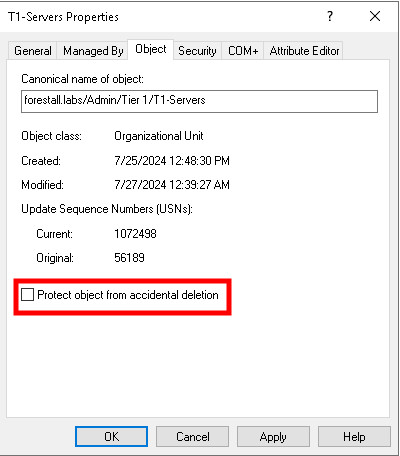
dsa.msc
6. Click “Apply” and then “OK” to save the change.
7. Right-click the child OU again and select “Move…”.
8. In the “Move” dialog, navigate to the destination where you want to place the OU.
9. Select the destination and click “OK”.
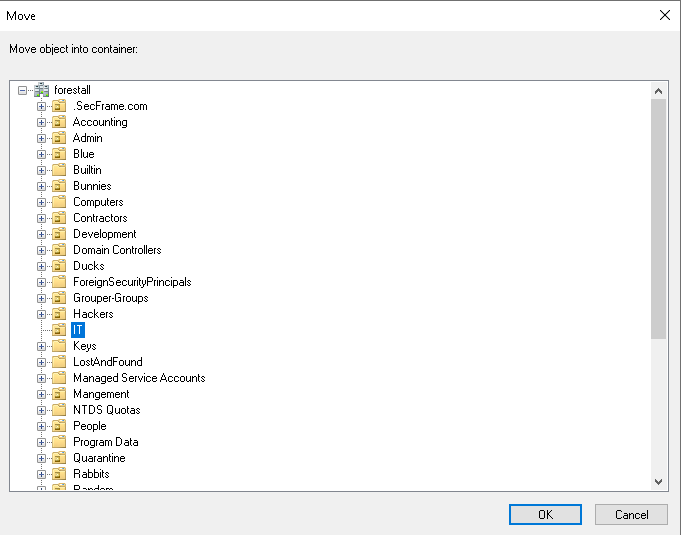
dsa.msc
10. Verify that the OU has been successfully moved to the new location in the directory tree.
11. Consider re-enabling the “Protect object from accidental deletion” checkbox on the moved OU for protection.
Detection
Adding new Access Control Entries on Active Directory objects changes the ntSecurityDescriptor attribute of the objects themselves. These changes can be detected with Event IDs 5136 and 4662 and can help identify dangerous modifications.
| Event ID | Description | Fields/Attributes | References |
|---|---|---|---|
| 5136 | A directory service object was modified. | ntSecurityDescriptor | https://learn.microsoft.com/en-us/windows/security/threat-protection/auditing/event-5136 |
| 4662 | An operation was performed on an object. | AccessList, AccessMask | https://learn.microsoft.com/en-us/windows/security/threat-protection/auditing/event-4662 |
References
Active Directory OU & Security Groups - University of Arkansas