
Summary
| Forestall ACL Alias | IN_LOCALGROUP |
| Affected Object Types | Users, Groups |
| Exploitation Certainty | Unlikely |
Description
IN_LOCALGROUP permission in an Active Directory environment grants an account membership in one of the local groups on a specific system. By obtaining this membership, a user gains the rights and privileges associated with that local group, ranging from the ability to read certain files or registry keys to elevated permissions that might allow software installations or configuration changes. This capability is especially valuable for environments where delegated administration is required on a per-machine basis, ensuring that support teams or application owners can manage system-level tasks without receiving full domain-wide privileges.
However, if misconfigured, the IN_LOCALGROUP permission can introduce serious security vulnerabilities. An attacker who obtains membership in a privileged local group could leverage that foothold to bypass security controls, read or modify sensitive system settings, and potentially escalate privileges. This could allow the attacker to install malicious software, manipulate scheduled tasks, or even tamper with system services—actions that might lead to persistent unauthorized access or lateral movement within the network. Ultimately, improperly managed IN_LOCALGROUP membership can compromise the overall security posture of the organization, jeopardizing critical systems and sensitive data.
Identification
PowerShell
Active Directory Module
Using the ActiveDirectory PowerShell module, you can enumerate IN_LOCALGROUP entries.
1. Find-IN_LOCALGROUP function
function Find-IN_LOCALGROUP { [CmdletBinding()] param([string]$SearchBase,[string[]]$ComputerName,[string]$OutputPath = "LocalGroupMembers.csv",[System.Management.Automation.PSCredential]$Credential) Import-Module ActiveDirectory -ErrorAction Stop if (-not $ComputerName) { $adFilter = 'Enabled -eq $true' $ComputerName = if ($SearchBase) {Get-ADComputer -Filter $adFilter -SearchBase $SearchBase -Properties Name |Select-Object -ExpandProperty Name} else {Get-ADComputer -Filter $adFilter -Properties Name |Select-Object -ExpandProperty Name}} $scriptBlock = { param($comp) $groups = Get-LocalGroup -ErrorAction SilentlyContinue foreach ($group in $groups) { $members = Get-LocalGroupMember -Group $group.Name -ErrorAction SilentlyContinue foreach ($member in $members) { $isDomain = $false if ($member.PSObject.Properties['PrincipalSource']) {$isDomain = ($member.PrincipalSource -eq 'ActiveDirectory')} else {$cn = $env:COMPUTERNAME;$isDomain = $member.Name -notmatch "^(NT AUTHORITY|BUILTIN|$([regex]::Escape($cn)))\\"} if ($isDomain) { [PSCustomObject]@{ ComputerName = $comp GroupName = $group.Name MemberName = $member.Name MemberType = $member.ObjectClass }}}}} $icmParams = @{ ScriptBlock = $scriptBlock ErrorAction = 'Stop'} if ($Credential) { $icmParams.Credential = $Credential } $results = foreach ($c in $ComputerName) {try {Invoke-Command -ComputerName $c @icmParams -ArgumentList $c} catch {Write-Host "Unable to connect to $c" -ForegroundColor Red}} $results | Where-Object { $_ } | Select-Object ComputerName, GroupName, MemberName, MemberType | Export-Csv -Path $OutputPath -NoTypeInformation}2. Scan all domain computers
Find-IN_LOCALGROUP3. Scan a specific computer
Find-IN_LOCALGROUP -ComputerName vm01.NET Directory Services
By leveraging PowerShell’s built-in .NET DirectoryServices namespace, you can enumerate IN_LOCALGROUP entries without relying on any external modules or dependencies.
1. Find-IN_LOCALGROUPSimple function
function Find-IN_LOCALGROUPSimple { [CmdletBinding()] param([string[]]$ComputerName,[string]$OutputPath = "LocalGroupMembers.csv") $getComputers = { if ($args[0]) { try { $entry = New-Object System.DirectoryServices.DirectoryEntry("LDAP://$($args[0])") } catch { Write-Error "Failed to bind to '$($args[0])': $_"; return @() } $objClass = ($entry.Properties["objectClass"] | Select-Object -Last 1) if ($objClass -and $objClass -match '^computer$') { $name = $entry.Properties["name"][0];return @($name) } else { try { $searcher = [System.DirectoryServices.DirectorySearcher]::new($entry);$searcher.Filter = "(&(objectCategory=computer)(!(userAccountControl:1.2.840.113556.1.4.803:=2)))" $searcher.PageSize = 1000;[void]$searcher.PropertiesToLoad.Add("name") ($searcher.FindAll() | ForEach-Object { $_.Properties["name"][0] }) | Where-Object { $_ }} catch { Write-Error "LDAP search failed: $_"; @() }}} else { try { $root = New-Object System.DirectoryServices.DirectoryEntry("LDAP://RootDSE");$baseDN = $root.Properties["defaultNamingContext"].Value $base = New-Object System.DirectoryServices.DirectoryEntry("LDAP://$baseDN");$search = [System.DirectoryServices.DirectorySearcher]::new($base) $search.Filter = "(&(objectCategory=computer)(!(userAccountControl:1.2.840.113556.1.4.803:=2)))";$search.PageSize = 1000 [void]$search.PropertiesToLoad.Add("name");($search.FindAll() | ForEach-Object { $_.Properties["name"][0] }) | Where-Object { $_ } } catch { Write-Error "Failed to enumerate computers via LDAP: $_"; @() }}} if (-not $ComputerName -or $ComputerName.Count -eq 0) {$ComputerName = & $getComputers $null} $scriptBlock = { param($comp) $emit = { param($c,$g,$mName,$mType) [PSCustomObject]@{ ComputerName = $c GroupName = $g MemberName = $mName MemberType = $mType } } $haveLocalAccounts = (Get-Command Get-LocalGroup -ErrorAction SilentlyContinue) -and (Get-Command Get-LocalGroupMember -ErrorAction SilentlyContinue) if ($haveLocalAccounts) { $groups = Get-LocalGroup -ErrorAction SilentlyContinue foreach ($group in $groups) { $members = Get-LocalGroupMember -Group $group.Name -ErrorAction SilentlyContinue foreach ($member in $members) { $isDomain = $false if ($member.PSObject.Properties['PrincipalSource']) {$isDomain = ($member.PrincipalSource -eq 'ActiveDirectory')} else { $cn = $env:COMPUTERNAME;$isDomain = $member.Name -notmatch "^(NT AUTHORITY|BUILTIN|$([regex]::Escape($cn)))\\"} if ($isDomain) { & $emit $comp $group.Name $member.Name $member.ObjectClass}}}} else { try { $machine = [ADSI]"WinNT://$env:COMPUTERNAME" $machine.Children | Where-Object { $_.SchemaClassName -eq 'Group' } | ForEach-Object { $g = $_ try { ($g.psbase.Invoke('Members') | ForEach-Object { $_.GetType().InvokeMember('Name','GetProperty',$null,$_,$null) }) | ForEach-Object { $name = $_ $cn = $env:COMPUTERNAME $isLocal = $name -match "^(Administrators|Users|Guests|Remote Desktop Users|$([regex]::Escape($cn))\\)" if (-not $isLocal) { & $emit $comp $g.Name $name 'User'}}} catch {}}} catch {}}} $icmParams = @{ ScriptBlock = $scriptBlock ErrorAction = 'Stop'} $results = foreach ($c in $ComputerName) {if (-not $c) { continue } try {Invoke-Command -ComputerName $c @icmParams -ArgumentList $c} catch {Write-Host "Unable to connect to $c" -ForegroundColor Red}} $results | Where-Object { $_ } | Select-Object ComputerName, GroupName, MemberName, MemberType | Export-Csv -Path $OutputPath -NoTypeInformation}2. Scan all domain computers
Find-IN_LOCALGROUPSimple3. Scan a specific computer
Find-IN_LOCALGROUPSimple -ComputerName vm01Active Directory Users and Computers
To identify IN_LOCALGROUP using Computer Management, follow the steps below
1. Open Active Directory Users and Computers.
2. Right-click on the Computer.
3. Select Manage from the context menu.
4. In the Computer Management window, navigate to the Local Users And Groups section.
5. In the Local Users And Groups, double-click the local group to open it.
6. In the Members list, locate Users and Groups.
7. Click OK to close the dialogs.
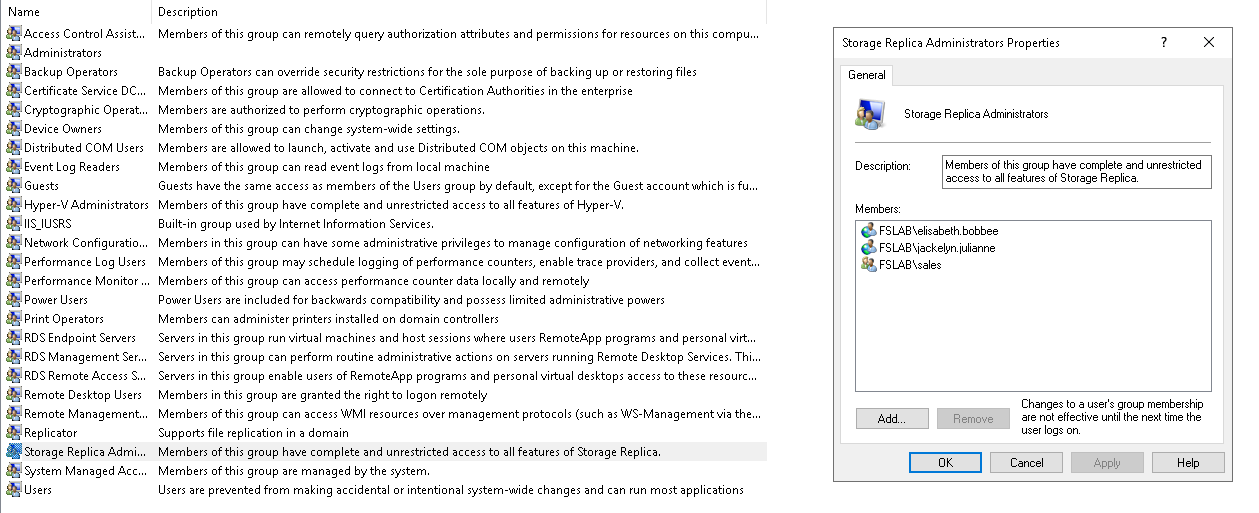
ADUC
Exploitation
Membership in a local group does not necessarily imply an exploitable path.
Mitigation
You can mitigate IN_LOCALGROUP with the following steps:
1. Open Active Directory Users and Computers.
2. Right-click on the Computer.
3. Select Manage from the context menu.
4. In the Computer Management window, navigate to the Local Users And Groups section.
5. In the Local Users And Groups, double-click the local group to open it.
6. In the Members list, select the unwanted user or group, then click Remove.
7. Click OK to close the dialogs.
ADUC
Detection
Adding new Access Control Entries to Active Directory objects changes the ntSecurityDescriptor attribute of the objects themselves. These changes can be detected with Event IDs 5136 and 4662 to identify dangerous modifications.
| Event ID | Description | Fields/Attributes | References |
|---|---|---|---|
| 5136 | A directory service object was modified. | ntSecurityDescriptor | https://learn.microsoft.com/en-us/windows/security/threat-protection/auditing/event-5136| |
| 4662 | An operation was performed on an object. | AccessList, AccessMask | https://learn.microsoft.com/en-us/windows/security/threat-protection/auditing/event-4662| |