
Summary
| Forestall ACL Alias | AllExtendedRights |
| Active Directory Alias | All Extended Rights |
| Affected Object Types | Objects |
| Exploitation Certainty | Certain |
| AD Right | ExtendedRight |
| AD Permission GUID | 00000000-0000-0000-0000-000000000000 |
Description
The AllExtendedRights permission grants a user the ability to perform all extended operations on objects within Active Directory, providing comprehensive administrative control over directory objects. This permission functions as an ExtendedRight access right, enabling the user to execute special tasks not covered by standard permissions. These permissions are listed below by object type.
Identification
PowerShell
Active Directory Module
Using the ActiveDirectory PowerShell module, you can enumerate AllExtendedRights entries.
1. Find-AllExtendedRights powershell function
function Find-AllExtendedRights { [CmdletBinding()] param ( [string]$Target = $null, [string]$SearchBase = $null,[string]$OutputPath = "AllExtendedRights.csv",[switch]$ExcludeAdmins = $false) Import-Module ActiveDirectory -ErrorAction Stop Write-Host "Gathering Active Directory objects and inspecting ACLs for explicit 'All Extended Rights' permissions..." $AccessControlType = [System.Security.AccessControl.AccessControlType]::Allow; $ActiveDirectoryRights = [System.DirectoryServices.ActiveDirectoryRights]::ExtendedRight; $AllExtendedRightsGuid = "00000000-0000-0000-0000-000000000000"; $ExcludedSIDs = @() if ($ExcludeAdmins) { Write-Host "Excluding default administrative groups and built-in accounts." $ExcludedSIDs += (New-Object System.Security.Principal.NTAccount "NT AUTHORITY\SYSTEM").Translate([System.Security.Principal.SecurityIdentifier]), (New-Object System.Security.Principal.NTAccount "NT AUTHORITY\SELF").Translate([System.Security.Principal.SecurityIdentifier]), (New-Object System.Security.Principal.NTAccount "BUILTIN\Account Operators").Translate([System.Security.Principal.SecurityIdentifier]),(New-Object System.Security.Principal.NTAccount "BUILTIN\Administrators").Translate([System.Security.Principal.SecurityIdentifier]), (New-Object System.Security.Principal.NTAccount "BUILTIN\Terminal Server License Servers").Translate([System.Security.Principal.SecurityIdentifier]),(New-Object System.Security.Principal.NTAccount "NT AUTHORITY\ENTERPRISE DOMAIN CONTROLLERS").Translate([System.Security.Principal.SecurityIdentifier]) $ExcludedSIDs += [System.Security.Principal.SecurityIdentifier]::new("S-1-3-0"); try { $ExcludedSIDs += (Get-ADGroup -Identity "Domain Admins").SID $ExcludedSIDs += (Get-ADGroup -Identity "Enterprise Admins").SID ; $ExcludedSIDs += (Get-ADGroup -Identity "Schema Admins").SID $ExcludedSIDs += (Get-ADGroup -Identity "Cert Publishers").SID; $ExcludedSIDs += (Get-ADGroup -Identity "Group Policy Creator Owners").SID $ExcludedSIDs += (Get-ADGroup -Identity "Domain Controllers").SID ; $ExcludedSIDs += (Get-ADGroup -Identity "Key Admins").SID $ExcludedSIDs += (Get-ADGroup -Identity "Enterprise Key Admins").SID ;$ExcludedSIDs += (Get-ADGroup -Identity "RAS and IAS Servers").SID } catch { Write-Warning "Could not resolve one or more default domain admin groups. They might not be filtered from results." } } $foundAcls = @() $objectsToScan = @() try { if ($Target) { Write-Host "Searching for permissions on specific object: '$Target'." $specificObject = Get-ADObject -Identity $Target -Properties nTSecurityDescriptor -ErrorAction Stop if ($specificObject) { $objectsToScan += $specificObject } else { Write-Output "Object '$Target' not found." return } } elseif ($SearchBase) { Write-Host "Searching for objects within '$SearchBase'." $objectsToScan = Get-ADObject -Filter "*" -SearchBase $SearchBase -Properties "nTSecurityDescriptor" -ErrorAction Stop } else { Write-Host "Searching for all objects in the domain." $actualSearchBase = (Get-ADRootDSE).DefaultNamingContext $objectsToScan = Get-ADObject -Filter "*" -SearchBase $actualSearchBase -Properties "nTSecurityDescriptor" -ErrorAction Stop } if (-not $objectsToScan) { Write-Output "No Active Directory objects found matching the criteria." return } foreach ($obj in $objectsToScan) { $ObjectDistinguishedName = $obj.DistinguishedName; try { $acl = Get-Acl -Path "AD:$ObjectDistinguishedName" foreach ($ace in $acl.Access) { $isExcluded = $false if ($ExcludeAdmins) { try { if ($ExcludedSIDs -contains $ace.IdentityReference.Translate([System.Security.Principal.SecurityIdentifier])) { $isExcluded = $true } } catch { Write-Warning "Could not translate SID for exclusion check: $($ace.IdentityReference.Value). Error: $($_.Exception.Message)" } } if ($ace.AccessControlType -eq $AccessControlType -and ($ace.ActiveDirectoryRights -band $ActiveDirectoryRights) -and ($ace.ObjectType -eq $AllExtendedRightsGuid) -and -not $ace.IsInherited -and -not $isExcluded) { $foundAcls += [PSCustomObject]@{ 'Object' = $ObjectDistinguishedName 'Trustee' = $ace.IdentityReference.Value # Get the string representation } } } } catch { Write-Warning "Could not retrieve ACL for '$ObjectDistinguishedName': $($_.Exception.Message)" } } } catch { Write-Error "Failed to retrieve Active Directory objects: $($_.Exception.Message)" return } if ($foundAcls.Count -gt 0) { $exclusionMessage = if ($ExcludeAdmins) { " (excluding default admin groups and built-in accounts)" } else { "" } Write-Host "Found $($foundAcls.Count) Active Directory object(s) with explicit 'All Extended Rights' permissions$exclusionMessage." try { $foundAcls | Sort-Object -Unique Object, Trustee | Export-Csv -Path $OutputPath -NoTypeInformation -Encoding UTF8 Write-Output "Results exported successfully to '$OutputPath'" } catch { Write-Error "Failed to export results to CSV file '$OutputPath': $($_.Exception.Message)" } } else { $exclusionMessage = if ($ExcludeAdmins) { " (excluding default admin groups and built-in accounts)" } else { "" } Write-Output "No Active Directory objects found with explicit 'All Extended Rights' permissions$exclusionMessage." }}2. Scan all objects in the domain
Find-AllExtendedRights3. Scan a specific object
Find-AllExtendedRights -Target "CN=VM06,CN=Computers,DC=Forestall,DC=labs"4. To exclude default admin ACLs for clearer results
Find-AllExtendedRights -ExcludeAdmins5. Using SearchBase to limit the search scope
Find-AllExtendedRights -SearchBase "CN=Computers,DC=Forestall,DC=labss".NET Directory Services
By leveraging PowerShell’s built-in .NET DirectoryServices namespace, you can enumerate AllExtendedRights entries without relying on any external modules or dependencies.
1. Find-AllExtendedRightsSimple function
function Find-AllExtendedRightsSimple {    [CmdletBinding()]    param([string]$Target, [string]$SearchBase,[string]$OutputPath = "AllExtendedRights.csv",[switch]$ExcludeAdmins )    $accessControlType      = [System.Security.AccessControl.AccessControlType]::Allow    $adRights               = [System.DirectoryServices.ActiveDirectoryRights]::ExtendedRight    $allExtendedRightsGuid  = [Guid]"00000000-0000-0000-0000-000000000000"    function _SidString($idRef) {        try {            if ($idRef -is [System.Security.Principal.SecurityIdentifier]) { return $idRef.Value }            if ($idRef -is [System.Security.Principal.NTAccount]) {                return ($idRef.Translate([System.Security.Principal.SecurityIdentifier])).Value            }            return [string]$idRef        } catch { return $null }    }    # --- Build excluded SIDs (as strings) when requested    $excludedSidSet = New-Object 'System.Collections.Generic.HashSet[string]'    if ($ExcludeAdmins) {        # Well-known / builtin        foreach ($sid in @(            # SYSTEM, ENTERPRISE DOMAIN CONTROLLERS, SELF, CREATOR OWNER            'S-1-5-18','S-1-5-9','S-1-5-10','S-1-3-0',            # BUILTIN groups            'S-1-5-32-544', # Administrators            'S-1-5-32-548', # Account Operators            'S-1-5-32-561',  # Terminal Server License Servers            'S-1-5-32-577'   # RDS Management Servers        )) { [void]$excludedSidSet.Add($sid) }        try {            $rootDse = [ADSI]"LDAP://RootDSE"            $defaultNC = $rootDse.defaultNamingContext            $domEntry = [ADSI]("LDAP://$defaultNC")            $domSid   = New-Object System.Security.Principal.SecurityIdentifier($domEntry.objectSid[0], 0)            $domSidStr = $domSid.AccountDomainSid.Value
            foreach ($rid in 512,518,519,516,520,500,553) {                [void]$excludedSidSet.Add("$domSidStr-$rid")            }        } catch {            Write-Verbose "Could not derive domain SID for extra exclusions: $_"        }    }    $entries = @()    if ($Target) {        try {            $entries = ,(New-Object System.DirectoryServices.DirectoryEntry("LDAP://$Target"))        } catch {            Write-Error "Failed to bind to '$Target': $_"            return        }    } else {        try {            $bindBase = if ($SearchBase) { $SearchBase } else {                $r = [ADSI]"LDAP://RootDSE"; $r.defaultNamingContext            }            $base = New-Object System.DirectoryServices.DirectoryEntry("LDAP://$bindBase")            $searcher = [System.DirectoryServices.DirectorySearcher]::new($base)            $searcher.Filter = "(objectClass=*)"            $searcher.PageSize = 1000            $null = $searcher.PropertiesToLoad.Add("distinguishedName")            $hits = $searcher.FindAll()            foreach ($hit in $hits) {                try { $entries += $hit.GetDirectoryEntry() } catch { continue }            }        } catch {            Write-Error "LDAP enumeration failed: $_"            return        }    }    $found = New-Object System.Collections.Generic.List[object]    foreach ($entry in $entries) {        try {            $dn  = $entry.distinguishedName            $acl = $entry.ObjectSecurity            $aces = $acl.GetAccessRules($true, $true, [System.Security.Principal.SecurityIdentifier])        } catch { continue }
        foreach ($ace in $aces) {            if ($ace.AccessControlType -ne $accessControlType) { continue }            if (($ace.ActiveDirectoryRights -band $adRights) -eq 0) { continue }            if ($ace.ObjectType -ne $allExtendedRightsGuid) { continue }            if ($ace.IsInherited) { continue }
            $sidStr = _SidString $ace.IdentityReference            if (-not $sidStr) { continue }
            if ($ExcludeAdmins -and $excludedSidSet.Contains($sidStr)) { continue }
            $who = try {                ($ace.IdentityReference.Translate([System.Security.Principal.NTAccount])).Value            } catch {                $sidStr            }
            $found.Add([PSCustomObject]@{                Object  = $dn.ToString()                Trustee = $who            })        }    }    if ($found.Count -gt 0) {        try {            $found | Sort-Object -Property Object, Trustee -Unique | Export-Csv -Path $OutputPath -NoTypeInformation -Encoding UTF8            Write-Host "Exported $($found.Count) entries to '$OutputPath'"        } catch {            Write-Error "Failed to export: $_"        }    } else {        Write-Host "No 'All Extended Rights' ACLs found."    }}
2. Scan all objects in the domain
Find-AllExtendedRightsSimple3. Scan a specific object
Find-AllExtendedRightsSimple -Target "CN=VM06,CN=Computers,DC=Forestall,DC=labs"4. To exclude default admin ACLs for clearer results
Find-AllExtendedRightsSimple -ExcludeAdmins5. Using SearchBase to limit the search scope
Find-AllExtendedRightsSimple -SearchBase "CN=Computers,DC=Forestall,DC=labs"Active Directory Users and Computers
1. Open Active Directory Users and Computers on your Windows server.
2. Right-click the object or group name.
3. Select Properties from the context menu.
4. In the Properties window, navigate to the Security tab.
5. Click the Advanced button to open the Advanced Security Settings dialog.
6. In the Advanced Security Settings window, locate and select the relevant Access Control Entry (ACE) for the user or group you wish to configure.
7. Click Edit to modify the selected ACE.
8. In the permissions list, locate and check the AllExtendedRights option.
9. Click OK and Apply to save your changes and close the dialogs.
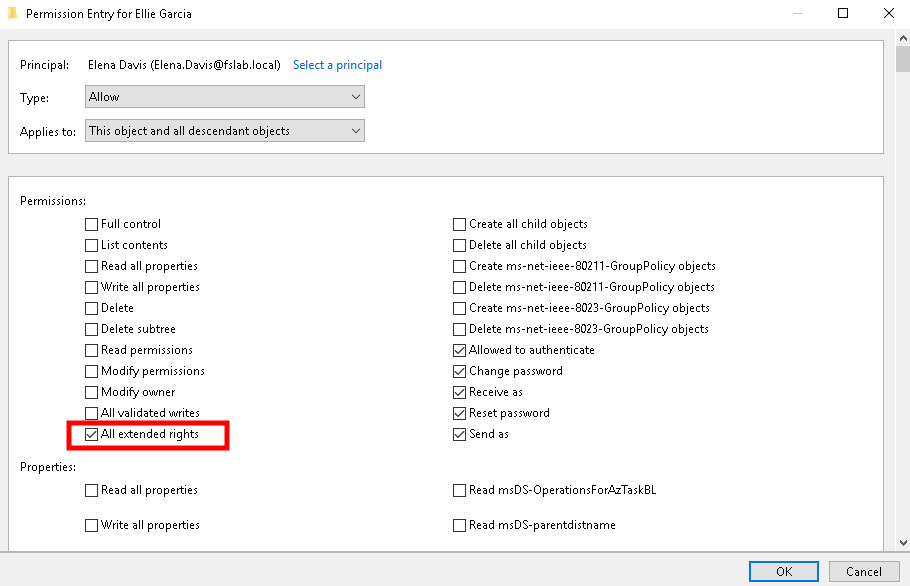
Active Directory Users and Computers
Exploitation
User
Granting this privilege also gives users the ForceChangePassword permission, allowing their password to be reset (typically for legitimate reasons such as forgotten passwords). However, if misconfigured, this can lead to privilege escalation, persistence, and data breaches, as an attacker could misuse it to gain elevated access or maintain control of an account.
For more details, refer to the ForceChangePassword permission.
Computer
Holding computer-object permissions such as ReadLAPS allows reading the LAPS-managed local administrator password, effectively granting local administrator access to the machine. With this access an attacker can authenticate to the host, move laterally, and harvest further credentials. Where Windows LAPS (v2) is deployed, the password is held in newer attributes—see the ReadLAPSv2Password and SyncLAPSPassword edges.
Domain
The AllExtendedRights permission includes both the DS-Replication-Get-Changes and DS-Replication-Get-Changes-All privileges. When combined, these privileges allow a principal to replicate domain objects, which could potentially be exploited in a DCSync attack to retrieve sensitive domain data.
For more details, refer to the DCSync permission.
Certificate Templates
The AllExtendedRights permission grants enrollment rights on certificate templates. This allows a principal to enroll for certificates, provided the certificate template is published on an enterprise CA, the principal has the Enroll permission on the CA, and the principal meets the template’s issuance requirements, including subject name and subject alternative name criteria.
For the full enrollment-abuse walkthrough, see the CertificateEnrollment edge; for autoenrollment scenarios, see CertificateAutoenrollment.
Organizational Unit (OU)
The AllExtendedRights permission over an Organizational Unit can be leveraged to link a malicious GPO to the OU through its gPLink attribute, applying attacker-controlled policy to all users and computers within it.
For more details, refer to the ManageGPLink and GPLINK edges.
Certificate Authority (CA)
The AllExtendedRights permission over an Enterprise CA can be abused to obtain CA management rights such as ManageCA or ManageCertificates, introducing the ESC7 vulnerability that can be exploited to escalate privileges within AD CS.
For more details, refer to the ManageCA and ManageCertificates edges.
Mitigation
Access Control Entries identified as dangerous should be removed by following the steps below.
1. Open Active Directory Users and Computers, and enable Advanced Features.
2. Double-click the affected object and open the Security tab.
3. In this tab, click the Advanced button and open the dangerous Access Control Entry.
4. Remove the rights marked as dangerous.
5. Click the OK and Apply buttons to save your changes.
Active Directory Users and Computers
Detection
Adding new Access Control Entries to Active Directory objects modifies the object’s ntSecurityDescriptor attribute. These changes can be detected using Event IDs 5136 and 4662 to identify suspicious or dangerous object modifications.
| Event ID | Category | Description | Fields/Attributes | References |
|---|---|---|---|---|
| 5136 | Audit Directory Service Changes | A directory service object was modified. | ntSecurityDescriptor | https://learn.microsoft.com/en-us/windows/security/threat-protection/auditing/event-5136| |
| 4662 | Audit Directory Service Access | An operation was performed on an object. | AccessList, AccessMask | https://learn.microsoft.com/en-us/windows/security/threat-protection/auditing/event-4662| |