> For the complete documentation index, see [llms.txt](https://docs.forestall.io/fsprotect/llms.txt). Markdown versions of documentation pages are available by appending `.md` to page URLs; this page is available as [Markdown](https://docs.forestall.io/fsprotect/scans/policies/aws-policies.md).
# AWS Policies
**AWS Policies**
AWS Policies define security controls and assessment rules tailored for AWS IAM environments.
These policies focus on analyzing identity-related risks, role assignments, access key configurations, and access control mechanisms within AWS IAM.
By using AWS-specific policies, FSProtect helps identify privilege misuse, risky identity configurations, and exposure points in AWS cloud identity infrastructures.
***
**Edit Scan Policy (AWS)**
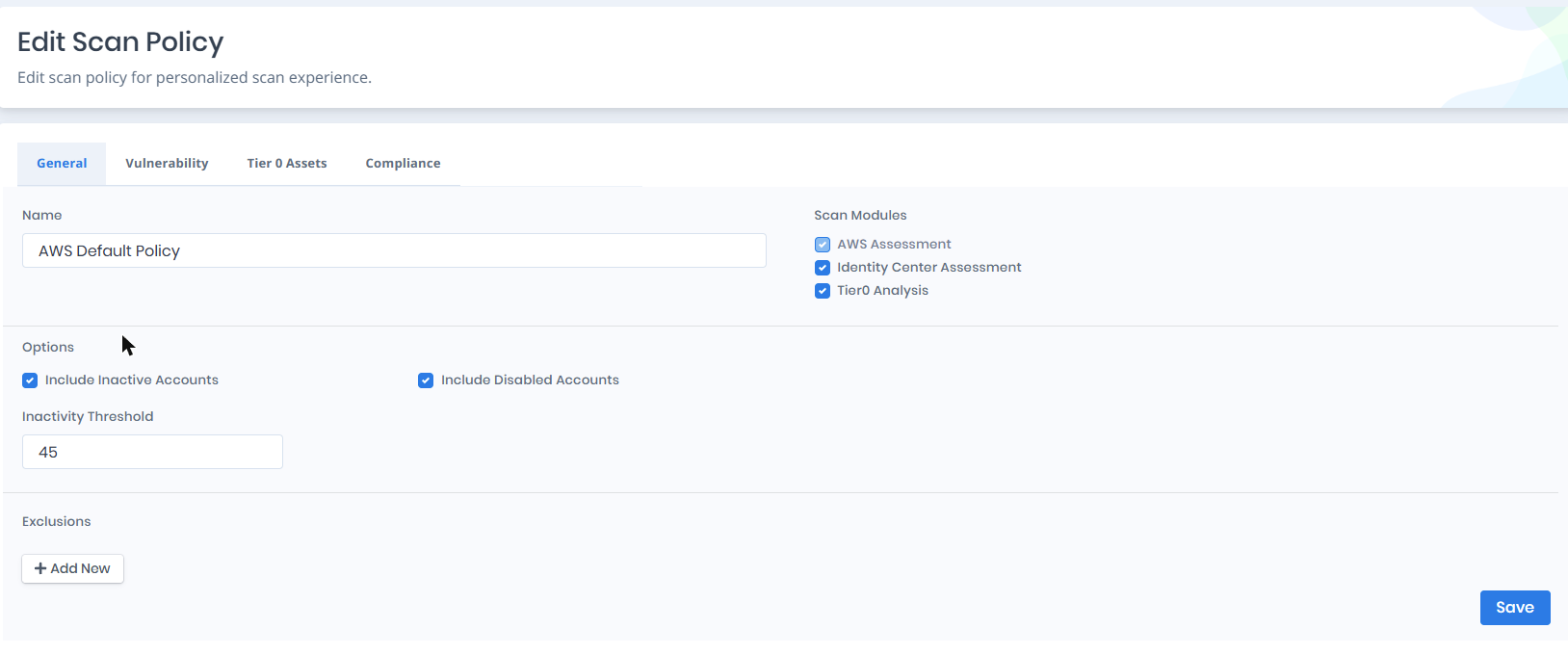
This section allows users to configure scan settings specific to AWS environments, including enabled modules, exclusions, and scan options.
AWS Scan Policy Settings
***
**AWS Scan Policy Settings**
***
**Vulnerability Policies and Tiering (AWS)**
This section defines vulnerability policies and tiering configurations specific to AWS environments. Vulnerability policies determine which AWS-specific security checks are executed during the scan, while tiering helps identify critical cloud identities and roles based on their potential security impact.
***
**AWS Scan Modules**
**AWS Assessment:** This module enables users to identify and evaluate vulnerabilities, misconfigurations, and security risks within their AWS environment, including IAM users, roles, groups, policies, and access keys. It provides deep visibility into the cloud configuration and access relationships across accounts and organizations. As a core component of the engine for AWS-based assessments, this module is a mandatory option.
**Identity Center Assessment:** This module collects IAM Identity Center: the instance, permission sets, SSO users and groups, and the account assignments that map them to roles in member accounts. It also builds the Identity Center relationships in the graph, such as which SSO user can assume which role. The module is enabled by default in every AWS policy, including policies created before it existed. When it is disabled, the scan skips Identity Center and records IAM identities only. Reading Identity Center requires the management account or the account registered as the Identity Center delegated administrator. The **Organization delegation** row on the AWS Configuration page shows whether that registration is in place.
**Tier 0 Analysis:** This module analyzes attack paths and privilege escalation routes within the AWS environment to identify identities that can reach Tier 0 assets through dangerous permissions or policy configurations.
***
**General Settings**
| Setting | Description |
| ------------------------- | ---------------------------------------------------------------------------------- |
| Name | The name of the scan policy. |
| Include Inactive Accounts | When enabled, inactive IAM users, roles, and access keys are included in the scan. |
| Include Disabled Accounts | When enabled, disabled IAM accounts are included in the scan. |
| Inactivity Threshold | The number of days after which an IAM identity is considered inactive. |
| Exclusions | Specific IAM identities or resources to be excluded from the scan. |
***
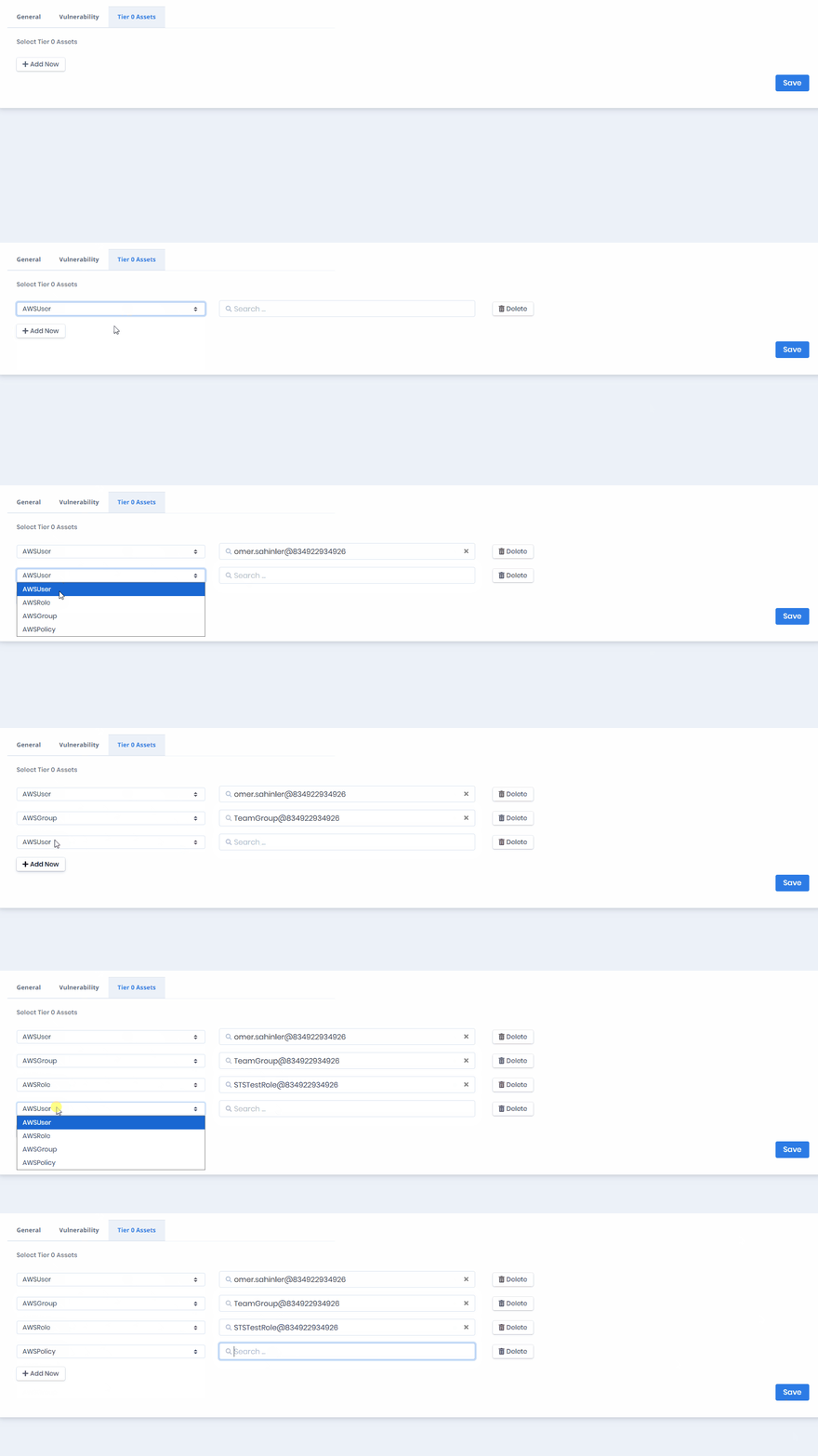
**Tier 0 Assets (AWS)**
Tier 0 Assets settings allow users to designate critical AWS IAM identities as privileged. Selected AWS users, roles, and groups are treated as high-impact identities and are prioritized during privilege exposure and attack path analysis. Identities marked as Tier 0 Assets represent potential account-level or organization-level compromise if misused or exposed.