> For the complete documentation index, see [llms.txt](https://docs.forestall.io/fsprotect/llms.txt). Markdown versions of documentation pages are available by appending `.md` to page URLs; this page is available as [Markdown](https://docs.forestall.io/fsprotect/dashboard/gcp-dashboard.md).
# GCP Dashboard
## GCP Dashboard
The Dashboard provides a general and holistic view of the security posture of scanned GCP environments based on different perspectives.
***
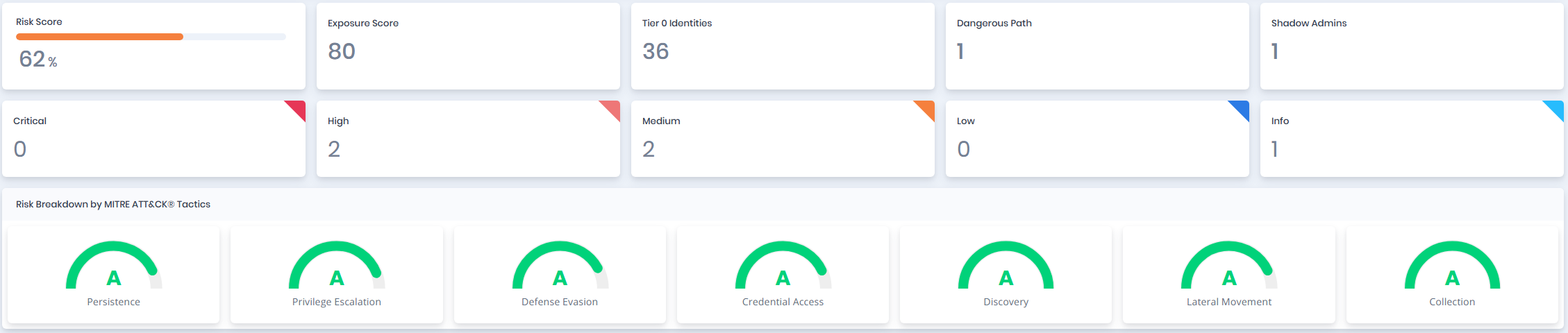
### Risk Pane (GCP Dashboard)
This Risk Pane summarizes key risk metrics from the scan, including the overall **Risk** and **Exposure Scores**, **Dangerous Paths**, **Shadow Admins**, and severity levels (Critical to Info). It breaks down risks by:
* **MITRE ATT\&CK Tactics** (e.g., Persistence, Privilege Escalation)
* **Tags** (e.g., Identity Governance, Account Security)
* **Impacts** (e.g., Privileged Role Assignment, Service Account Ownership Abuse)
* **GCP Entity Types** (e.g., GCPUser, GCPGroup, GCPServiceAccount, GCPServiceAccountKey, GCPOrganization, GCPFolder, GCPProject, GCPDevice, GCPRole)
This layout helps quickly identify high-risk areas and prioritize remediation actions within GCP environments.
Risk Pane
***
### Risk Breakdown by Tags, Impacts and Entity Types
Risk Breakdown by Tags, Impacts and Entity Types
**Risk Breakdown by Tags:** Risk scores based on Tags.
**Risk Breakdown by Impacts:** Risk scores based on Impacts.
**Risk Breakdown by Entity Types:** Risk scores based on GCP Entity Types.
***
### GCP Entity Pane
Dashboard Entity Pane
#### Users Table
| Statistic | Description |
| ------------------ | -------------------------------------------------------------------------------------------------------------------------------- |
| Shadow Admin Users | The number of GCP user accounts that have administrative privileges indirectly, without being explicitly assigned an admin role. |
| Privileged Users | The number of privileged GCP user accounts. |
| Risky Users | The number of GCP user accounts that have a risk score greater than 50. |
***
#### Groups Table
| Statistic | Description |
| ----------------- | ---------------------------------------------------------------- |
| Empty Groups | The number of GCP groups that have no members. |
| Privileged Groups | The number of privileged GCP groups. |
| Risky Groups | The number of GCP groups that have a risk score greater than 50. |
***
#### Structure
The Structure section provides an overview of the GCP organizational hierarchy and resource layout discovered during the scan.
| Entity | Description |
| --------------- | --------------------------------------------------------------------------------------------------- |
| GCPOrganization | The top-level GCP organization node. Represents the root of the GCP resource hierarchy. |
| GCPFolder | Folders used to group projects and apply policies at an intermediate level within the organization. |
| GCPProject | Individual GCP projects discovered within the organization or folders. |
| GCPDevice | Devices registered in the environment and associated with users or organizational policies. |
***
#### Service Accounts Table
| Statistic | Description |
| --------------------------- | ----------------------------------------------------------------------------------------- |
| Inactive Service Accounts | The number of GCP service accounts that have not been used or active in a defined period. |
| Privileged Service Accounts | The number of privileged GCP service accounts. |
| Risky Service Accounts | The number of GCP service accounts that have a risk score greater than 50. |
***
#### Roles Table
| Statistic | Description |
| ---------------- | ------------------------------------------------------------------------ |
| Custom Roles | The number of non-default roles created manually in the GCP environment. |
| Privileged Roles | The number of privileged GCP roles. |
***
#### Service Account Keys Table
| Statistic | Description |
| --------------- | ----------------------------------------------------------------------------------- |
| Disabled Keys | The number of GCP service account keys that are currently disabled. |
| Privileged Keys | The number of GCP service account keys associated with privileged service accounts. |