> For the complete documentation index, see [llms.txt](https://docs.forestall.io/fsprotect/llms.txt). Markdown versions of documentation pages are available by appending `.md` to page URLs; this page is available as [Markdown](https://docs.forestall.io/fsprotect/dashboard/azure-entra-id-dashboard.md).
# Azure / Entra ID Dashboard
Dashboard provides a general and holistic view of security posture about scanned Azure environments based on different perspectives.
### **Risk Pane (Azure Dashboard)**
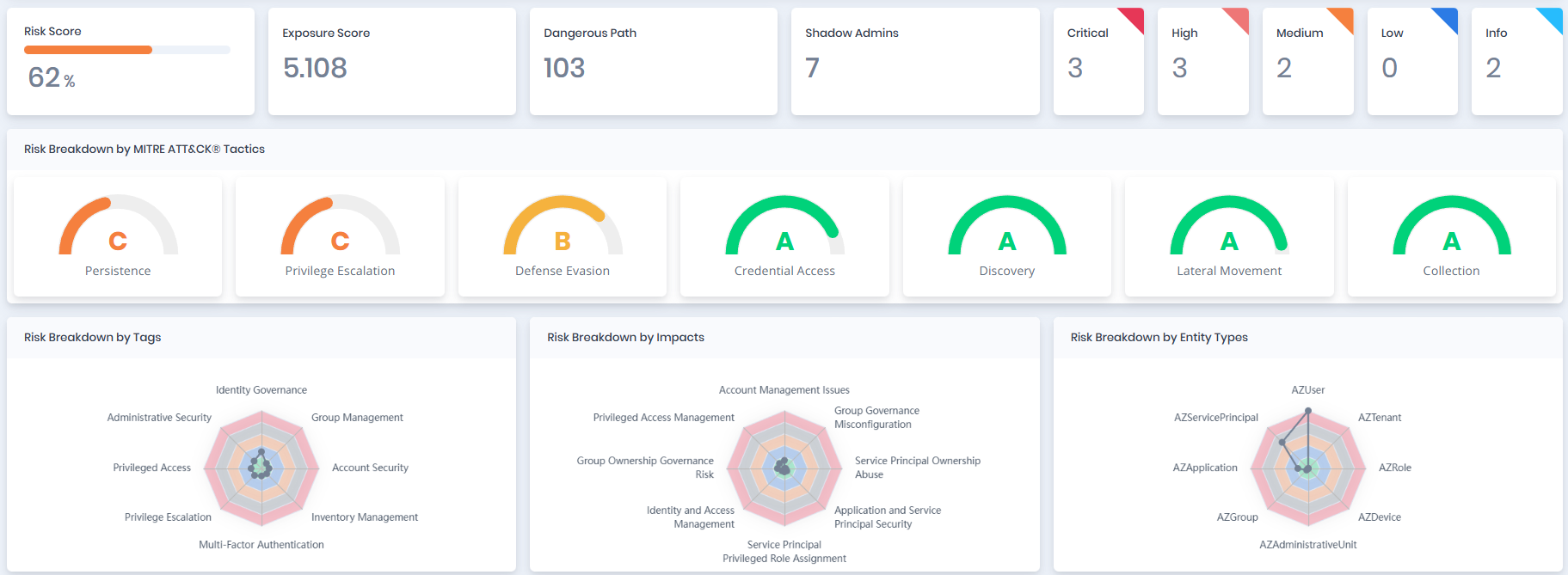
This Risk Pane summarizes key risk metrics from the scan, including the overall Risk and Exposure Scores, Dangerous Paths, Shadow Admins, and severity levels (Critical to Info). It breaks down risks by MITRE ATT\&CK Tactics (e.g., Persistence, Privilege Escalation), Tags (e.g., Identity Governance, Account Security), Impacts (e.g., Privileged Role Assignment, Service Principal Ownership Abuse), and Azure Entity Types (e.g., AZUser, AZGroup, AZRole, AZApplication, AZServicePrincipal, AZTenant). This layout helps quickly identify high-risk areas and prioritize remediation actions within Azure environments.
Risk Pane
### Risk Breakdown by Tags, Impacts and Entity Types
Risk Breakdown by Tags, Impacts and Entity Types
**Risk Breakdown by Tags:** Risk scores based on Tags.
**Risk Breakdown by Impacts:** Risk scores based on Impacts.
**Risk Breakdown by Entity Types:** Risk scores based on Entity Types.
Azure Entity Pane
### **Users Table**
| Statistic | Description |
| -------------------- | ------------------------------------------------------------------- |
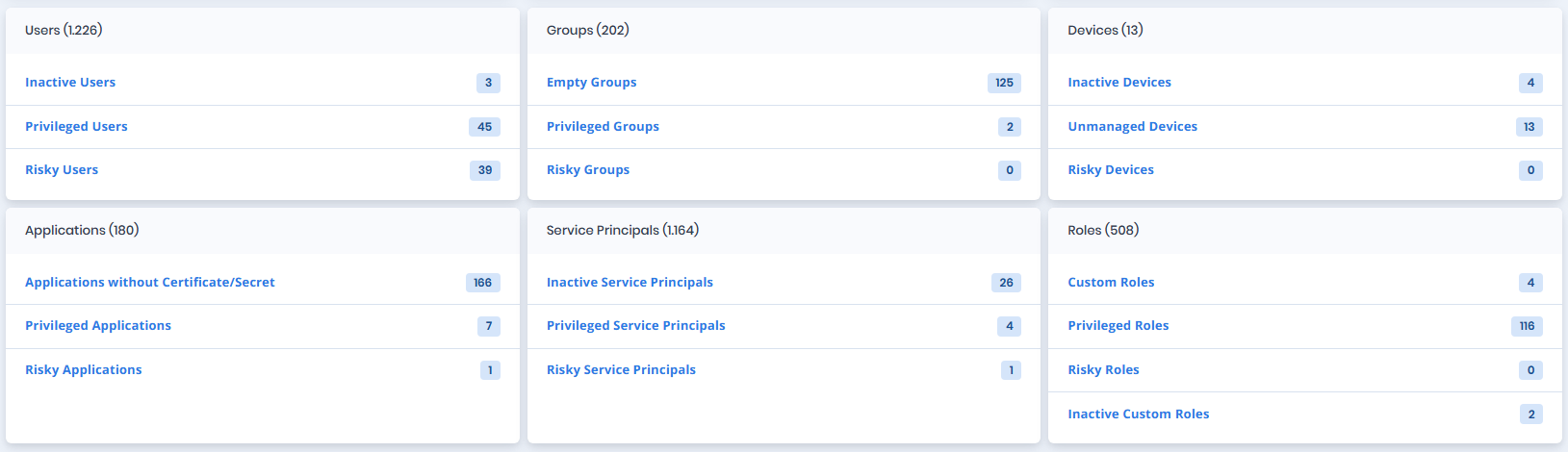
| **Inactive Users** | The number of inactive user accounts. |
| **Privileged Users** | The number of privileged user accounts. |
| **Risky Users** | The number of user accounts that have a risk score greater than 50. |
### **Groups Table**
| Statistic | Description |
| --------------------- | ------------------------------------------------------------ |
| **Inactive Groups** | The number of inactive groups. |
| **Privileged Groups** | The number of privileged groups. |
| **Risky Groups** | The number of groups that have a risk score greater than 50. |
### **Devices Table**
| Statistic | Description |
| --------------------- | ----------------------------------------------------------------------------- |
| **Inactive Devices** | The number of device accounts that have not been active for a defined period. |
| **Unmanaged Devices** | The number of devices that not managed. |
| **Risky Devices** | The number of devices that have a risk score greater than 50. |
### **Applications Table**
| Statistic | Description |
| ------------------------------------------- | ----------------------------------------------------------------------------------------------------- |
| **Applications without Certificate/Secret** | The number of applications missing authentication credentials such as certificates or client secrets. |
| **Privileged Applications** | The number of privileged applications. |
| **Risky Applications** | The number of applications that have a risk score greater than 50. |
### **Service Principals Table**
| Statistic | Description |
| --------------------------------- | --------------------------------------------------------------------------------------- |
| **Inactive Service Principals** | The number of service principals that have not been used or active in a defined period. |
| **Privileged Service Principals** | The number of privileged service principals. |
| **Risky Service Principals** | The number of service principals that have a risk score greater than 50. |
### **Roles Table**
| Statistic | Description |
| ------------------------- | ---------------------------------------------------------------------- |
| **Custom Roles** | The number of non-default roles created manually in the environment. |
| **Privileged Roles** | The number of privileged roles. |
| **Risky Roles** | The number of roles that have a risk score greater than 50. |
| **Inactive Custom Roles** | The number of custom roles not assigned or used over a defined period. |
### **ARM Roles Table**
| Statistic | Description |
| ----------------------------- | -------------------------------------------------------------------------- |
| **Custom ARM Roles** | The number of non-default ARM roles created manually in the environment. |
| **Privileged ARM Roles** | The number of ARM privileged roles. |
| **Risky ARM Roles** | The number of ARM roles that have a risk score greater than 50. |
| **Inactive Custom ARM Roles** | The number of custom ARM roles not assigned or used over a defined period. |