> For the complete documentation index, see [llms.txt](https://docs.forestall.io/fsprotect/llms.txt). Markdown versions of documentation pages are available by appending `.md` to page URLs; this page is available as [Markdown](https://docs.forestall.io/fsprotect/dashboard/0x1-dashboard.md).
# Active Directory Dashboard
Single Pane of Glass for Entire Active Directory
Dashboard, provides a general and holistic view of security posture about scanned Active Directory Forests based on different perspectives.
### Risk Pane
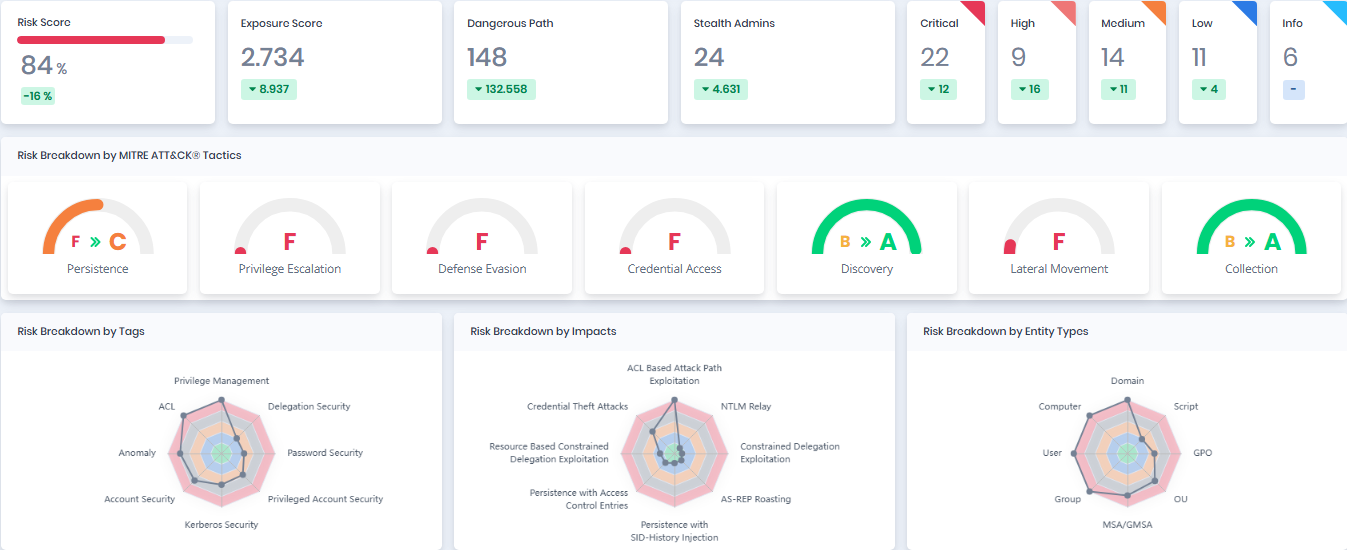
This Risk Pane summarizes key risk metrics from the scan, including the overall Risk and Exposure Scores, Dangerous Paths, Shadow Admins, and severity levels (Critical to Info). It also breaks down risks by MITRE ATT\&CK Tactics (e.g., Persistence, Privilege Escalation), Tags (e.g., Privilege Management, Account Security), Impacts (e.g., Credential Theft, NTLM Relay), and Entity Types (e.g., Domain, User, GPO). This layout helps quickly pinpoint high-risk areas and prioritize actions.
Risk Pane
### Risk Breakdown by Tags, Impacts and Entity Types

**Risk Breakdown by Tags**: Risk scores based on Tags.
**Risk Breakdown by Impacts**: Risk scores based on Impacts.
**Risk Breakdown by Entity Types**: Risk scores based on Entity Types.
### Active Directory Entity Pane
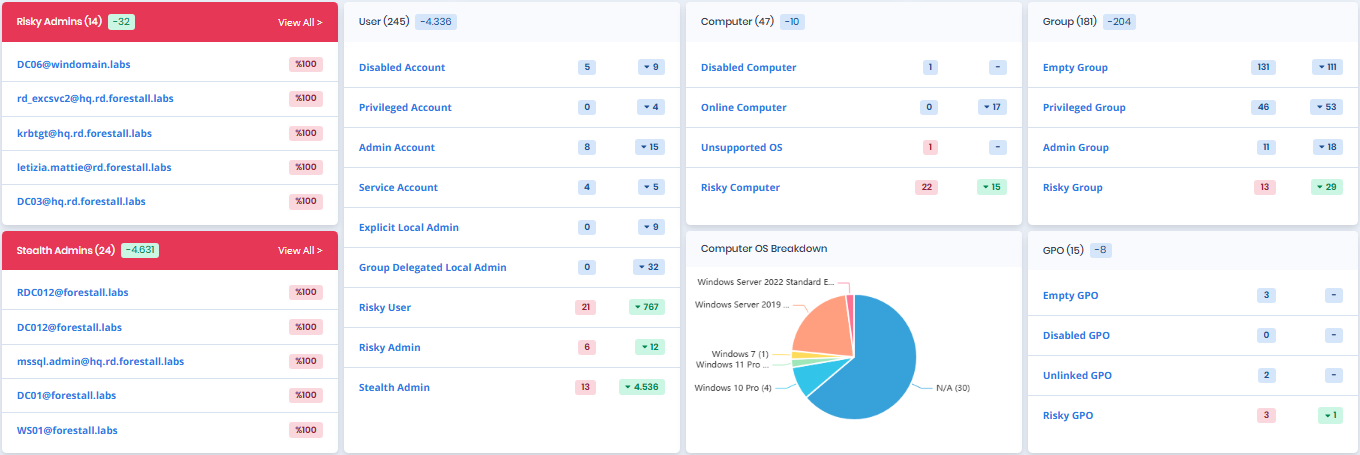
Entity Pane, contains different statistics by object types for the selected scan. This area can be useful to view identity-related statistics from both security and management perspectives. The result of these statistics can be seen with **Search & Reports** interface with just one click.
Active Directory Entity Pane
**Risky Admins:** Admins with elevated privileges that pose security risks due to weak credentials, over-permissioning, or suspicious activity.
**Shadow Admins:** Admins with hidden or hard-to-detect privileges, increasing the risk of unnoticed misuse.
### **Users Table**
| Statistic | Description |
| ------------------------------- | ------------------------------------------------------------------------------------------------------ |
| **Disabled Account** | The number of disabled user accounts. |
| **Privileged Account** | The number of privileged user accounts. |
| **Admin Account** | The number of admin user accounts. |
| **Service Account** | The number of service user accounts. |
| **Explicit Local Admin** | The number of explicit local admin user accounts. |
| **Group Delegated Local Admin** | The number of group delegated local admin user accounts. |
| **Risky User** | The number of user accounts that have a risk score greater than 50. |
| **Risky Admin** | The number of admin user accounts that have a risk score greater than 50. |
| **Shadow Admin** | The count of admin accounts with elevated permissions that are hard to detect, posing a security risk. |
### **Computers Table**
| Statistic | Description |
| --------------------- | ---------------------------------------------------------------------------- |
| **Disabled Computer** | The number of disabled computer objects. |
| **Online Computer** | The number of computer objects accessed through the network during the scan. |
| **Unsupported OS** | The number of computer objects that runs an unsupported operating system. |
| **Risky Computer** | The number of computer objects that have a risk score greater than 50. |
### **Groups Table**
| Statistic | Description |
| -------------------- | ------------------------------------------------------------ |
| **Empty Group** | The number of groups which have no member. |
| **Privileged Group** | The number of privileged groups. |
| **Admin Group** | The number of admin groups. |
| **Risky Group** | The number of groups that have a risk score greater than 50. |
### **Group Policy Objects Table**
| Statistic | Description |
| ---------------- | -------------------------------------------------------------------------- |
| **Empty GPO** | The number of Group Policy objects which have no applicable settings. |
| **Disabled GPO** | The number of disabled Group Policy objects. |
| **Unlinked GPO** | The number of Group Policy objects that are not linked to any container. |
| **Risky GPO** | The number of Group Policy Objects that have a risk score greater than 50. |
**Computer OS Breakdown**: Distribution of computer objects by their operating system.
**Top Risky Admins**: Top 5 admin user accounts according to their risk scores.
**Top Shadow Admins** : Top 5 shadow admin user accounts according to their risk scores.