# Settings

You can configure `parameters`, `exclusions`, and `matching rules` for the `Share Audit` module with the `Settings` page.

### General Settings

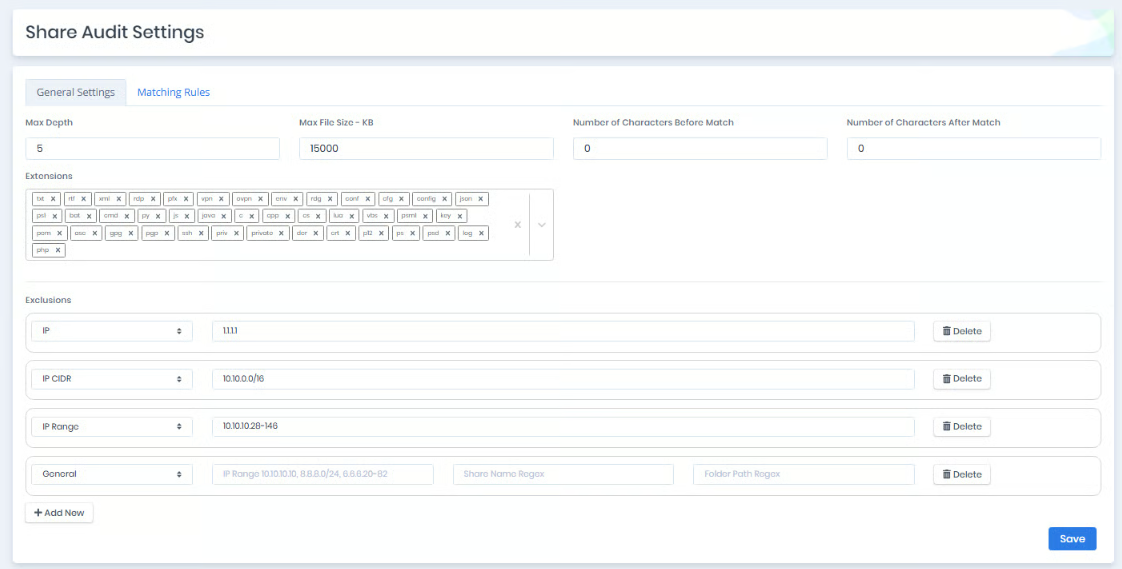
You can configure `Max Depth`, `Max File Size`,`Number of Characters Before Match` ,`Number of Characters After Match`,`Extensions`, and `Exclusions` with `General Settings`.

<figure><img src="/files/HWVyusnemaX1L9sCLy77" alt=""><figcaption><p>Share Audit General Settings</p></figcaption></figure>

<table><thead><tr><th width="207">Setting</th><th>Description</th></tr></thead><tbody><tr><td><strong>Max Depth</strong></td><td>Specifies the maximum folder depth that the Share Audit module will process.</td></tr><tr><td><strong>Max File Size - KB</strong></td><td>Specifies the maximum size of files that the Share Audit module will process.</td></tr><tr><td><strong>Extensions</strong></td><td>Specifies the file extensions that the Share Audit module will process.</td></tr><tr><td><strong>Exclusion</strong></td><td>Specifies the IP addresses that the Share Audit module will not process. Input can be an IP Address, CIDR, Range notation, or defined as General to exclude specific shares and folders.</td></tr><tr><td><strong>Number of Characters Before Match</strong></td><td><p>Specifies the number of characters to include before the matching pattern in the processed data.</p><p></p></td></tr><tr><td><strong>Number of Characters After Match</strong></td><td>Specifies the number of characters to include after the matching pattern in the processed data.</td></tr></tbody></table>

### Matching Rules

#### Inclusion Rule

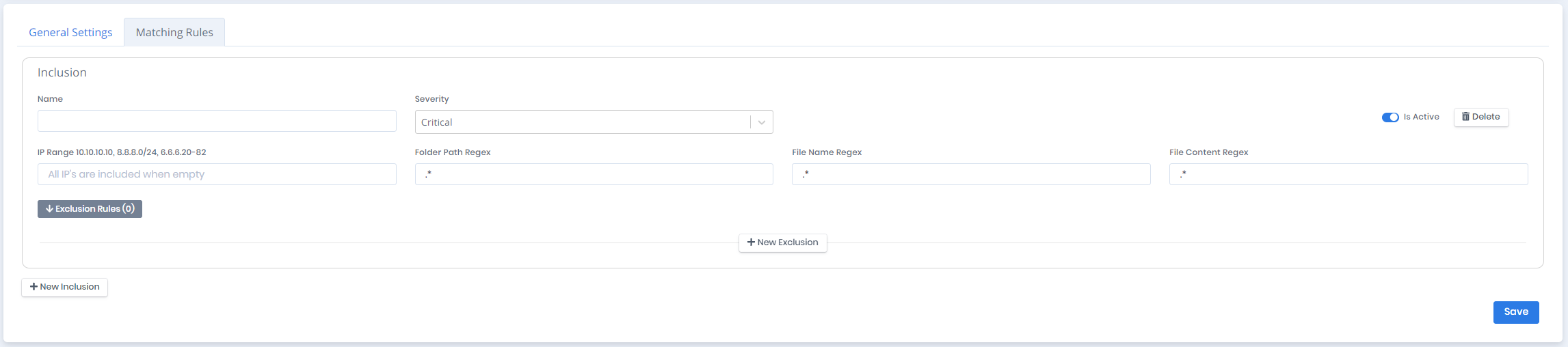
Each matching rule is designated as an `Inclusion`. You can create matching rules with `Name`, `Status`, `Severity`, `IP Range`, `Folder Path Regex`, `File Name Regex`, and `File Content Regex` parameters.

<figure><img src="/files/STbFxEblv9iXJIKhh6JV" alt=""><figcaption><p>Matching Rule</p></figcaption></figure>

<table><thead><tr><th width="191">Setting</th><th>Description</th></tr></thead><tbody><tr><td><strong>Name</strong></td><td>Name of the matching rule.</td></tr><tr><td><strong>Severity</strong></td><td>Risk level of matching rule.</td></tr><tr><td><strong>Is Active</strong></td><td>Status of the rule.</td></tr><tr><td><strong>IP Range</strong></td><td>Specifies the IP range of the machines to be scanned. IP range can be specified in formats such as 10.10.10.10, 8.8.8.8/24, or 6.6.6.6.20-82. If this field is empty, all machines will be scanned.</td></tr><tr><td><strong>Folder Path Regex</strong></td><td>Specifies the paths to be scanned based on the regex pattern. If this field is <strong><code>.*</code></strong> all folders will be scanned.</td></tr><tr><td><strong>File Name Regex</strong></td><td>Specifies the name of the files to be scanned based on the regex pattern. If this field is <strong><code>.*</code></strong> all files will be scanned.</td></tr><tr><td><strong>File Content Regex</strong></td><td>Specifies the regex pattern used to search for secrets in files. If this field is <strong><code>.*</code></strong> all data will be matched.</td></tr></tbody></table>

#### Exclusion Rule

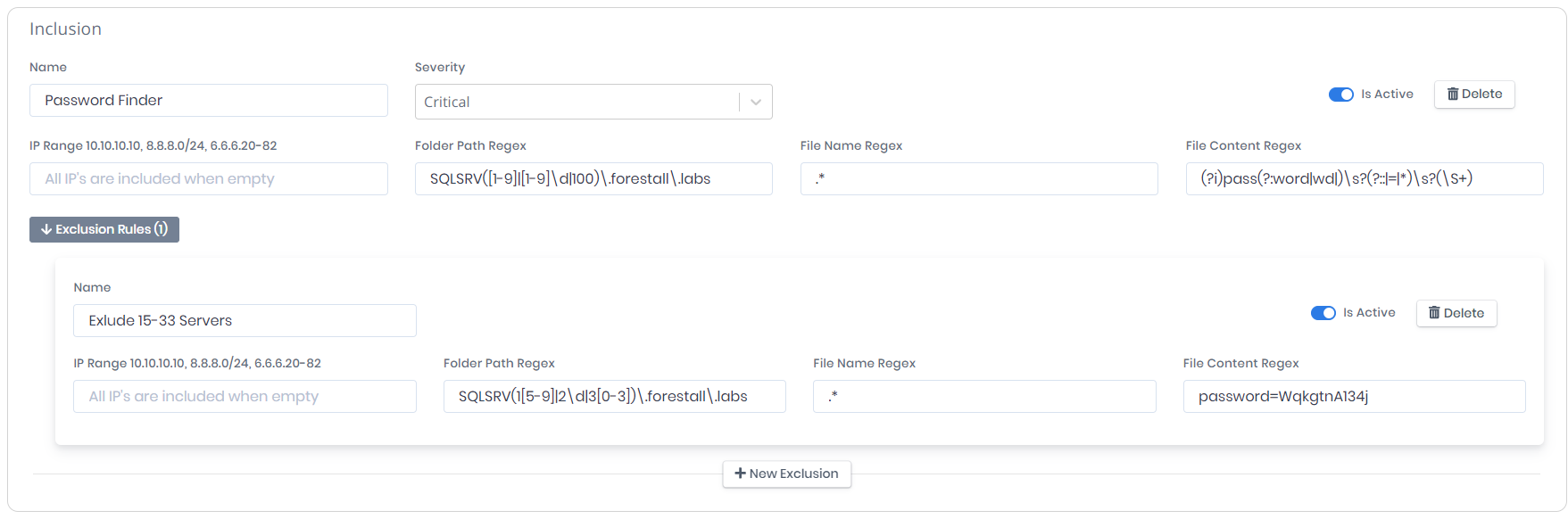
Each matching rule can have multiple `Exclusion Rules` to filter the output. You can create exclusion rules with `Name`, `IP Range`, `Folder Path Regex`, `File Name Regex`, and `File Content Regex` parameters.

<figure><img src="/files/NppqTeeg8i8vsCsARMY8" alt=""><figcaption><p>Exclusion Rule</p></figcaption></figure>

<table><thead><tr><th width="191">Setting</th><th>Description</th></tr></thead><tbody><tr><td><strong>Name</strong></td><td>Name of the exclusion rule.</td></tr><tr><td><strong>Is Active</strong></td><td>Status of the exclusion rule.</td></tr><tr><td><strong>IP Range</strong></td><td>Specifies the IP range of the machines to be excluded. IP range can be specified in formats such as 10.10.10.10, 8.8.8.8/24, or 6.6.6.6.20-82. If this field is empty, all machines will be excluded.</td></tr><tr><td><strong>Folder Path Regex</strong></td><td>Specifies the paths to be excluded based on the regex pattern. If this field is <strong><code>.*</code></strong> all folders will be excluded.</td></tr><tr><td><strong>File Name Regex</strong></td><td>Specifies the name of the files to be excluded based on the regex pattern. If this field is <strong><code>.*</code></strong> all files will be excluded.</td></tr><tr><td><strong>File Content Regex</strong></td><td>Specifies the regex pattern used to exclude content. If this field is <strong><code>.*</code></strong> all data will be excluded.</td></tr></tbody></table>

#### Example

This matching rule finds the passwords between `SQLSRV1.forestall.labs` and `SQLSRV100.forestall.labs`. Machines between `SQLSRV15.forestall.labs` and `SQLSRV33.forestall.labs` and matches containing `password=WqkgtnA134j` are excluded from the rule.

<figure><img src="/files/qD3rGE5rFV1V8SXCKzWu" alt=""><figcaption><p>Example Matching Rule</p></figcaption></figure>

### Built-in Rules and Descriptions

**.venv:** Excludes Python virtual environment directories. These paths contain third-party dependencies and are not relevant for credential discovery.

**node\_modules:** Excludes Node.js dependency directories. Automatically downloaded packages may cause noise and false positives.

**WindowsApps:** Excludes system-managed Windows application directories. These paths do not provide meaningful credential exposure findings.

**Cortana:** Excludes Cortana-related system folders. These directories are not relevant for credential discovery analysis.


---

# Agent Instructions: Querying This Documentation

If you need additional information that is not directly available in this page, you can query the documentation dynamically by asking a question.

Perform an HTTP GET request on the current page URL with the `ask` query parameter:

```
GET https://docs.forestall.io/fsprotect/credential-discovery/settings.md?ask=<question>
```

The question should be specific, self-contained, and written in natural language.
The response will contain a direct answer to the question and relevant excerpts and sources from the documentation.

Use this mechanism when the answer is not explicitly present in the current page, you need clarification or additional context, or you want to retrieve related documentation sections.