> For the complete documentation index, see [llms.txt](https://docs.forestall.io/fsprotect/llms.txt). Markdown versions of documentation pages are available by appending `.md` to page URLs; this page is available as [Markdown](https://docs.forestall.io/fsprotect/configuration-center/aws-configurations.md).

# AWS Configurations

**AWS Configurations**

Amazon Web Services Integration: Step-by-Step Setup

Forestall ISPM reads AWS through two identities: one collector IAM user in a hub account, and a read-only scan role in every account it scans. A CloudFormation stack creates both. You do not build either by hand.

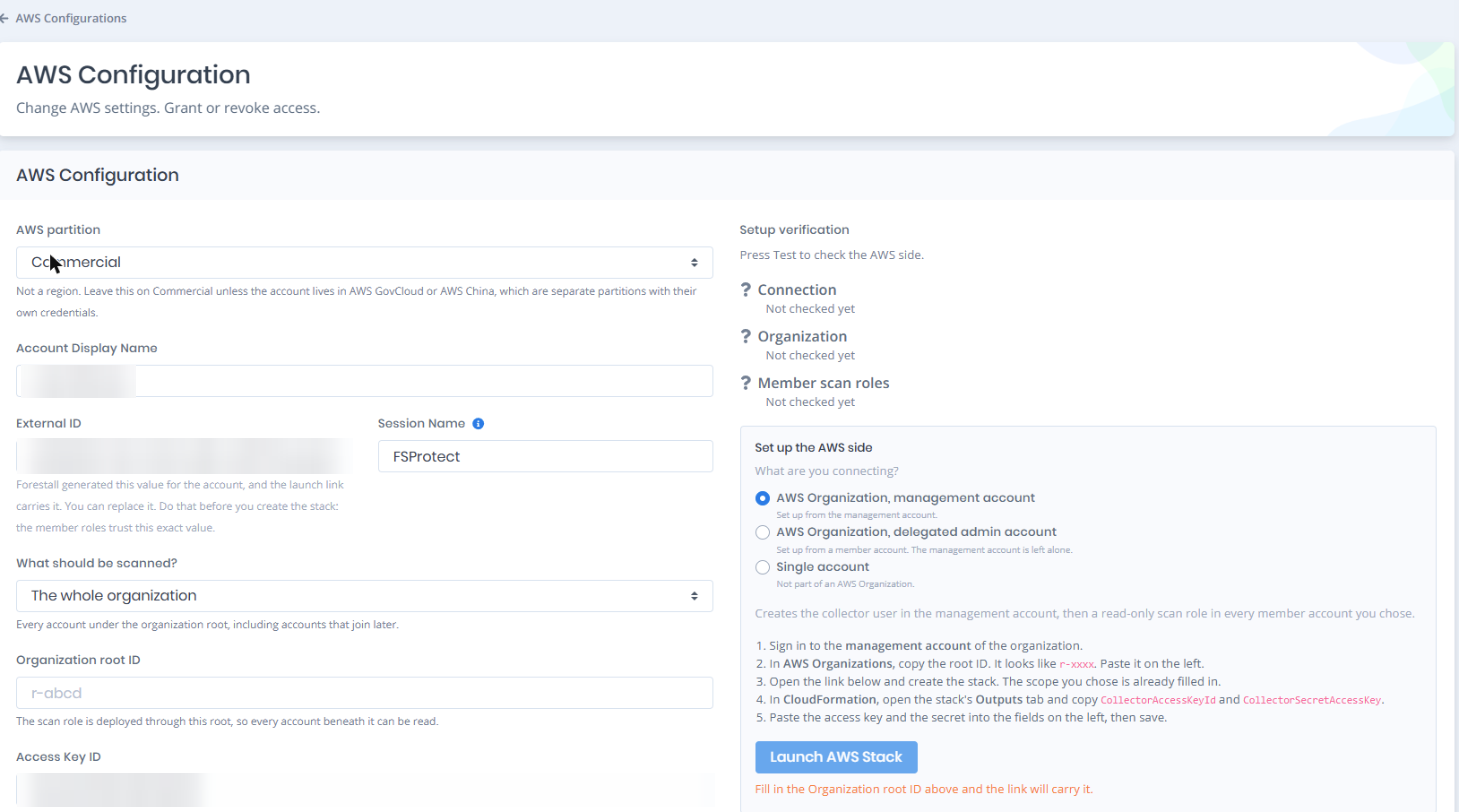
The **AWS Configuration** page gives you a launch link that already carries your scope and External ID. This guide follows the form from top to bottom: the shape of your AWS estate, the External ID, the scan scope, the stack, and the **Setup verification** panel that checks the result. The access key comes last on the form, because it exists only after the stack.

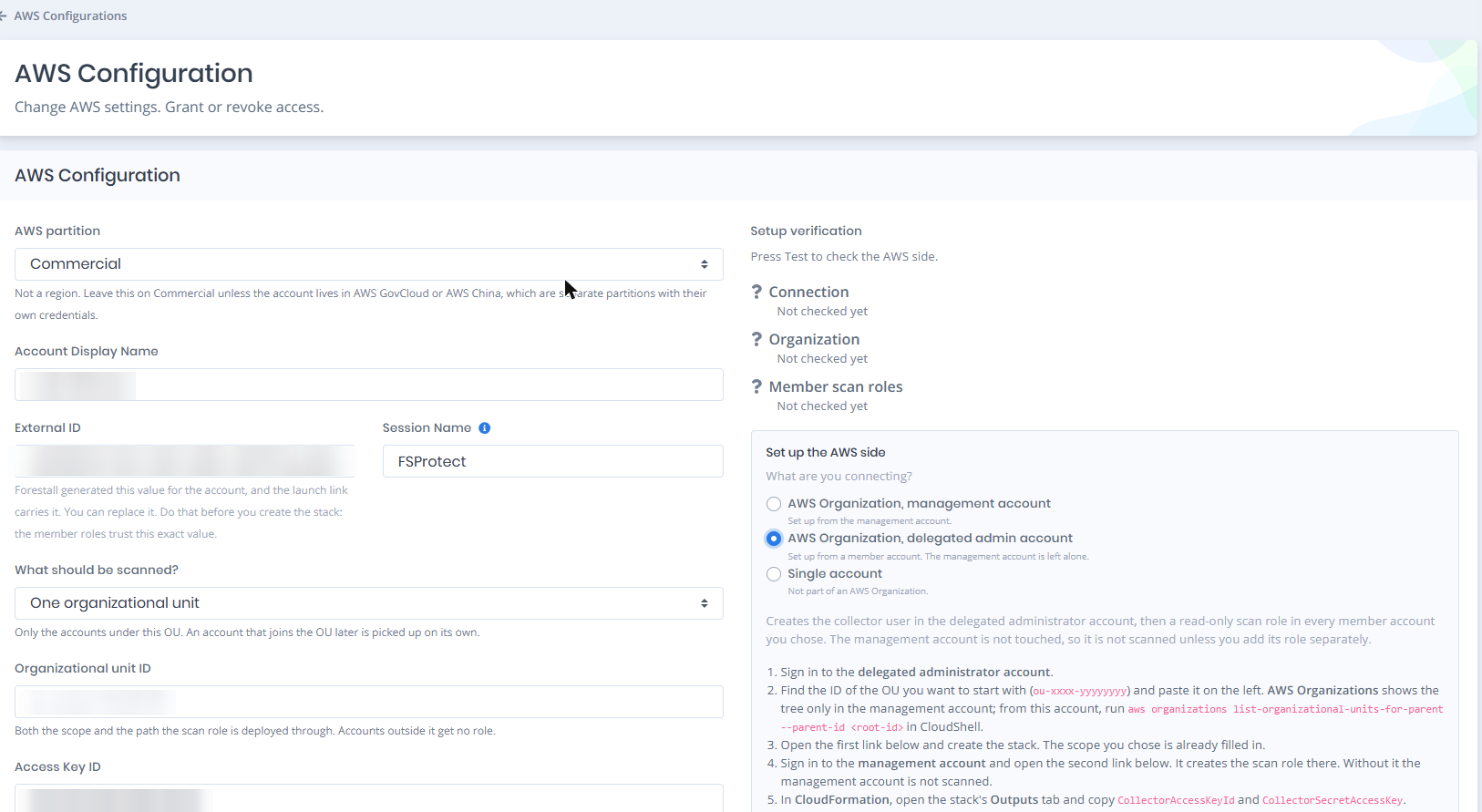
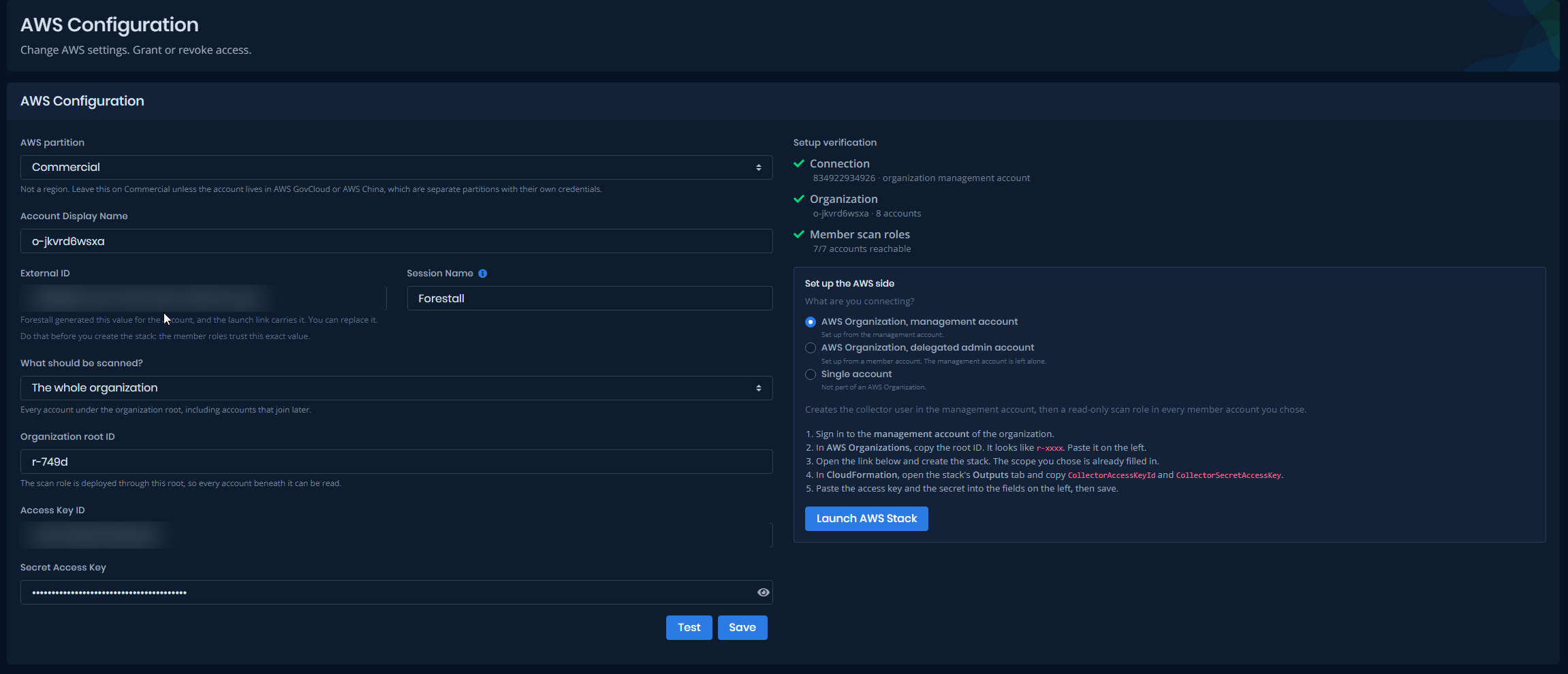
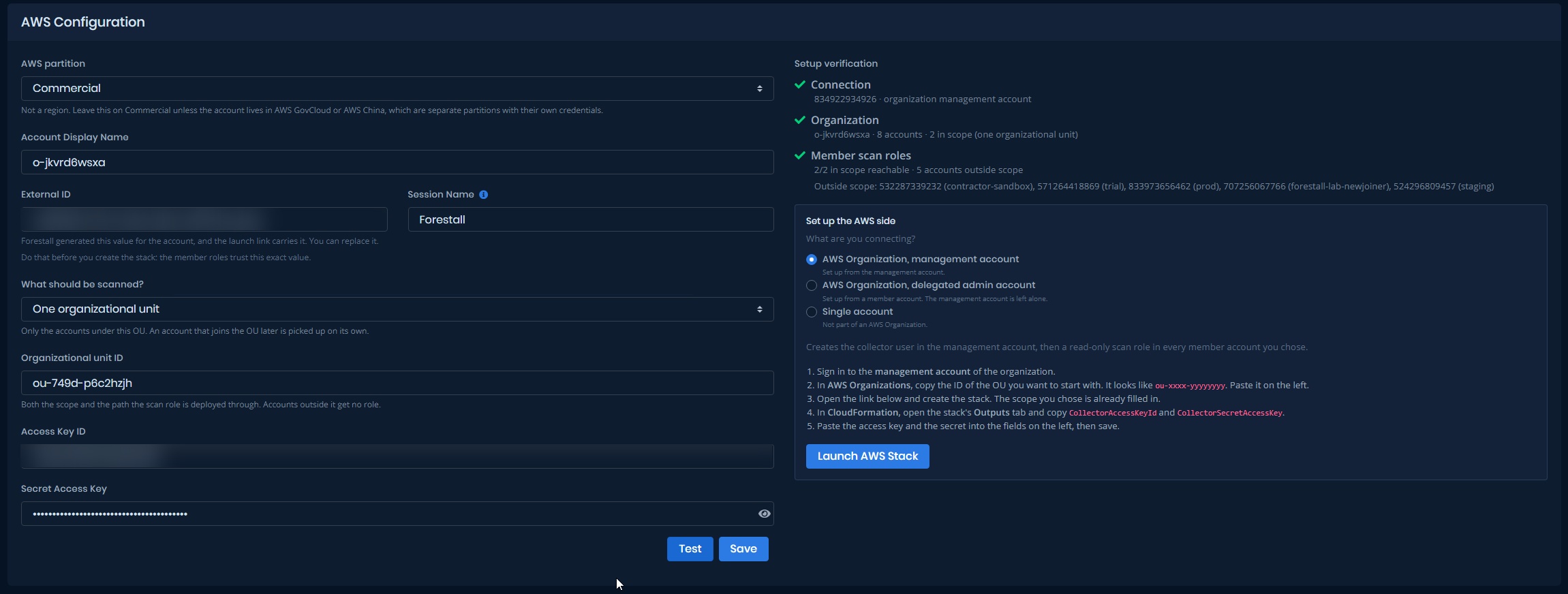
<figure><img src="https://3408039743-files.gitbook.io/~/files/v0/b/gitbook-x-prod.appspot.com/o/spaces%2FObpV44hoVkNmo5bFuVVL%2Fuploads%2Fgit-blob-7abce6e57708473a97563068a25910bdc8ab0684%2Faws-configuration-form.png?alt=media" alt=""><figcaption><p>The AWS Configuration page. Connection fields and scope on the left, the AWS-side steps and Launch AWS Stack on the right</p></figcaption></figure>

***

**Step 1: Choose what you are connecting**

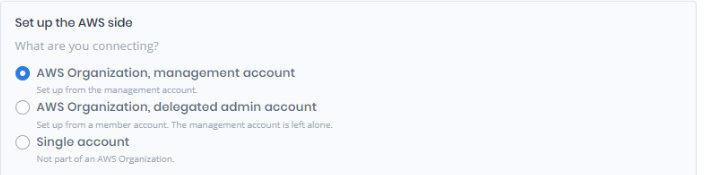
Open **Settings > AWS Configurations** and click **New Configuration**. The box on the right, **What are you connecting?**, lists three shapes. Pick the one that matches your AWS estate.

| Shape                                     | Pick it when                                              | What the stack creates                                                                                                                                                                                                                      |
| ----------------------------------------- | --------------------------------------------------------- | ------------------------------------------------------------------------------------------------------------------------------------------------------------------------------------------------------------------------------------------- |
| AWS Organization, management account      | You can sign in to the organization's management account. | The collector user in the management account, then a read-only scan role in every member account you chose.                                                                                                                                 |
| AWS Organization, delegated admin account | You want the management account left alone.               | The collector user in a member account that you register as a delegated administrator, then the scan role in the member accounts you chose. The management account is not touched, so it is not scanned unless you add its role separately. |
| Single account                            | The account is not part of an AWS Organization.           | The collector user in this one account. There is no root or OU to fill in.                                                                                                                                                                  |

The numbered steps under the choice change with it. Everything runs in the AWS Console, plus one CloudShell command when a delegated administrator needs a root or OU ID. The delegated administrator shape also expects one prerequisite already done in AWS Organizations, covered below.

A saved configuration reopens with the shape and scope it was saved with.

<figure><img src="https://3408039743-files.gitbook.io/~/files/v0/b/gitbook-x-prod.appspot.com/o/spaces%2FObpV44hoVkNmo5bFuVVL%2Fuploads%2Fgit-blob-7f8d2eb8ef5f4c29463cd26706645176033a286c%2Faws-config-shape-picker.png?alt=media" alt=""><figcaption><p>The three shapes under What are you connecting?, with the delegated administrator shape selected and its summary line below</p></figcaption></figure>

***

**Step 2: External ID**

Forestall fills in the **External ID** field when you add a configuration. The launch link carries the same value, and every scan role trusts exactly this value. The two organization shapes use it. The single-account stack does not, because nothing assumes a role across accounts there.

You can replace the generated value. Do that before you create the stack. A change afterwards breaks the trust in every scan role until you update the stack with the new value.

Use 2 to 256 characters: letters, digits, and `+ = , . @ : / _ -`.

***

**Step 3: Choose what should be scanned**

The two organization shapes show a **What should be scanned?** list on the left. The single-account shape hides it.

| Scope                   | What is scanned                                                                              | What you type                                                                                                                              |
| ----------------------- | -------------------------------------------------------------------------------------------- | ------------------------------------------------------------------------------------------------------------------------------------------ |
| The whole organization  | Every account under the organization root, including accounts that join later.               | **Organization root ID**, for example `r-749d`.                                                                                            |
| One organizational unit | Only the accounts under that OU. An account that joins the OU later is picked up on its own. | **Organizational unit ID**, for example `ou-749d-p6c2hzjh`.                                                                                |
| Specific accounts       | Only the accounts you list, and only they receive the scan role.                             | **Organization root or OU ID**: the root, or the OU the listed accounts sit under. Plus **Account IDs**: 12-digit IDs separated by commas. |
| Only this account       | No member account receives the scan role, so Forestall has no way into any of them.          | Nothing. The ID field is hidden.                                                                                                           |

The scope is saved with the configuration and written into the launch link. The scan role lands in the accounts the scan will read, and in no others.

In the whole-organization and Specific accounts scopes, the root or OU ID only builds the link. Forestall does not store it: when you reopen a configuration and need the link again, type it again.

New accounts are the other difference between scopes. Under the whole organization or one OU, a new account receives the role on its own. Under Specific accounts it does not: add the account to the list, save, and update the stack.

To change the scope later, save the form, then update the `ForestallOnboarding` stack in CloudFormation with the parameter values the link now carries. Roles disappear from accounts that left the scope and appear in accounts that joined it.

<figure><img src="https://3408039743-files.gitbook.io/~/files/v0/b/gitbook-x-prod.appspot.com/o/spaces%2FObpV44hoVkNmo5bFuVVL%2Fuploads%2Fgit-blob-ee83f03ee87c1cc83c29e6b5babbada7638c0612%2Faws-config-scope-ou.png?alt=media" alt=""><figcaption><p>What should be scanned? set to One organizational unit, with the OU ID filled in and the note under the field</p></figcaption></figure>

**Where the IDs come from**

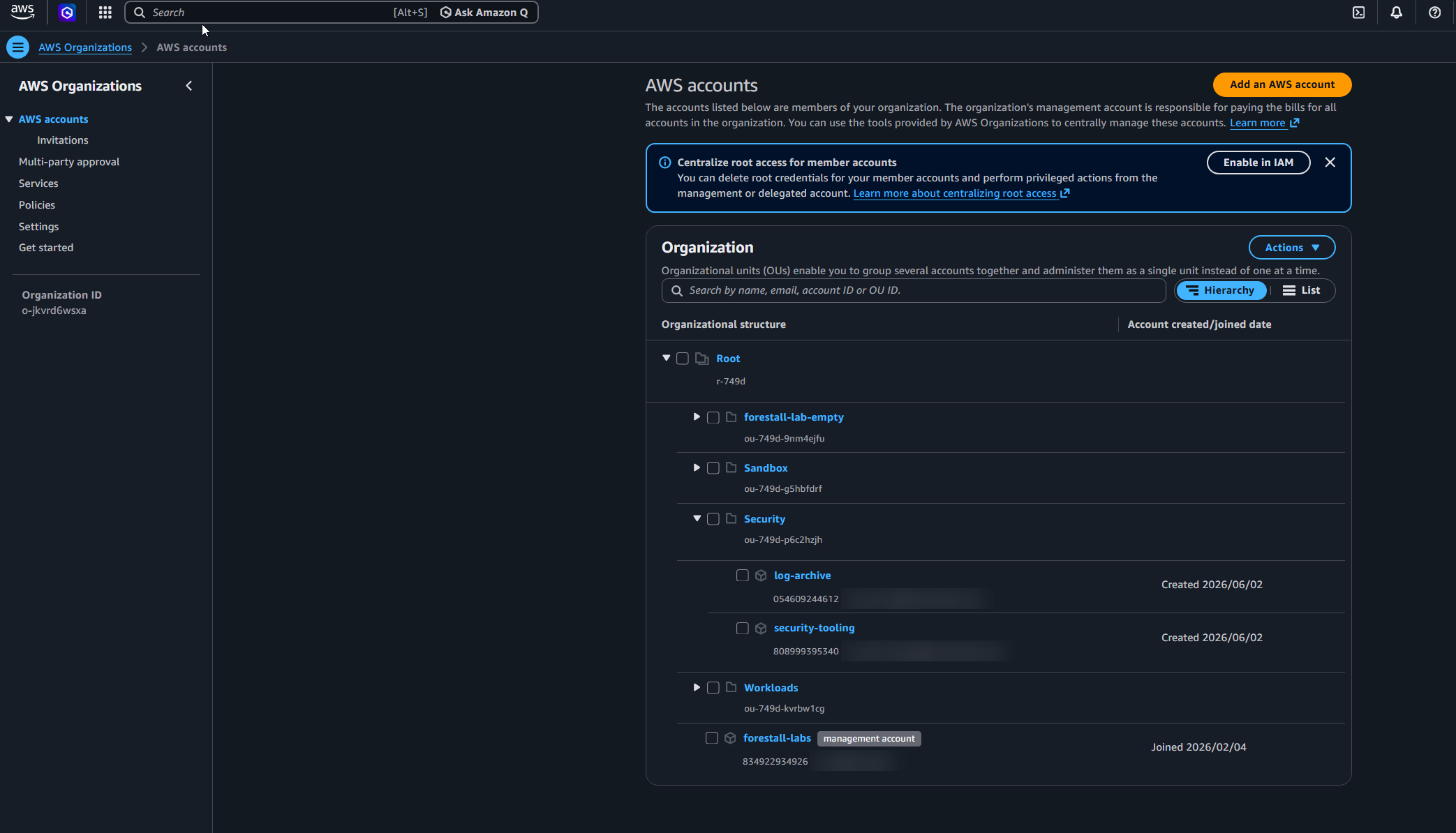
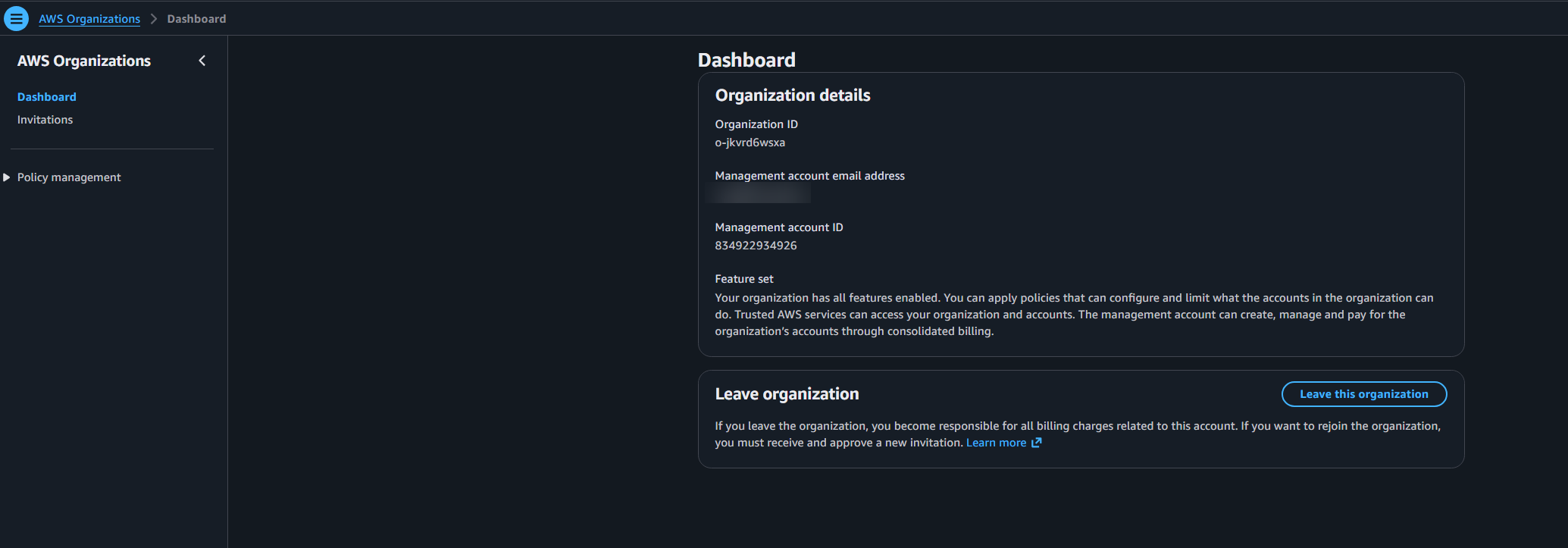
The root ID and the OU IDs live in AWS Organizations, and the console shows the account tree **only in the management account**. A delegated administrator account can read the same structure through the API, but its Organizations console page stays empty: no root, no OUs, no accounts. That is how AWS works, not a sign that the registration failed.

So there are two ways to get an ID.

| ID                                          | Management account, in the console                                                                          | Any account with Organizations read access, with the CLI                                                                                                                   |
| ------------------------------------------- | ----------------------------------------------------------------------------------------------------------- | -------------------------------------------------------------------------------------------------------------------------------------------------------------------------- |
| Organization root ID (`r-xxxx`)             | **AWS Organizations > AWS accounts**. Click **Root** at the top of the tree; the details pane shows the ID. | `aws organizations list-roots`                                                                                                                                             |
| Organizational unit ID (`ou-xxxx-yyyyyyyy`) | Same page. Click the OU; the details pane shows the ID.                                                     | `aws organizations list-organizational-units-for-parent --parent-id <root-id>`                                                                                             |
| Account IDs                                 | Same page, next to each account name.                                                                       | `aws organizations list-accounts`. After Test, the **Member scan roles** row also names up to five of the accounts outside the scope, with their IDs, and counts the rest. |

The CLI column works from the management account and from a registered delegated administrator account. It needs no installation: **CloudShell**, the terminal icon in the top bar of the AWS Console, has the CLI ready and signed in as you.

This is what the commands return in our lab, run from the delegated administrator account `808999395340`:

```
$ aws organizations list-roots --query "Roots[].[Id,Name]" --output table
--------------------
|     ListRoots    |
+---------+--------+
|  r-749d |  Root  |
+---------+--------+

$ aws organizations list-organizational-units-for-parent --parent-id r-749d --query "OrganizationalUnits[].[Id,Name]" --output table
---------------------------------------------
|     ListOrganizationalUnitsForParent      |
+-------------------+-----------------------+
|  ou-749d-9nm4ejfu |  forestall-lab-empty  |
|  ou-749d-g5hbfdrf |  Sandbox              |
|  ou-749d-kvrbw1cg |  Workloads            |
|  ou-749d-p6c2hzjh |  Security             |
+-------------------+-----------------------+
```

The second command lists one level. For an OU nested inside another, run it again with the parent OU's ID.

To see which accounts an OU scope would cover before you create the stack:

```
$ aws organizations list-accounts-for-parent --parent-id ou-749d-p6c2hzjh --query "Accounts[].[Id,Name]" --output table
--------------------------------------
|        ListAccountsForParent       |
+---------------+--------------------+
|  808999395340 |  security-tooling  |
|  054609244612 |  log-archive       |
+---------------+--------------------+
```

And the whole account list, for the Specific accounts scope:

```
$ aws organizations list-accounts --query "Accounts[].[Id,Name,Status]" --output table
-------------------------------------------------------
|                    ListAccounts                     |
+---------------+---------------------------+---------+
|  808999395340 |  security-tooling         |  ACTIVE |
|  532287339232 |  contractor-sandbox       |  ACTIVE |
|  571264418869 |  trial                    |  ACTIVE |
|  833973656462 |  prod                     |  ACTIVE |
|  834922934926 |  forestall-labs           |  ACTIVE |
|  054609244612 |  log-archive              |  ACTIVE |
|  707256067766 |  forestall-lab-newjoiner  |  ACTIVE |
|  524296809457 |  staging                  |  ACTIVE |
+---------------+---------------------------+---------+
```

`describe-organization` tells you which account is the management account, useful when you are in a delegated administrator account and need to know where the management scan-role stack goes:

```
$ aws organizations describe-organization --query "Organization.[Id,MasterAccountId]" --output table
----------------------
|DescribeOrganization|
+--------------------+
|  o-jkvrd6wsxa      |
|  834922934926      |
+--------------------+
```

<figure><img src="https://3408039743-files.gitbook.io/~/files/v0/b/gitbook-x-prod.appspot.com/o/spaces%2FObpV44hoVkNmo5bFuVVL%2Fuploads%2Fgit-blob-6b594436598074bf0b186169104d41d459e12c71%2Faws-org-console-management-root-ou-ids.png?alt=media" alt=""><figcaption><p>AWS Organizations > AWS accounts in the management account: the tree, with Root selected and its ID in the details pane</p></figcaption></figure>

<figure><img src="https://3408039743-files.gitbook.io/~/files/v0/b/gitbook-x-prod.appspot.com/o/spaces%2FObpV44hoVkNmo5bFuVVL%2Fuploads%2Fgit-blob-045c27d8903bea5406c9da4d9ad61ae493f62016%2Faws-org-console-delegated-no-tree.png?alt=media" alt=""><figcaption><p>AWS Organizations in the delegated administrator account: only Dashboard and Invitations in the menu, no AWS accounts page and no tree. Read the IDs from the management account or with the CLI</p></figcaption></figure>

***

**Step 4: Create the stack in AWS**

Fill in the fields your shape needs, then click **Launch AWS Stack**. The button stays disabled until the External ID and the root or OU ID it needs are on the form, and the line under it says what is missing.

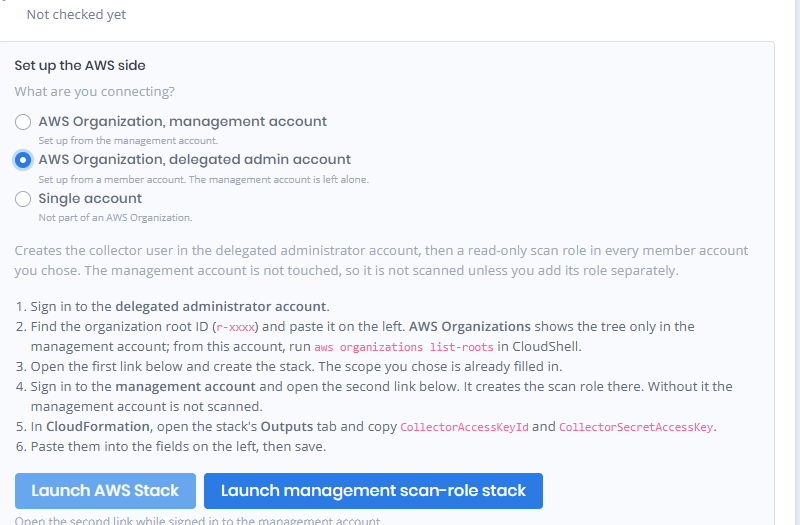
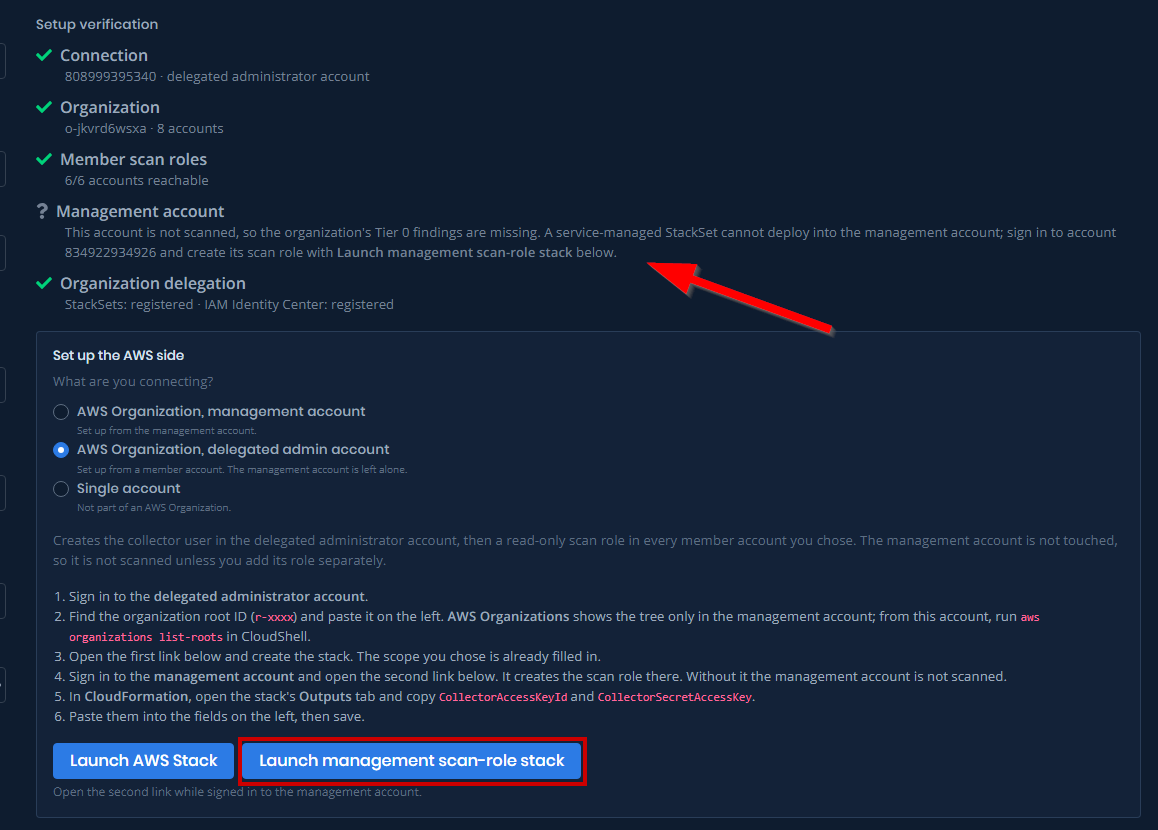
The delegated administrator shape adds a second button beside it, **Launch management scan-role stack**, as soon as you pick the shape, with the note "Open the second link while signed in to the management account." under both. It launches the stack that gives the management account its own scan role, the one account a StackSet cannot reach. The link carries your External ID; while that field is empty, both buttons stay disabled. It also carries the hub account ID and the collector's ARN once Forestall knows them, from a saved configuration or from Test. Until then, fill those two fields in on the CloudFormation page yourself.

<figure><img src="https://3408039743-files.gitbook.io/~/files/v0/b/gitbook-x-prod.appspot.com/o/spaces%2FObpV44hoVkNmo5bFuVVL%2Fuploads%2Fgit-blob-bcb98e3364f89168ef0ba77ad186d23f41965e34%2Faws-config-delegated-two-buttons.png?alt=media" alt=""><figcaption><p>The delegated shape selected: <strong>Launch AWS Stack</strong> and <strong>Launch management scan-role stack</strong> side by side</p></figcaption></figure>

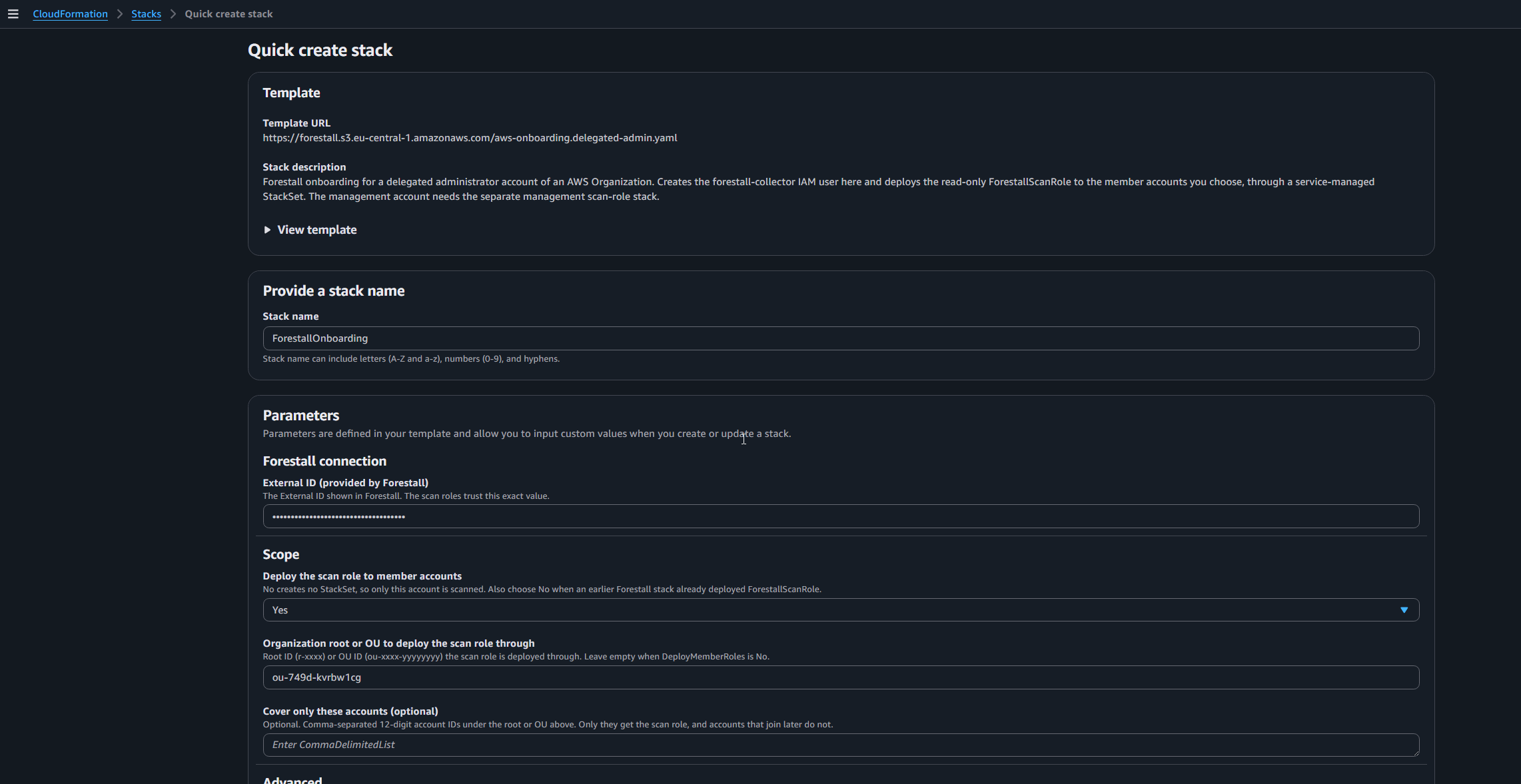
The CloudFormation quick-create page opens with the template, the stack name `ForestallOnboarding`, and these parameters:

| Stack parameter                                         | Where it comes from           | Notes                                                                                                           |
| ------------------------------------------------------- | ----------------------------- | --------------------------------------------------------------------------------------------------------------- |
| External ID (provided by Forestall)                     | The form                      | Hidden on the AWS side. Leave it as it is.                                                                      |
| Deploy the scan role to member accounts                 | The scope                     | `Yes` for the first three scopes, `No` for Only this account. With `No` no StackSet is created.                 |
| Organization root or OU to deploy the scan role through | The scope                     | The root or OU ID you typed. Required when Deploy is `Yes`; the stack refuses to start without it.              |
| Cover only these accounts (optional)                    | The scope                     | The account list from Specific accounts. Automatic deployment is switched off while a list is in use.           |
| `CollectorUserName`                                     | Default `forestall-collector` | Advanced.                                                                                                       |
| `MemberDeploymentRegion`                                | Default `us-east-1`           | Advanced. IAM is global, so one region is enough.                                                               |
| `StoreSecretInSecretsManager`                           | The link                      | Store the access key in Secrets Manager. The link sets it to `false`, so the key is shown in the stack Outputs. |

The single-account stack has no scope and no External ID; only the two Advanced parameters remain.

<figure><img src="https://3408039743-files.gitbook.io/~/files/v0/b/gitbook-x-prod.appspot.com/o/spaces%2FObpV44hoVkNmo5bFuVVL%2Fuploads%2Fgit-blob-f00336c9cf6e5426eb803d14f2056b639634005c%2Faws-cfn-quickcreate-delegated.png?alt=media" alt=""><figcaption><p>The CloudFormation quick-create page opened from Launch AWS Stack: stack name ForestallOnboarding, External ID masked, the OU ID filled in as the deploy target, Deploy set to Yes</p></figcaption></figure>

**Management account**

1. Sign in to the management account of the organization.
2. In **AWS Organizations > AWS accounts**, click **Root** or the OU and copy its ID (`r-xxxx` or `ou-xxxx-yyyyyyyy`). Paste it on the left.
3. Click **Launch AWS Stack** and create the stack. The scope you chose is already filled in.
4. Wait for `CREATE_COMPLETE`. The member roles go out through a StackSet; in our lab an eight-account organization took about four minutes.
5. In **CloudFormation**, open the stack's **Outputs** tab and copy `CollectorAccessKeyId` and `CollectorSecretAccessKey`.
6. Paste them into the fields on the left, then save.

<figure><img src="https://3408039743-files.gitbook.io/~/files/v0/b/gitbook-x-prod.appspot.com/o/spaces%2FObpV44hoVkNmo5bFuVVL%2Fuploads%2Fgit-blob-fff641d12ac2cb7a9508e10e74faafd95f18aeec%2Faws-setup-verification-management-full.png?alt=media" alt=""><figcaption><p>A management account hub after Test with the whole organization in scope: 7/7 member accounts reachable. The management and delegation rows exist only for delegated administrator hubs</p></figcaption></figure>

**Delegated administrator account**

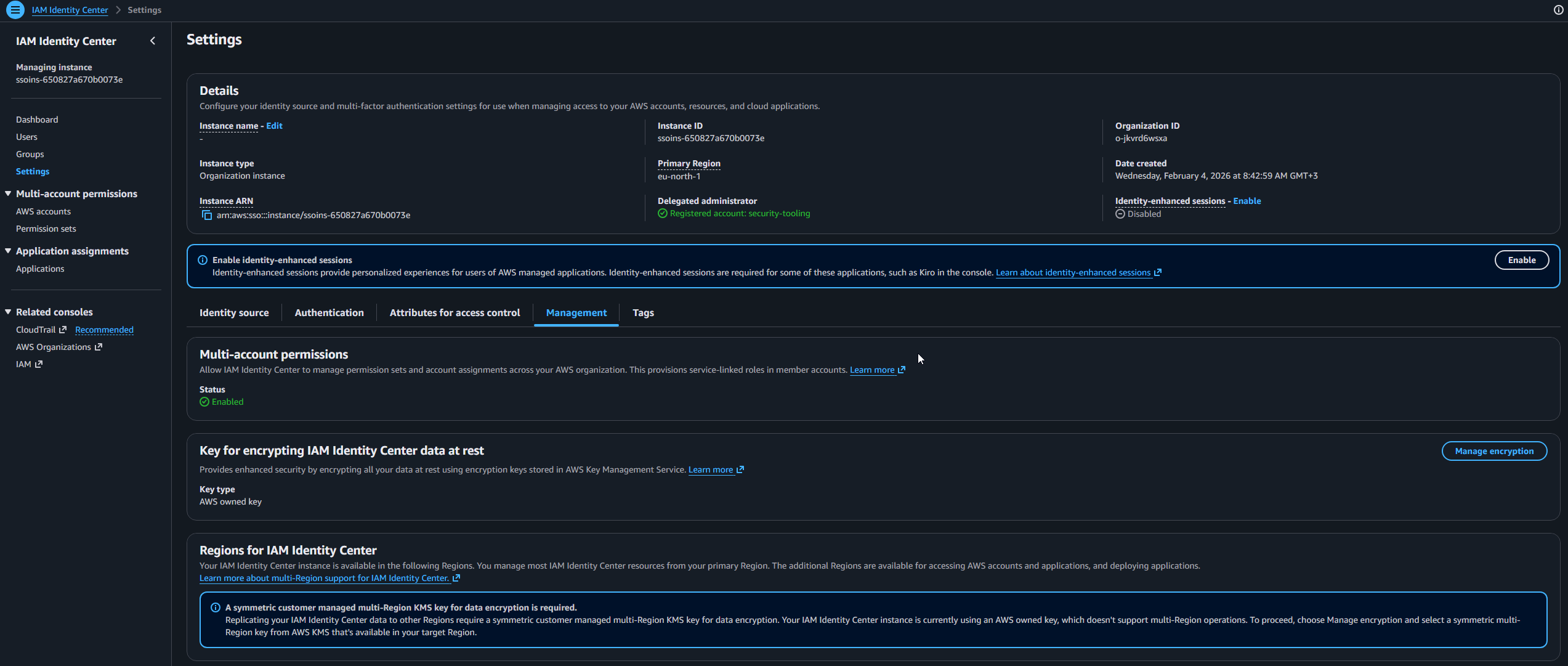
**Prerequisite: register the account as a delegated administrator.** You do this once, from the management account, and it takes two registrations. The first lets the stack deploy the scan role into member accounts. The second lets the collector read IAM Identity Center. The member account cannot register itself.

| Service                  | In the console, signed in to the management account                                                                                                                  | With the CLI, signed in to the management account                                                                                                        |
| ------------------------ | -------------------------------------------------------------------------------------------------------------------------------------------------------------------- | -------------------------------------------------------------------------------------------------------------------------------------------------------- |
| CloudFormation StackSets | **CloudFormation > StackSets**, then under **Delegated administrators** choose **Register delegated administrator** and pick the account.                            | `aws organizations register-delegated-administrator --account-id <hub-account-id> --service-principal member.org.stacksets.cloudformation.amazonaws.com` |
| IAM Identity Center      | **IAM Identity Center > Settings > Management** tab, then under **Delegated administrator** choose **Register account** and pick the account. One account at a time. | `aws organizations register-delegated-administrator --account-id <hub-account-id> --service-principal sso.amazonaws.com`                                 |

StackSets also needs trusted access with AWS Organizations switched on; the StackSets page in the management account offers **Activate trusted access** when it is not.

You can check both registrations from the delegated administrator account itself, without a management sign-in:

```
$ aws organizations list-delegated-services-for-account --account-id 808999395340 --output table
---------------------------------------------------------------------------------------------
|                              ListDelegatedServicesForAccount                              |
+-------------------------------------------------------------------------------------------+
||                                    DelegatedServices                                    ||
|+-----------------------------------+-----------------------------------------------------+|
||       DelegationEnabledDate       |                  ServicePrincipal                   ||
|+-----------------------------------+-----------------------------------------------------+|
||  2026-09-02T12:44:03.745000+03:00 |  member.org.stacksets.cloudformation.amazonaws.com  ||
||  2026-09-02T15:42:54.994000+03:00 |  sso.amazonaws.com                                  ||
|+-----------------------------------+-----------------------------------------------------+|
```

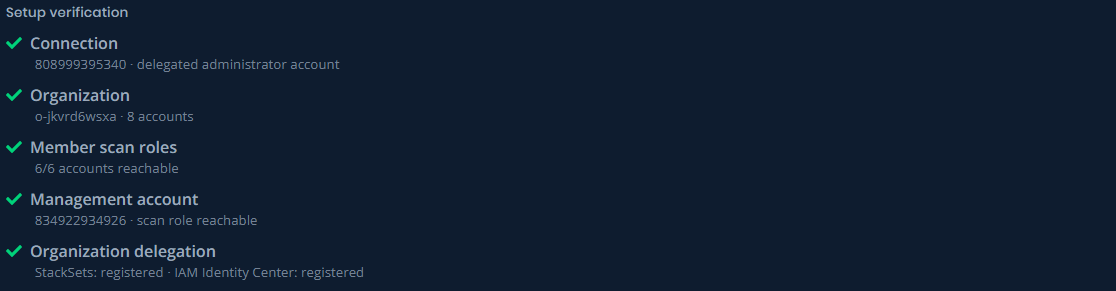
The **Organization delegation** row in Setup verification makes the same check after Test, and prints the missing command when one registration is absent.

<figure><img src="https://3408039743-files.gitbook.io/~/files/v0/b/gitbook-x-prod.appspot.com/o/spaces%2FObpV44hoVkNmo5bFuVVL%2Fuploads%2Fgit-blob-b1836f4650f59c74b493b7074615388b4e5ce863%2Faws-idc-settings-delegated-administrator.png?alt=media" alt=""><figcaption><p>IAM Identity Center > Settings > Management in the management account, with Delegated administrator showing the hub account</p></figcaption></figure>

1. Sign in to the delegated administrator account.
2. Find the root ID or the OU ID and paste it on the left. AWS Organizations in this account shows no tree, so read the ID from the management account's console, or run `aws organizations list-roots` (or `list-organizational-units-for-parent`) here in CloudShell, as shown under Where the IDs come from.
3. Click **Launch AWS Stack** and create the stack. Wait for `CREATE_COMPLETE`.
4. Sign in to the management account, then click **Launch management scan-role stack** and create that stack too. Without it, the management account is not scanned. This is the one step that needs management-account access. If that account belongs to another team, hand them the link, or the CLI command under The AWS side from the CLI.
5. In **CloudFormation**, open the stack's **Outputs** tab and copy `CollectorAccessKeyId` and `CollectorSecretAccessKey`.
6. Paste them into the fields on the left, then save.

The management link creates a stack named `ForestallManagementScanRole`. It holds the same read-only scan role the member accounts have, and trusts only your collector user with your External ID. IAM takes a moment to settle: if Test still says the account will not be scanned, wait half a minute and press **Test** again.

<figure><img src="https://3408039743-files.gitbook.io/~/files/v0/b/gitbook-x-prod.appspot.com/o/spaces%2FObpV44hoVkNmo5bFuVVL%2Fuploads%2Fgit-blob-19eabab0a7c35d94351d35e5b68a376907f19152%2Faws-config-delegated-steps.png?alt=media" alt=""><figcaption><p>The delegated administrator steps on the right of the form: six steps, no command block</p></figcaption></figure>

<figure><img src="https://3408039743-files.gitbook.io/~/files/v0/b/gitbook-x-prod.appspot.com/o/spaces%2FObpV44hoVkNmo5bFuVVL%2Fuploads%2Fgit-blob-e648fafbe3df4ff2c98bfe8cc05cd7539f14f7e4%2Faws-setup-verification-management-link.png?alt=media" alt=""><figcaption><p>The Management account row before its scan role exists, pointing at Launch management scan-role stack</p></figcaption></figure>

> ⚠️ Service control policies still apply to a delegated administrator account and to every member account; only the management account is exempt. If an SCP denies calls made without MFA, paste the two ARNs from the stack output `ScpMfaException` into that SCP's `ArnNotLike` condition.

**Single account**

1. Sign in to the account you want to scan.
2. Click **Launch AWS Stack** and create the stack. There is no scope and no External ID to fill in.
3. In **CloudFormation**, open the stack's **Outputs** tab and copy `CollectorAccessKeyId` and `CollectorSecretAccessKey`.
4. Paste them into the fields on the left, then save.

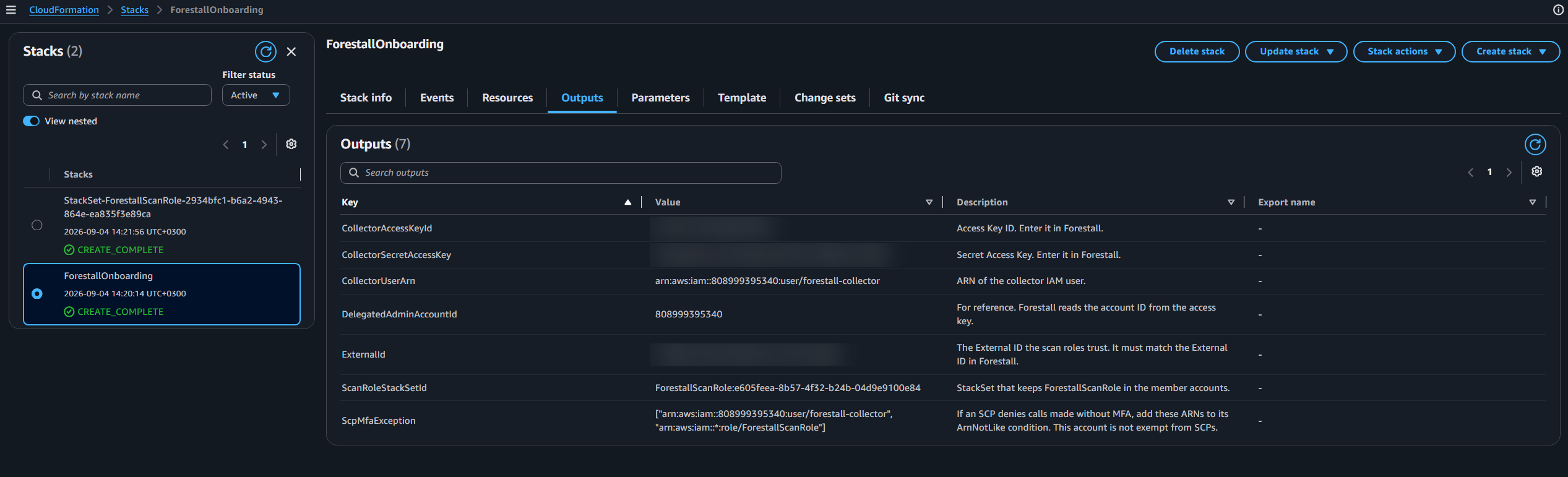
<figure><img src="https://3408039743-files.gitbook.io/~/files/v0/b/gitbook-x-prod.appspot.com/o/spaces%2FObpV44hoVkNmo5bFuVVL%2Fuploads%2Fgit-blob-98632e669af1fccb59f06489e2b110fb24b5dd23%2Faws-cfn-stack-outputs-credentials.png?alt=media" alt=""><figcaption><p>Outputs tab of the ForestallOnboarding stack created from the delegated administrator shape, with the CollectorAccessKeyId, CollectorSecretAccessKey and ExternalId rows</p></figcaption></figure>

For the two organization stacks, the Outputs tab also lists `ExternalId`, the value the scan roles trust. When a stack was created by hand, check it against the External ID on the form. The single-account stack has no External ID and no such row.

> The Outputs tab shows the secret in plain text, so restrict who can read the stack. Forestall shows the Secret Access Key only while you type it, so keep the AWS-side copy.

***

**Step 5: Test and read the Setup verification panel**

Click **Test**. Forestall signs in with the key, reads the organization, and tries the scan role in every account in scope. The **Setup verification** panel on the right fills in row by row. Until then it reads "Press Test to check the AWS side."

Test uses the scope currently on the form, not the saved one, so you can preview a change before you save it.

Each row carries a colour. Green check: in place. Yellow triangle: the scan runs, but covers less than you may expect. Red cross: the scan would be missing data. Grey: not checked, or nothing to check.

| Row                     | What it shows                                                                                                                                                                                                                                                                                                                                                                                                                                                           |
| ----------------------- | ----------------------------------------------------------------------------------------------------------------------------------------------------------------------------------------------------------------------------------------------------------------------------------------------------------------------------------------------------------------------------------------------------------------------------------------------------------------------- |
| Connection              | The account ID the key belongs to and its role: `organization management account`, `delegated administrator account`, or `standalone account`.                                                                                                                                                                                                                                                                                                                          |
| Organization            | The organization ID and its account count, for example `o-xxxx · 8 accounts`. With a narrowed scope it adds the in-scope count: `1 in scope (one organizational unit)`. A standalone account reads "This account is not part of an AWS Organization, so only this account is scanned." A yellow line appears under it when an ID in your account list does not exist in the organization.                                                                               |
| Member scan roles       | How many in-scope accounts the collector could reach: `6/6 accounts reachable`, or `2/2 in scope reachable · 5 accounts outside scope` with a sample of the accounts left out. Red, with an `Unreachable:` list and a reason per account, when an in-scope account could not be reached. Yellow when the scope covers no member account: "scans will cover only this account". Grey for a standalone account.                                                           |
| Management account      | Delegated administrator hubs only. Green with `<id> · scan role reachable` once the management scan role exists. Grey with "outside the scan scope, so it was not probed" when the scope excludes it. Otherwise it explains that the account is not scanned and points at the **Launch management scan-role stack** button under the steps. This row is never red: leaving the management account out is a choice.                                                      |
| Organization delegation | Delegated administrator hubs only. `StackSets: registered · IAM Identity Center: registered` in green. Red when the Identity Center registration is missing: the scan would return an organization with no permission sets and no assignments. Yellow when only the StackSets registration is missing: existing roles keep working, but you can no longer deploy or update them. The row prints the `register-delegated-administrator` command for the missing service. |

Fix anything red, press **Test** again, then **Save**.

<figure><img src="https://3408039743-files.gitbook.io/~/files/v0/b/gitbook-x-prod.appspot.com/o/spaces%2FObpV44hoVkNmo5bFuVVL%2Fuploads%2Fgit-blob-cbc8ef125d68f0350f2ca9d4034c50f9fa95d9fb%2Faws-setup-verification-delegated-full.png?alt=media" alt=""><figcaption><p>Setup verification for a delegated administrator hub with the whole organization in scope: all five rows green, including the management account</p></figcaption></figure>

<figure><img src="https://3408039743-files.gitbook.io/~/files/v0/b/gitbook-x-prod.appspot.com/o/spaces%2FObpV44hoVkNmo5bFuVVL%2Fuploads%2Fgit-blob-79fe397721104ceb82068208f190f80ec8e9398b%2Faws-setup-verification-ou-scope.png?alt=media" alt=""><figcaption><p>A management account hub with one OU on the form and Test pressed without Save: 8 accounts, 2 in scope, 2/2 in scope reachable, 5 accounts outside scope, with the accounts left out named</p></figcaption></figure>

***

**AWS Configuration Fields**

| Field                                                                      | Description                                                                                                                                                                                               |
| -------------------------------------------------------------------------- | --------------------------------------------------------------------------------------------------------------------------------------------------------------------------------------------------------- |
| AWS partition                                                              | The AWS partition of the account: Commercial, GovCloud, or China.                                                                                                                                         |
| Account Display Name                                                       | A friendly name for this account inside Forestall.                                                                                                                                                        |
| External ID                                                                | The value the scan roles trust. Generated by Forestall; replace it only before the stack exists.                                                                                                          |
| Session Name                                                               | Becomes the `RoleSessionName` when Forestall assumes a scan role. Forestall appends the account ID and a timestamp, so CloudTrail shows `Forestall-123456789012-20260824153011`. Defaults to `Forestall`. |
| What should be scanned?                                                    | The scan scope: whole organization, one OU, specific accounts, or only this account. Organization shapes only.                                                                                            |
| Organization root ID / Organizational unit ID / Organization root or OU ID | The root or OU the scan role is deployed through. Root only for the whole organization, OU only for one OU, either for Specific accounts. Hidden for Only this account.                                   |
| Account IDs                                                                | The comma-separated list for Specific accounts.                                                                                                                                                           |
| Access Key ID                                                              | The access key ID of the collector user, copied from the stack's Outputs tab. Last on the form, because the key exists only after the stack.                                                              |
| Secret Access Key                                                          | The secret half of the same key.                                                                                                                                                                          |

You do not type the account ID. Test reads it from the key and shows it in the Connection row.

**Actions**

**Test** signs in with the key, reads the organization, and probes the scan roles for the scope on the form. Nothing is saved.

**Save** stores the configuration, including the scope.

***

**Scan policy note**

Forestall collects Identity Center data (permission sets, SSO users and groups, account assignments) only when the **Identity Center Assessment** module is enabled in the AWS scan policy. It is on by default. See [AWS Policies](/fsprotect/scans/policies/aws-policies.md).

***

**The AWS side from the CLI**

The AWS CLI can do everything the launch links do. Use it when the console is out of reach, when a change ticket has to carry the exact command, or when the management-account step belongs to another team. The templates are the ones the links open.

| Template                             | URL                                                                                        |
| ------------------------------------ | ------------------------------------------------------------------------------------------ |
| Management account hub               | `https://forestall.s3.eu-central-1.amazonaws.com/aws-onboarding.master.yaml`               |
| Delegated administrator hub          | `https://forestall.s3.eu-central-1.amazonaws.com/aws-onboarding.delegated-admin.yaml`      |
| Single account                       | `https://forestall.s3.eu-central-1.amazonaws.com/aws-onboarding.single-account.yaml`       |
| Management scan role, delegated hubs | `https://forestall.s3.eu-central-1.amazonaws.com/aws-onboarding.management-scan-role.yaml` |

The parameter values are the ones the launch link carries. Open the link once to read them, or take them from the scope table in Step 3.

**Create the hub stack.** Run this in the hub account: the management account, the delegated administrator account, or the single account.

```
aws cloudformation create-stack \
  --stack-name ForestallOnboarding \
  --template-url https://forestall.s3.eu-central-1.amazonaws.com/aws-onboarding.delegated-admin.yaml \
  --capabilities CAPABILITY_NAMED_IAM \
  --parameters \
    ParameterKey=ExternalId,ParameterValue=<external-id-from-the-form> \
    ParameterKey=DeployMemberRoles,ParameterValue=Yes \
    ParameterKey=TargetOuId,ParameterValue=r-749d \
    ParameterKey=StoreSecretInSecretsManager,ParameterValue=false

aws cloudformation wait stack-create-complete --stack-name ForestallOnboarding
```

For **One organizational unit**, put the OU ID in `TargetOuId`. For **Specific accounts**, put the root ID, or the ID of the OU the accounts sit under, in `TargetOuId`. Pass the account list through a parameter file, because commas inside a value are awkward on the command line:

```
[
  { "ParameterKey": "ExternalId", "ParameterValue": "<external-id-from-the-form>" },
  { "ParameterKey": "DeployMemberRoles", "ParameterValue": "Yes" },
  { "ParameterKey": "TargetOuId", "ParameterValue": "r-749d" },
  { "ParameterKey": "TargetAccountIds", "ParameterValue": "571264418869,524296809457" },
  { "ParameterKey": "StoreSecretInSecretsManager", "ParameterValue": "false" }
]
```

```
aws cloudformation create-stack --stack-name ForestallOnboarding --template-url <template-url> --capabilities CAPABILITY_NAMED_IAM --parameters file://forestall-params.json
```

For **Only this account**, set `DeployMemberRoles=No` and leave `TargetOuId` out. The single-account template takes only `StoreSecretInSecretsManager=false`.

**Read the credentials**, instead of the Outputs tab:

```
aws cloudformation describe-stacks --stack-name ForestallOnboarding \
  --query "Stacks[0].Outputs[?OutputKey=='CollectorAccessKeyId' || OutputKey=='CollectorSecretAccessKey'].[OutputKey,OutputValue]" \
  --output table
```

**Create the management scan role** for a delegated administrator hub. Run this in the management account; the three values are the ones the second launch button carries.

```
aws cloudformation create-stack \
  --stack-name ForestallManagementScanRole \
  --template-url https://forestall.s3.eu-central-1.amazonaws.com/aws-onboarding.management-scan-role.yaml \
  --capabilities CAPABILITY_NAMED_IAM \
  --parameters \
    ParameterKey=HubAccountId,ParameterValue=808999395340 \
    ParameterKey=CollectorPrincipalArn,ParameterValue=arn:aws:iam::808999395340:user/forestall-collector \
    ParameterKey=ExternalId,ParameterValue=<external-id-from-the-form>
```

**Change the scope later.** Save the form, then update the stack with the new value. Every parameter you do not name falls back to its template default, so keep the others with `UsePreviousValue`:

```
aws cloudformation update-stack --stack-name ForestallOnboarding --use-previous-template --capabilities CAPABILITY_NAMED_IAM \
  --parameters \
    ParameterKey=TargetOuId,ParameterValue=ou-749d-p6c2hzjh \
    ParameterKey=ExternalId,UsePreviousValue=true \
    ParameterKey=DeployMemberRoles,UsePreviousValue=true \
    ParameterKey=TargetAccountIds,UsePreviousValue=true \
    ParameterKey=StoreSecretInSecretsManager,UsePreviousValue=true \
    ParameterKey=CollectorUserName,UsePreviousValue=true \
    ParameterKey=MemberDeploymentRegion,UsePreviousValue=true
```

**See which accounts hold the scan role.** Run this in the hub account; on a delegated administrator hub add `--call-as DELEGATED_ADMIN`.

```
aws cloudformation list-stack-instances --stack-set-name ForestallScanRole --query "Summaries[].[Account,Status]" --output table
```

Test's **Member scan roles** row shows the same from Forestall's side, and also whether the collector can actually assume each role.

***

**Best Practices**

* **Let the stack create the identities.** It grants exactly what Forestall needs and denies the content reads it must never make.
* **Keep the External ID.** Do not change it after the stack exists unless you also update the stack.
* **Rotate the collector key.** Every 90 days, or per your policy. Update the configuration and press Test.
* **Test before Save.** A broken delegation or a missing role shows up in Setup verification before the first scan runs.
* **Delegated hubs: add the management role.** Without it the management account and its Tier 0 findings are missing from every scan.
* **Update the stack when the scope changes.** The scan reads only accounts that have the role. The stack is what puts it there.

***

**Troubleshooting**

**Authentication fails**

* Check that the Access Key ID and Secret Access Key match the values in the stack's Outputs tab and that the key is still active.
* Check that an SCP is not denying the collector. The stack output `ScpMfaException` lists the ARNs to exempt.

**Launch AWS Stack is disabled**

* The button needs the External ID, the root or OU ID, and for Specific accounts the account list. The line under the button says which one is missing. A configuration saved before External IDs were editable opens with that field empty: enter one, then the links open.

**Stack creation fails and rolls back**

* A StackSet named `ForestallScanRole` already exists in the organization, usually from an earlier Forestall stack. CloudFormation returns `NameAlreadyExistsException` and the rollback removes the collector user too. Either delete the earlier stack first, or set **Deploy the scan role to member accounts** to `No`. With `No` the existing roles are left alone; they still have to trust the new collector.

**Member scan roles shows accounts as unreachable**

* The stack was created with a different scope or External ID than the form. Open the link again and update the stack.
* On a delegated administrator hub, check the **Organization delegation** row. The StackSets registration is what lets the stack reach member accounts.
* The row prints a reason per unreachable account. An SCP that denies the role in that account shows up there.

**The Management account row still says the account will not be scanned right after you created its stack**

* IAM changes take a moment to spread. Wait about 30 seconds and press **Test** again.

**Identity Center data is missing from a scan**

* On a delegated administrator hub the account must be registered for `sso.amazonaws.com`. The **Organization delegation** row shows this in red when it is missing.
* Check that the **Identity Center Assessment** module is enabled in the scan policy.

**An account in the list is not scanned**

* The **Organization** row shows a yellow line naming account IDs that AWS could not find in the organization. Check the IDs, or drop them from the list.

**AWS Organizations shows no accounts in the delegated administrator account**

* Expected. The console draws the tree only in the management account. Read the IDs there, or run the commands under Where the IDs come from in CloudShell from the delegated administrator account. The registration is not broken: the **Organization delegation** row after Test would say so.

**Configuration won't save**

* Every required field must be filled, and the External ID must use the allowed characters.
* A root ID belongs in the root field and an OU ID in the OU field; the message under the field shows the expected form.
* Press Test and clear anything red first.

***

**Required AWS IAM Permissions**

The stack grants these; you do not paste a policy. Two identities receive them: the collector user in the hub account, and `ForestallScanRole` in every scanned member account (and in the management account, when you add that stack).

**Collector user**

| Grant                                                                                                                                                                                                                           | What it is for                                                                                                                                                                                                                                                                                                                        |
| ------------------------------------------------------------------------------------------------------------------------------------------------------------------------------------------------------------------------------- | ------------------------------------------------------------------------------------------------------------------------------------------------------------------------------------------------------------------------------------------------------------------------------------------------------------------------------------- |
| `SecurityAudit` (AWS managed policy)                                                                                                                                                                                            | Read-only access across AWS services. It covers every IAM read Forestall makes (`iam:Get*`, `iam:List*`), the Organizations reads that list the accounts and OUs, and the Identity Center reads that list instances, permission sets and assignments. AWS extends it as new services appear, so the stack needs no redeploy for them. |
| `sso:DescribeRegisteredRegions`                                                                                                                                                                                                 | Finds the region the Identity Center instance lives in.                                                                                                                                                                                                                                                                               |
| `identitystore:DescribeUser`, `identitystore:DescribeGroup`                                                                                                                                                                     | Reads a single SSO user or group by ID, to resolve the identities behind account assignments.                                                                                                                                                                                                                                         |
| `sts:AssumeRole` on `arn:aws:iam::*:role/ForestallScanRole`                                                                                                                                                                     | Lets the collector step into member accounts through the scan role, and into nothing else. Organization shapes only.                                                                                                                                                                                                                  |
| `lambda:GetFunctionUrlConfig`, `opensearch:ListDomainNames`, `opensearch:DescribeDomain`, `opensearch:DescribeDomains`, `glue:GetResourcePolicies`, `kafka:GetClusterPolicy`, `memorydb:DescribeAcls`, `memorydb:DescribeUsers` | Reads that `SecurityAudit` does not include: Lambda function URL settings, OpenSearch domains, Glue and MSK resource policies, MemoryDB ACLs and users.                                                                                                                                                                               |
| `apigateway:GET` on `/restapis`, `/apis`, `/domainnames` and their children, and on `/vpclinks`                                                                                                                                 | API Gateway configuration reads. The paths that return API key values are denied below.                                                                                                                                                                                                                                               |

`SecurityAudit` includes the IAM reads Forestall depends on:

| IAM reads (inside `SecurityAudit`)                                                                                                      | Why Forestall needs them                                                        |
| --------------------------------------------------------------------------------------------------------------------------------------- | ------------------------------------------------------------------------------- |
| `iam:ListUsers`, `iam:GetUser`                                                                                                          | Enumerates users and their attributes for identity analysis.                    |
| `iam:ListGroups`, `iam:GetGroup`, `iam:ListGroupsForUser`                                                                               | Maps group memberships and group-level access control.                          |
| `iam:ListRoles`, `iam:GetRole`                                                                                                          | Enumerates roles and their trust policies to assess privilege escalation paths. |
| `iam:ListPolicies`, `iam:GetPolicy`, `iam:GetPolicyVersion`, `iam:ListPolicyVersions`                                                   | Reads managed policies and their documents to compute effective permissions.    |
| `iam:ListAttachedUserPolicies`, `iam:ListAttachedGroupPolicies`, `iam:ListAttachedRolePolicies`                                         | Lists the managed policies attached to users, groups, and roles.                |
| `iam:ListUserPolicies`, `iam:ListGroupPolicies`, `iam:ListRolePolicies`, `iam:GetUserPolicy`, `iam:GetGroupPolicy`, `iam:GetRolePolicy` | Reads inline policies, where non-standard permission grants hide.               |
| `iam:ListAccessKeys`, `iam:GetAccessKeyLastUsed`                                                                                        | Finds inactive, unused, or aged access keys.                                    |
| `iam:ListUserTags`, `iam:ListRoleTags`                                                                                                  | Reads the tags on users and roles.                                              |

**Scan role (`ForestallScanRole`)**

| Grant                                                                                                       | What it is for                                                                                                                             |
| ----------------------------------------------------------------------------------------------------------- | ------------------------------------------------------------------------------------------------------------------------------------------ |
| `SecurityAudit` (AWS managed policy)                                                                        | The same read-only baseline, inside the member account.                                                                                    |
| The eight extra reads above (`lambda:GetFunctionUrlConfig` … `memorydb:DescribeUsers`) and `apigateway:GET` | The same gaps, inside the member account.                                                                                                  |
| Trust policy                                                                                                | Only the hub account's collector user may assume it (`aws:PrincipalArn`), and only with your External ID (`sts:ExternalId`). No wildcards. |

The scan role has no `sts:AssumeRole` and no `sso:` or `identitystore:` grant. Identity Center is read from the hub.

**What both identities are denied**

Forestall reads configuration, never content. An explicit `Deny` sits on top of every allow and stays in force however `SecurityAudit` grows. It blocks these content reads:

* S3 objects
* Secrets Manager values
* SSM parameters, sessions and commands
* KMS decrypt and data keys
* DynamoDB items and queries
* Lambda code and invocation
* EC2 password data, console output, screenshots and instance user data; EC2 Instance Connect; launch templates and launch configurations
* Batch job definitions, CodeBuild projects, Data Pipeline definitions, Elastic Beanstalk configuration settings
* CloudFormation templates and stack parameters
* SQS messages
* CloudWatch log events and query results
* ECR images and tokens, CodeCommit files, Athena query results
* STS federation and session tokens

It also blocks the API Gateway paths that return API key values: `/apikeys` and `/usageplans/*/keys`.