> For the complete documentation index, see [llms.txt](https://docs.forestall.io/forestall/llms.txt). Markdown versions of documentation pages are available by appending `.md` to page URLs; this page is available as [Markdown](https://docs.forestall.io/forestall/visualize/visualize.md).
# Graph
Graph shows every edge between the entities of the scanned environments: Active Directory, Entra ID and Azure resources, AWS, GCP and GitHub. Objects from different platforms are drawn on the same graph, together with the edges that connect them.
Use it to find the attack paths caused by the relationships and access control entries between these entities.
## **Initial Foothold**
When the Graph page is opened from the menu, it draws a starting node that depends on the platforms scanned in the selected scan:
* **Active Directory** scanned: the `Domain Admins` group.
* Otherwise **Azure**: the `Global Administrator` role.
* Otherwise **GCP**: the first GCP user whose name contains "admin".
* Otherwise **AWS**: the first IAM user whose name contains "admin".
* Otherwise **GitHub**: the enterprise, or every organization when no enterprise was collected.
Any entity can be opened as the starting node from the **Graph »** button (**Admin Path »** for shadow admins) in the header of its detail page, or from the search box on the top bar.
The graph can also be opened with a query already run:
* The shortest path links on entity detail pages open the graph with that query applied to the entity. If no path is found, the page shows "No path found with your current relationship filters. You can adjust them in graph settings."
* A saved search in [Search & Reports](/forestall/search-and-reports.md) can be drawn on the graph.
Graph Module
Hover over a node to see its entity type.
Each node is drawn as a coloured circle with the icon of its entity type. A small badge on its lower-right edge shows the provider the object came from: Active Directory, Azure, AWS, GCP or GitHub. A Tier 0 object additionally carries a crown badge above the node.
### Active Directory Icon-to-Entity Mapping
| Icon | Entity Type |
| :------------------------------------------------------------------------------------------------------------------------------------------------------------------------------------------------------------------------------------------------------------------------------------------------------: | :-----------------------------------------------------: |
| | **Forest** |
| | **Domain** |
| | **Unknown Trust (trusted domain that was not scanned)** |
| | **Container** |
| | **Organizational Unit** |
| | **User** |
| | **Group** |
| | **Computer (domain controllers, servers and clients)** |
| | **Group Policy Object** |
| | **GPO Owned Script** |
| | **Managed Service Account** |
| | **Group Managed Service Account** |
| | **Delegated Managed Service Account** |
| | **Local User** |
| | **Local Group** |
| | **Service Principal Name** |
| | **Certificate Authority** |
| | **Certificate Template** |
| | **CA Certificate** |
| | **Fine Grained Password Policy** |
| | **DNS Zone** |
### Azure Icon-to-Entity Mapping
| Icon | Entity Type |
| :------------------------------------------------------------------------------------------------------------------------------------------------------------------------------------------------------------------------------------------------------------------------------------------------------: | :----------------------------------: |
| | **Tenant** |
| | **User** |
| | **Group** |
| | **Device** |
| | **Application** |
| | **Service Principal** |
| | **Role** |
| | **Administrative Unit** |
| | **Conditional Access Policy** |
| | **Application Secret** |
| | **Application Certificate** |
| | **Application Federated Credential** |
| | **Management Group** |
| | **Subscription** |
| | **Resource Group** |
| | **ARM Role** |
| | **Virtual Machine** |
| | **VM Scale Set** |
| | **Managed Cluster (AKS)** |
| | **Web App** |
| | **Function App** |
| | **Logic App** |
| | **Automation Account** |
| | **Container Registry** |
| | **Storage Account** |
| | **Storage Container** |
| | **Key Vault** |
| | **SQL Server** |
| | **User-Assigned Managed Identity** |
| | **Teams Settings** |
| | **Teams Meeting Policy** |
| | **Teams Messaging Policy** |
| | **Teams External Access Settings** |
| | **SharePoint Settings** |
| | **SharePoint Site** |
### GCP Icon-to-Entity Mapping
| Icon | Entity Type |
| :------------------------------------------------------------------------------------------------------------------------------------------------------------------------------------------------------------------------------------------------------------------------------------------: | :-------------------------: |
| | **Customer** |
| | **Organization** |
| | **Organizational Unit** |
| | **Folder** |
| | **Project** |
| | **User** |
| | **Group** |
| | **Service Account** |
| | **Service Account Key** |
| | **Role** |
| | **Device** |
| | **Principal** |
| | **Workforce Identity Pool** |
| | **Workforce Provider** |
| | **Workload Identity Pool** |
| | **Workload Provider** |
| | **VM Instance** |
| | **KMS Key** |
### AWS Icon-to-Entity Mapping
| Icon | Entity Type |
| :-----------------------------------------------------------------------------------------------------------------------------------------------------------------------------------------------------------------------------------------------------------------------------------: | :---------------------: |
| | **Organization** |
| | **Organizational Unit** |
| | **Account** |
| | **IAM User** |
| | **IAM Group** |
| | **IAM Role** |
| | **IAM Policy** |
| | **IAM Access Key** |
| | **Identity Center** |
| | **SSO User** |
| | **SSO Group** |
| | **Permission Set** |
### GitHub Icon-to-Entity Mapping
| Icon | Entity Type |
| :----------------------------------------------------------------------------------------------------------------------------------------------------------------------------------------------------------------------------------------------------------------------------: | :-------------------: |
| | **Enterprise** |
| | **Organization** |
| | **User** |
| | **Team** |
| | **Repository** |
| | **Organization Role** |
| | **App Installation** |
### Other Nodes
| Icon | Entity Type |
| :--------------------------------------------------------------------------------------------------------------------------------------------------------------------------------------------------------------------------------------------------------------------------: | :---------------------------------------------------: |
| | **Cluster (neighbours grouped with Cluster Options)** |
| | **Unified Identity** |
| | **Scan** |
| | **Vulnerability** |
Every node type above has its own icon. A type with no icon of its own is drawn with the computer icon.
## **Graph Canvas Controls**
Use the mouse wheel to zoom in and out, and drag the background to move around the graph. Drag a node to move it.
**Search:** The `Search...` box in the upper-left corner searches the nodes that are currently drawn on the graph and moves the view to the selected node.
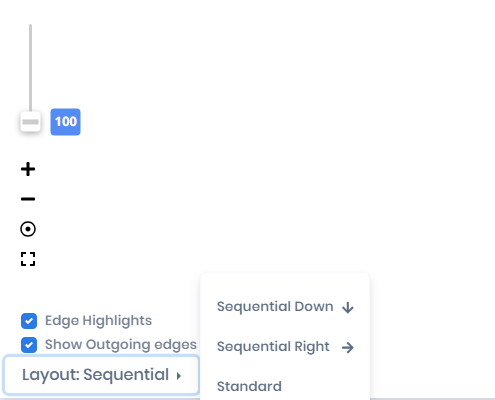
**Slide Bar:** The vertical slider on the lower left corner limits the number of results a query returns. The range is 50 to 2000 in steps of 50, and the default is 100. In large environments, common objects can have tens of thousands of relation paths.
Graph Visualization Controls
**Zoom In / Zoom Out:** Zooms the graph in or out.
**Reset View:** Centers the graph.
**Full Screen:** Shows the graph in full screen.
**Edge Highlights:** When enabled, the relationships of the node under the mouse cursor are highlighted while hovering over it.
**Show Outgoing Edges from Cluster Nodes:** When enabled, outgoing relationships from clustered nodes (see [Right-Click Menu](#right-click-menu)) are displayed.
**Layout:** The `Layout` menu at the bottom shows the current layout and changes it:
* **Sequential Down:** Hierarchical layout from top to bottom.
* **Sequential Right:** Hierarchical layout from left to right (the default).
* **Standard:** Iterative force-directed layout.
The canvas settings (slider value, Edge Highlights, layout) are remembered in the browser.
### **Right-Click Menu**
Right-clicking a node opens a menu with three groups:
* **HIDE NODE:** Removes the node from the drawing.
* **Cluster Options:** Groups the neighbours of the node into cluster nodes to keep large graphs readable:
* **Incoming All** / **Outgoing All:** Groups all incoming or outgoing neighbours into one cluster node.
* **Entity Type:** Groups the incoming (left button) or outgoing (right button) neighbours by entity type.
* **Rel Type:** Groups the incoming (left button) or outgoing (right button) neighbours by relation type.
On a cluster node the menu offers **OPEN** for the option that created it, which expands the cluster again.
* **Filter Options:** Lists every relation type of the node with its number of incoming (left) and outgoing (right) relations, for example `→0 IN_SCAN 1→`. Clicking a count adds the neighbours connected with that relation to the graph.
Right-click menu
{% hint style="info" %}
The right-click menu is not available with a trial licence.
{% endhint %}
## **Built-in Graph Features**
Click a node or edge to open the operation pane on the right side of the graph. Drag the pane's edge to resize it.
The pane has five tabs:
* **Info** (The queries varies according to the selected entity type)
* **ACL List**
* **Queries** (Fixed)
* **Path Finder** (Fixed)
* **Settings** (Fixed)
Side Pane
The identifier information of the selected node is shown above the tabs, so it stays visible on every tab:
* **FSName:** Name of the node. It links to the entity's detail page (opens in a new tab).
* **DN:** Distinguished name, where the object has one.
* **Type:** Entity type, followed by its tier, for example `Group, Tier0`.
* **Guid** and **Id**.
### **Info Tab**
For a selected node, the `Info` tab contains built-in graph queries in two sections:
* **Node Queries:** Queries that vary according to the selected entity type (see [Node Specific Built-in Queries](#active-directory-node-specific-built-in-queries)).
* **Shortest Path Queries:** Shortest path queries of the platform the selected node belongs to. Only the queries of that platform are listed. For example, an AWS node shows only the AWS queries.
These built-in queries find the most common incoming and outgoing attack paths.
For a selected edge, the `Info` tab shows the edge's `Id`, its properties (for example `Role Guid`, `SourceObjectFSName` or `Role Assignment Resource`, linked to the related objects) and the documentation of the relation type in collapsible sections, such as its abuse and remediation information.
Edge information
### **ACL List Tab**
The `ACL List` tab lists the relations of the selected node that are drawn on the graph, in two collapsible tables: **Incoming Relations - N** and **Outgoing Relations - N**. The columns are `Type`, `Relation` and `FSName`. Each column can be sorted and has a text filter. Clicking an `FSName` moves the view to that node.
For a cluster node, the columns are `From Type`, `From Node`, `Relation`, `To Type` and `To Node`.
ACL List
### **Shortest Path Queries - Active Directory Built-in Queries**
These shortest path queries are listed for every Active Directory entity type, regardless of the selected node.
**Get Shortest Path to AD Admin Objects**: Finds the shortest path from the selected node to administrative objects.
**Get All AD Shortest Path to Here**: Finds the shortest path from any Active Directory node to the selected node.
**Get All AD Shortest Path to Here from Non-Privileged Objects:** Finds the shortest privilege escalation path from non privileged Active Directory objects, such as standard users or computers, to the selected node.
**Get All AD Shortest Path to Here from Everyone-Like Objects:** Identifies the shortest paths from broadly accessible identities, such as Domain Users or Authenticated Users, to the selected object.
**Get AD Shortest Path to Here from Cross Domain/Forest**: Finds the shortest path from any node that belongs to another domain or forest to the selected node.
**Get AD Shortest Path to Cross Domain/Forest**: Finds the shortest path from the selected node to any node that belongs to another domain or forest.
**Get Shortest Path to Hybrid Admin Objects (AD->Azure):** Finds the shortest attack path from on-premises Active Directory objects to hybrid administrative objects in Azure environments.
{% hint style="info" %}
Calculation of the shortest paths is according to the hop numbers between edges. Only the relations enabled on the [Settings](#settings-tab) tab are used.
{% endhint %}
The example below finds the shortest paths to the `Domain Admins` object of the `fsprotect.io` domain.
Get All AD Shortest Path to Here
### **Shortest Path Queries - Azure Built-in Queries**
These shortest path queries are listed for every Azure entity type, regardless of the selected Azure object.
**Get Shortest Path to Azure Admin Objects:** Finds the shortest path from the selected Azure identity to Azure administrative (Tier 0) objects.
**Get All Azure Shortest Path to Here:** Finds the shortest path from any Azure identity to the selected Azure object.
**Get All Azure Shortest Path to Here from Non-Privileged Objects:** Finds the shortest privilege escalation path from non-privileged Azure identities, such as standard users or service principals, to the selected Azure object.
**Get Shortest Path to Hybrid Admin Objects (Azure->AD):** Finds the shortest attack path from Azure identities to hybrid administrative objects in on-premises Active Directory environments.
Azure shortest path queries
### **Shortest Path Queries - GCP Built-in Queries**
**Get Shortest Path to GCP Admin Objects:** Finds the shortest path from the selected GCP object to GCP Tier 0 objects.
**Get All GCP Shortest Path to Here:** Finds the shortest path from any GCP object to the selected object.
**Get All GCP Shortest Path to Here from Non-Privileged Objects:** Finds the shortest path from non-privileged GCP objects to the selected object, through non-privileged objects only.
### **Shortest Path Queries - AWS Built-in Queries**
**Get Shortest Path to AWS Admin Objects:** Finds the shortest path from the selected AWS object to Tier 0 objects. For an object that can escalate its own privileges, it shows that self-escalation instead.
**Get All AWS Shortest Path to Here:** Finds the shortest path from any AWS object to the selected object.
**Get All AWS Shortest Path to Here from Non-Privileged Objects:** Finds the shortest path from non-privileged AWS objects to the selected object, through non-privileged objects only.
**Find AWS Self-Escalation:** Finds the policy-modification relations with which the selected object can escalate its own privileges (for example attaching or putting a policy on itself or on its group, or changing a policy version or permission set).
**Get Shortest Path to AWS Tier 0 Objects:** Finds the shortest path from the selected object to AWS Tier 0 objects.
**Get Shortest Path to AWS Privileged Objects:** Finds the shortest path from the selected object to privileged AWS objects that are not Tier 0.
**Find AWS Cross-Account Attack Paths:** Finds the shortest paths from the selected object to Tier 0 or privileged objects in another AWS account.
### **Shortest Path Queries - GitHub Built-in Queries**
**Get Shortest Path to GitHub Admin Objects:** Finds the shortest path from the selected GitHub object to GitHub Tier 0 objects.
**Get All GitHub Shortest Path to Here:** Finds the shortest path from any GitHub object to the selected object.
**Get All GitHub Shortest Path to Here from Non-Privileged Objects:** Finds the shortest path from non-privileged GitHub objects to the selected object, through non-privileged objects only.
## Active Directory Node Specific Built-in Queries
#### **Forest - Node Specific Built-in Queries**
* **Get Trust Relations**: Trust relations between this forest and other domains/forests.
#### **Domain - Node Specific Built-in Queries**
* **Dangerous access control entries on this domain**: Directly incoming access control entries from non-privileged objects to this domain node. Owners of the access control entries have permission to perform critical operations on this node. (See Relations)
* **Get Trust Relations**: Trust relations between this domain node and other domains/forests.
#### **Computer - Node Specific Built-in Queries**
Includes all the domain controllers, servers and clients.
* **Who can read this computer password ?**: The attack paths that allow other entities to read the selected computer's password.
* **Who can rdp into this computer?**: The attack paths that allow other entities to connect with Remote Desktop Protocol to the selected computer.
* **Who can exec command on this computer?**: The attack paths that allow other entities to execute command with DCOM, Powershell, and etc. on the selected computer.
* **Find nested group memberships**: Reveals the nested parent group membership paths of the selected computer.
* **Explicit local admin rights**: The attack paths that grants the selected computer the `Local Administrator` rights on other computers. These attack paths are caused by direct/explicit membership in the `Local Administrators` group.
* **Group delegated local admin rights**: The attack paths that grants the selected computer the `Local Administrator` rights on other computers. These attack paths are caused by the **nested** membership in the `Local Administrators` group.
* **Derivative local admin rights**: It is very similar to the `Group delegated local admin rights` query. The only difference is, `Derivative local admin rights` takes the existing sessions into consideration which can be abused by impersonation or credential harvesting.
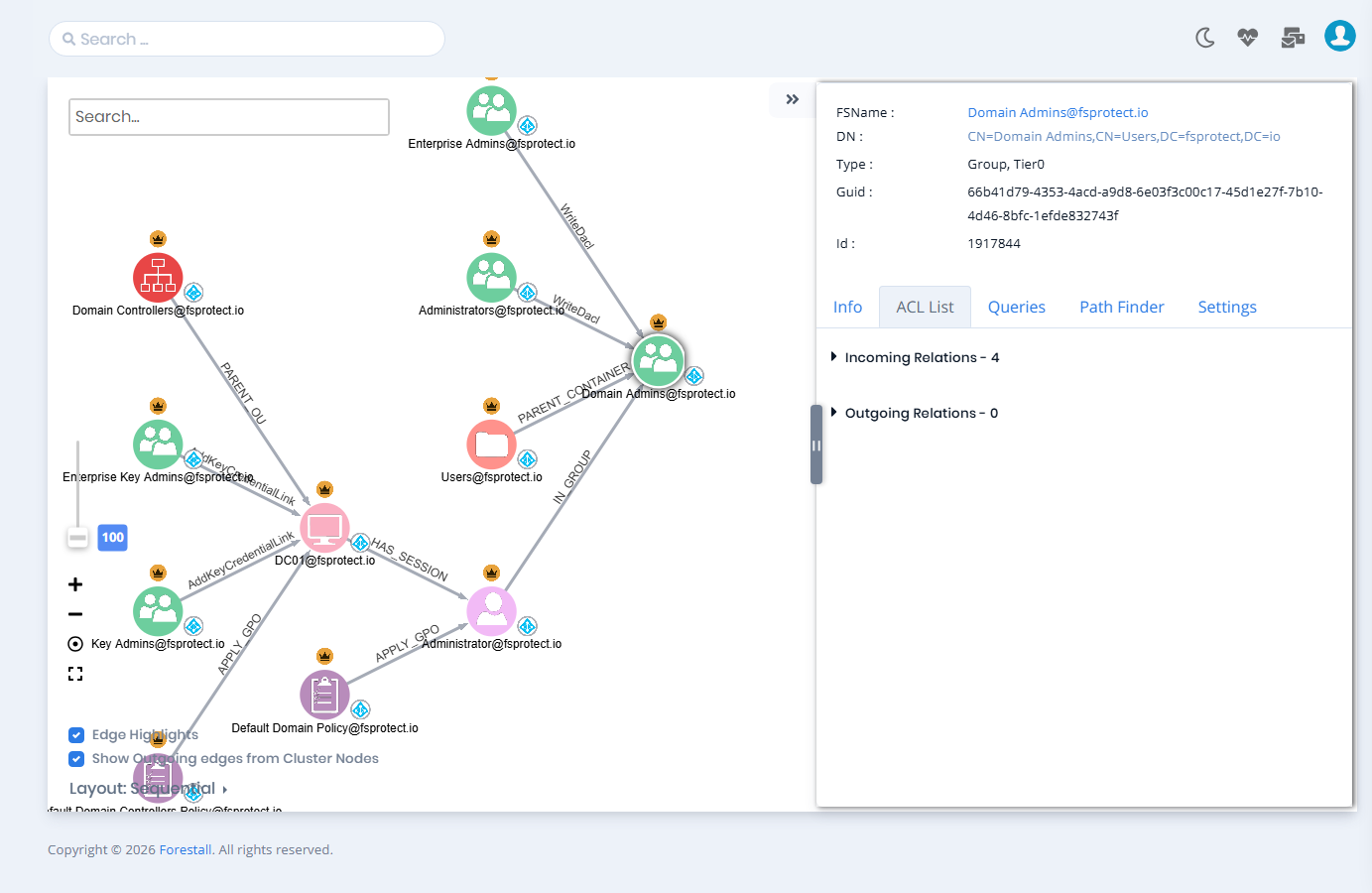
* Example: `Incoming - Derivative local admin rights` on the `DC01@fsprotect.io` domain controller;
Derivative Local Admin Rights
When no session is involved, the result shows the same paths as the group delegated query, as in the figure. In a derivative path, a user that has local admin rights on the target computer also has a **SESSION** on another computer. Any entity with local admin rights on that second computer can harvest the credentials, hashes or tickets of the user, or impersonate its processes, and so reach the target computer as a local administrator.
* **Incoming - Explicit local admin rights:** The attack paths that allow other entities to gain explicit local administrator privileges on the selected computer.
* **Incoming - Group delegated local admin rights:** The attack paths that allow other entities to obtain local administrator privileges on the selected computer through group-based delegation.
* **Incoming - Derivative local admin rights:** The attack paths that allow other entities to gain local administrator privileges on the selected computer indirectly, through sessions.
* **Dangerous access control entries on this computer**: Directly incoming access control entries from non-privileged objects to this computer node. Owners of the access control entries have permission to perform critical operations on this node. (See Relations)
* **Group Policies can apply to this computer:** The Group Policy Objects (GPOs) that can be applied to the selected computer and may affect its configuration, security settings, or privilege assignments.
#### **User - Node Specific Built-in Queries**
* **Who can reset this users password?**: The attack paths that allow other entities to reset the selected user's password.
* **Find nested group memberships**: Reveals the nested parent group membership paths of the selected user.
* **Explicit local admin rights**: The attack paths that grants the selected user node to the `Local Administrator` rights on the computer entities. These attack paths are caused by direct/explicit membership in the `Local Administrators` group in any computer.
* **Group delegated local admin rights**: The attack paths that grants the selected user node to the `Local Administrator` rights on the computer entities. These attack paths are caused by the **nested** membership in the `Local Administrators` group in any computer.
* **Derivative local admin rights**: The attack paths that grants the selected user node to the `Local Administrator` rights on the computer entities. It is very similar to the `Group delegated local admin rights` query. The only difference is, `Derivative local admin rights` takes the existing sessions into consideration which can be abused by impersonation or credential harvesting.
* **Dangerous access control entries on this user**: Directly incoming access control entries from non-privileged objects to this user node. Owners of the access control entries have permission to perform critical operations on this node. (See Relations)
* **Group Policies can apply to this user:** The Group Policy Objects (GPOs) that can be applied to the selected user and may affect the user's permissions, security settings, or policy-based configurations.
#### **Group - Node Specific Built-in Queries**
* **Who Can Add Members to This Group ?**: Find the entities that can add members to the selected group node.
* **Find Nested Parent Groups**: Reveals the nested parent group membership paths of the selected group.
* **Find Nested Child Groups**: Reveals the nested child group membership paths of the selected group.
* **Explicit local admin rights**: The attack paths that grants the selected group node to the `Local Administrator` rights on the computer entities. These attack paths are caused by direct/explicit membership in the `Local Administrators` group in any computer.
* **Group delegated local admin rights**: The attack paths that grants the selected group node to the `Local Administrator` rights on the computer entities. These attack paths are caused by the **nested** membership in the `Local Administrators` group in any computer.
* **Dangerous access control entries on this group**: Directly incoming access control entries from non-privileged objects to this group node. Owners of the access control entries have permission to perform critical operations on this node. (See Relations)
#### **Group Policy Object - Node Specific Built-in Queries**
* **Who can edit this Group Policy?**: Reveals the entities that can directly edit this group policy objects.
* **Which nodes does this Group Policy apply to?:** The nodes (such as users, computers, or organizational units) that the selected Group Policy Object (GPO) is applied to through scope, inheritance, and filtering rules.
* **Dangerous access control entries on this Group Policy**: Directly incoming access control entries from non-privileged objects to this group policy object node. Owners of the access control entries have permission to perform critical operations on this node. (See Relations)
#### **Organizational Unit - Node Specific Built-in Queries**
* **Dangerous access control entries on this OU**: Directly incoming access control entries from non-privileged objects to this organizational unit node. Owners of the access control entries have permission to perform critical operations on this node. (See Relations)
#### **Managed Service Account - Node Specific Built-in Queries**
The same queries are available for **Group Managed Service Account** and **Delegated Managed Service Account** nodes.
* **Who can read this user password ?**: The attack paths that allow other entities to read the selected account's password.
* **Find nested group memberships**: Reveals the nested parent group membership paths of the selected account.
* **Explicit local admin rights**: The attack paths that grants the selected account the `Local Administrator` rights on the computer entities. These attack paths are caused by direct/explicit membership in the `Local Administrators` group in any computer.
* **Group delegated local admin rights**: The attack paths that grants the selected account the `Local Administrator` rights on the computer entities. These attack paths are caused by the **nested** membership in the `Local Administrators` group in any computer.
* **Dangerous access control entries on this account**: Directly incoming access control entries from non-privileged objects to this account. Owners of the access control entries have permission to perform critical operations on this node. (See Relations)
#### **Group Managed Service Account - Node Specific Built-in Queries**
Same as [Managed Service Account](#managed-service-account-node-specific-built-in-queries).
#### **Delegated Managed Service Account - Node Specific Built-in Queries**
Same as [Managed Service Account](#managed-service-account-node-specific-built-in-queries).
#### **Local Group - Node Specific Built-in Queries**
* **Get Domain Members of Local Group**: Find the members of the selected local group that belong to the domain. Reveals the membership paths between domain environment to local environment.
#### **Certificate Authority - Node Specific Built-in Queries**
* **Who can Request a Certificate from the Certificate Authority ?**: Reveals the entities that have permission to enroll any certificate template published by the selected certificate authority node.
* **Published Certificate Templates from this CA that Enables Domain Authentication & Arbitrary SAN**: Finds the certificate templates published by the selected certificate authority node, that allow enrolled users to authenticate to the domain environment and specify arbitrary Subject Alternative Name.
#### **Certificate Template - Node Specific Built-in Queries**
* **Who Have Enrollment Rights on the Certificate Template ?**: Finds the entities that have permissions to enroll this certificate template node.
## Cloud Node Specific Built-in Queries
Cloud nodes have their own node queries. Queries marked "(includes nested groups)" or "(includes inherited)" also follow nested group memberships or role assignments inherited from parent scopes. "Non-privileged identities" means identities that are neither privileged nor Tier 0.
### Azure (Entra ID)
| Node | Node Queries |
| --------------------- | ------------------------------------------------------------------------------------------------------------------------------------------------------------------------------------------------------------------------------------------------------------------------------------------- |
| **Tenant** |
Who is Global Administrator on this tenant? (includes nested groups) Who holds a tenant-level privileged admin role? (Global / Security / Privileged Auth / Privileged Role / Intune Admin) Which guest accounts are Global Administrators on this tenant?
|
| **User** |
Who can reset this user's password? (includes nested groups) Who can reset this user's password from non-privileged identities? (not AZ-privileged, not Tier 0) Who can reset this user's password from guest accounts?
|
| **Group** |
Who can add members to this group? (includes nested groups) Who can add members to this group from non-privileged identities? (not AZ-privileged, not Tier 0) Who can add members to this group from guest accounts?
|
| **Application** |
Who can add credentials to this application (and sign in as it)? (includes nested groups) Who can add credentials to this application from non-privileged identities? (not AZ-privileged, not Tier 0) Who can add credentials to this application from guest accounts?
|
| **Service Principal** |
Who can take over this service principal (add credentials/owner or app admin)? (includes nested groups) Who can take over this service principal from non-privileged identities? (not AZ-privileged, not Tier 0) Who can take over this service principal from guest accounts?
|
| **Role** |
Who holds this directory role? (includes nested groups) Which guest accounts hold this directory role?
Who owns this Management Group? (includes inherited) Who is contributor on this Management Group? (includes inherited) Who can assign roles on this Management Group? Who can modify role definitions on this Management Group? Who has access to this Management Group from non-privileged identities? (not ARM-privileged, not Tier 0) Who has access to this Management Group from guest accounts?
|
| **Subscription** |
Who owns this Subscription? (includes inherited) Who is contributor on this Subscription? (includes inherited) Who can assign roles on this Subscription? Who can modify role definitions on this Subscription? Who has access to this Subscription from non-privileged identities? (not ARM-privileged, not Tier 0) Who has access to this Subscription from guest accounts?
|
| **Resource Group** |
Who owns this Resource Group? (includes inherited) Who is contributor on this Resource Group? (includes inherited) Who can assign roles on this Resource Group? Who can modify role definitions on this Resource Group? Who has access to this Resource Group from non-privileged identities? (not ARM-privileged, not Tier 0) Who has access to this Resource Group from guest accounts?
|
| **ARM Role** |
Who holds this ARM role? (includes nested groups) Where is this ARM role scoped? Which guest accounts hold this ARM role?
|
| **Virtual Machine** |
Who owns this VM? (includes inherited) Who is contributor on this VM? (includes inherited) Who is VM Contributor (or Avere Contributor) on this VM? (includes inherited) Who can execute commands on this VM? Who can admin-login to this VM? Who can SSH into this VM? Who can RDP into this VM? Who has access to this VM from non-privileged identities? (not ARM-privileged, not Tier 0) Who has access to this VM from guest accounts?
|
| **VM Scale Set** |
Who owns this Scale Set? (includes inherited) Who is contributor on this Scale Set? (includes inherited) Who is VM Contributor on this Scale Set? (includes inherited) Who can execute commands on this Scale Set? Who has access to this Scale Set from non-privileged identities? (not ARM-privileged, not Tier 0) Who has access to this Scale Set from guest accounts?
|
| **Managed Cluster** |
Who owns this cluster? (includes inherited) Who is contributor on this cluster? (includes inherited) Who is AKS Contributor on this cluster? (includes inherited) Who can execute commands on this cluster? Who can list cluster admin credentials? Who has access to this cluster from non-privileged identities? (not ARM-privileged, not Tier 0) Who has access to this cluster from guest accounts?
|
| **Web App** |
Who owns this Web App? (includes inherited) Who is contributor on this Web App? (includes inherited) Who is Website Contributor on this Web App? (includes inherited) Who can execute commands / deploy code to this Web App? Who has access to this Web App from non-privileged identities? (not ARM-privileged, not Tier 0) Who has access to this Web App from guest accounts?
|
| **Function App** |
Who owns this Function App? (includes inherited) Who is contributor on this Function App? (includes inherited) Who is Website Contributor on this Function App? (includes inherited) Who can execute commands / deploy code to this Function App? Who has access to this Function App from non-privileged identities? (not ARM-privileged, not Tier 0) Who has access to this Function App from guest accounts?
|
| **Logic App** |
Who owns this Logic App? (includes inherited) Who is contributor on this Logic App? (includes inherited) Who is Logic App Contributor on this Logic App? (includes inherited) Who can modify / run this Logic App? Who has access to this Logic App from non-privileged identities? (not ARM-privileged, not Tier 0) Who has access to this Logic App from guest accounts?
|
| **Automation Account** |
Who owns this Automation Account? (includes inherited) Who is contributor on this Automation Account? (includes inherited) Who is Automation Contributor on this Automation Account? (includes inherited) Who can control this Automation Account (run runbooks as its identity)? Who has access to this Automation Account from non-privileged identities? (not ARM-privileged, not Tier 0) Who has access to this Automation Account from guest accounts?
|
| **Container Registry** |
Who owns this Container Registry? (includes inherited) Who is contributor on this Container Registry? (includes inherited) Who is Container Registry Contributor on this Container Registry? (includes inherited) Who can list admin credentials for this Container Registry? (includes inherited) Who can run build tasks on this Container Registry? (code execution, includes inherited) Who can obtain registry credentials from non-privileged identities? (not ARM-privileged, not Tier 0)
|
| **Storage Account** |
Who owns this Storage Account? (includes inherited) Who is contributor on this Storage Account? (includes inherited) Who is Storage Account Contributor on this Storage Account? (includes inherited) Who has access to this Storage Account from non-privileged identities? (not ARM-privileged, not Tier 0) Who has access to this Storage Account from guest accounts? Who can list account keys for this Storage Account? (full data access, includes inherited) Who can generate SAS tokens for this Storage Account? (delegated data access, includes inherited) Who is Storage Account Contributor? (full management-plane control, includes inherited) Who can read blob data on this Storage Account? (data-plane read, includes inherited) Who can write blob data on this Storage Account? (data-plane write/delete, includes inherited) Who can access data on this Storage Account from non-privileged identities? (not ARM-privileged, not Tier 0)
|
| **Storage Container** |
Who owns the parent Storage Account of this Container? (includes inherited) Who is contributor on the parent Storage Account of this Container? (includes inherited) Who can list account keys granting access to this Container? (includes inherited) Who can generate SAS tokens granting access to this Container? (includes inherited) Who can read blob data on this Container? (data-plane read via parent, includes inherited) Who can write blob data on this Container? (data-plane write/delete via parent, includes inherited) Who can access this Container from non-privileged identities? (not ARM-privileged, not Tier 0)
|
| **Key Vault** |
Who owns this Key Vault? (includes inherited) Who is contributor on this Key Vault? (includes inherited) Who is Key Vault Contributor on this Key Vault? (includes inherited) Who has access to this Key Vault? Who can read secrets from this Key Vault? Who can read keys from this Key Vault? Who can read certificates from this Key Vault? Who has access to this Key Vault from non-privileged identities? (not ARM-privileged, not Tier 0) Who has access to this Key Vault from guest accounts?
|
| **SQL Server** |
Who owns this SQL Server? (includes inherited) Who is contributor on this SQL Server? (includes inherited) Who is SQL Server Contributor on this SQL Server? (includes inherited) Who has access to this SQL Server? Who has access to this SQL Server from non-privileged identities? (not ARM-privileged, not Tier 0) Who has access to this SQL Server from guest accounts?
|
| **User-Assigned Managed Identity** |
Who owns this User-Assigned Managed Identity? (includes inherited) Who is contributor on this User-Assigned Managed Identity? (includes inherited) Which resources are assigned this User-Assigned Managed Identity? Who has access to this User-Assigned Managed Identity from non-privileged identities? (not ARM-privileged, not Tier 0) Who has access to this User-Assigned Managed Identity from guest accounts? Who can assign this User-Assigned Managed Identity to resources?
Find parent project Find workload providers in pool Find principals in pool
|
| **Workload Provider** | Find parent workload identity pool |
| **VM Instance** | Find path to parent project |
| **KMS Key** | Find path to parent project |
### GitHub
| Node | Node Queries |
| -------- | --------------------- |
| **User** | Find team memberships |
## **Queries Tab**
The `Queries` tab contains built-in graph queries that run on the whole environment, not only on the selected node.
They show how Active Directory is operated and managed. The category of each query (`General`, `Domain Users`, `Administrator`, `Groups`, `Service Accounts` or `Trust`) is shown under its name.
### **Queries**
**Find Objects with DCSync Rights**: `DCSync` is a special right that allows entities to obtain the password hash database from the domain controllers. This query finds all the objects that have `DCSync` rights on the domain objects.
**Find Non Builtin Admin Objects with WriteDACL Rights**: `WriteDACL` is a special right that allows right holders to change the access control entries on a target. In general, the administrator groups (`Domain Admins`,`Enterprise Admins`,`Administrators`) or their members own this right over the entities. This query finds the objects that have `WriteDACL` rights on any entity but are neither an administrator group nor a member of one.
**Find Top Ten Users with Most Sessions**: Finds the top ten users that have the most number of sessions over the computers in the environment.
**Find Top Ten Computers with Most Sessions**: Finds the top ten computers that have the most number of incoming sessions from the entities in the environment.
**Find Top Ten Computers with Most Admins**: Finds the top ten computers that have the most local administrative entities.
**Find All Users that have Local Admin Rights**: Finds all users/local users that have local administrator rights on any computer in the environment.
**Find All Computers that have Local Admin Rights**: Finds all computer accounts that have local administrator rights on any other computer in the environment.
**Find Domain Members of Local Groups**: Find the members of the local group objects that belong to the domain. Reveals the membership paths between domain environment to local environment.
**Find Computers where Domain Users are Local Administrator**: Finds the computer objects where the `Domain Users` group has explicit local admin rights.
**Find Computers where Domain Users can RDP to**: Finds the computer objects where the `Domain Users` group has been allowed to connect with Remote Desktop Protocol.
**Find Other Rights which Domain Users Shouldn't Have**: Finds the too-permissive rights that cause attack paths from the Domain Users to any entity. Since these rights allow critical operations, broad groups like `Domain Users` should not have such rights.
**Find Administrators (DA,BA,EA) Sessions**: Finds sessions from members of the Administrator groups (`Domain Admins`,`Built-in Administrators`,`Enterprise Admins`) to any computers.
**Find Administrators (DA,BA,EA) Sessions to Non Domain Controllers**: Finds sessions from members of the Administrator groups (`Domain Admins`,`Built-in Administrators`,`Enterprise Admins`) to computers where the computer is not a domain controller.
**Find Groups with RDP Rights**: Finds group objects that have been allowed to connect with Remote Desktop Protocol to a computer.
**Find Groups with PS Remoting Rights**: Finds group objects that have been allowed to connect and execute commands on a computer over the PowerShell.
**Find Groups with DCOM Execution Rights**: Finds group objects that have been allowed to connect and execute commands on a computer over the Distributed Component Object Model (DCOM).
**Find Groups that have Local Admin Rights**: Finds group objects that have local administrator rights on any computer in the environment.
**Find Service Accounts' Sessions**: Finds the service users that have an existing session on any computer object.
**Find Accounts which Used in Local Services**: Finds accounts that are responsible for managing and running a local service.
**Get All Trust Relations**: Gets all trust relations between domains/forests and other domains/forests.
**Get Inter Domain/Forest Group Memberships**: Gets group memberships between entities from different domains or forests.
**Get Inter Domain/Forest Access Control Entries**: Finds the access control entries between entities from different domains or forests.
## **Settings Tab**
The `Settings` tab holds the **Relation List**: the relations that the shortest path and Path Finder queries are allowed to use. When you turn a relation off, paths that need it are no longer reported.
Relation List
The relations are split into one tab per platform: `AD`, `Azure`, `GCP`, `AWS` and `GitHub`.
Within a platform tab:
**Filter relations:** Narrows the list to the relations whose name matches what you type.
**Selected counter:** Shows how many relations are enabled out of the total for that platform, for example `47/47`.
**All / None:** Enables or disables every relation on the platform tab at once.
**Categories:** The relations are grouped into categories such as `Default`, `Local` and `GPO/Container`, each with its own checkbox and its own enabled-of-total count, for example `Local (4/4)`. Toggling the category checkbox toggles every relation inside it.
## **Path Finder**
The `Path Finder` tab finds the shortest paths between two entities. The paths use only critical relations, which allow a critical operation on a node or a full compromise of it.
1. Type at least two characters of the starting entity's name in the **From** box ("Search for Starting Node"). After a short pause, matching entities are suggested with their type.
2. Select the starting entity, then select the ending entity in the **To** box ("Search for Ending Node") the same way.
3. When both are selected, the shortest paths between them are drawn on the graph.
Path Finder uses only the relations enabled on the [Settings](#settings-tab) tab.
{% hint style="info" %}
Path Finder requires a full licence. With a trial licence the tab is locked ("Path finding requires a full licence").
{% endhint %}

 | **Forest** |
|
| **Forest** |
|  | **Domain** |
|
| **Domain** |
|  | **Unknown Trust (trusted domain that was not scanned)** |
|
| **Unknown Trust (trusted domain that was not scanned)** |
|  | **Container** |
|
| **Container** |
|  | **Organizational Unit** |
|
| **Organizational Unit** |
|  | **User** |
|
| **User** |
|  | **Group** |
|
| **Group** |
|  | **Computer (domain controllers, servers and clients)** |
|
| **Computer (domain controllers, servers and clients)** |
|  | **Group Policy Object** |
|
| **Group Policy Object** |
|  | **GPO Owned Script** |
|
| **GPO Owned Script** |
|  | **Managed Service Account** |
|
| **Managed Service Account** |
|  | **Group Managed Service Account** |
|
| **Group Managed Service Account** |
|  | **Local User** |
|
| **Local User** |
|  | **Local Group** |
|
| **Local Group** |
|  | **Service Principal Name** |
|
| **Service Principal Name** |
|  | **Certificate Authority** |
|
| **Certificate Authority** |
|  | **Certificate Template** |
|
| **Certificate Template** |
|  | **CA Certificate** |
|
| **CA Certificate** |
|  | **Fine Grained Password Policy** |
|
| **Fine Grained Password Policy** |
|  | **DNS Zone** |
### Azure Icon-to-Entity Mapping
| Icon | Entity Type |
| :------------------------------------------------------------------------------------------------------------------------------------------------------------------------------------------------------------------------------------------------------------------------------------------------------: | :----------------------------------: |
|
| **DNS Zone** |
### Azure Icon-to-Entity Mapping
| Icon | Entity Type |
| :------------------------------------------------------------------------------------------------------------------------------------------------------------------------------------------------------------------------------------------------------------------------------------------------------: | :----------------------------------: |
|  | **Tenant** |
|
| **Tenant** |
|  | **User** |
|
| **User** |
|  | **Group** |
|
| **Group** |
|  | **Device** |
|
| **Device** |
|  | **Application** |
|
| **Application** |
|  | **Service Principal** |
|
| **Service Principal** |
|  | **Role** |
|
| **Role** |
|  | **Administrative Unit** |
|
| **Administrative Unit** |
|  | **Conditional Access Policy** |
|
| **Conditional Access Policy** |
|  | **Application Secret** |
|
| **Application Secret** |
|  | **Application Certificate** |
|
| **Application Certificate** |
|  | **Application Federated Credential** |
|
| **Application Federated Credential** |
|  | **Management Group** |
|
| **Management Group** |
|  | **Subscription** |
|
| **Subscription** |
|  | **ARM Role** |
|
| **ARM Role** |
|  | **Virtual Machine** |
|
| **Virtual Machine** |
|  | **VM Scale Set** |
|
| **VM Scale Set** |
|  | **Managed Cluster (AKS)** |
|
| **Managed Cluster (AKS)** |
|  | **Web App** |
|
| **Web App** |
|  | **Function App** |
|
| **Function App** |
|  | **Logic App** |
|
| **Logic App** |
|  | **Automation Account** |
|
| **Automation Account** |
|  | **Container Registry** |
|
| **Container Registry** |
|  | **Storage Account** |
|
| **Storage Account** |
|  | **Storage Container** |
|
| **Storage Container** |
|  | **Key Vault** |
|
| **Key Vault** |
|  | **SQL Server** |
|
| **SQL Server** |
|  | **User-Assigned Managed Identity** |
|
| **User-Assigned Managed Identity** |
|  | **Teams Settings** |
|
| **Teams Settings** |
|  | **Teams Meeting Policy** |
|
| **Teams Meeting Policy** |
|  | **Teams Messaging Policy** |
|
| **Teams Messaging Policy** |
|  | **Teams External Access Settings** |
|
| **Teams External Access Settings** |
|  | **SharePoint Settings** |
|
| **SharePoint Settings** |
|  | **SharePoint Site** |
### GCP Icon-to-Entity Mapping
| Icon | Entity Type |
| :------------------------------------------------------------------------------------------------------------------------------------------------------------------------------------------------------------------------------------------------------------------------------------------: | :-------------------------: |
|
| **SharePoint Site** |
### GCP Icon-to-Entity Mapping
| Icon | Entity Type |
| :------------------------------------------------------------------------------------------------------------------------------------------------------------------------------------------------------------------------------------------------------------------------------------------: | :-------------------------: |
|  | **Customer** |
|
| **Customer** |
|  | **Organization** |
|
| **Organization** |
|  | **Organizational Unit** |
|
| **Organizational Unit** |
|  | **Folder** |
|
| **Folder** |
|  | **Project** |
|
| **Project** |
|  | **User** |
|
| **User** |
|  | **Group** |
|
| **Group** |
|  | **Service Account** |
|
| **Service Account** |
|  | **Service Account Key** |
|
| **Service Account Key** |
|  | **Role** |
|
| **Role** |
|  | **Device** |
|
| **Device** |
|  | **Workforce Identity Pool** |
|
| **Workforce Identity Pool** |
|  | **Workforce Provider** |
|
| **Workforce Provider** |
|  | **Workload Identity Pool** |
|
| **Workload Identity Pool** |
|  | **Workload Provider** |
|
| **Workload Provider** |
|  | **VM Instance** |
|
| **VM Instance** |
|  | **KMS Key** |
### AWS Icon-to-Entity Mapping
| Icon | Entity Type |
| :-----------------------------------------------------------------------------------------------------------------------------------------------------------------------------------------------------------------------------------------------------------------------------------: | :---------------------: |
|
| **KMS Key** |
### AWS Icon-to-Entity Mapping
| Icon | Entity Type |
| :-----------------------------------------------------------------------------------------------------------------------------------------------------------------------------------------------------------------------------------------------------------------------------------: | :---------------------: |
|  | **Organization** |
|
| **Organization** |
|  | **Organizational Unit** |
|
| **Organizational Unit** |
|  | **Account** |
|
| **Account** |
|  | **IAM Role** |
|
| **IAM Role** |
|  | **IAM Policy** |
|
| **IAM Policy** |
|  | **IAM Access Key** |
|
| **IAM Access Key** |
|  | **Enterprise** |
|
| **Enterprise** |
|  | **Organization** |
|
| **Organization** |
|  | **User** |
|
| **User** |
|  | **Team** |
|
| **Team** |
|  | **Repository** |
|
| **Repository** |
|  | **Organization Role** |
|
| **Organization Role** |
|  | **App Installation** |
### Other Nodes
| Icon | Entity Type |
| :--------------------------------------------------------------------------------------------------------------------------------------------------------------------------------------------------------------------------------------------------------------------------: | :---------------------------------------------------: |
|
| **App Installation** |
### Other Nodes
| Icon | Entity Type |
| :--------------------------------------------------------------------------------------------------------------------------------------------------------------------------------------------------------------------------------------------------------------------------: | :---------------------------------------------------: |
|  | **Cluster (neighbours grouped with Cluster Options)** |
|
| **Cluster (neighbours grouped with Cluster Options)** |
|  | **Unified Identity** |
|
| **Unified Identity** |
|  | **Scan** |
|
| **Scan** |
|  | **Vulnerability** |
Every node type above has its own icon. A type with no icon of its own is drawn with the computer icon.
## **Graph Canvas Controls**
Use the mouse wheel to zoom in and out, and drag the background to move around the graph. Drag a node to move it.
**Search:** The `Search...` box in the upper-left corner searches the nodes that are currently drawn on the graph and moves the view to the selected node.
**Slide Bar:** The vertical slider on the lower left corner limits the number of results a query returns. The range is 50 to 2000 in steps of 50, and the default is 100. In large environments, common objects can have tens of thousands of relation paths.
| **Vulnerability** |
Every node type above has its own icon. A type with no icon of its own is drawn with the computer icon.
## **Graph Canvas Controls**
Use the mouse wheel to zoom in and out, and drag the background to move around the graph. Drag a node to move it.
**Search:** The `Search...` box in the upper-left corner searches the nodes that are currently drawn on the graph and moves the view to the selected node.
**Slide Bar:** The vertical slider on the lower left corner limits the number of results a query returns. The range is 50 to 2000 in steps of 50, and the default is 100. In large environments, common objects can have tens of thousands of relation paths.